I have an idiot that is constantly going to my site with Tor, and while he's blocked each and every time, my log is filling up with his ref spam crap. And he must be a human since CloudFlare has a captcha for some of the countries the IP is coming from that I set up.. Unless CloudFlare isn't working like usual. They certainly can't do a direct IP connection. My host doesn't allow it.
So I was wondering if there can be an ON/OFF switch for modules or what ever to disable logging for things that logs may not be needed for.
Tor is a dirty little punk, and I have reported a pedophile site many times to the authorities, but nothing has been done. Probably because they can't track down the server origin.
 737simpilot
All 35 comments
Think I may have this solved, although selective logging may be a nice feature to implement. I just found out in my CloudFlare firewall I can block (well challenge with a captcha since I don't have an enterprise plan) a tor IP address. So users coming to my site with a shady ass tor IP are challenged with a recaptcha, and then they will meet the final block form CIDRAM if it's a human that solves it. LMAO. If this is a human like I think it is he may get tired of doing recaptchas all the time. Great thing about CloudFlare is they update the tor IP list every 15 minutes.
It really is a love/hate relationship with CloudFlare. On one hand it's free and it keeps my origin IP hidden from NMAP scans and all that funny biz. Plus I have some firewall ability and everyday I see a boat load of IPs that were blocked. On the other hand it breaks sometimes allowing the punk into my site only getting stopped by CIDRAM or worse getting a 200 which has happened and those IPs were listed at AbuseIPDB. One reason why I'd love to have that module.
All in all a happy camper. What do you want for free after all? LOL More Info. https://support.cloudflare.com/hc/en-us/articles/203306930-Does-Cloudflare-block-Tor-
737simpilot
on 18 Dec 2018
Good to hear that the problem has been solved. :-)
Bit tired right now and about to get some sleep for the night, but I'll think on this a bit, about the best way to go about doing something like this, whether possible, etc, and reply in more detail a little later. Replying now to confirm that I've seen and have read the issue.
 Maikuolan
on 18 Dec 2018
Maikuolan
on 18 Dec 2018
No problem, man. It may or may not be a good feature to add and I'm in no hurry right now for such a thing. I do think it could be beneficial in case you are getting log spam up the yin yang and need to turn off logging for a certain component, but leave others alone.
Right now I'd really like to see that AbuseIPDB module. LOL I can't tell you how how many IPs that CIDRAM failed to stop access my site and to discover that IP is listed at AbuseIPDB. I feel the integration of AbuseIPDB encompass the overall goal of CIDRAM in blocking undesirable IPs. Don't think it would be mission creep. Or what ever that word was you coined back at SBS. :D
But anyway, take your time. I'm in no hurry and I can only imagine coding this stuff takes time and is brain racking. I don't think I could ever code in PHP. If I could I'd certainty contribute code. Merry Christmas and happy holidays.
737simpilot
on 18 Dec 2018
I'm thinking it might be possible to implement some extra options into the auxiliary rules system to achieve the desired goal here, without necessarily needing to implement additional configuration directives, front-end pages, "features", etc (i.e., this would probably be the simplest solution, AFAIK).
Because of the current order of execution for signature files, modules, and auxiliary rules (in the sense that auxiliary rules are executed after the two former), the information necessary to determine whether a block has occurred as a result of a particular module or signature should already be available by the time that auxiliary rules begin execution.
On the auxiliary rules page, where we've got "If the following conditions are met, (whitelist|greylist|block|bypass) the request", I could add something like "disable logging for" as an option, to effectively disable logging for any requests matching the given criteria (and possibly other, similar options too, if needed in the future).
Thoughts?
Maikuolan
on 7 Jan 2019
That actually sounds like I great idea. Simple yet effective and best of all, the code for most of the work is mostly there already. I don't see any negatives using the auxiliary rules for this implementation at all. And like you said, the blocks would come before the auxiliary rules get triggered so that makes perfect sense.
737simpilot
on 8 Jan 2019
And done. :-)
Maikuolan
on 17 Jan 2019
And done. :-)
Can you link / paste the commit / PR URLs / numbers here for reference?
Or add Closes #123 in the commit messages? Makes it easier to reference and see the related changes.
 DanielRuf
on 17 Jan 2019
DanielRuf
on 17 Jan 2019
True true. Will do. :+1:
51c2585934f0e7f725856cd3cc585744e57e1ba2
Maikuolan
on 17 Jan 2019
Nice, will try this out.
737simpilot
on 17 Jan 2019
Got an issue here, Caleb.
Upon creating a test rule for an IP address that's blocked in custom IPv4 using my VPN, I got the following error and the CIDRAM interface went to hell with no CSS or what ever.
Warning: preg_match(): Delimiter must not be alphanumeric or backslash in /home/systechf/public_html/cidram/vault/functions.php on line 1832
I first tried direct string comparison to the why blocked and it still logged. Then when I tried regular expression is when I got that error and lost CSS in CIDRAM.
737simpilot
on 17 Jan 2019
BTW- The why blocked reason is: Deny ("ipv4_custom.dat-IPv4", L215:F37)!
737simpilot
on 17 Jan 2019
I know L is line, what is F?
737simpilot
on 17 Jan 2019
I know L is line, what is F?
"F" represents the indexing of the loaded signature files. Let's say, for example, that you've got three active signature files: a.dat, b.dat, and c.dat, arranged and loaded in that order. Any signatures that get triggered from a.dat will show :F0, from b.dat will show :F1, and from c.dat will show :F2. Just provides a little extra debugging information, mostly in case somebody creates multiple custom signature files, names them really badly and uses a weird choice of section tags or something, making it hard to otherwise debug. In your case, :F37 just means that the signature file containing the signature being mentioned in the block reason, is the 38th (because it starts at 0, instead of 1) signature file to be loaded and processed for that particular request.
Seeing as we can already see ipv4_custom.dat in the block reason though, we already know which signature file contains the triggered signature in this case, so we won't need the :F37 part for debugging in this case.
Maikuolan
on 17 Jan 2019
Upon creating a test rule for an IP address that's blocked in custom IPv4 using my VPN, I got the following error and the CIDRAM interface went to hell with no CSS or what ever.
Warning: preg_match(): Delimiter must not be alphanumeric or backslash in /home/systechf/public_html/cidram/vault/functions.php on line 1832I first tried direct string comparison to the why blocked and it still logged. Then when I tried regular expression is when I got that error and lost CSS in CIDRAM.
For reference, the actual part of the codebase in question where this warning originates:
    /** Perform a match using regular expressions. */
    if ($Method === 'RegEx') {
        foreach ($Criteria as $TestCase) {
            if (preg_match($TestCase, $Actual)) {
                return true;
            }
        }
        return false;
    }
(The preg_match line, in particular).
Basically, the reason for the warning is an invalid regular expression being used when creating the rule.
What expression was used for the rule?
(Ideally, if I knew of a good way to verify the validity of a regular expression without attempting to execute it, I would implement that for when creating new rules. PHP's PCRE implementation doesn't provide any mechanism for that though, AFAIK).
Maikuolan
on 17 Jan 2019
The Windows-style wildcards option may be the easiest way to go, if we need a little more leeway than an exact match for when matching against something, but need something a little less error-prone or risky than regular expressions. We could, for example, disable logging for any requests blocked as a result of a custom IPv4 signature by using *ipv4_custom.dat* with Windows-style wildcards (assuming, of course, said signatures exist in that particular signature file).
Maikuolan
on 17 Jan 2019
So it looks like I don't know how to create a rule. I keep trying the match of:
Deny ("ipv4_custom.dat-IPv4", L215:F37)!
But CIDRAM still logs. I have tried all options. How exactly would I omit the log for a why blocked?
737simpilot
on 17 Jan 2019
Could you show me one of the log entries corresponding to the specific signature that we're wanting to not be logged? Just so that I can be sure that I won't be giving wrong instructions for getting this working properly.
Maikuolan
on 20 Jan 2019
I'm just testing this with a block from my VPN using an IP address so that I can understand how to deploy omissions to logs. The specific line I'm using from the log is: Deny ("ipv4_custom.dat-IPv4", L215:F37)!
That's the why blocked line I think.
Sorry I didn't respond earlier. For some stupid reason Thunderbird has been dumping notification emails into the spam folder and I never see them unless I check the spam folder.
737simpilot
on 22 Jan 2019
Okay, just to be clear, here's the exact log file.
ID: 2432
Date/Time: Mon, 21 Jan 2019 23:36:49 -0700
IP Address: 94.46.160.54
Referrer: Redacted
Signatures Count: 1
Signatures Reference: 94.46.160.54/32
Why Blocked: Deny ("ipv4_custom.dat-IPv4", L215:F37)!
User Agent: Mozilla/5.0 (Windows NT 6.1; Win64; x64; rv:64.0) Gecko/20100101 Firefox/64.0
Reconstructed URI: Redacted
737simpilot
on 22 Jan 2019
So, experimented a little, and I'm pretty sure I've figured out now why it wasn't working. '^.^
The exclamation mark ("!") at the end of the block reason: That actually gets appended to the block reason after auxiliary rules have already finished being processed, just before logging occurs. I hadn't thought about this beforehand, but realised after experimenting a little, that this could be the reason why your auxiliary rules weren't working correctly (seeing as your auxiliary rule currently includes the exclamation mark at the end).
A bit of a "gotcha", seeing as we would tend to intuitively expect the block reason that the auxiliary rules see to be exactly the same as what we see when we check our logs.
I'm still thinking a bit on this, to try to figure out whether I can make any adjustments at all to the way that auxiliary rules are processed in order to align it a bit closely more with what we would intuitively expect. The problem though, is partly that auxiliary rules themselves can modify the information that they check against (such as the block reason, for example) when a positive match is made, and the way that the block reason is formatted means that the final exclamation mark shouldn't be appended until anything capable of modifying the block reason (e.g., signature files, modules, auxiliary rules, etc) has already finished executing.
Until I'm able to come up with a code solution, the best solution for now, would be to just omit the exclamation mark from the end of the rule's condition value to be matched against the block reason. It should start working after that.
Let me know how it goes. :-)
Maikuolan
on 23 Jan 2019
You know, I had thought it might just be the exclamation mark, but not for the reasons you explained. I was going to try that without the use of the exclamation mark, but been busy with other things.
I'll try the log omission again without the exclamation mark and see what happens.
737simpilot
on 23 Jan 2019
Well, it works without the use of an exclamation, but there's a small problem. There's no block page presented to the user. So if perhaps I'm omitting the logging of a block based on an old UA, that person won't get a block page to let them know and consequently they won't have the email to contact me.
I think I just made your work even harder. Sorry about that.
737simpilot
on 25 Jan 2019
Maybe something has been written wrong somewhere maybe. I don't see this same behaviour on my end. :-/
The "don't log" option added to auxiliary rules, simply sets a flag used to "switch off" the part of the output generator normally used to write to the logs (thus disabling logging for a particular request, without actually affecting whether the request gets blocked or not):
    if (empty($CIDRAM['Flag Don\'t Log']) && (
        $CIDRAM['Config']['general']['log_banned_ips'] || empty($CIDRAM['Banned'])
    )) {
Whether the request gets blocked, shouldn't change based on whether a "don't log" auxiliary rule is in effect.
When you created the new auxiliary rule, was anything anywhere else changed too? Or just the new rule only?
Maikuolan
on 1 Feb 2019
I just created the rule and noticed that the block page never shows up. Just a blank screen.
737simpilot
on 1 Feb 2019
Could you show me what the contents of your auxiliary.yaml file looks like?
Maikuolan
on 1 Feb 2019
The IP in custom is to block me. Instead of the usual block page I get, with the omission of the log file I get a blank page. Here is the contents you requested.
test:
 Logic: Any
 Don't log:
  If matches:
   WhyReason:
    - Deny ("ipv4_custom.dat-IPv4", L215:F37)
Same result with this as well.
test:
 Method: WinEx
 Logic: Any
 Don't log:
  If matches:
   WhyReason:
    - Deny ("ipv4_custom.dat-IPv4", L215:F37)
And bingo! This method shows the block page.
test:
 Logic: Any
 Don't log:
  If matches:
   ReasonMessage:
    - Deny ("ipv4_custom.dat-IPv4", L215:F37)
Edit-
And well crap. This method doesn't omit the logfile like it should.
737simpilot
on 2 Feb 2019
This method also shows the block page, but still logs.
test:
 Method: WinEx
 Logic: Any
 Don't log:
  If matches:
   ReasonMessage:
    - Deny ("ipv4_custom.dat-IPv4", L215:F37)
Sorry for not replying here again since February. Became busy with other things and forgot about this. Can I confirm, before I look into this again: Are the results, per the most recent replies here (from February), still current/valid (i.e., does the problem persist, or has anything changed since then)?
Maikuolan
on 20 May 2019
Tested again.
This works:
test:
 Logic: "Any"
 Don't log:
  If matches:
   IPAddr:
    - "94.46.160.54"
The others don't. So it's like the block reason option isn't working, only a direct IP address reason. The block page shows up but still logs. And I just discovered the block audio no longer plays. So I'll create a separate issue on that.
737simpilot
on 20 May 2019
Cheers. :-)
Will look into this again now.
Maikuolan
on 20 May 2019
Yeah.. I still don't seem to be able to properly replicate the problem on my end. Could be maybe the information being used somewhere, or maybe something wrong with the file encoding or something like that? :-/
Glad to hear that it works when citing the specific IPs to not log, at least.
As an example regarding the other fields: In one of my test copies of CIDRAM, in my custom IPv4 file, on lines 14 and 15, I have this:
192.168.111.222/32 Deny Legal
192.168.111.220/30 Deny Legal
I then have a file, indirect-blocked.php, in the same directory as the loader.php file, containing this:
<?php
$_SERVER['REMOTE_ADDR'] = '192.168.111.222';
require 'loader.php';
Then, when I try to access that file, it'll produce this:
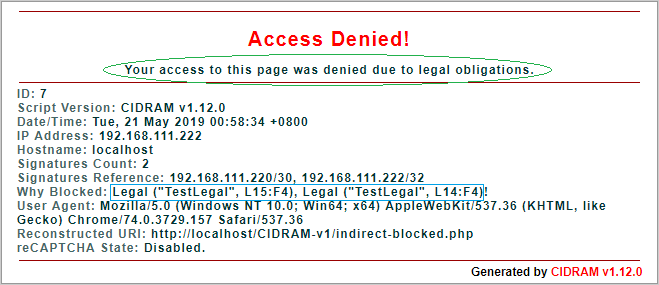
In this particular case, to prevent logging, I could cite the part circled in green using ReasonMessage (which would prevent logging for any blocked requests that display that same message, and would probably be a little too broad in most cases anyway, but could maybe be useful sometimes), or I could cite the part circled in blue using WhyReason (which would probably be better, due to targeting those specific lines, and therefore being a little less broad).
So, something like this (the green part):
test:
 Logic: "Any"
 Don't log:
  If matches:
   ReasonMessage:
    - "Your access to this page was denied due to legal obligations."
Or this (the blue part):
test:
 Logic: "Any"
 Don't log:
  If matches:
   WhyReason:
    - "Legal ("TestLegal", L15:F4), Legal ("TestLegal", L14:F4)"
It won't work if I swap the fields around though.
Regarding encoding: Check that the file is either just plain ASCII/ANSI or UTF-8. If it's anything else, that could possibly be screwing with things a bit. TBH though, the chances of the wrong encoding being used is pretty small, so I doubt that this is causing the problem here, but I mention it, for the sake of checking everything (and due to running short on ideas for what's causing the problem).
CIDRAM normally expects Unix-style LF newlines too, but I tried putting in different types of newlines (e.g., Windows-style CRLF newlines), and it seems to still work all the same on my end (so I doubt that using a non-expected type of newline would necessarily be able to break anything to do with auxiliary rules).
Another possibility (for the sake of checking everything): Any trailing whitespace or other kinds of unexpected bytes in the custom signature file?
Maikuolan
on 20 May 2019
I think I solved this. It must have been a damn whitespace. The whitespace issue happens to me with passwords as well.
737simpilot
on 20 May 2019
Yeah.. happens sometimes. Whitespace is something it can be a bit funny about sometimes too.
Well, good to know it's been solved. :-)
Maikuolan
on 21 May 2019
Related issues
 mikeruss1
·
5Comments
Maikuolan
·
5Comments
mikeruss1
·
5Comments
Maikuolan
·
5Comments
 Dibbyo456
·
3Comments
Dibbyo456
·
5Comments
Dibbyo456
·
3Comments
Dibbyo456
·
3Comments
Dibbyo456
·
5Comments
Dibbyo456
·
3Comments