Cidram: Checklist for stuff from Gitter.
- > just a thought, if the UA is empty the log does not confirm this, the words "User Agent" are missing. Could you consider a positive confirmation such as "User Agent is blank". By no means urgent!
- > Could I suggest you consider treating the custom_module in a different way so that it is automatically processed last ?
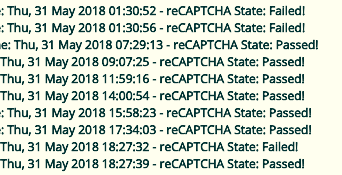
- > in the log a failed recaptcha is marked "failed" but a pass is marked "enabled"
- > in the front end the list of log files looks to be in random sequence - could it be ascending ?
5. > I don't know if this is a host error or not, but every day when the cron runs I get this: (...)
- [x] (1) Investigate possible new options for block event logging (2018.08.26: Resolved by a44a49affcfe4f2f328131d28ad2ed306a58e277).
- [x] (2) Investigate possible solutions for user-specific requirements for order of module execution (2018.07.01: Resolved by b572b7cccd563f88404dfd66017afb632b67d5dc).
- [x] (3) Investigate possible issue with reCAPTCHA status (2018.06.02: Determined this to be normal behaviour; Not a bug).
- [x] (4) Fix weird logfile display order issue (2018.06.02: Committed a change to improve the ordering of logfiles).
- [x] (5) Fix undefined index error that can occur when updating CIDRAM via Cronable (2018.06.07: Fixed).
 Maikuolan
All 19 comments
Logfile display order issue has been fixed.
Maikuolan
on 2 Jun 2018
Logfile display order issue has been fixed.
I can't see any package update from my end.
pass is marked "enabled"
You can mark it "passed" ..this makes more sense. I don't think any User will object on this.
BTW CIDRAM is already mentioning reCAPTCHA pass status with "passed" in logfile
 soumsps
on 2 Jun 2018
soumsps
on 2 Jun 2018
BTW CIDRAM is already mentioning reCAPTCHA pass status with "passed" in logfile
not in the main log
 mikeruss1
on 2 Jun 2018
mikeruss1
on 2 Jun 2018
I can't see any package update from my end.
Could be an issue with caching, either at upstream (i.e., GitHub still showing old versions of files for a while after they were already committed because of busy servers or something like that), or locally (i.e., accessed the updates page shortly before the update was committed, and CIDRAM's cache of the available upstream data hadn't expired yet). It should fix itself after an hour or so usually (either cache expiring at one end or the other, or servers finishing processing the new commits and propagating the new data).
Could you check again when you've got a spare moment and let me know whether the update has become available at your end? Cheers. :-)
not in the main log
Ah, okay.. I think I understand the issue now. :-)
So the main log, as we know, logs "block events" (i.e., logs when something is blocked), which is why things that aren't blocked, aren't logged there (i.e., it isn't equivalent to a server access log, which would normally log all requests regardless). When a user completes a reCAPTCHA instance, they shouldn't be blocked for subsequent requests, and so, a new block event shouldn't be occurring when a reCAPTCHA instance has been successfully completed. In short: Because nothing is being blocked (when a reCAPTCHA is successfully passed), there isn't any opportunity for CIDRAM to log the "passed" reCAPTCHA state with a block event.
This also means that the "reCAPTCHA state", as per reported by the main logfile, should only ever show "failed" (if a user attempted, but failed to pass the reCAPTCHA instance), "enabled" (when an opportunity to attempt a reCAPTCHA instance is presented, but wasn't attempted for the actual request triggering the block event), or "disabled" (when no opportunity to attempt a reCAPTCHA instance is presented, or when reCAPTCHA is disabled).
However, the reCAPTCHA logfile, specifically logs whenever a user attempts to complete a reCAPTCHA instance (as an analogue to the main logfile not logging requests that aren't blocked: requests where no reCAPTCHA instance has been attempted, aren't logged by the reCAPTCHA logfile, meaning that only "passed" or "failed" should show in that logfile; i.e., "enabled" and "disabled" shouldn't show up in that particular logfile).
So, in this particular case, I don't think what we're seeing here is a bug. :-)
Maikuolan
on 2 Jun 2018
I see what you are saying, if it were possible then it would fall into the category of "helpful to the user" IMHO. I normally scan the log to see whats going on, and it would then contain everything I want to know. I assumed if it can show failed it could show passed. No problem anyway.
mikeruss1
on 2 Jun 2018
Though current behaviour is not technically a bug, that doesn't mean, of course, that we can't explore options to improve logging behaviour, to be more helpful for users. :-)
Counter-intuitiveness, also, although not a type of "bug", is still a potential problem, and something to be slowly solved and worked through over time.
I'll have a play around during the week to see whether I can come up with any ideas to improve this at all. Maybe some way to cross-reference the different types of logging directly on the logs page or some such thing? Anyhow, I'll reply again if I can come up with anything. Let me know, too, whether any of you have any ideas in that regard.
Maikuolan
on 2 Jun 2018
merging the logs is a great idea, saves crossreferring
mikeruss1
on 2 Jun 2018
Could you check again
Update available now.. and updated... now it looks good :)
merging the logs is a great idea, saves crossreferring
I also agree with this.
@Maikuolan instead of creating a seprate logfile for reCAPTCHA status that could be present in log file. In frontend we can have a simple checkbox to enable /disable recaptcha status logging in main logfile itself.
soumsps
on 2 Jun 2018
logs in sequence looks much better .... tks
mikeruss1
on 2 Jun 2018
Update available now.. and updated... now it looks good :)
logs in sequence looks much better .... tks
Awesome! Glad to hear it, and no problem. ^.^
@Maikuolan instead of creating a seprate logfile for reCAPTCHA status that could be present in log file. In frontend we can have a simple checkbox to enable /disable recaptcha status logging in main logfile itself.
Definitely, that could work, and could be done easily enough. Also exploring some other ideas, which.. may or may not work; not sure yet. Anyway, I'll experiment with this a little during the week, to try to figure out the best way to approach this. I'll reply a little later, when I've got a little further with it. :+1:
Maikuolan
on 6 Jun 2018
just a thought, if the UA is empty the log does not confirm this, the words "User Agent" are missing. Could you consider a positive confirmation such as "User Agent is blank". By no means urgent!
Found an event where UA was completly missing:
ID: 2504
Date/Time: Fri, 08 Jun 2018 03:32:31
IP Address: 80.84.57.xx
Hostname: 109-57-84-80.rackcentre.redstation.net.uk
Signatures Count: 2
Signatures Reference: 80.84.48.0/20, 80.84.48.0/20
Why Blocked: Cloud service ("IOMart", L3791:F0, [GB]), Spam risk ("SFS Toxic CIDRs", L1230:F4)!
Reconstructed URI: https://www.-------------.com/
reCAPTCHA State: Enabled.
Another event where UA is very small and hostname missing
ID: 2476
Date/Time: Fri, 08 Jun 2018 00:12:32
IP Address: 185.35.63.xx
Signatures Count: 1
Signatures Reference: 185.35.60.0/22
Why Blocked: Generic ("Nagravision SA", L17668:F0, [CH])!
User Agent: lh
Reconstructed URI: https://www.-------------.com/
reCAPTCHA State: Enabled.
FWIW - I would block that UA with a signature that blocks anything with a UA less than 15 characters
mikeruss1
on 8 Jun 2018
Regarding the execution order of modules: This should be resolved with the latest commit. :-)
Going to keep this brief, because my internet is screwy at the moment (and I can elaborate on this a bit further a little later). I had a few different ideas on how I could go about allowing users to specify their own order of execution, in such a way that the updater wouldn't override it. What I've opted to do, is allow users to prefix some data to the the names of modules and signature files in their corresponding directives in such a way that they can continue to be found and used by CIDRAM, while technically having a different position when the updater tries to sort them when activating or deactivating them. Separated from the filenames with a a colon :, you can prefix some arbitrary text to force a different sort order. The updater will see this arbitrary data when sorting, but the rest of CIDRAM will ignore it.
Let's say you have something like this listed at the moment:
file1.php,file2.php,file3.php,file4.php
But, let's say you want file3.php to execute first, instead of file1.php. You can do this:
aaaa:file3.php,file1.php,file2.php,file4.php
When CIDRAM tries to load these modules or signature files, the aaaa: part will be ignored, so, file3.php gets loaded as per normal. But when the updater tries to sort them again, the aaaa: part pushes it to the front of the list, effectively giving it execution priority (or, you could use zzzz: if you wanted it to load last, or whatever else wanted; like I mentioned above, it's arbitrary anyway).
I figure that doing this way, means we don't need to radically change the way that modules or signature files work, we don't need to deal with yet another newly added directive, and it effectively gives us what we want, while changing as little as possible in the codebase (meaning that any users that don't care about this change, can also effective ignore it).
I haven't had time yet to update the documentation to properly document this change, but I'll get to that a little later when my internet stops being screwy.
Maikuolan
on 1 Jul 2018
looks good 👍 thank you !
just to be sure - my custom mods is zzcustom_mods.php
I rename it to zz:custom_mods.php
and change config signatures.modules to point to it ?
mikeruss1
on 1 Jul 2018
No problem; you're welcome. ^.^
Also, slightly delayed in this reply due to internet going completely down all day yesterday (GRRR! >.x), but it seems to be working fine today (Hooray! ^.^), so all good now anyhow.
just to be sure - my custom mods is zzcustom_mods.php
I rename it to zz:custom_mods.php
and change config signatures.modules to point to it ?
Kinda sorta. Just changing the configuration reference to the file though, as opposed to the name of the file itself.
So let's say, if for example, you had a module named as MyModule.php. You wouldn't need to rename the file itself anymore to change the order of execution, but you'd rename the configuration reference to it (so adding something: to the file's reference within the configuration, so that the configuration reference would look like something:MyModule.php, but the actual name of the file still remains just MyModule.php).
(Docs still pending but will sort that out soon).
Maikuolan
on 2 Jul 2018
signature sequence tested and working
thank you !
mikeruss1
on 4 Jul 2018
Docs updated.
Maikuolan
on 5 Jul 2018
Added a configuration directive which allows users to specify via the configuration whether to include or omit empty fields from logging and output display.
Maikuolan
on 26 Aug 2018
All specifically listed tasks have been completed. Created a new, separate issue at #88 to address the suggestion about a possible future option for a combined logfile, so that I can close this issue.
Maikuolan
on 26 Aug 2018
Related issues
 100percentlunarboy
·
6Comments
100percentlunarboy
·
6Comments
 Dibbyo456
·
3Comments
Dibbyo456
·
3Comments
 eurobank
·
3Comments
Dibbyo456
·
5Comments
Dibbyo456
·
3Comments
eurobank
·
3Comments
Dibbyo456
·
5Comments
Dibbyo456
·
3Comments