Cidram: Google search console could not show link preview - Access Denied page shown
Google search console could not show link preview as it gets blocked by CIDRAM.
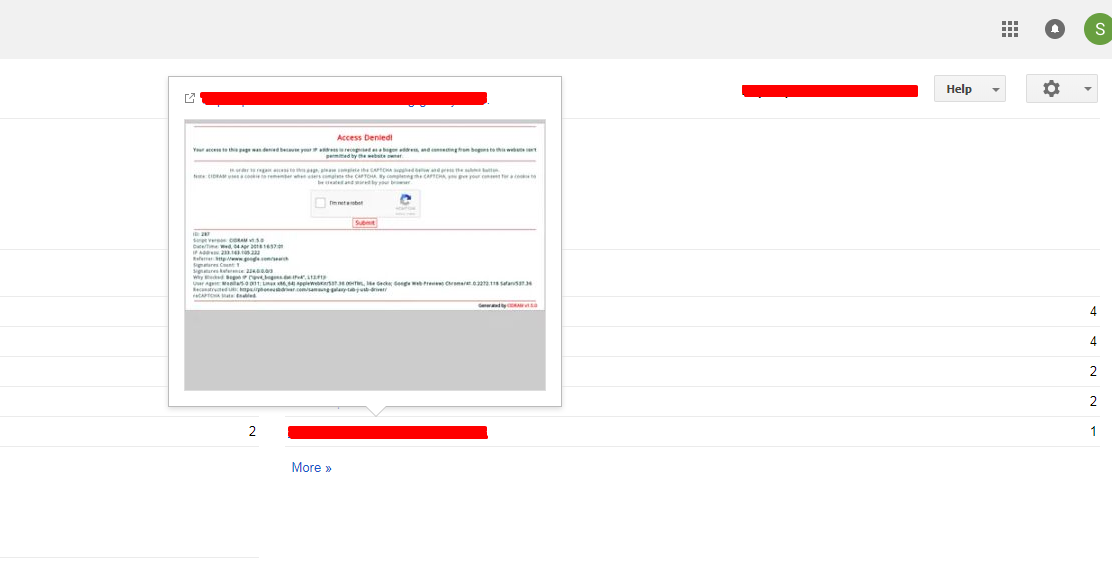
General log found :
ID: 293
Script Version: CIDRAM v1.5.0
Date/Time: Wed, 04 Apr 2018 17:03:41
IP Address: 233.163.105.222
Referrer: http://www.google.com/search
Signatures Count: 1
Signatures Reference: 224.0.0.0/3
Why Blocked: Bogon IP ("ipv4_bogons.dat-IPv4", L12:F1)!
User Agent: Mozilla/5.0 (X11; Linux x86_64) AppleWebKit/537.36 (KHTML, like Gecko; Google Web Preview) Chrome/41.0.2272.118 Safari/537.36
Reconstructed URI: -------
reCAPTCHA State: Enabled.
One suggestion: I think all kind of log files must be generated in a separate folder. As I used to make log file day by day basis, so for me now the main directory is filled with 15 log files.
 soumsps
All 27 comments
That's quite unexpected, that Google Preview would originate from that address (233.163.105.222), because that address is a part of the IPv4 multicast address space, which AFAIK, shouldn't typically be used to route HTTP(/S) traffic via public networks, and also shouldn't typically be announced by any ASNs.
See: https://www.iana.org/assignments/multicast-addresses/multicast-addresses.xhtml
I'll do some more investigating and reply again when I know a bit more.
 Maikuolan
on 4 Apr 2018
Maikuolan
on 4 Apr 2018
So, I've been discussing the situation a bit more with some others, which.. hasn't exactly provided a clear consensus yet, but has provided some clarity and further ideas about this.
Firstly, some quick questions:
- What value are you using currently for
ipaddr? - Is the website in question receiving traffic both directly __and__ indirectly (i.e., is accessible via a reverse-proxy, but can also be accessed directly), or is it receiving traffic just one way or the other (or, not and)?
Maikuolan
on 4 Apr 2018
Initially, I thought it might be a small issue, but after reading that facebook group talk. I am more interested in resolving this issue.
In CIDRAM configuration ipaddr => REMOTE_ADDR
The traffic is indirectly routed via Cloudflare proxy and my server allow only Cloudflare IPs for direct connection. If someone tries to directly access server they get 403 error.
Additional Info:
In my server Nginx act as a reverse proxy and Apache for backend.
VestaCP template discription (My config : Nginx = default, Apache=default)
Due to above config when my installed wp plugins (i.e WP-statistics and All in one security), i got an issue. Those plugin where showing my own server IP , so to correct that I added following code to my wp-config.php.
// Use X-Forwarded-For HTTP Header to Get Visitor's Real IP Address
if ( isset( $_SERVER['HTTP_X_FORWARDED_FOR'] ) ) {
  $http_x_headers = explode( ',', $_SERVER['HTTP_X_FORWARDED_FOR'] );

  $_SERVER['REMOTE_ADDR'] = $http_x_headers[0];
}
My DNS records is simple and i don't think there is any error.
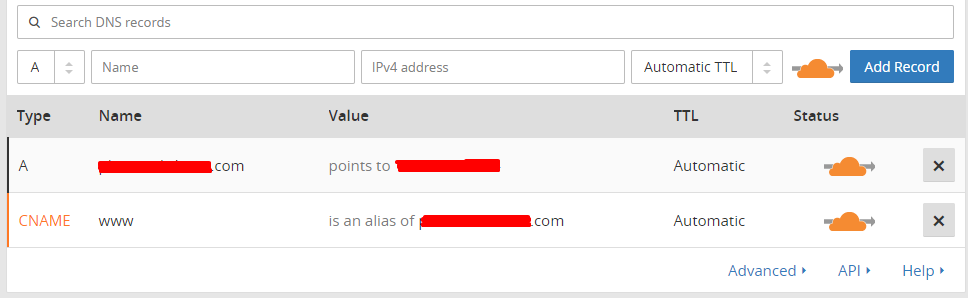
With all the above settings I can surely say CIDRAM properly detects correct IPs. ( Exception : When I try to open loader.php from my browser then CIDRAM detects my server IP and not my real IP. I have raised this issue earlier see this )
I hope these all information could help in further investigation.
soumsps
on 4 Apr 2018
Thanks for the extra info. This will definitely help, I think. :-)
At work at the moment, but I'll reply again in ~1 - ~2 hours.
Maikuolan
on 4 Apr 2018
ipaddr => REMOTE_ADDR
This is wrong for Cloudflare.
 DanielRuf
on 4 Apr 2018
DanielRuf
on 4 Apr 2018
Use X-Forwarded-For HTTP Header to Get Visitor's Real IP Address
This is insecure. This can be changed / set by clients.
All in one security
Totally insecure, try NinjaFirewall
DanielRuf
on 4 Apr 2018
my server IP and not my real IP
Because this is the internal X-Forwarded-For probably.
DanielRuf
on 4 Apr 2018
Try setting the ipaddr value to HTTP_CF_CONNECTING_IP and let me know how it goes, and also whether there are any problems. Cloudflare should forward the original IP of the request with that header, and it should, in this case (in theory), fix the problem of CIDRAM seeing the wrong IP address, both when blocking requests and when accessing the front-end.
Reference: Recommended values for "ipaddr".
Maikuolan
on 5 Apr 2018
(I haven't yet confirmed this, and I definitely could still be wrong, but my current thoughts regarding the originally blocked IP address, which belongs to the multicast address space, is that it's probably an IP assigned to one more devices internally within Google's own network, which is normal for multicast addresses, and it got leaked via the HTTP_X_FORWARDED_FOR header when Google Preview attempted to access your website, which is slightly less normal, but not unheard of. Due to the code added to your wp-config.php file, this leaked IP, which shouldn't normally be publicly routable and doesn't actually belong to Google, got then interpreted as being the originating IP address of the request from Google Preview, and because of the bogon signatures included with CIDRAM, included because the IP addresses associated with these signatures shouldn't normally be routable, the request was consequently blocked, with being a bogon IP address cited as the reason for the block. Speculative, but the most likely reason for what's happened that I can think of at the moment).
Maikuolan
on 5 Apr 2018
Try setting the ipaddr value to
HTTP_CF_CONNECTING_IP
Removing server IP from Whitelist, then going to change ipaddr to see the changes.
@Maikuolan will give you update :-)
Update:
After changing ipaddr value to HTTP_CF_CONNECTING_IP , when i tried to load loader.php. I did'nt got any Access Denied page. Thank you @DanielRuf @Maikuolan
@Maikuolan Is there any page in frontend that shows my current IP Address ??
I think Google Preview is not blocked anymore, as when I hovered on some more links. I was able to see the page preview. But the link on which I hovered earlier are still showing the same access denied page. I guess google is caching those preview. So I will tell you when there is any change.
soumsps
on 5 Apr 2018
try NinjaFirewall
I will check this. :-)
soumsps
on 5 Apr 2018
New Issue :
ID: 425
Script Version: CIDRAM v1.5.0
Date/Time: Thu, 05 Apr 2018 10:51:15
IP Address: My server IP
Query: doing_wp_cron=1522905675.6222100257873535156250
Referrer: https://example.com/wp-cron.php?doing_wp_cron=1522905675.6222100257873535156250
Signatures Count: 1
Signatures Reference: 108.61.128.0/18
Why Blocked: Cloud service ("Choopa, LLC", L6237:F0, [US])!
User Agent: WordPress/4.9.5; https://example.com
Reconstructed URI: https://example.com/wp-cron.php?doing_wp_cron=1522905675.6222100257873535156250
reCAPTCHA State: Enabled.

ID: 426
Script Version: CIDRAM v1.5.0
Date/Time: Thu, 05 Apr 2018 10:52:16
IP Address: My server IP
Query: doing_wp_cron=1522905736.3965508937835693359375
Referrer: https://example.com/wp-cron.php?doing_wp_cron=1522905736.3965508937835693359375
Signatures Count: 1
Signatures Reference: 108.61.128.0/18
Why Blocked: Cloud service ("Choopa, LLC", L6237:F0, [US])!
User Agent: WordPress/4.9.5; https://example.com
Reconstructed URI: https://example.com/wp-cron.php?doing_wp_cron=1522905736.3965508937835693359375
reCAPTCHA State: Enabled.
Looks like cron jobs are blocked now.
These issues occurred after changing ipaddr to HTTP_CF_CONNECTING_IP.
For now, as a solution, I have whitelisted my server IP.
soumsps
on 5 Apr 2018
Try setting the ipaddr value to HTTP_CF_CONNECTING_IP
For reference: https://support.cloudflare.com/hc/en-us/articles/200170986-How-does-Cloudflare-handle-HTTP-Request-headers-
CF-Connecting-IP
To provide the client (visitor) IP address for every request to the origin, Cloudflare adds the CF-Connecting-IP header.
DanielRuf
on 5 Apr 2018
Looks like cron jobs are blocked now.
These issues occurred after changing ipaddr to HTTP_CF_CONNECTING_IP.For now, as a solution, I have whitelisted my server IP.
Cronjobs are directly run by the server itself (the PHP process, that's how it works in WordPress) so these always use your server IP.
DanielRuf
on 5 Apr 2018
Replaced this code :
// Use X-Forwarded-For HTTP Header to Get Visitor's Real IP Address
if ( isset( $_SERVER['HTTP_X_FORWARDED_FOR'] ) ) {
  $http_x_headers = explode( ',', $_SERVER['HTTP_X_FORWARDED_FOR'] );

  $_SERVER['REMOTE_ADDR'] = $http_x_headers[0];
}
with this one in my wp-config.php :
// Use X-Forwarded-For HTTP Header to Get Visitor's Real IP Address from cloudflare
if ( isset( $_SERVER['HTTP_CF_CONNECTING_IP'] ) ) {
  $http_x_headers = explode( ',', $_SERVER['HTTP_CF_CONNECTING_IP'] );

  $_SERVER['REMOTE_ADDR'] = $http_x_headers[0];
}
@DanielRuf Now, I think i am doing right ?
soumsps
on 5 Apr 2018
After changing ipaddr value to
HTTP_CF_CONNECTING_IP, when i tried to load loader.php. I did'nt got any Access Denied page. Thank you @DanielRuf @Maikuolan
Awesome. ^.^
@Maikuolan Is there any page in frontend that shows my current IP Address ??
Not currently, but I could easily add that in with the next update. :-)
Maikuolan
on 5 Apr 2018
Regarding cronjobs being blocked: Another solution there could be to add Choopa, LLC to the ignore.dat file. I'm guessing that your hosting provider resides somewhere within Choopa's AS (autonomous system), given what we can see in the "Why Blocked" fields of those logged block events. If the IP address responsible for cronjobs never changes at all, then whitelisting it would be the best solution, but if there's a chance that it might unexpectedly change at some point in the future to a different IP within the same network, telling CIDRAM to ignore the signature section responsible for blocking that network might be a more future-proof solution in the sense of preventing those future IPs from also being blocked (of course, this would also then let in anything else trying to access your website from within the given network, but ultimately, deciding what to block and what not to block is always a bit of a balancing act, weighing up the pros and cons; if there's a chance that the IPs might change, then ensuring cronjobs aren't blocked in the future might be the more weighty consideration there).
Maikuolan
on 5 Apr 2018
Regarding cronjobs being blocked: Another solution there could be to add Choopa, LLC to the ignore.dat file.
But they are also often used by hackers, saw Choopa servers in many attacks ;-)
DanielRuf
on 5 Apr 2018
A server IP does normally never change, except you change servers or are using hosting with different IPs / load balancing and so on.
DanielRuf
on 5 Apr 2018
But they are also often used by hackers, saw Choopa servers in many attacks ;-)
Very true, and good point. Probably in this case then, better to just whitelist the IPs (and keep an eye out for changes), and not ignore the entire section. XD
But yeah; The ignore.dat can be useful as a means to unblock a normally blocked network if you need it to have access for whatever reason (like being unsure which IPs on the network expected traffic is likely to originate from), so, it's something good to know about. I hadn't considered the various hacking attempts seen from their network in the past specifically when first mentioning it here though (so probably not such a safe network to be unblocking).
Maikuolan
on 5 Apr 2018
@DanielRuf I agree with you.
@Maikuolan I am just whitelisting my server IP, If in case I change my server then I will take care of Whitelisting new IP. :-) but that wouldn't going to be happening frequently.
soumsps
on 5 Apr 2018
One suggestion: I think all kind of log files must be generated in a separate folder. As I used to make log file day by day basis, so for me now the main directory is filled with 15 log files.
@Maikuolan Can you do this modification? I think it will be good to separate out log files from core files.
soumsps
on 5 Apr 2018
Not currently, but I could easily add that in with the next update. :-)
..and done.
@Maikuolan Can you do this modification? I think it will be good to separate out log files from core files.
I'll take a look at this later tonight.
Maikuolan
on 5 Apr 2018
..and done.
Updated Latest version :-)
Showing My IP and not server IP :)
soumsps
on 5 Apr 2018
I'll take a look at this later tonight.
..and done. :-)
You should now be able to include arbitrary subdirectories when specifying the target path and filename for logfiles, and CIDRAM will create the subdirectories when logging data if they don't already exist.
Maikuolan
on 6 Apr 2018
Should I mark this issue as resolved? It seems like the problem has been solved now AFAIK.
Maikuolan
on 6 Apr 2018
You should now be able to include arbitrary subdirectories
Thank you :-) It's working fine... checked
Yes, you can mark this issue as resolved. And thanks again @Maikuolan @DanielRuf for pointing out the misconfigured part in my setup. :-)
soumsps
on 6 Apr 2018
Related issues
 Dibbyo456
·
6Comments
Dibbyo456
·
3Comments
Dibbyo456
·
3Comments
Dibbyo456
·
6Comments
Dibbyo456
·
3Comments
Dibbyo456
·
3Comments
 eurobank
·
8Comments
Dibbyo456
·
7Comments
eurobank
·
8Comments
Dibbyo456
·
7Comments
Most helpful comment
A server IP does normally never change, except you change servers or are using hosting with different IPs / load balancing and so on.