Cht-core: Form submissions hang in desktop browsers when location permission requests are ignored by users
Describe the bug
In certain conditions, the CHT on version 3.10 fails to defend against missing translation location permissions being ignored. When a form is submitted in this scenario, the data is not written to PouchDB, the form controls are disabled (cancel, prev & submit) and a spinner is shown.
To Reproduce
This was recreated in docker but should affect any CHT hosting environment. The docker set up and Covid MoH Mali (CMoHM) app steps are listed here for completeness, but it's assumed we can isolate the behavior of the app. This assumes you have node, npm, docker and medic-conf installed:
- Download this
docker-compose.yml- the one with medic-osimage: medicmobile/medic-os:cht-3.9.0-rc.2and haproxyimage: medicmobile/haproxy:rc-1.17. - Ensure you don't have a persistent docker volume that already has data in it by deleting the containers that use it, and then the volume itself:
docker rm medic-os haproxyand thendocker volume rm medic-data. - launch the two containers with
docker-compose up. you now have a 3.9 CHT instance on htps://127.0.0.1 - clone out the CMoHM repo (private) and
cdinto the config dir:cd config-moh-mali/covid-surveillance/. After you clone out the repo, be sure to switch tob8e6c4abranch in case the app config changed:git checkout b8e6c4a - In your browser Log in as
medic/passwordon your local instance htps://127.0.0.1 - go to htps://127.0.0.1/admin/#/upgrade and "Install" version 3.10.0
- Back in the CLI, run
medic-confto install the CMoHM app:medic-conf --url=https://medic:password@localhost --accept-self-signed-certs - In your browser, click on 'people' icon on the top
- click on "new district" on the bottom left
- under "set the primary contact" choose "create a new person"
- ensure their age is over 20, sex to femail and role to asc-s
- accept all defaults on the next page and click "submit"
- in the upper right click the hamburger menu and click "app management"
- click the "Users" option, and click "Add user" at the top
- enter a username you'll remember, for "role" choose "ASC-S", choose the place and associated contact you just created. Enter a password you'll remember and click "Add user"
- log out as the admin user or open an incognito tab. Log in as the user you just created
- click on the "Reports" icon at the very top, and then click "submit report" on the lower left, and click the "Formulaire..." pop up
- For "User" accept the defaults and choose "Next"
- For 1st "Village" choose "Autre", for 2nd "Village" enter any value
- click anywhere on the map to choose a location and click "Next"
- for "select what applies" choose "I am not currently in the household."
- Choose "Next"
- On the "Evaluation" page for "obtained the consent" choose "yes" and "next"
- On the "Household information" page
- enter any value for chief
- enter "71234567" for phone
- for "hand washing" choose "yes"
- for how many people put 1
- for children and all other values on the page put "0"
- for "anyone in the household sick" put "no"
- choose "Next"
- On "Formulaire Evaluation" choose "Next"
- On the final "Formulaire Evaluation" choose "submit"
Expected behavior
Ideally we defend against this and ensure the data is saved. As well, it'd be nice if we fall back to a default translation to show a message as needed about the transaction succeeding. In a worst case scenario, we should alert the user the data was not saved and they should try again.
Logs
Frustratingly, there are no logs in the browser console when the actual form is submitted :( There are prior errors that show up about missing translations (which turned out to be unreleated), as seen in the screenshots below.
Screenshots
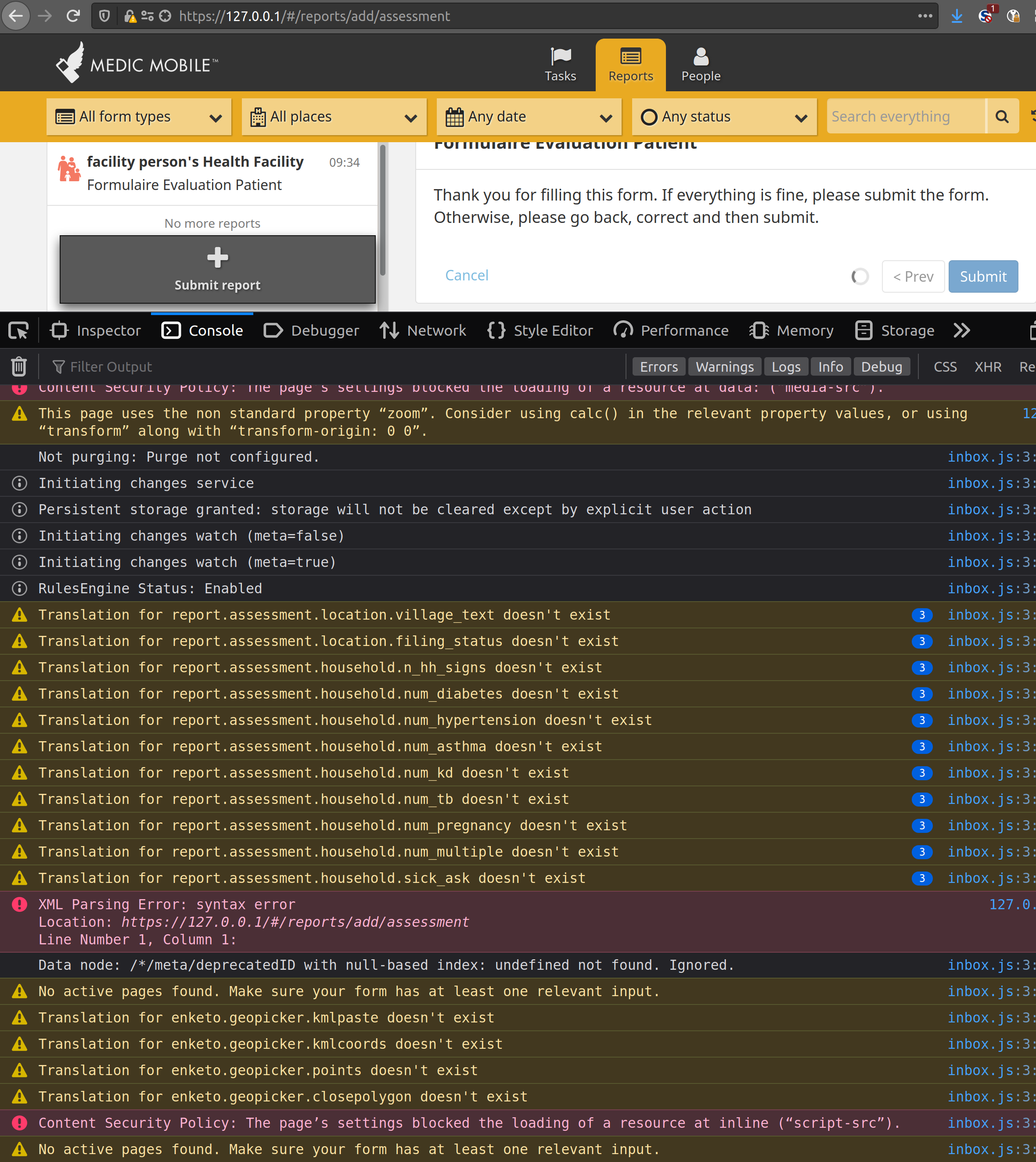
Environment
- Instance: local dev instance
- Browser: Firefox & Chrome both latest
- Client platform: Linux Ubuntu 20 and 18
- App: webapp
- Version: 3.10
Additional context
Note that this works as expected in 3.9, and then breaks in 3.10. This strongly suggests it's a regression in 3.10. If you follow the above steps, but do not upgrade to 3.9, the bug is not encountered.
In 3.10 you can fix the bug by uploading the missing translations by being in the This turned out to be wrong and I very likely choose to allow location permission. See below for specific workarounds.config-moh-mali/covid-surveillance directory in CMoHM repo and running medic-conf --url=https://medic:password@localhost upload-app-settings upload-app-forms upload-resources upload-custom-translations --accept-self-signed-certs
 mrjones-plip
All 37 comments
@Marina-Kenf - thanks so much for you help finding this earlier today! After talking to @garethbowen , we agreed that CHT shouldn't let this happen, so here's a ticket ;) Please add any details or corrections you think might be helpful.
FYI - @binokaryg and @kennsippell
mrjones-plip
on 5 Nov 2020
The workaround is to provide the translations so this isn't critically urgent, but it does concern me that upgrading to 3.10.0 may block users in configurations that are missing the translation.
 garethbowen
on 5 Nov 2020
garethbowen
on 5 Nov 2020
I'm unable to replicate this on Chrome.
I can only replicate on Firefox - and looking at the submitted image, @mrjones-plip you're also replicating this on Firefox.
I followed the steps exactly and also tried other combinations of inputs and didn't get a fail on Chrome (against Chrome 86).
I also cannot replicate it when using the Android app (that runs Chrome 54?).
 dianabarsan
on 5 Nov 2020
dianabarsan
on 5 Nov 2020
I think this might be related to the geolocation rework in 3.10: https://github.com/medic/cht-core/issues/5917
Specifically this code:
https://github.com/medic/cht-core/blob/master/webapp/src/js/services/enketo.js#L596
We wait to get a response from the geolocation service before proceeding to save documents.
The geolocation service promise is resolved when the watchPosition calls either the success or the failure callbacks here:
https://github.com/medic/cht-core/blob/master/webapp/src/js/services/geolocation.js#L84
Running this code in FF, it looks like that "watchPosition" never resolves when I don't grant "persistent" location permissions for the website - by clicking the "remember this decision" when the location permissions request notification appears. For some reason, granting temporary permissions doesn't make the "existent" watcher resolve.
Running this code in Chrome, if the location permissions is neither granted or denied (and you get the wants to know your location notification), the app indeed hangs until you either allow or block, so the existent watcher is resolved even if the permissions are granted later.
I found no correlation with translations, Is it possible that, at some point in testing, persistent location permissions were granted and custom translations were uploaded and the incorrect conclusion was drawn?
@mrjones-plip would you be so kind as to double check that granting permissions retroactively in Chrome works? (means that once the permission is either granted or revoked, the form is saved) and that in FF, once you grant persistent location permissions, the issue is resolved?
For fixing, I think we should not rely entirely on the watchPosition handler calling either of the callbacks we pass it to resolve this promise and maybe set an additional timeout that forcefully resolves the promise after 31 seconds (to make sure that the watcher resolution has priority somehow).
Later edit
Apologies for all the edits. I wrote the bulk of the text in a file and then performed the worst copy-paste job in history 🤦🏻
dianabarsan
on 5 Nov 2020
@dianabarsan - you a pure joy to watch work.
Now that you mention it, I do seem to remember that location permission prompts were more pervasive in 3.10 than in 3.9 - thanks so much for uncovering this! Also, sorry for what appears to be a bit of sloppy testing on my part with FF vs Chrome - my daily driver is indeed FF and I did a test only once in Chrome, but clearly I wasn't careful enough when reproducing it there.
I'll jump back in this with some more testing and report back!
Finally - feel free to change the title of the bug when we're sure we know what it should be - it seems pretty clear it's wrong.
FYI @Marina-Kenf - in case you were about to add feedback re translations ;)
mrjones-plip
on 5 Nov 2020
Thanks @mrjones-plip :)
but clearly I wasn't careful enough when reproducing it there.
I don't think this is the case. My initial message was incorrect, when I stated that I can't replicate it in Chrome.
The reason I couldn't replicate was because I had already granted location permissions for 127.0.0.1 and everything worked as expected (I wasn't even suspecting location permissions at the time). Once I tracked down the source of what I was seeing in FF, I revoked permissions in Chrome and I saw something similar (I explained in the above post what the differences are).
dianabarsan
on 5 Nov 2020
Whew! After I got around my bungling of how to use a browser (private slack comment), I got down to actually being able to test.
tl;dr - @dianabarsan is spot on. TMI is below.
To review, my test set up is:
- local docker instance with 3.9 base image upgraded to 3.10 using the admin web GUI
- CMoHM repo (private) cloned, checked out at specific branch (
git checkout b8e6c4a) and then uploaded into my local instance viamedic-conf --url=https://medic:password@localhost --accept-self-signed-certs - a new user
chwis created who can submit household assessments, the primary workflow for CMoHM
We then load up FF and Chrome pointing to the same local instance, logged in as the same chw user attempting to start the same assessment form. We get prompted for location access the same in both:
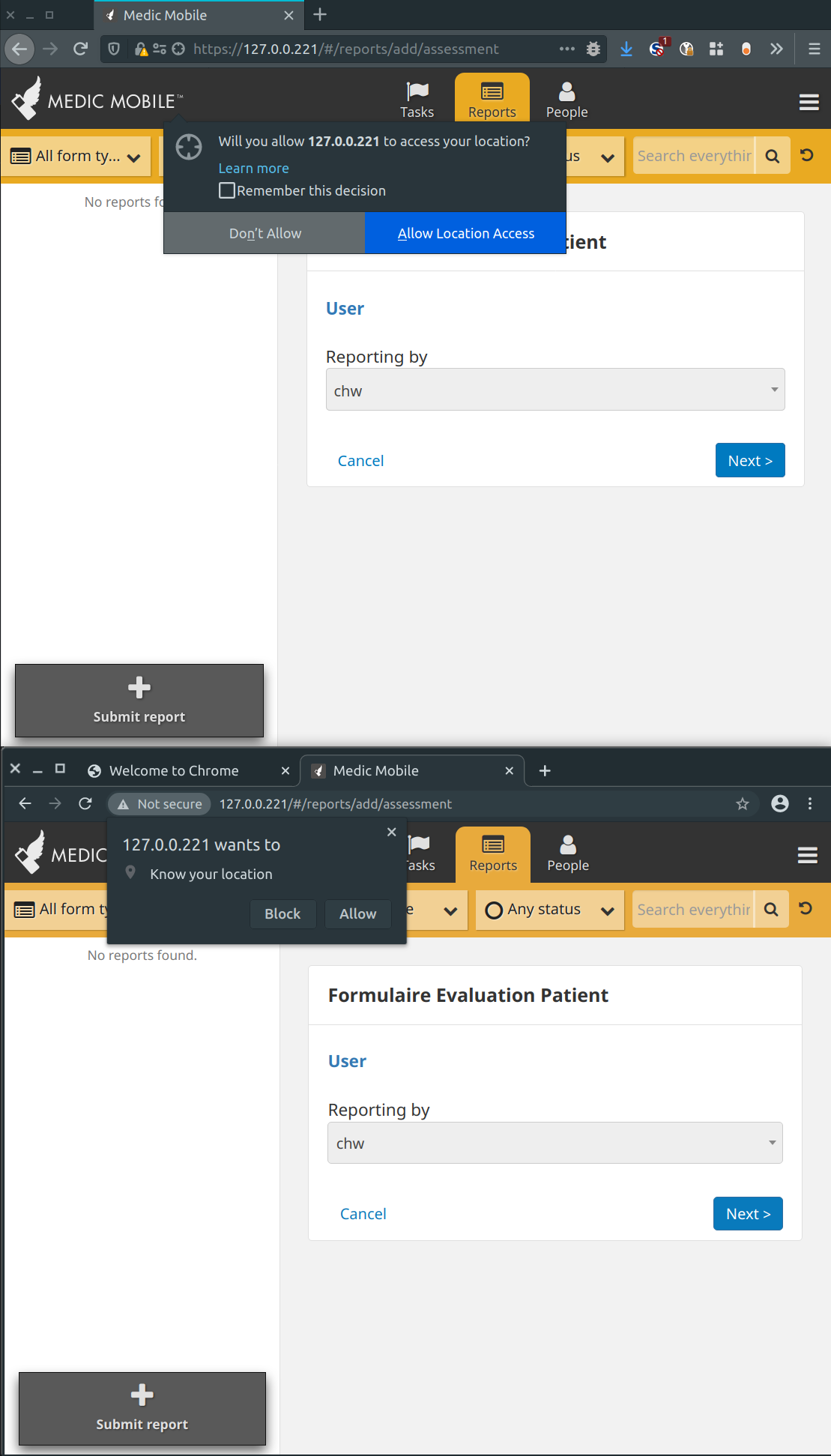
My specific findings - again all in agreement with Diana's findings - but the big tl;dr is that FF is broken when you choose "Deny" (last item):
- For both you can just ignore the prompt and continue to use browser to fill out the assessment under the prompt.
- For both if you ignore the prompt the whole time with it in the foreground, they both hang on submit
- For chrome only you can click either "allow" or "block" in the request and it will successfully submit (promise resolved) for the form that's actively hung
- For Chrome only clicking either "allow" or "block" will result in all future forms being succssfull
- For FF only clicking either "allow" or "block" does nothing for the form that's actively hung. There is no way I found to recover the unsubmitted form.
- For FF only clicking "block" means there is no way to submit any assessments. The only way to submit assessments is to reset the permission for the site, get re-prompted for location access and select "allow".
mrjones-plip
on 6 Nov 2020
I have some interesting news about FF (found while trying to devise a proper title for the issue).
Not granting persistent permissions for FF (by checking the "remember this decision") does indeed only resolve one location request (the last one!).
The reason why the assessment form hangs is because it contains an Enketo geo widget (that allows you to specify some location in the form), this widget calls navigator.geolocation.getCurrentPosition and replaces the navigator.geolocation.watchPosition (the webapp location request) as the "last" geolocation request, that gets resolved by the user action.
When the form doesn't have an Enketo geo widget, Firefox's behavior is exactly like Chrome's - the form will submit when you respond to the location permissions request.
you can click either "allow" or "block" in the request and it will successfully submit (promise resolved) for the form that's actively hung
This can be replicated using any two forms, one that doesn't have a geo widget and one that does (for example this one: https://github.com/medic/cht-core/blob/master/demo-forms/geopoint.xml).
dianabarsan
on 6 Nov 2020
This so fun to help out with! Thanks again @dianabarsan . And this is a perfectly awesome and very accurate title, thanks!
Form submissions hang in desktop browsers when location permission requests are ignored by users
I've update body to be more correct to reduce confusion to anybody reading this ticket for the first time.
Please let me know how I can help, especially if we're still going to push to get this into the 3.10.1 release. I suspect I would be little to no help code wise, but I'm happy to rig up tests galore! Either from a branch for a PR or possibly against 3.9 if we're interested in the deltas.
Oh yes, maybe it'd be handy to document a more limited test steps to reproduce this? Outside of docker in the traditional dev environment?
Otherwise, rock on!
Now that Diana fixed up the root cause and title to be correct, FYI @binokaryg, @kennsippell and @Marina-Kenf
mrjones-plip
on 6 Nov 2020
Ready for AT in 6711-always-resolve-geolocation-promise.
For AT: Make sure geolocation still works as expected on the phone and in the browser, both with and without permissions, and particularly when you ignore the permissions request prompt.
garethbowen
on 8 Nov 2020
@dianabarsan Do you think this is worth backporting to 3.10.x? It looks like it'll only impact a very small number of users, and as long as they don't ignore the prompt it'll be fine...
Also, do you think we should raise an issue to replace Enketo's geolocation widget so it calls _our_ location service instead? I'm concerned about the inconsistencies in the implementations as you found in your investigation.
garethbowen
on 8 Nov 2020
I'm tempted to not backport if Quality Assurance can go over the 3.10 implementation on a phone and confirm that permissions are always resolved.
We could definitely try to replace the widget with one that gets geolocation from the Webapp service.
Also, one more note for AT, the expected behavior now is that, after 30 seconds of opening the form, the Geolocation service will resolve its promise, whether permissions are granted or not. So if you submit within this 30 seconds interval, you will see a hanging spinner until the timeout expires. This is the same behavior that we would see when geolocation has trouble getting a lock. I think you can also use any two forms to compare, one with the geo widget and one without - the assessment form that is linked in the main description probably has enough fields to keep you busy for more than 30 seconds :)
dianabarsan
on 9 Nov 2020
New issue raised: https://github.com/medic/cht-core/issues/6717
garethbowen
on 9 Nov 2020
Using 3.10 and denying access in the app to verify whether we should backport for app fix. I tested these on my android 11 and android 6.0.1 devices.
Using playstore app(0.4.31), prompted before login, only this time option was selected. Was able to get the GPS data.
Went to permissions and denied. Submitted a report without any delay.
Built 0.5.2 Locally, Denied permission and the form submits without much delay. Enabled GPS and the app pulls the data and submits without delay.
This is ancillary because I knew it was happening and wanted to see how it works. Note: I could not get the build working once I updated my android studios. This is only tested on the 11 device.
@garethbowen branch with webview. Prompted by android system selected only this time, second prompt with Allow or Deny. Denied. It eventually timed out and submitted the report.
More to come for the fix branch. Mostly done just wanted to get this portion posted.
 newtewt
on 10 Nov 2020
newtewt
on 10 Nov 2020
With 6711-always-resolve-geolocation-promise applied to local env.
@dianabarsan With the fix branch in Firefox desktop. Having the geo widget on the form and selecting allow but not checking the box to remember will not prompt a second time to get the form GPS fulfillment. Meaning the user then waits 30 seconds. I'm not sure if we can handle the double request.
Android 11 with @garethbowen's branch using the webview prompts twice. The android alert shows. Select only this time. It dismisses with another Allow or Deny prompt. This definitely causes some trouble if you select nothing on the first and nothing on the second. Then allow. It seems like some permissions are not immediately recognized on the second trip through.
Chrome desktop.
The speed issues in chrome don't exist for me. Clicking the button on the gps widget loads almost instantly.
Allowing - Immediate submit with gps data
Denying - Immediate submit, no data
No selection - user waits 30 seconds and form submits.
Firefox Desktop
Allowing - With the geo widget. Clicking the icon to get the location and then immediately clicking submit puts into the spinner delay. The GPS data isn't loaded for the widget in the report but you do see it populate before submitting. The second iteration. If you click the icon to locate gps for the widget and clickly submit. There is no delay and it doesn't populate the widget gps value. Waiting for everything to load on the screen and then submitting works fine.
Allowing without checking save selection - The widget will get Gps coords but the form takes the timeout to submit. Seems like a double prompt might be missing?
Denying - Submits immediately no data
No Selection - wait the 30 seconds and form submits
Android 11 App 0.4.31
Allow - submits immediately with data
Deny - Submits immediately no data
Android 11 App 0.5.1
Allow - submits immediately with data
deny - submits immediately no data
Android 6.0.1 App 0.4.31
allow - submits immediately with data
deny - submits immediately no data
Android 6.0.1 App 0.5.1
allow - submits immediately with data
deny - submits immediately with no data.
newtewt
on 11 Nov 2020
With the fix branch in Firefox desktop. Having the geo widget on the form and selecting allow but not checking the box to remember will not prompt a second time to get the form GPS fulfillment. Meaning the user then waits 30 seconds. I'm not sure if we can handle the double request.
Not sure either, we don't control the permissions request notification.
I think the idea behind the 30 seconds interval is that, most users will take at least that amount of time to submit a form. I don't know how optimistic that is, though.
dianabarsan
on 11 Nov 2020
Do we think it would be useful to track this in telemetry. So we can see if tons of users are running into that blocking state?
newtewt
on 11 Nov 2020
I'm tempted to not backport if Quality Assurance can go over the 3.10 implementation on a phone and confirm that permissions are always resolved.
@newtewt If I'm reading your testing report correctly, it sounds like this is now confirmed. Is that your understanding? If so, I'll go forward with the 3.10.1 without this patch.
garethbowen
on 12 Nov 2020
Do we think it would be useful to track this in telemetry
@newtewt
We're already tracking user edit time and form save time.
We track the time users spend on a form (under enketo:<thing>:<form>:<action>:user_edit_time). This entry is logged before the actual saving action is started. We also track the time it took to save a form (under enketo:<thing>:<form>:<action>:save).
Do you think we should track GEO waiting time specifically?
dianabarsan
on 12 Nov 2020
@dianabarsan That's more what I was referring to. If users are getting blocked submitting because they're waiting on GPS. I'm not sure anyone will experience it because there forms might take long enough and my testing example was quick. I don't think it's necessary to add as part of this but might be something we think about later.
@garethbowen yes I based on the testing, I think we can skip backporting this fix as the app is working fine.
newtewt
on 12 Nov 2020
I'm not sure anyone will experience it because there forms might take long enough and my testing example was quick.
Yes - I was unable to reproduce @newtewt's initial results in the CMoHM app for this exact reason. Only N of 1 to be clear of course. When using the demo forms with JUST a geo widget was when I saw the user facing timeout manifest (Bonus is that now I know how to install demo-forms!)
mrjones-plip
on 12 Nov 2020
@dianabarsan @garethbowen is there any concern about the issue with the android 10 branch? Should I re-test this again with the current release?
Android 11 with @garethbowen's branch using the webview prompts twice. The android alert shows. Select only this time. It dismisses with another Allow or Deny prompt. This definitely causes some trouble if you select nothing on the first and nothing on the second. Then allow. It seems like some permissions are not immediately recognized on the second trip through.
newtewt
on 17 Nov 2020
Yes I'm concerned - let's make sure this patch works with crosswalk and webview versions of the android app.
@newtewt I'm wondering if this is prompting twice due to the enketo geo widget requesting once, and the cht-core location services requesting once. Does the form have a geo widget? Can you try to reproduce using a form without the geo widget and see if it only prompts once?
Possibly related: https://github.com/medic/cht-core/issues/6717
garethbowen
on 17 Nov 2020
The prompt occurs twice with a report that does not include the geo widget. I am getting this on the 3.10 branch. Should we move this to the 106 issue?
newtewt
on 18 Nov 2020
@newtewt Could you provide clear reproduction steps, maybe with screenshots? I'm having trouble following...
garethbowen
on 18 Nov 2020
Fresh install the webview version of the app.
Navigate to reports
Tap Submit report
Select a report. I don't think it matters which but I am using standard config for this.
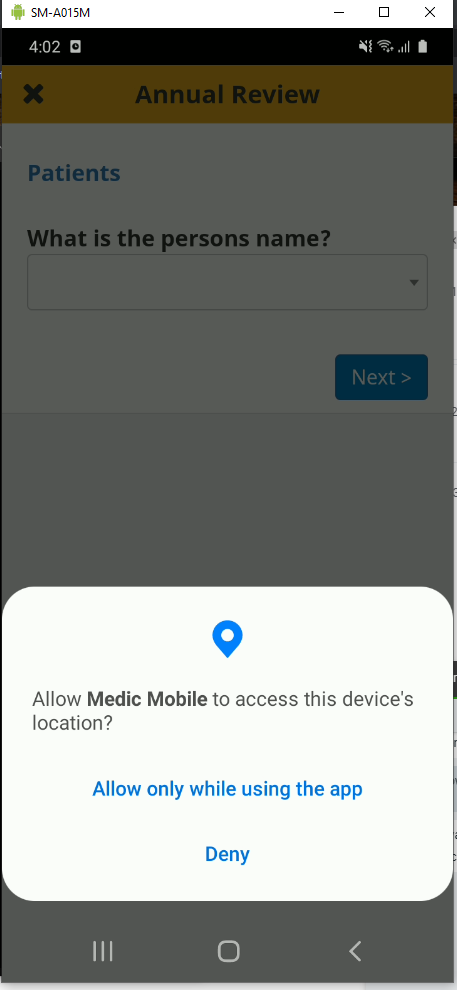
First permission request
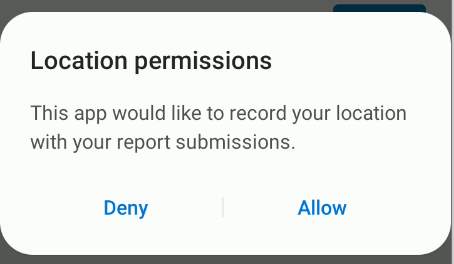
Second Permission request after allowing on the first
newtewt
on 18 Nov 2020
:+1: to this @newtewt - I'm seeing the same thing. Seems to me that the first one is OS level and the 2nd one is App level b/c the first one to me is themed dark (my OS theme) and the second is light.
Of note:
- my first one has an extra option "Deny & don't ask again"
- I'm testing on the CMoHM dev instance. Test user creds are in 1pass if anyone else needs 'em.
mrjones-plip
on 18 Nov 2020
Adding this here per @garethbowen's request.
Testing on Android 10 Pixel 1 device for a "happy no GPS perm prompt after upgrade" path, I get a prompt when I shouldn't. See last step below:
Steps to reproduce:
- start with no apps installed
- install this xwalk apk
- launch and log into an instance with geopoint form (i used CMoHM Dev)
- start submitting form, get prompted for GPS perms, choose "allow all the time"
- upgrade to webview version
- start submitting form, get prompted for GPS perms with different looking prompt
Expected:
on last step I shouldn't have gotten a prompt
Workaround:
Choose "allow" on last step
mrjones-plip
on 18 Nov 2020
@newtewt @mrjones-plip I've removed the additional location prompt and it works as expected on my device now.
garethbowen
on 19 Nov 2020
@garethbowen - confirmed - Using latest builds on GH from yesterday, 2nd prompt no longer comes up on the happy path (fully accpet on xwalk -> upgrade webview -> no 2nd prompt as expected).
Nice work!
mrjones-plip
on 20 Nov 2020
I believe that the original change to webapp was complete and looking the additional issue with the andorid app was solved as well. I think this can be closed. @garethbowen @dianabarsan @mrjones-plip any objections?
newtewt
on 24 Feb 2021
Maybe this still needs another look at once we merge the ng10 migration - as it has a webapp component.
dianabarsan
on 24 Feb 2021
I agree this issue can be closed. However, I defer to @dianabarsan about concerns w/ testing after merging ng10 migration.
Thanks for the follow up @newtewt!
mrjones-plip
on 24 Feb 2021
Maybe this still needs another look at once we merge the ng10 migration - as it has a webapp component.
I'm thinking once the merge happens a quick once over on the "Done" changes in master would be good.
newtewt
on 24 Feb 2021
Chrome desktop.
Allowing - Immediate submit with gps data
Denying - Immediate submit, no data
No selection - user waits 30 seconds and form submits.
Firefox Desktop
Allowing - With the geo widget. Clicking the icon to get the location and then immediately clicking submit puts into the spinner delay. The GPS data isn't loaded for the widget in the report but you do see it populate before submitting. The second iteration. If you click the icon to locate gps for the widget and clickly submit. There is no delay and it doesn't populate the widget gps value. Waiting for everything to load on the screen and then submitting works fine.
Allowing without checking save selection - The widget will get Gps coords but the form takes the timeout to submit. Seems like a double prompt might be missing?
Denying - Submits immediately no data
No Selection - wait the 30 seconds and form submits.
So it seems there is a bit of oddity with Firefox still. I'm going to get to the android apps this afternoon. The same situation as before was happening. Where not selecting Remeber this decision. However clicking the geo button on the gps form prompts the alert to allow location all the time. Which I would expect but the spinner still shows because there is not another prompt to allow the location access on submit.
newtewt
on 1 Mar 2021
Allowing without checking save selection - The widget will get Gps coords but the form takes the timeout to submit. Seems like a double prompt might be missing?
That's right. There are 2 geolocation requests, one in our service and one in the form. Only the last one gets the allowed flag, and the one in the service requires the timeout to fire.
Info about that here: https://github.com/medic/cht-core/issues/6711#issuecomment-722813430
dianabarsan
on 1 Mar 2021
Ok cool, if we are ok with that behavior in firefox then this is working the same after the merge.
newtewt
on 1 Mar 2021
Related issues
 SCdF
·
38Comments
SCdF
·
28Comments
SCdF
·
47Comments
SCdF
·
38Comments
SCdF
·
28Comments
SCdF
·
47Comments
 abbyad
·
29Comments
SCdF
·
31Comments
abbyad
·
29Comments
SCdF
·
31Comments
Most helpful comment
I'm thinking once the merge happens a quick once over on the "Done" changes in master would be good.