Cht-core: Upgrade UI only considers URLS ending in "app.medicmobile.org" as production
In production instances we only show supported upgrades, i.e. real releases.
In every other instance we also show upgrades to betas and branches.
We do this by reading the URL. Which worked fine in the old days, but now lots are self hosting you could argue this isn't correct.
We should either:
- be OK with self hosting installing arbitrary things, but probably add a clear warning that releases "below this line" are not supported in any way.
- Change this logic to use the
process.env.NODE_ENV === 'production';check instead
 SCdF
SCdF
All 8 comments
Unsure if this is a bug or an improvement. I feel like the first option is an improvement, and the second option is a bug. YMMV.
SCdF
on 26 May 2020
I'm calling this a bug as it's not working as expected.
 garethbowen
on 26 May 2020
garethbowen
on 26 May 2020
Just wondering, @garethbowen If this is in Webapp, can we do it during or after the upgrade of Angular? 🤔
 latin-panda
on 6 Aug 2020
latin-panda
on 6 Aug 2020
@latin-panda The upgrade UI is all in the admin app, which is not going to be upgraded to angular 10 right away so I think it can be done during the upgrade of webapp.
garethbowen
on 6 Aug 2020
Ready for AT in 6447-always-show-releases-upgrade-ui
garethbowen
on 1 Sep 2020
LGTM @latin-panda
Just two nitpicks (not probably linked to this work):
a) for releases with long name, the name goes over adjacent row

b)On each release there is a warning (This release may be incompatible with your current release). It seems to show on ever release: not sure how potentiallyIncompatible(release) is defined/verified in the code in order to NOT show the warning IF the release is compatible
 ngaruko
on 10 Sep 2020
ngaruko
on 10 Sep 2020
Hi @ngaruko,
A) I have truncated the long names and added a tooltip to expose the full name.
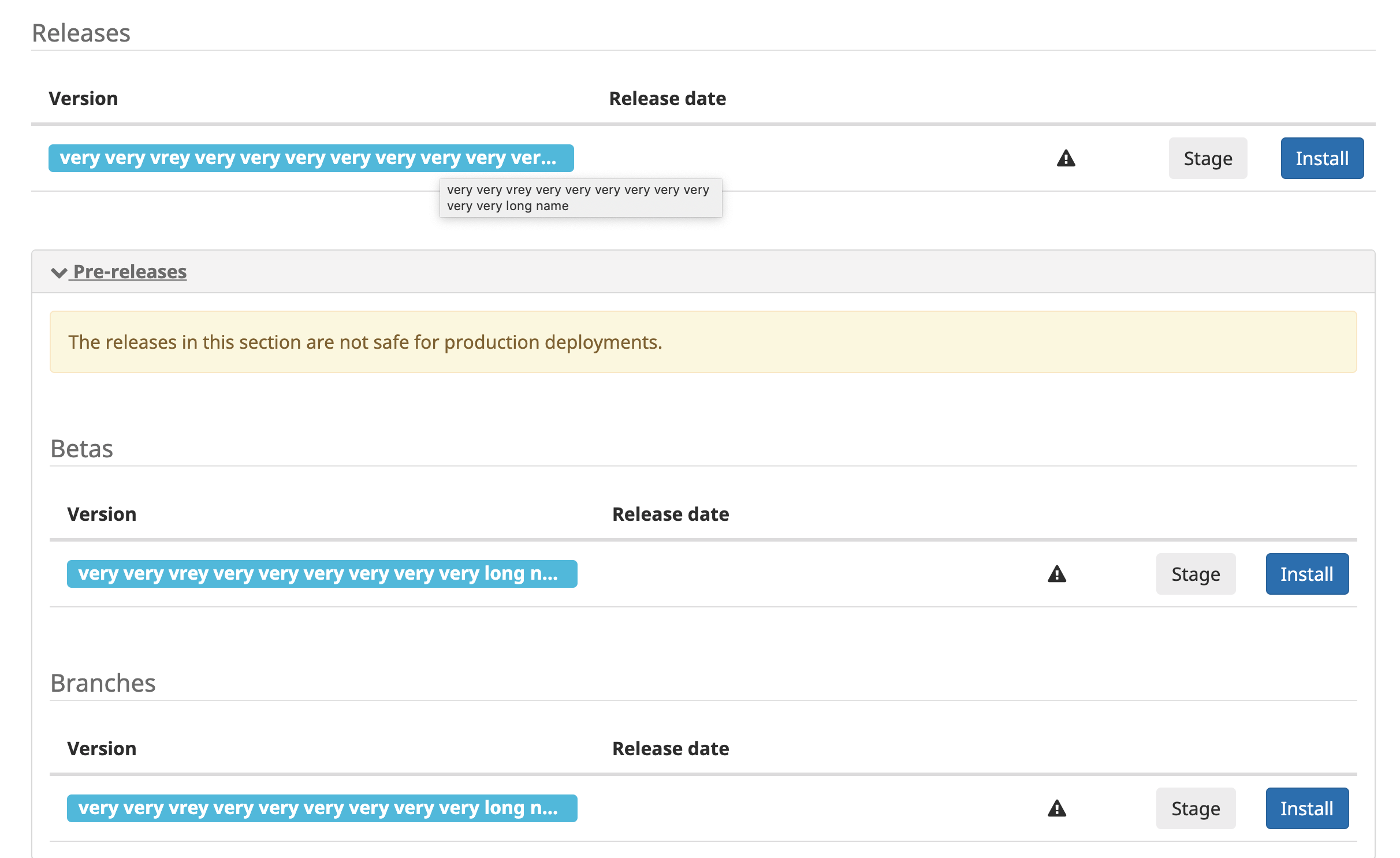
B) The rules as based on version, based version and current version: https://github.com/medic/cht-core/blob/a2f86650e0af3e4147e9919fdcbef031cb02db47/admin/src/js/controllers/upgrade.js#L120
Do you think there is an issue with this rule? We can open a separate ticket.
latin-panda
on 14 Sep 2020
@latin-panda
A) Looks good thanks
B) Makes sense - the comment in the code makes it clear :
unless their version is in the form 1.2.3[-maybe.4] (ie it's a branch) we can't tell and will just presume maybe it's bad...
Feel free to merge and close.
ngaruko
on 15 Sep 2020
Related issues
garethbowen
·
4Comments
 abbyad
·
5Comments
SCdF
·
3Comments
SCdF
·
5Comments
abbyad
·
5Comments
SCdF
·
3Comments
SCdF
·
5Comments
 kennsippell
·
3Comments
kennsippell
·
3Comments