Cht-core: Add a screen that shows messages queued to be sent
It would be nice to see your outgoing message queue, say before you decide to plug in a gateway.
 mandric
All 16 comments
Related to #1849
 diannakane
on 21 Apr 2016
diannakane
on 21 Apr 2016
Consider having a button to show the outgoing message in English if it is being sent in another language.
 sglangevin
on 27 Jun 2018
sglangevin
on 27 Jun 2018
Related: medic/medic-projects#2816 medic/medic-projects#2719
sglangevin
on 27 Jun 2018
Related: #3249
 garethbowen
on 13 Aug 2018
garethbowen
on 13 Aug 2018
View the full design spec and additional mockups here: https://docs.google.com/document/d/1RHydv1vjO0jGZwD9T0k5pEiZxJLVmSJamuzER7oOmCM/edit?usp=sharing
Summary of the MVP
- Create a new page on the Admin Console for “Outgoing messages”
- The page should have three tabs: “Scheduled”, “Due”, and “Will not send”
- Each page should have individual messages displayed in a table, with each row showing the details of a particular message
- Messages should be sorted by default by most recent scheduled/due date
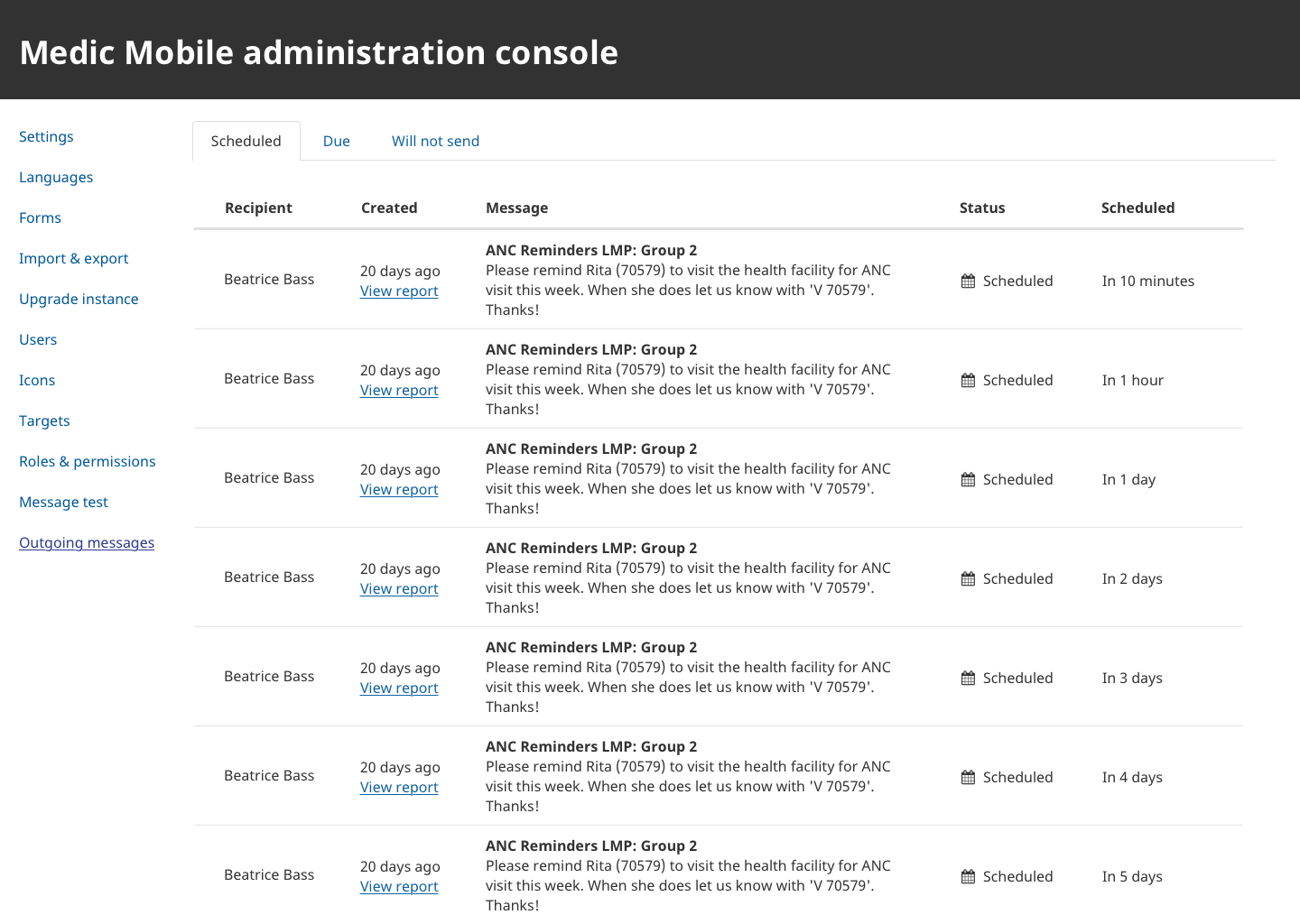
Scheduled tab
- Includes only “scheduled” statuses

Due tab
- This tab contains any messages in a pending/transitory state as well as messages that have been sent (either successfully or unsuccessfully)
- Includes all “pending”, “forwarded-to-gateway”, “received-by-gateway”, “forwarded-by-gateway”, “sent”, “delivered”, “failed” statuses
Will not send tab
- This tab contains any messages that will never be sent
- Includes all “denied”, “cleared”, and “muted” statuses
Table columns
Recipient
- Name of message recipient
- If name is unknown, displays recipient phone number
- If we don’t have name or phone, says “Unknown”
Created
- Date (relative) when the original message was generated as part of a schedule. (Devs: Use the reported_date of the form that triggered it.)
- Has a hover tip showing the exact calendar date and time
- Below the created date, display a “View report” link, which opens up that original report on the Medic webapp in a new tab (this is a nice to have but not required).
Message
- First line of the message is the title (e.g. “ANC Reminders LMP: Group 1”), in bold
- Full text of the message starts on the second line, wrapping in column as necessary
Status
- Message status icon on the left followed by text label on the right
- We have a unique icon for each state (FontAwesome icons for now, size 16px)
- Add a hover tip to provide more definition about what each status means (nice to have)
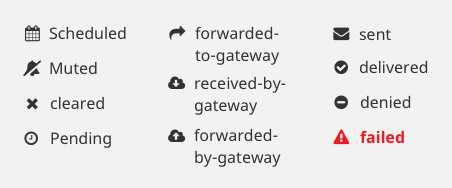
Conditional styling of status
- Whenever a message has a “failed” status, the failed status text and icon should be red
- Any message stuck in a transitional status (pending, forwarded, received, sent) for more than 5 minutes should be styled orange
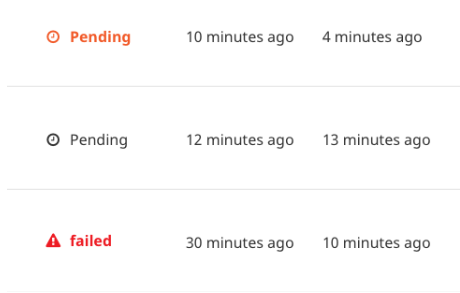
Scheduled
- Date (relative) when the message is/was scheduled to go out
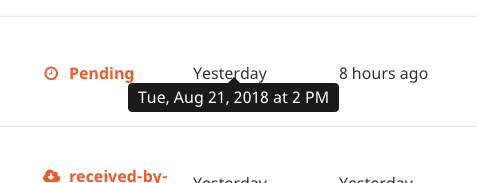
- Has a hover tip with the exact calendar date and time
Last Update
- Date (relative) of last state change
- Has a hover tip with the exact calendar date and time
Note there are three types of dates:
- Created date (when it was first triggered)
- Scheduled date (when it is due/scheduled to go out)
- Last updated date (date of last state change)
Date formatting
- Messages that are “scheduled” will only have two dates - created & scheduled date
- Messages of any other state will have three dates - created, scheduled, and last updated
- All dates should be formatted to show relative dates and times (If the day is today, then it displays information down to the minute e.g. “6 minutes ago”. Otherwise, uses relative language e.g. “3 days ago”, “In 1 month” etc.)
- Whenever we display a relative date, we should allow the user to see a hover tip with the exact calendar date and time (current existing feature on Reports tab)
 amandacilek-zz
on 24 Aug 2018
amandacilek-zz
on 24 Aug 2018
For reference, pasting a summary of a few clarifications discussed with Diana and Jill:
Do we include outgoing messages from the Messages tab, or just those from the Reports tab?
- Although we were not initially considering including messages from the Messages tab, we do think that they are a helpful inclusion. They are part of the story of what is happening with the gateway.
- Spam loops should hopefully be avoided because we are including outgoing messages only
- In regards to auto replies - for now, let’s include these in the list and see how it goes. Although we are curious how easy it would be to filter them out.
Will not send tab - do we include past due date or future due date or both?
- Ideally, we’d like to include both. If forced to choose, we think displaying messages from the past only is the most helpful. PMs might often want to answer the question “why didn’t X message get delivered?” and they can only answer that by checking both the pending tab (if something has stalled or failed) and by checking messages that were not sent for other reasons such as being muted. Future messages are also helpful to see, especially once we give users the ability to "mute" a scheduled message - we don't want a newly muted message to completely disappear - it should be somewhere accessible. In general, we think ALL message status types should live on this page somewhere.
- Our preference is to add a fourth tab so that we have “Will not send” for all future dates, and “Did not send” for all past dates. We like the tabs because they in essence allow us to “filter” and narrow down the lists without actually having a filter function.
What to do in cases where recipient phone number doesn’t exist
- Confirmed that we’re fine just keeping these for now. Jill thinks we have a Google phone number library that we check phone numbers against, and is not sure this will be much of an issue in real life. Let’s see how it goes and address separately if it becomes an issue - at that point we might want to create a new ticket to make this a new status type (as it is a different error, and useful to differentiate from the others).
amandacilek-zz
on 12 Sep 2018
For my own understanding...
-- will messages which are muted and appear on the "do not send" list switch over to the "scheduled/due" list when the mute status is cleared? And only those after the time when the schedule was unmuted? (i.e. unmute doesn't apply to the entire past schedule, only future messages)
-- for how long do we try again to send failed messages and when do they permanently fail?
-- did you all run the naming of the tabs and statuses by a few other teammates and users?
diannakane
on 13 Sep 2018
Will messages which are muted and appear on the "do not send" list switch over to the "scheduled/due" list when the mute status is cleared?
Yes, my understanding is that they would switch over to the "Scheduled" tab, provided that the due date is still in the future. If a muted message is unmuted, but the due date is in the past, it should remain in the "Did not send" tab. The rules for which message appears on which tab are based on the message status. A given message may and should move across tabs as it's status changes.
For how long do we try again to send failed messages and when do they permanently fail?
My understanding is that we do NOT try again. As soon as a message has reached the status "failed" it will not be retried. In the future we would like to add a "resend" button but that has been removed from the MVP.
Did you all run the naming of the tabs and statuses by a few other teammates and users?
Not explicitly, but during conversation the only status name that was mentioned as confusing was "Delivered". People have a hard time understanding the difference between "Sent" and "Delivered". We suggested that it might be clearer to change "Delivered" to "Received" but I did not include that in this ticket, as it seemed like a separate issue.
amandacilek-zz
on 13 Sep 2018
Thanks for those clarifications!
The wording that trips me up is "due" in the context of messages that live in the past (because they are no longer due, and arguably the failed ones are "overdue" but cannot be rectified), and "failed" as a status as differentiated from the tab "will not send" (because neither have been sent and neither will... hence my question about re-trying). I'm OK hearing that I'm in the minority here and don't need to make an issue of it if these terms are clear to others.
diannakane
on 13 Sep 2018
Here is why we like having "failed" messages grouped together with other pending message states: We anticipate that the "Due" tab will be the tab where PMs spend the majority of their time. They can go to this tab to either verify that all messages are properly moving quickly through the states, or they can be alerted to messages that have failed or been stuck in a pending state for a long time, indicating a potential gateway issue or some other problem. "Failed" is one of the statuses that PMs care about _most_. If we moved "failed" to a different tab, then PMs would have to toggle between multiple tabs to get the full picture of the health of the system.
Your point is valid about the wording "Due" not quite fitting all of the content on that page. All I can say is we're all well aware that this is not a perfect solution. We've had countless back and forth conversations about how many tabs there should be, what should be on them, and what the tabs should be called, and we all compromised to get here. "Due" vs "Overdue" is a tricky concept, because in reality almost every message will take _some_ time to go through the process and be delivered, so I think they will often be past the exact due date/time even when progressing normally through the pending states...Do you have a suggestion for a name besides "Due" without splitting off to make a separate "Overdue" tab?
In the end, we'd just like to get something out, let people start using it, and gather feedback from there to inform future tweaks or iterations. I don't think changing the name of a tab is too difficult down the road!
amandacilek-zz
on 13 Sep 2018
because neither have been sent and neither will
On the contrary, "failed" messages DID attempt to send. Here is the full definition of "failed":
The sending attempt failed. Sending will not be retried without user intervention.
amandacilek-zz
on 13 Sep 2018
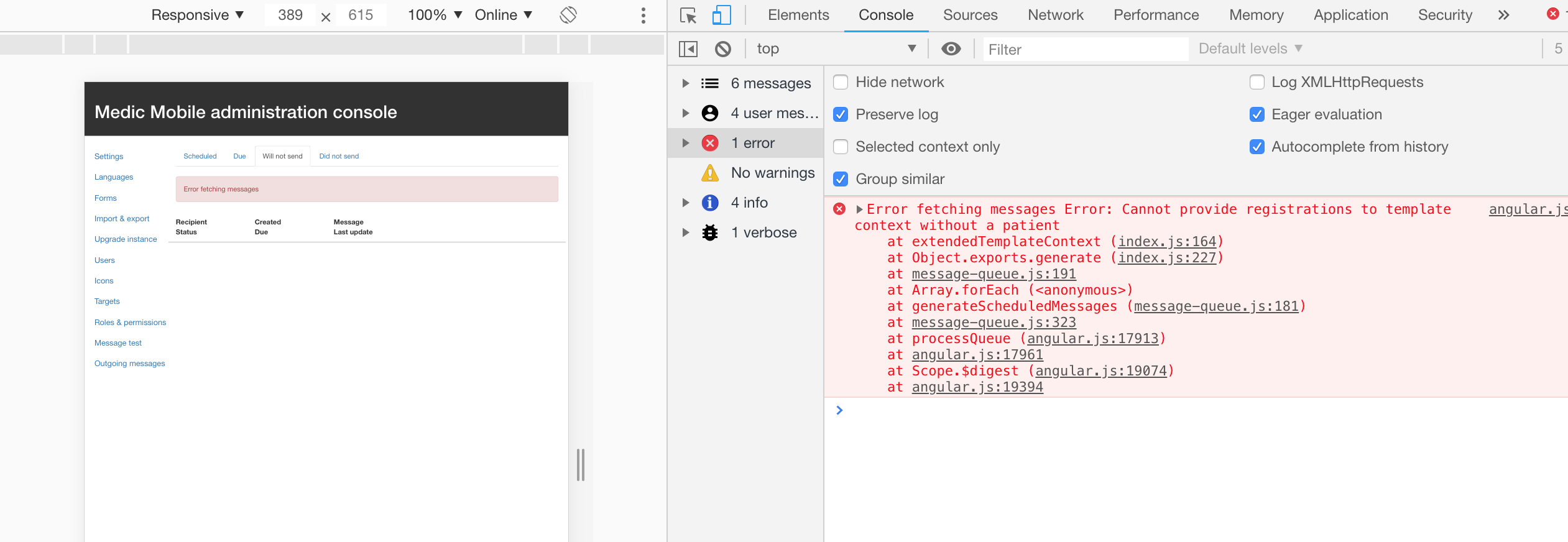
LGTM. There is an error message showing on the Will not send tab. It might be related to #4899 . So, I will go ahead and close this (as a feature done) and keep #4899 open.
 ngaruko
on 22 Nov 2018
ngaruko
on 22 Nov 2018
Reopening to fix bug related to deleted patients causing messages list to error (https://github.com/medic/medic-webapp/issues/4899#issuecomment-440941632)
 dianabarsan
on 22 Nov 2018
dianabarsan
on 22 Nov 2018
@ngaruko The fix for the deleted patients has been merged into master (3.4), with no intention to backporting to 3.3. I deleted the report that caused the error in Admin message queue (id 8cb9904d-cc22-485a-8ef0-0c3d2a1372e2).
dianabarsan
on 4 Dec 2018
@ngaruko this issue is part of 3.3.x, not 3.4.x.
dianabarsan
on 5 Dec 2018
LGTM
ngaruko
on 12 Dec 2018
Related issues
 abbyad
·
4Comments
abbyad
·
4Comments
 alxndrsn
·
6Comments
alxndrsn
·
6Comments
 ghost
·
4Comments
diannakane
·
6Comments
alxndrsn
·
4Comments
ghost
·
4Comments
diannakane
·
6Comments
alxndrsn
·
4Comments