Cht-core: Percentage target values are confusing
Percentage type targets show progress towards the target as a percentage which makes it hard to understand.

In this example it's not clear whether you're 50% or 45% of the way to the target.
One possible improvement is to state the progress as "30 of 60" instead of "50%".
 garethbowen
All 25 comments
I've made some mockups of how the targets could look. Because the "30 of 60" text is longer than "50%" I've moved it inside the bar so it won't overflow. I've left the "count" type unchanged.
Count:

Percentage:

I propose we change all percentage types to be rendered like this.
Credit to @joshnesbit for this solution.
garethbowen
on 21 Jul 2016
@diannakane @joshnesbit Can I get your feedback on the above? It will be fairly easy to implement once you've signed off on it.
garethbowen
on 21 Jul 2016
@diannakane deferring to you and @sglangevin, since you've been organizing feedback from CHWs. My understanding was that the concept of percentages – by itself – is what's confusing, so we'd want to replace it everywhere.
Example idea: "Newborn Care Visit within 48 hours... Monthly goal 9 of every 10... So far, 5 of 20"
or
Second idea: "Newborn Care Visit within 48 hours.... Monthly goal 9 of every 10... So far, 2 of every 10"
Gareth, I think your mockup for percentage types is definitely an improvement. Will let others jump in from here.
 joshnesbit
on 21 Jul 2016
joshnesbit
on 21 Jul 2016
This is definitely tricky to represent well, especially to users not familiar with percentages.
cc @michaelkohn to see how we could do this throughout our analytics offerings
 abbyad
on 21 Jul 2016
abbyad
on 21 Jul 2016
Honestly, even when you are comfortable with percentages having a percentage of a percentage is confusing... Protip: look at the progress bar and ignore the numbers.
garethbowen
on 21 Jul 2016
@garethbowen Agree with Josh, my understanding is that percentages themselves are confusing.
Can we break this up into counts?
newborn visits = 10
newborn visits within 48 hours = 6
My guess is the percentage will be more useful to the supervisor so we can include that in their dashboards of CHW performance.
 diannakane
on 21 Jul 2016
diannakane
on 21 Jul 2016
@diannakane We can easily change the "Monthly Goal" to be represented as "9 of every 10" or similar as Josh suggested. Breaking it into two lines seems to duplicate the information in the title of the widget and would require reconfiguring as well as coding.
garethbowen
on 21 Jul 2016
The 10/100 framing is hard because it looks like you still have 90 to go, whereas what we're really saying is you were late on 90. This may be the wrong target or type of widget to show CHWs.
How about this: change the new born title to "newborn visits within 48 hours," show the count of fast vs. total visits in the bar and show the CHW percentage below. Basically, the original chart with the inclusion of counts within the bar.
diannakane
on 21 Jul 2016

diannakane
on 21 Jul 2016
A few other options.... though I'm not sure if we can have the little goal line ( or just a little triangle pointer)?

 michaelkohn
on 24 Jul 2016
michaelkohn
on 24 Jul 2016
@garethbowen: @michaelkohn and I did some whiteboarding.
Can we have a dotted line to show that 90% is a point on the bar, not the end of the bar?
We think that by including counts of on-time visits vs. late visits will make it clear that these visits are "done" (10 out of 100 sounds like you still have 90 left to do, especially with the white space between the count and the goal). We played with a number of ways to show this and like it included in parentheses after the percentage.

We also did some thinking about how to show counts when they surpass goals.

This has prompted us to consider the overall design of our in-app targets, so we'll be looking at that at a later time.
cc: @sglangevin @joshnesbit
diannakane
on 26 Jul 2016
I find it a little confusing to see percentage targets with a goal line and count targets without one. I also think it's unnecessarily wordy to repeat the title of the widget as part of the status count, and unnecessary words lead to confusion. I've made a little mockup with a dotted goal line on counts as well, and used the "x of y" wording which is more obvious.


garethbowen
on 26 Jul 2016
The issue with the one above is that my target is a % but it doesn't tell me my % to compare to the goal, so we are asking them to do that math.
The 0/0 and 18/18 bars feel OK, but in "14 of 20," it's unclear that I have completed 20 visits. The white space on the right looks like I still have 6 visits left to complete -- it looks like progress towards, not percentage of. If we could know the number of visits we expect them to do, then something like this could work. We felt the plaintext labels helped with clarity since we are jumping between counts and percentages so that you don't have to reread the title of the widget in order to understand what it's telling you.
We played with another option of showing on-time vs. late visits on either side of the line to be clear that the bar is all visits that have been done.

It seems like there are a lot of issues around the Targets tab which should get prioritized and addressed within a milestone. It feels like we're forcing this into a framework that's not ideal. My suggestion is to make the small changes to improve clarity in the short-term and revisit this in a future release where we reflect on all of our targets designs.
diannakane
on 26 Jul 2016
make the small changes to improve clarity
Which small changes are those?
garethbowen
on 26 Jul 2016
Sorry for the delay, @garethbowen
After spending several hours on this, @michaelkohn and I propose adding the dotted line demarcating 90% would improve clarity that the bar is showing their score against 100%, not 90%. It's clear with count targets that the goal and the bar are both 100%.
Adding the counts of on-time vs. late visits is helpful if marked as such. This is not defined in the title of the widget, which only refers to percentages. We would leave the CHW percentage "score" in because this is what the title of the widget is announcing.
The consensus is that this is a quick fix and not the ideal design, and may not even be the ideal metric for a CHW. We will look at the targets tab in a more comprehensive design process and include user testing in our future milestones.
diannakane
on 27 Jul 2016
It's hard to get because the percentage target (% of on-time visits) varies when the fixed target (total num of visits) varies.
We can remove the percentage target to dissociate them:
Total number of visits : goal = 10
Number of on-time visits : goal = 9
(or conversely, Number of late visits : goal = 1 max)
It's not quite the same as the percentage target, but it's more understandable for CHWs. The difference is you would not be penalized for late visits in the second target : 9 on-time and 8 late = success!
The top-level analytics can be different, and keep the original percentage target.
(obviously we need to get LG's sign-off before changing targets in this way)
 estellecomment
on 1 Aug 2016
estellecomment
on 1 Aug 2016
I'm not I know what you mean, @estellecomment. Why can't the percentage
target remain at 90% and the personal performance percentage change based
on the number of visits completed?
I think 9/10 on-time is a difficult target since the actual number of
visits will vary and it will be up to the CHW to do the math of comparing
these fractions...
diannakane
on 1 Aug 2016
@diannakane
I'm suggesting the change because I think that it's a hard metric to understand, and I think that's why we're having a hard time representing it.
That's why I'm suggesting changing the metric altogether. The CHWs wouldn't do any math, they would just view this new metric.
If the CHWs do a lot more than 10 visits, then it kinda breaks down, yeah.
If we don't think it's hard to understand, then it's just a problem of representation, and this doesn't apply.
estellecomment
on 2 Aug 2016
I agree that it is a hard metric to understand, though as you mentioned,
that would need to be discussed with the partner. This thread was
originally started to see if we could make any small adjustments to improve
the clarity of the widget, and I'm afraid the answer might be no. Michael
and I put our heads together and made the imperfect recommendation above.
We'll definitely be revisiting this when we look at the design of the
Targets tab, and will feed this back into our design work on setting
targets with partners.
diannakane
on 3 Aug 2016
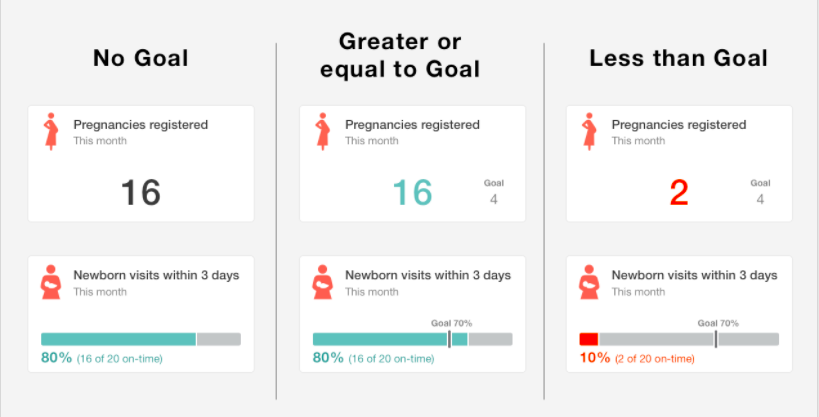
This issue has been worked on by the design team and is ready for development. The below image is a good overview of how the widgets are meant to look. Note that we will continue to have only 2 types of widgets for now: counts and percents. More information, including Zeplin files, is in the design spec.
 sglangevin
on 7 Jul 2017
sglangevin
on 7 Jul 2017
We can also break this up into two issues, one for count targets and one for percent targets, if that makes more sense. Maybe @estellecomment has thoughts?
sglangevin
on 7 Jul 2017
I think one issue is fine - it could get messy trying to do one without breaking the other.
garethbowen
on 7 Jul 2017
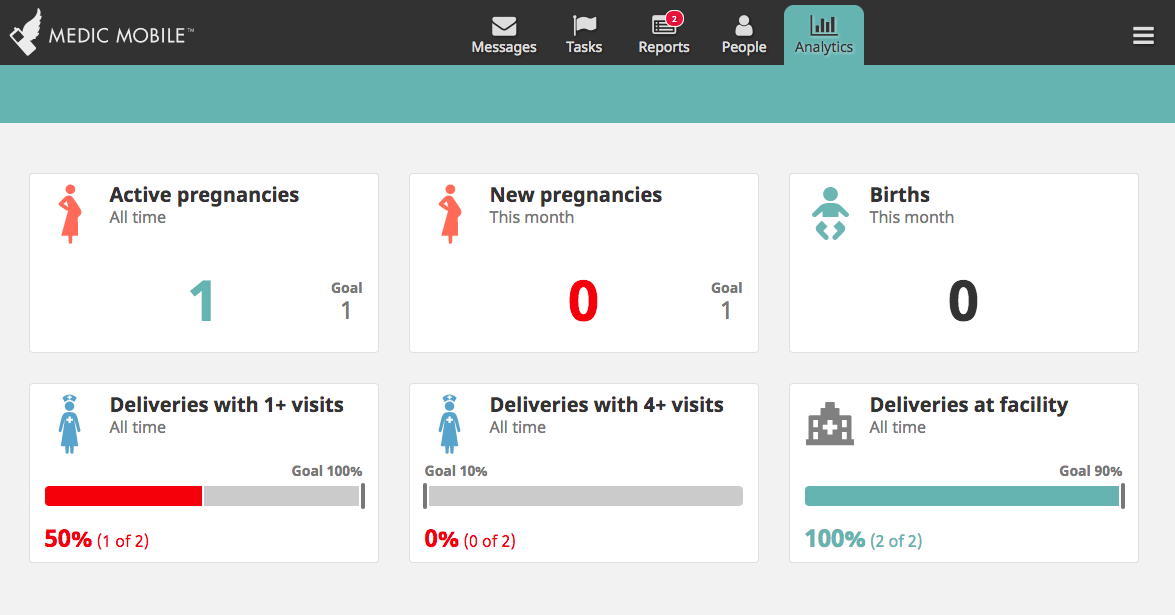
This is looking awesome overall! One minor thing, though. When I set the goal for a percentage target to to 10%, the goal line shows up at the same place as a 0% goal. Similarly, when I set the goal to 90%, the goal line shows up at the same place as a 100% goal. These should not show up at the ends of the bar.
sglangevin
on 2 Oct 2017
Back to you, @garethbowen
sglangevin
on 2 Oct 2017
LGTM. Moving to ready!
sglangevin
on 4 Oct 2017
Related issues
 SCdF
·
46Comments
SCdF
·
46Comments
 benkags
·
41Comments
sglangevin
·
30Comments
benkags
·
41Comments
sglangevin
·
30Comments
 n-orlowski
·
29Comments
n-orlowski
·
29Comments
 mandric
·
37Comments
mandric
·
37Comments
Most helpful comment
I think one issue is fine - it could get messy trying to do one without breaking the other.