Chronograf: Alert Rule test button which triggers all the alert handlers on a rule.
A button on KapacitorRulesPage next to the name of the rule,
and/or a button on KapacitorRulePage (during editing and creation of a rule)
The button artificially "triggers" the rule, sending the alert message to all of the alert handlers on the rule.
The benefit of this button in addition to button testing Kapacitor Configs is to (1) test alert handlers that are not in the configuration (http/log/tcp/exec) and (2) test the rule-specific configurations for the alert handlers.
 ebb-tide
All 12 comments
@russorat @ebb-tide Having the possibility to trigger the alerts for testing would be really great.
An option to preview the alert message would also be useful. Thanks.
 afausti
on 20 Mar 2019
afausti
on 20 Mar 2019
This issue has been automatically marked as stale because it has not had recent activity. It will be closed if no further activity occurs. Thank you for your contributions.
![stale[bot] picture](https://avatars.githubusercontent.com/in/1724?v=4&s=40) stale[bot]
on 22 Jul 2019
stale[bot]
on 22 Jul 2019
I agree that having a way to trigger the rule from the builder page would be very nice.
 SimonKrughoff
on 29 Jul 2019
SimonKrughoff
on 29 Jul 2019
This issue has been automatically marked as stale because it has not had recent activity. It will be closed if no further activity occurs. Thank you for your contributions.
stale[bot]
on 27 Oct 2019
Any chance this could still be added, if only in Influx 2.0?
 kfindeisen
on 28 Oct 2019
kfindeisen
on 28 Oct 2019
This issue has been automatically marked as stale because it has not had recent activity. It will be closed if no further activity occurs. Thank you for your contributions.
stale[bot]
on 26 Jan 2020
Still relevant.
afausti
on 27 Jan 2020
Still relevant. I just ran into this today. It is very frustrating not to be able to trigger an alert.
 r-owen
on 25 Sep 2020
r-owen
on 25 Sep 2020
Testing depends on data that the user must help with and cannot be generally created by the UI itself. Also, the successful verification of functionality might require long delay(s), depending on the rule's query and type. I cannot imagine a Test button to do a simple trick in the UI. Kapacitor offers a command-line tool that lets you test a task with the help of data sampling.
I manually test the rule by writing test data to trigger it. Such data can be written directly from Chronograf UI (_Write Data_ button is in the top-right corner of Explorer UI). I can imagine a Test button that would open a similar dialog to let the user write (pre-filled when possible) test data to trigger the execution of alerts. There could be also an option to send the data directly to kapacitor, so that such test data are not persisted in InfluxDB. @russorat @timhallinflux please advise
 sranka
on 17 Mar 2021
sranka
on 17 Mar 2021
This isn't testing the work that Kapacitor is doing within the TICKscript... it is simply testing the connectivity between Kapacitor and the Event Handler target.
I would propose:
Define a "test alert" message which can be sent to any of the event handlers.
When defining the connection between Kapacitor via Chronograf, enable the "test connection" button -- and when that button is pressed, send the test alert message to event handler.
I would attempt to define a canonical message which includes some very basic information and as you walk through the various event handlers, enrich the canonical message/information. For example, the "level" of the message should be INFO, the text of the message should be something like,"Testing Connection from Kapacitor".
 timhallinflux
on 18 Mar 2021
timhallinflux
on 18 Mar 2021
Since not all alert handlers support testing, we agreed to add Send Test Event to every alert handler section that supports it:
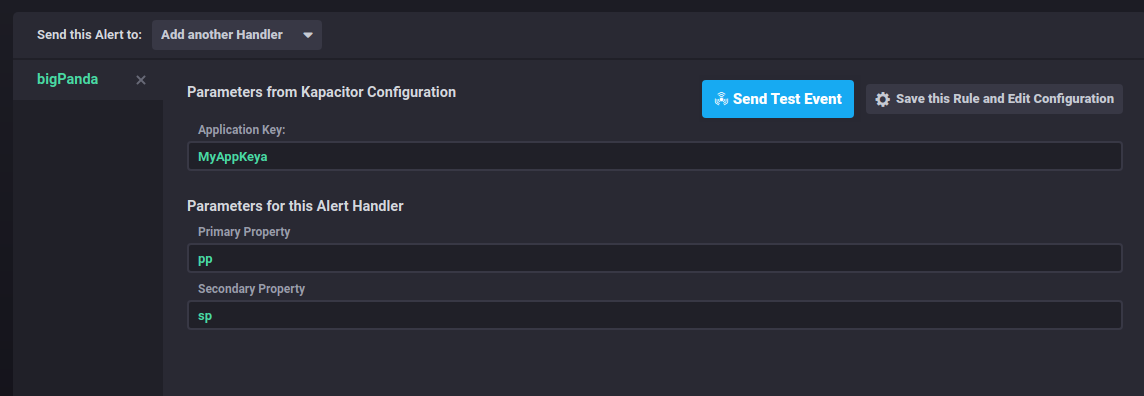
It will do the same job as the kapacitor configuration's Send Test Event handler, but the visible additional UI options are also used in the notification.
sranka
on 9 Jun 2021
Thanks @sranka this looks like a good option. It will help us to preview the messages.
afausti
on 11 Jun 2021
Related issues
 chetu
·
3Comments
chetu
·
3Comments
 QuentinMoss
·
6Comments
QuentinMoss
·
6Comments
 jaredscheib
·
3Comments
jaredscheib
·
3Comments
 coreprocess
·
6Comments
coreprocess
·
6Comments
 nsteinmetz
·
5Comments
nsteinmetz
·
5Comments
Most helpful comment
Any chance this could still be added, if only in Influx 2.0?