Chronograf: [ux] Unreadable labels in cell legends

Queries with long measurement names and multiple GROUP BYs can easily generate giant unreadable labels. It would be ideal if users had some sort of control over how this happens. Many times the title of the chart, in the case above Container Memory, gets repeated in each of the entries along with a bunch of other non relevant information. In this case, as with many others I can think of, the lines should be labeled with a user defined tag value.
 jackzampolin
All 12 comments
Yeah I'd love to see this addressed as well
 jaredscheib
on 24 May 2017
jackzampolin
on 12 Jun 2017
jaredscheib
on 24 May 2017
jackzampolin
on 12 Jun 2017
Current proposal:
- Add a
Legend Configoption to the caret of every dashboard cell, and as a button to Data Explorer, and add a caret to precanned dashboard to allow legend config
- Summons overlay technology with a basic configuration view
- Filter by top 5/10
- Hide/show specific tags
- Rename labels
- Allow current config to become default for all dashboard cells
- Consider exposing more of Dygraph legend API in this config
Further Future:
- Give users to option and ability to put a graph's legend in a dedicated "support" (linked) cell.
- Introduce the idea of linkedCells, as a property on a cell:
linkedCells: { legend: <cell_id>, config: <cell_id>, templateVariables: <cell_id> } - Allow users to untoggle a metric's visibility in the legend, and easily re-toggle its visibility
- Create a "focus" mode, such as where if a user clicks a specific line or tag in the legend, they only see that line highlighted in the graph and only see that metric in the legend, until they click outside of it to untoggle focus mode
- The linked legend cell could have the following abilities:
- Filter:
- Only show top 5 or 10 tags
- hide or show various arbitrary tags
- Give user the ability to change legend labels for tabs
jaredscheib
on 12 Jun 2017
Filter by top or bottom N?
Hide/show measurement name?
Is the future linked cell thing an idea for putting the legend off to the side/bottom of the graph so that it's always visible? If the side thing then it would also be interesting later to be able to show summary stats about those series (e.g. first, last, min, max, mean).
 pauldix
on 13 Jun 2017
pauldix
on 13 Jun 2017
@pauldix I still got those designs we put together that encapsulate some of those features
 alexpaxton
on 13 Jun 2017
alexpaxton
on 13 Jun 2017
Filter by N sounds good.
And yes, hide/show measurement name.
And yes, the future linked cell is an idea for associating one cell with another, which would, yes, include putting a legend for one graph in another cell. To the side/bottom so that it could be always visible, yes. Good ideas @pauldix -- thanks
jaredscheib
on 13 Jun 2017
Is this feature still a part of Chronograf? I can't find any documentation on modifying the legend, and don't see any options in the dashboard.
 rfbonett
on 27 Sep 2019
rfbonett
on 27 Sep 2019
cc @russorat
jaredscheib
on 28 Sep 2019
is this a thing? It's maddening that I can't control the legend text. Instead I get these stupid long labels and I can't read the values in the hover thingy.
 optimuspaul
on 17 Dec 2019
optimuspaul
on 17 Dec 2019
@optimuspaul thanks for commenting! you can control the legend text using the SELECT field AS "custom_name" in the InfluxQL statements. If you have additional requirements or feature requests, please let us know in a new issue.
 russorat
on 17 Dec 2019
russorat
on 17 Dec 2019
Is there plan to move out first part of the label AKA SELECT mean("used") AS "test", mean("active") AS "test2" FROM "telegraf"."autogen"."mem"
it displays labels in form of mem. test & mem.test2, and i want to be just test and test2
 stelikov
on 19 Aug 2020
stelikov
on 19 Aug 2020
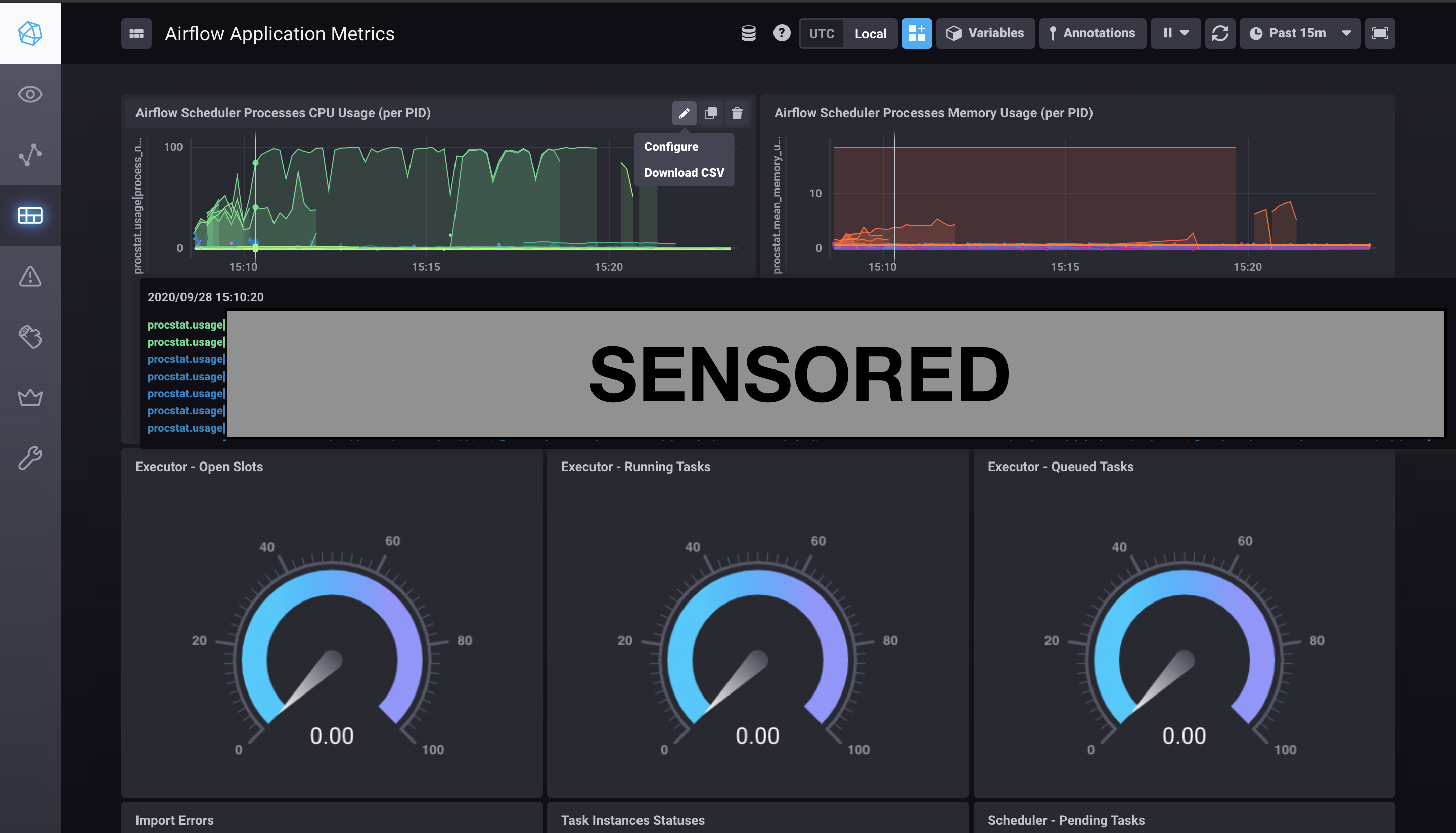
Hi, there's a problem with this.
If the measurement's name is too long, it makes the filter and sort buttons disappear from the other end of the display,
also I could not find a way to alias the measurements using regular expressions. There's a tag for this measurement and I want to select a part of this tag value as the legend, but I could not find a way to do so.
 KhashayarDanesh
on 28 Sep 2020
KhashayarDanesh
on 28 Sep 2020
Related issues
 coreprocess
·
5Comments
coreprocess
·
5Comments
 thomasklein
·
3Comments
thomasklein
·
3Comments
 121watts
·
6Comments
121watts
·
6Comments
 AlirieGray
·
4Comments
jaredscheib
·
3Comments
AlirieGray
·
4Comments
jaredscheib
·
3Comments