Chromeless: Error: No inspectable targets
When trying to use it with chrome headless instance, I'm getting:
Error: No inspectable targets
    at defaultTarget (/Project/node_modules/chrome-remote-interface/lib/chrome.js:45:23)
    at /Project/node_modules/chrome-remote-interface/lib/chrome.js:228:32
    at <anonymous>
    at process._tickDomainCallback (internal/process/next_tick.js:208:7)
Failing near here:
class Chrome extends EventEmitter {
    constructor(options, notifier) {
        super();
        // options
        const defaultTarget = function (targets) {
            // prefer type = 'page' inspectabe targets as they represents
            // browser tabs (fall back to the first instectable target
            // otherwise)
            let backup;
            let target = targets.find((target) => {
                if (target.webSocketDebuggerUrl) {
                    backup = backup || target;
                    return target.type === 'page';
                } else {
                    return false;
                }
            });
            target = target || backup;
            if (target) {
                return target;
            } else {
                throw new Error('No inspectable targets');
            }
        };
Running example with:
  const chromeless = new Chromeless({
    viewport: {
      width: 1440,
      height: 900,
      scale: 1,
    }
  });

  const screenshot = await chromeless
    .goto('https://www.google.com')
    .type('chromeless', 'input[name="q"]')
    .press(13)
    .wait('#resultStats')
    .screenshot();

  console.log(screenshot) // prints local file path or S3 url

    await chromeless.end()
 Thinkscape
All 16 comments
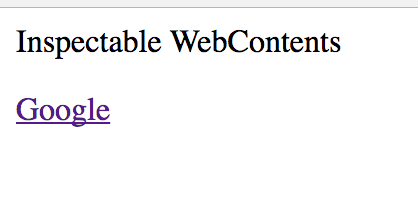
When I open the inspector in different chrome, I see previous tab still active (with "google.com" open):
Thinkscape
on 6 Aug 2017
hey, i get a same problem
 Anehta
on 7 Aug 2017
Anehta
on 7 Aug 2017
There was some small API/protocol changes in chrome regarding targets... might have to fix this on our end
 joelgriffith
on 7 Aug 2017
joelgriffith
on 7 Aug 2017
I've had some issues with this. I worked around it by manually telling Chrome what to do with chrome-remote-interface (aka CDP - https://github.com/cyrus-and/chrome-remote-interface). Sample:
let chromeless = new Chromeless({ debug: true });
CDP.listTabs()
  .then(tabs => {
    if (!tabs.length) {
      return CDP.New().then(() => chromeless = new Chromeless({ debug: true }));
    }
  })
  .then(() => {
    // do stuff with chromeless in here
  });
@adieuadieu @joelgriffith That might help on your end too.
 azurelogic
on 9 Aug 2017
azurelogic
on 9 Aug 2017
Well, I take that back. The error just came back for me even with that hack in place.
azurelogic
on 10 Aug 2017
Hm.. Some questions for everyone experiencing this issue:
- What version of Chrome are you using?
- What version of nodejs?
- Are you launching Chrome with any specific flags, or letting Chromeless launch Chrome?
- Was Chrome already running?
- Are you using Chromeless v1.2? (if no, please upgrade)
- Which OS are you experiencing the issue on?
 adieuadieu
on 10 Aug 2017
adieuadieu
on 10 Aug 2017
I experienced this after the Chrome Canary auto-updated to version 62, everything was fine before. I use MacOS. Switching back to Chrome 60 worked for me.
 quangbuule
on 10 Aug 2017
quangbuule
on 10 Aug 2017
@adieuadieu I've been able to trigger this locally and in Lambda. My experience has to do with repeated runs of Chrome. It never happens on the first run. In Lambda, it would happen almost every time on subsequent runs. These were non-overlapping runs, so my assumption is that I'm hitting the same container in Lambda. Redeploying the Lambda (requiring cold start) would set me back to a good state of course.
Locally, I can't remember the steps, but I remember needing to cause an error in the previous chain of commands to Chromeless. Then I'd new up another Chromeless, and everything would be hosed. I can't remember if chrome or the chrome window was killed in betweeen. I was trying to diagnose it with CDP, and in some cases, I was ending up with a valid Chromeless instance, but CDP was reporting zero tabs. My next thought was trying to kill all of the tabs and then CDP.New(), but we're moving on from the feature we were trying to this for.
Your questions:
Chrome version: local - 60.0.3112.90; Lambda - whatever serverless-plugin-chrome brings in
Node version: 6.10
Debug flag in use
Seems like Chrome might still be running in both cases
Using Chromeless v1.2
macOS 10.12 and Amazon Linux (Lambda)
azurelogic
on 10 Aug 2017
Experiencing this issue when running the mocha-chai example locally
Your questions
Chrome version: Canary 62 and Chrome 60
NodeJS version:8.3.0
I'm letting Chromeless launch Chrome
Chrome wasn't already running
Im using Chromeless 1.2.0
Using MacOS Sierra
 mitramejia
on 10 Aug 2017
mitramejia
on 10 Aug 2017
I was experiencing Error: No inspectable targets with a similar mocha-chai set up when using Chrome Canary version: 62.0.3183.0.
I added in the hack mentioned by @azurelogic
CDP.New().then(() => chromeless = new Chromeless({ debug: true }));
this got it kind of working but await chromeless.end() was failing with
(node:62301) PromiseRejectionHandledWarning: Promise rejection was handled asynchronously (rejection id: 1)
Error: unexpected server response (500)
      at ClientRequest._req.on (node_modules/ws/lib/WebSocket.js:651:26)
      at HTTPParser.parserOnIncomingClient (_http_client.js:565:21)
      at HTTPParser.parserOnHeadersComplete (_http_common.js:116:23)
      at Socket.socketOnData (_http_client.js:454:20)
      at addChunk (_stream_readable.js:252:12)
      at readableAddChunk (_stream_readable.js:239:11)
      at Socket.Readable.push (_stream_readable.js:197:10)
      at TCP.onread (net.js:589:20)
I deleted my Canary version and used Chrome version: 60.0.3112.90 (Official Build) (64-bit). This fixed all the issues I was having.
Versions it worked with
Chrome version: 60.0.3112.90 (Official Build) (64-bit)
v8.3.0
Chromeless 1.2.0: it is launching Chrome
MacOS Sierra 10.12.6
 benjefferies
on 12 Aug 2017
benjefferies
on 12 Aug 2017
I'm also having this problem:
- Chrome version: 60
- NodeJS: 8.1.2
- Chromeless is launching Chrome
- Chrome was already running
- Yes, v1.2.0 of Chromeless
- macOS 10.12.5 Sierra
Quitting Google Chrome then reopening it seemed to fix the issue for me once, but now happening again. I haven't tried any of the workarounds mentioned above.
 jakeg-ci
on 14 Aug 2017
jakeg-ci
on 14 Aug 2017
I'm also having the same problem:
- Version 60.0.3112.101 (Official Build) (64-bit)
- NodeJS: v8.3.0
- Chromeless is launching Chrome
- Chrome was already running (I even stopped all instances of Chrome when I tried)
- v1.2.0 of Chromeless
- macOS 10.12.6 Sierra
 lastcoolnameleft
on 15 Aug 2017
lastcoolnameleft
on 15 Aug 2017
➜   mocha mocha-chai-test-example.js
  When searching on google
    ✓ shows results (3061ms)

  When clicking on the image of the demo playground
(node:12719) UnhandledPromiseRejectionWarning: Unhandled promise rejection (rejection id: 1): Error: No such target id: undefined
(node:12719) [DEP0018] DeprecationWarning: Unhandled promise rejections are deprecated. In the future, promise rejections that are not handled will terminate the Node.js process with a non-zero exit code.
    1) should redirect to the demo


  1 passing (3s)
  1 failing

  1) When clicking on the image of the demo playground should redirect to the demo:
     Error: No inspectable targets
      at defaultTarget (node_modules/chromeless/node_modules/chrome-remote-interface/lib/chrome.js:45:23)
      at node_modules/chromeless/node_modules/chrome-remote-interface/lib/chrome.js:228:32
      at <anonymous>
      at process._tickDomainCallback (internal/process/next_tick.js:228:7)
Me too.
I get the issue every time, with the test script below.
The first test passes, the second test fails (error below code)
It works / passes, if I skip the first test. Which suggests that chrome less.end() isn't working how I expect.
Chrome Version 60.0.3112.101 (Official Build) (64-bit)
OS: macOS Sierra 10.12.6
EDIT If I move out chromeless.end() into an after(chromeless.end) it resolves the issue. It looks like it's a problem with multiple instances of Chromeless (?)
CODE:
const testWrapper = require('./support/test-wrapper');

const testRunner = (expect) => {
  const {Chromeless} = require('chromeless');

  describe('Chromeless', function () {
    it('should find the heading', async function () {
      this.timeout(10000);
      const chromeless = new Chromeless();

      await chromeless
        .goto('http://localhost:9000')
        .wait('#app', 2500);

      const headingText = await chromeless.evaluate(() => {
        return document.querySelector('#app h1').innerText;
      });

      expect(headingText).to.equal('Hello !');

      await chromeless.end();
    });

  });

  describe(`Given John is a website user
              When he enters "John" into the name field and submits`, function () {
    it(`Then he should see a "Hello John!" message`, async function() {
      const chromeless = new Chromeless();

      await chromeless
        .goto('http://localhost:9000')
        .wait('#app', 7500)
        .type('John', 'input[name="nameValue"]')
        .click('button');

      const headingText = await chromeless.evaluate(() => {
        return document.querySelector('#app h1').innerText;
      });

      expect(headingText).to.equal('Hello John!');

      await chromeless.end();
    });
  });
};

testWrapper(testRunner);
ERROR:
 1) Given John is a website user
              When he enters "John" into the name field and submits Then he should see a "Hello John!" message:
     Error: No inspectable targets
      at defaultTarget (node_modules/chrome-remote-interface/lib/chrome.js:45:23)
      at node_modules/chrome-remote-interface/lib/chrome.js:228:32
      at <anonymous>
      at process._tickDomainCallback (internal/process/next_tick.js:228:7)
 supasympa
on 18 Aug 2017
supasympa
on 18 Aug 2017
In case this helps someone else debug this: I got this error when there was an existing headless chrome running / listening to the debugging port. As soon as I shut that down the error went away.
 mankins
on 23 Aug 2017
mankins
on 23 Aug 2017
@mankins I've tried telnetting to 9222, but there's nothing open on that part. I've also downloaded Chrome Canary and enabled remote-debugging-port, but still no joy. Can you share what exactly you did?
@supasympa Can you share the code that you used to get it working? I've been unsuccessful so far.
lastcoolnameleft
on 24 Aug 2017
Related issues
 seangransee
·
5Comments
seangransee
·
5Comments
 Corefinder89
·
4Comments
Corefinder89
·
4Comments
 ylscsdb
·
6Comments
ylscsdb
·
6Comments
 schickling
·
3Comments
schickling
·
3Comments
 kellylawrence
·
4Comments
kellylawrence
·
4Comments
Most helpful comment
In case this helps someone else debug this: I got this error when there was an existing headless chrome running / listening to the debugging port. As soon as I shut that down the error went away.