Chrome-remote-interface: What is "params"?
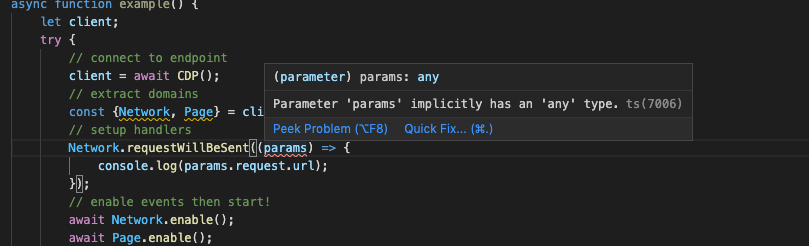
I dont understad the variable params. The code snippets posted in the readme do not work in vscode because:
params implicitly has any type.
See screenshot.
 vbisbest
All 5 comments
It does work on my end, you must be doing something fancy with TypeScript (which is not supported)?
params is a generic object, whose properties are according to the method, in your case is Network.requestWillBeSent.
 cyrus-and
on 9 Sep 2020
cyrus-and
on 9 Sep 2020
This is likely because of the build-in TS/JS linting in vscode. You can disable TS validation in the (user/workspace) settings (this should be enough for this issue) or disable all the built-in linting and use plugins like ESLint in JS workspaces or TSLint is TS workspaces. Unfortunately it's a mess and I can't check my editor settings right now, maybe you find some helpful answers in
- https://stackoverflow.com/questions/42632215/how-to-disable-typescript-warnings-in-vscode
- https://stackoverflow.com/questions/50823743/disable-tslint-in-vscode.
Not too precise, I know, hope it helps a bit though.
 deleted-user-1
on 9 Sep 2020
deleted-user-1
on 9 Sep 2020
@matjaeck thanks for chiming in, I'm no a vscode user but how come TypeScript errors pop up in a pure JavasScript code?
FWIW opening the README example in a vanilla vscode setup works as expected.
cyrus-and
on 9 Sep 2020
@cyrus-and I can neither reproduce the specific error, but the ts(7006) label shows that it comes from the built-in vscode.typescript-language-features extension (one can find it in the extension tab when searching for @builtin TypeScript and JavaScript Language Features).
The TypeScript extension powers our javascript intellisense which is why you see [TS] in your js file. That only indicates what extension is providing that error
Users have also reported a while ago that they see random errors (Microsoft/vscode/#54261). I don't know if those reports have ever been or are still valid, but I can reproduce a similar warning, although having typescript validation disabled in user (topright window) and workspace setting (bottom right, no overrides).
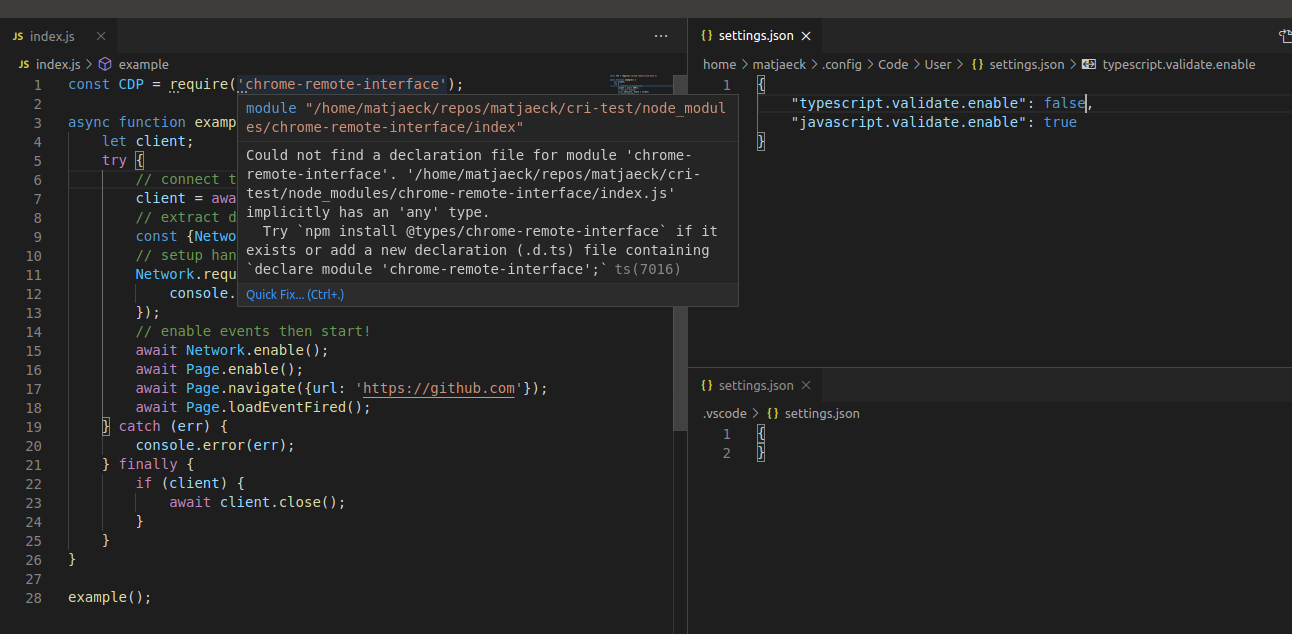
The only way I know to fix these warnings and potentially errors too is to set "javascript.validate.enable": false and setup own tooling with for example ESLint. It's not nessecary on my system because I see only these unobtrusive mouse-over-suggestions.
deleted-user-1
on 10 Sep 2020
Thank you @matjaeck, this was the issue. However, I was able to use "noImplicitAny": false to fix this.
vbisbest
on 11 Sep 2020
Related issues
 zirill
·
6Comments
zirill
·
6Comments
 westy92
·
3Comments
westy92
·
3Comments
 elsigh
·
3Comments
westy92
·
7Comments
elsigh
·
3Comments
westy92
·
7Comments
 Mic75
·
4Comments
Mic75
·
4Comments