Chocolatey-coreteampackages: (nmap) Fails automatic verification tests on v7.90
Expected Behavior
The automated verification test on chocolatey.org to succeed.
Current Behavior
The verification test for version 7.90 of nmap is currently failing with a message saying that silent installation is only supported in Nmap OEM (I can not find any reference on such a thing on their website).
Possible Solution
May require the usage of autohotkey (which I have zero to little knowledge about).
Context
Prevents the latest version of nmap to be approved for download.
Your Environment
- Package Version used: 7.90
- Operating System and version: Windows Server 2012 R2
- Chocolatey version: 0.10.16-beta
- Install/uninstall gist: https://gist.github.com/choco-bot/da935bb24075c9e8912235a1f48c5624
 AdmiringWorm
All 9 comments
I'm not sure they already decided what are they nowadays:
https://github.com/nmap/npcap/blob/master/LICENSE
"Even though Npcap source code is publicly available for review, it is not open source software"
https://nmap.org/
"Nmap ("Network Mapper") is a free and open source (license) utility"
 UsernameIsAlreadyTakenByMe
on 6 Oct 2020
UsernameIsAlreadyTakenByMe
on 6 Oct 2020
Yeah i don't even know how to do silent install now so now what do we do install the oem version or if you said need autohotkey how do we use that to get silent install?
 nutterthanos
on 15 Oct 2020
nutterthanos
on 15 Oct 2020
@AdmiringWorm
The best option is to convert the package to use the zip file.
Then using the Chocolatey Get-UninstallRegistryKey Helper to find a prior install location, or extract to the $toolsdir folder.
 RedBaron2
on 17 Oct 2020
RedBaron2
on 17 Oct 2020
The best option is to convert the package to use the zip file.
@RedBaron2 @AdmiringWorm The only thing with that is npcap will need to be a dependency
nutterthanos
on 17 Oct 2020
@AdmiringWorm Any Progress?
nutterthanos
on 9 Nov 2020
OEM installer is commercial one so silent options can not be used anymore. I tried with AHK installer and it seems to work. Zip is also an option but it doesn't have everything setup has (stuff could be added via dependencies).
I think it should work now but will be available from next version as I didn't manage to force update now.
 majkinetor
on 22 Nov 2020
majkinetor
on 22 Nov 2020
OK, I managed to publish new version.
Give it a go: https://chocolatey.org/packages/nmap/7.91.0.20201123
majkinetor
on 23 Nov 2020
It still fails verifier but for different reason.
https://gist.github.com/choco-bot/95d84e24c35f9b1951b683737b7a2fb7
It looks like it blocked when installing vcredist2008. Its probable that some popup blocked it that showed on old Windows Server that verifier is using. If I can get that popup I could fix it, but I don't have working verifier vagrant image with me.
I tested this in Windows Sandbox and locally and it works fine. Maybe verifier should be skipped now. Alternative would be to add vcredist2008 as dependency and hope it skip it.
majkinetor
on 24 Nov 2020
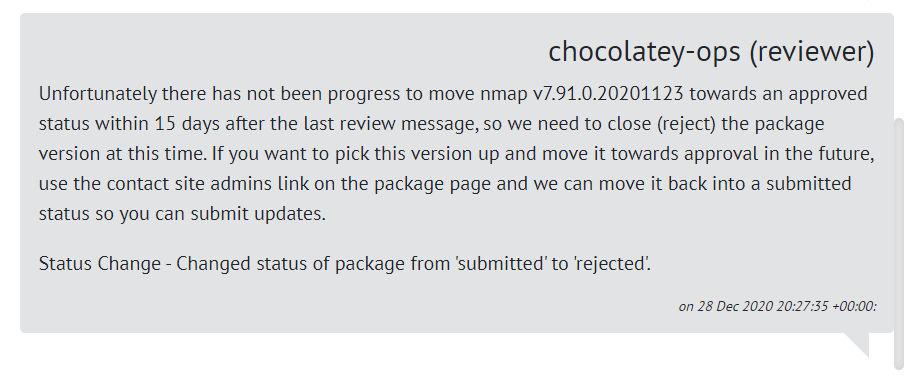
it got rejected
@majkinetor
@AdmiringWorm
nutterthanos
on 16 Jan 2021
Related issues
 jbisson
·
6Comments
jbisson
·
6Comments
 jnm2
·
3Comments
majkinetor
·
4Comments
jnm2
·
3Comments
majkinetor
·
4Comments
 gep13
·
4Comments
gep13
·
4Comments
 ericoporto
·
3Comments
ericoporto
·
3Comments
Most helpful comment
It still fails verifier but for different reason.
https://gist.github.com/choco-bot/95d84e24c35f9b1951b683737b7a2fb7
It looks like it blocked when installing vcredist2008. Its probable that some popup blocked it that showed on old Windows Server that verifier is using. If I can get that popup I could fix it, but I don't have working verifier vagrant image with me.
I tested this in Windows Sandbox and locally and it works fine. Maybe verifier should be skipped now. Alternative would be to add vcredist2008 as dependency and hope it skip it.