Chocolatey-coreteampackages: (python3) install error: Cannot bind argument to parameter 'Path' because it is null.
Trying to update or install python3 generates an error after windows installer finished.
Expected Behavior
Successfully install python3
Current Behavior
Install python and then fails with an error
Possible Solution
I think there should be a null check in the chocolateyInstall.ps1
Steps to Reproduce (for bugs)
cinst python3
Context

Your Environment
- Package Version used: 3.8.1, 3.8.1.20200110
- Operating System and version: Windows 10 1903 build 18362.592
- Chocolatey version: 0.10.15
- Install/uninstall gist: https://gist.github.com/ViceIce/48ad08a6ab0c10493cf01d2f0ad75f57
 viceice
All 19 comments
From looking at the logs (and the version of python3 that you are trying to install according to the logs) this do not look like the issue is originating from the python3 package, but rather from the "chocolatey-core.extension" package.
@ViceIce can you run choco list -lo | ? { $_ -match "chocolatey-core.extension" } and tell us the installed version of that package? (Could be beneficial to also look into $env:chocolateyInstall\lib folder and see that there isn't multiple chocolatey-core.extension packages there.)
 AdmiringWorm
on 11 Feb 2020
AdmiringWorm
on 11 Feb 2020
> choco list -lo | ? { $_ -match "chocolatey-core.extension" }
chocolatey-core.extension 1.3.5.1
No multiple packages
viceice
on 11 Feb 2020
Now updated to windows 10 1909 build 18363.
viceice
on 11 Feb 2020
I see. I was kinda hoping it was a problem with picking the wrong version of that package, no such luck I guess.
As I am unable to reproduce the result on my end, I need your help further here.
Can you try running the following in powershell (I believe this command it the cause of the failure).
(Get-Command -CommandType Application) -match "python" | select -First 1 | % { Split-Path $_.Source }
I don't need the output, just whether that command fails or not (will need the error message if it fails though).
AdmiringWorm
on 11 Feb 2020

viceice
on 11 Feb 2020
This is relevant part of the log:
2020-02-08 18:41:58,114 13740 [INFO ] - python3 has been installed.
2020-02-08 18:41:58,116 13740 [INFO ] -
2020-02-08 18:41:58,157 13740 [INFO ] - VERBOSE: Trying local and machine (x32 & x64) Uninstall keys
2020-02-08 18:41:58,159 13740 [DEBUG] - Running 'Get-UninstallRegistryKey' for 'python3' with SoftwareName:'python'
2020-02-08 18:41:58,160 13740 [INFO ] - VERBOSE: Retrieving all uninstall registry keys
2020-02-08 18:41:59,228 13740 [DEBUG] - Registry uninstall keys on system: 1095
2020-02-08 18:41:59,230 13740 [DEBUG] - Error handling check: 'Get-ItemProperty' fails if a registry key is encoded incorrectly.
2020-02-08 18:41:59,903 13740 [DEBUG] - Found  uninstall registry key(s) with SoftwareName:'python'
2020-02-08 18:41:59,904 13740 [INFO ] - VERBOSE: Found  keys, aborting this method
2020-02-08 18:41:59,905 13740 [DEBUG] - Running Get-ProcessorBits -compare '64'
2020-02-08 18:41:59,907 13740 [INFO ] - VERBOSE: Trying Program Files with 2 levels depth: C:\Program Files C:\Program Files\*\* C:\Program Files (x86) C:\Program Files (x86)\*\*
2020-02-08 18:42:00,366 13740 [INFO ] - VERBOSE: Trying native commands on PATH
2020-02-08 18:42:00,775 13740 [ERROR] - ERROR: Cannot bind argument to parameter 'Path' because it is null.
This fails in Get-AppInstallLocation.ps1#L66-L71:
https://github.com/chocolatey-community/chocolatey-coreteampackages/blob/9c54d6d96977712a8b33ab652111a4a83f240988/extensions/chocolatey-core.extension/extensions/Get-AppInstallLocation.ps1#L66-L71
The only thing that can fail there is Split-Path $_.Source. Now, since you shown that it works, I guess your test is not good. For one, it didn't run within Chocolatey powershell.
Can you try replacing Source with Path directly in this file and see if it works ?
 majkinetor
on 20 Feb 2020
majkinetor
on 20 Feb 2020
Ah, i see:
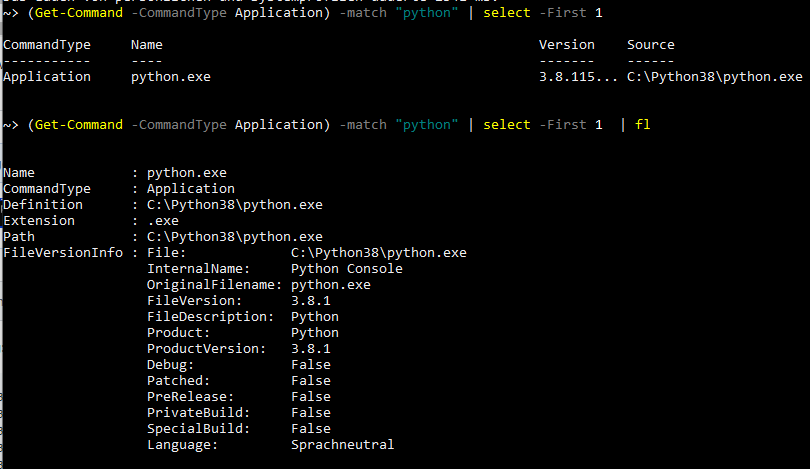
Maybe source is only a table display parameter?
viceice
on 20 Feb 2020

🤔
viceice
on 20 Feb 2020
Maybe source is only a table display parameter?
No.
Try what I said, change file
C:\ProgramData\Chocolatey\lib\chocolatey-core.extension\extensions\Get-AppInstallLocation.ps1
Then restart shell and try again.
majkinetor
on 20 Feb 2020
I get the same error in Windows 2012 server and Python version 3.7.6, but not in Windows 2016 server.
 MarkusNousiainenWebscale
on 4 Mar 2020
MarkusNousiainenWebscale
on 4 Mar 2020
I tried to change Split-Path $_.Source into Split-Path $_.Path in C:\ProgramData\Chocolatey\lib\chocolatey-core.extension\extensions\Get-AppInstallLocation.ps1 and still got the same error.
MarkusNousiainenWebscale
on 4 Mar 2020
I don't know. Its really strange. This library is used on many packages which means it has millions of downloads and still this is the first time we got that report.
majkinetor
on 17 Mar 2020
Yeah, it's really strange
viceice
on 17 Mar 2020
I am having the exact same problem (when upgrading from Python 3.7.4 to 3.8.2) on a Windows 7 machine.
I followed the instruction above by majkinetor, but that makes no difference.
- Update file: C:\ProgramData\Chocolatey\lib\chocolatey-core.extension\extensions\Get-AppInstallLocation.ps1
- I replaced _Source_ with _Path_ (line 67)
I also have a v2 version of python installed (python2 2.7.17), but that should make no difference.
Any clues?
 Piscator74
on 23 Mar 2020
Piscator74
on 23 Mar 2020
Note that while choco gives the error "Cannot bind argument to parameter...",
- Python 3,8.2 is successfully installed
- The choco installer does not pick it up
- Python 3.7.4 is not uninstalled
Other notes
- When doing a choco uninstall python3, python 3.8.2 actually gets uninstalled (and not 3.7.4).
- When removing all python 3 versions and reinstalling it with choco, I still get the error "Cannot bind argument to parameter..." (but it is installed)
Piscator74
on 23 Mar 2020
Exact same problem on WindowsServer2012.
 stolpovsky
on 15 May 2020
stolpovsky
on 15 May 2020
I have been able to reproduce this issue.
I was able to reproduce this by installing python2, and an older version of python3, then trying to upgrade the python3 package.
I have not had the time to look into fixing the issue, unfortunately.
AdmiringWorm
on 8 Jun 2020
I had this exact problem when trying to install python3. I tried @majkinetor suggestion:
This fails in Get-AppInstallLocation.ps1#L66-L71:
...
Can you try replacing Source with Path directly in this file and see if it works ?
After doing that python3 successfully installed for me.
 felin-arch
on 16 Jul 2020
felin-arch
on 16 Jul 2020
This issue have been resolved in the repository, and a package fix is in the process of being submitted to chocolatey.org for version 3.8.x (fix versions for older versions and beta versions are not planned at this time).
AdmiringWorm
on 21 Jul 2020
Related issues
 verglor
·
5Comments
verglor
·
5Comments
 pseigo
·
5Comments
pseigo
·
5Comments
 jberezanski
·
5Comments
jberezanski
·
5Comments
 kroppt
·
3Comments
kroppt
·
3Comments
 frankhalligan
·
4Comments
frankhalligan
·
4Comments
Most helpful comment
This issue have been resolved in the repository, and a package fix is in the process of being submitted to chocolatey.org for version 3.8.x (fix versions for older versions and beta versions are not planned at this time).