Chocolatey-coreteampackages: (skype) Fix for "skype automatically starts after installation (no known way to disable it yet)"
Expected Behavior
For Skype to NOT run after install.
Current Behavior
Skype automatically runs after install
Possible Solution
Add the following post install and pre-uninstall:
if ((get-process "skype" -ea SilentlyContinue) -eq $Null){
    Write-Host "Skype currently NOT running."
  }else{
    Write-Host "Stopping Skype process..."
    Stop-Process -processname "skype"
  }
Better yet would be checking if Skype is already running before running Install-ChocolateyPackage and then letting it continue to run or stop running based on previous state.
if ((get-process "skype" -ea SilentlyContinue) -eq $Null){
    $SkypeRunning="False" # Always false on new install.
   } else {
    $SkypeRunning="True"
    Write-Host "Skype found running." -foreground magenta
}
Install-ChocolateyPackage
if ($SkypeRunning -eq "False"){
if ((get-process "skype" -ea SilentlyContinue) -eq $Null){
    Write-Host "Skype currently NOT running."
  }else{
    Write-Host "Stopping Skype process..."
    Stop-Process -processname "skype"
  }
}
Steps to Reproduce (for bugs)
Install Skype package
Context
If updated in background (scheduled task) in non interactive mode, Skype can unknowingly be stuck running in the background until next reboot.
Your Environment
- Package Version used: 7.41.0.10101
- Operating System and version: Microsoft Windows [Version 10.0.16299.371]
- Chocolatey version: Chocolatey v0.10.10 Professional
- Install/uninstall gist: n/a
 bcurran3
All 24 comments
I would _like_ Skype to run in the background after an upgrade, especially an upgrade that is a "background (scheduled task) in non interactive mode", as suggested in the Context section above.
The second option (where it checks to see if it is currently running first) is the only one I personally would like to see considered as a change from the status quo. Surely most people who use Skype have it running permanently in the background and certainly wouldn't want it silently stopped?
If the running check can't be done for whatever reason, please don't change it. I would think that silently stopping Skype from running after an upgrade will inconvenience more people than having it silently start up after an upgrade.
 SidSmallwood
on 16 May 2018
SidSmallwood
on 16 May 2018
UPDATE: I made a helper to make this process even easier:
https://chocolatey.org/packages/chocolatey-misc-helpers.extension
- Checks for and stops $ProcessName if running
- $ProcessWasRunning can be checked later in scripts to re-run the process if it was running previously before stopped
- $ProcessFullPath is the full path and executable of the stopped process
- i.e. to re-run the process after an upgrade - if ($ProcessWasRunning -eq "True") {$ProcessFullPath}
function Start-CheckandStop($ProcessName){
$ProcessWasRunning="False"
if((Get-Process $ProcessName -ea SilentlyContinue) -eq $Null){
Write-Host "$ProcessName currently NOT running." -foreground green
}else{
Write-Host "Stopping $ProcessName process..." -foreground yellow
Stop-Process -ProcessName "$ProcessName" -Force
$ProcessWasRunning = "True"
$ProcessFullPath = (Get-Process $ProcessName).path
}
}`
bcurran3
on 5 Jun 2018
Four new packages of Skype listed just this month. No fix for Skype running post install implemented yet, no NotSilent tag added to package yet.
I'm pointing it out and going to assume package is updated via AU.
bcurran3
on 31 Aug 2018
@bcurran3 sorry about the long silence, but yes you're assuming correct.
This package is indeed being updated through AU.
This issue is marked as an Up for Grabs, so it's unlikely that any change will be implemented by anyone part of the team in this repository.
Would love it if anyone would be interested in opening a PR for this though.
 AdmiringWorm
on 16 Jan 2019
AdmiringWorm
on 16 Jan 2019
Kim,
I'm willing to do it (and probably others after I get over the hurdle).
Admittedly my GitHub use is more self-centric and the PR process to OP's repositories is still new to me. Please help me through the process. I get stuck here:
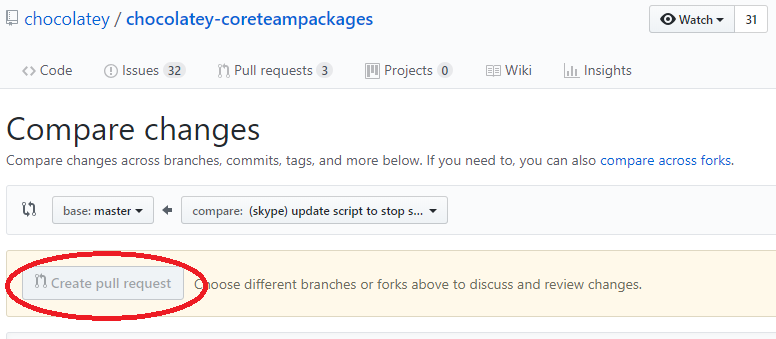
EDIT: Seems to me I want to pull from the master, but I'm guessing now I have to fork first? Please confirm.
UPDATE: I've forked. Now time to spoon? LOL
bcurran3
on 16 Jan 2019
Yes, you will need to create a fork first.
This is because you don't have write access to this repository
AdmiringWorm
on 16 Jan 2019
UPDATE: I've forked. Now time to spoon? LOL
Be careful, or you'll get the knife 😛
AdmiringWorm
on 16 Jan 2019
Thanks for the confirmation.
Once I make the changes... in general terms how do I submit? (Please just don't reference submitting guidelines).
knife - :)
bcurran3
on 16 Jan 2019
Well, we can take it step by step.
- ~Fork the repository~ (which you already did)
- Create a new branch (truly recommended)
- Make your changes and commit them
- Push your changes to your own fork
- Navigate to github (either your own fork, or this repo), and you'll notice a prompt showing up to create a PR
- Input all the requested details in the PR template (remember to prefix the title with '(skype)'
- Wait for the appveyor build to run
- If successful, you'll need to wait for one of us is available to review the process.
If you have any other questions, feel free to ask. You can also ask them in our gitter channel: https://gitter.im/chocolatey/chocolatey-coreteampackages
AdmiringWorm
on 16 Jan 2019
Thanks. Will re-review to digest that and run with it when I have the time.
(Have to figure out step 2. I think the rest will be easy and intuitive at the time of doing it.)
bcurran3
on 16 Jan 2019
(Have to figure out step 2. I think the rest will be easy and intuitive at the time of doing it.)
if you're using the git client, it's quite easy to do. On your computer, just do git checkout -b name-of-branch
AdmiringWorm
on 16 Jan 2019
Is this still relevant? If so, what is blocking it? Is there anything you can do to help move it forward?
![stale[bot] picture](https://avatars.githubusercontent.com/in/1724?v=4&s=40) stale[bot]
on 18 Jun 2019
stale[bot]
on 18 Jun 2019
@bcurran3 If you could quickly sum-up the required code changes, I'd submit a PR with your changes. I'd love to get this long-standing issue fixed. :+1:
 fraenki
on 18 Jun 2019
fraenki
on 18 Jun 2019
@fraenki, see the 1st and 3rd post. :)
bcurran3
on 18 Jun 2019
I've created a PR #1295 that should fix the issue.
 psdavid-muc
on 19 Jun 2019
psdavid-muc
on 19 Jun 2019
@AdmiringWorm Do you have time to review PR #1295? :) It's stupidly simple, but it works and we're already using it in production.
fraenki
on 15 Jul 2019
@fraenki not right now I'm afraid. Hopefully I will get some time later today to review it.
AdmiringWorm
on 15 Jul 2019
@AdmiringWorm did you have by chance some time to review the merge request?
psdavid-muc
on 6 Aug 2019
Sorry, I have not. TBH I had completely forgotten about it (been quite busy for the past month).
But just quickly looking at the code and comments now, and the only thing I can currently say (until I can have a deeper look) is that running the program as an administrator (which is effectively what Start-ChocolateyProcessAsAdmin do) is not acceptable IMO.
In my mind this would be a case of concern (security wise) as it will elevate skype and give it more permissions to change things it really shouldn't need to change. (This may not be the case with skype, but it would still be a concern when it is ran as an administrator).
If the program is to be started after installation manually, then that must be implemented in a way that ensure it is only run as the current user without elevated permissions (this should probably also only be an opt-in, and not by default).
AdmiringWorm
on 6 Aug 2019
However, stopping the program is completely fine
AdmiringWorm
on 6 Aug 2019
But that should probably be done in a chocolateyBeforeModify.ps1 file instead (which will run before an upgrade, and before uninstallation).
AdmiringWorm
on 6 Aug 2019
but from my understanding, the issue isn't really about that.
This issue is about stopping the program after it have been installed, which can be done quite straightforward but with an opt-in for not stopping it (using a package parameter).
AdmiringWorm
on 6 Aug 2019
Is this still relevant? If so, what is blocking it? Is there anything you can do to help move it forward?
stale[bot]
on 5 Jan 2020
Dear contributor,
because this issue seems to be inactive for quite some time now, I've automatically closed it. If you still feel this is a valid issue, please feel free to re-open the issue. Thank you for your contribution.
stale[bot]
on 4 Feb 2020
Related issues
 verglor
·
5Comments
verglor
·
5Comments
 kaffeekanne
·
4Comments
kaffeekanne
·
4Comments
 Technetium1
·
4Comments
Technetium1
·
4Comments
 frankhalligan
·
4Comments
frankhalligan
·
4Comments
 jberezanski
·
5Comments
jberezanski
·
5Comments
Most helpful comment
but from my understanding, the issue isn't really about that.
This issue is about stopping the program after it have been installed, which can be done quite straightforward but with an opt-in for not stopping it (using a package parameter).