Choco: High failure rate for installs & uninstalls when using community repository
I've installed ~120 programs with Chocolately, and I've probably had ~8-10 fail to install, and a few fail to uninstall. That's about a 7-8% install failure rate and, while the uninstall failure rate doesn't seem as bad, you have to consider that I only tried to uninstall maybe a dozen or so programs, so it's actually probably an even higher rate, I'd guess ~15-20%. And the inability to uninstall a program is a much more significant problem than the inability to install one. Also, the failure message contains indecipherable reasoning, leaving me with no clue as to why it's not working. PotPlayer is one program that keeps failing. I don't remember what the other ones were. This is on Win10x64. I'd be happy to provide logs, but I'm not sure how to get them.
Admin Addition
From Rob (@ferventcoder): see my comment at https://github.com/chocolatey/choco/issues/1564#issuecomment-399090947 (below) to understand why this should not be an issue for an organization using Chocolatey.
 vertigo220
All 28 comments
Take a look in C:\ProgramData\chocolatey\logs
 bcurran3
on 10 May 2018
bcurran3
on 10 May 2018
They seem awfully small for the amount of stuff I've done in Chocolately, so hopefully they have the needed info, but if not I can try doing some stuff that fails and see if that stuff is captured.
vertigo220
on 10 May 2018
@vertigo220 if you have a look at the PotPlayer Package Page you will see a red ball at the top. This is an indication that there is a known installation error. If you click through, you will see all the logs from the installation attempt. This was picked up by our package-verifier service, which runs periodically on all current versions of software to ensure that they are still working correctly. The package maintainer of this package will have been alerted to the problem. In the case of this package, it looks like the checksum contained within the Chocolatey package no longer matches the file that is downloaded. This happens from time to time when new installer versions are pushed to the same download URL.
You should have seen this in the output from the installation:
ERROR: Checksum for 'C:\Users\Administrator\AppData\Local\Temp\chocolatey\potplayer\1.7.5545\PotPlayerSetup64.exe' did not meet 'EC919BC5C3900C9D81C5B963A0A5B624F80847F2AE9E15D957BA24867399F9D1' for checksum type 'sha256'. Consider passing the actual checksums through with --checksum --checksum64 once you validate the checksums are appropriate. A less secure option is to pass --ignore-checksums if necessary.
Is there a way that we can improve this?
 gep13
on 10 May 2018
gep13
on 10 May 2018
To start, as has been pointed out to me, many of my issues should be in the GUI repo, not here. So I apologize if this doesn't apply to you.
When I go to the PotPlayer page in the GUI, there's no indication at all that there have been issues found with the package. And even with the red ball on the web page, unless I specifically knew what it meant, I wouldn't pay any attention to it. So for that I would suggest adding some sort of label as well.
As for the checksum error, it doesn't explain why it would have received such an error, so it leaves the user knowing what went wrong, but not why, which is also very important. So I don't know if it's corrupting in download, if there's an issue with the repo/server, or if, as you said, the file has been updated and the checksum hasn't. And I'm not even sure that possibility would occur to me, since I just figured it was calculating the checksum on both ends. Here's another error that leaves me completely clueless as to what went wrong:
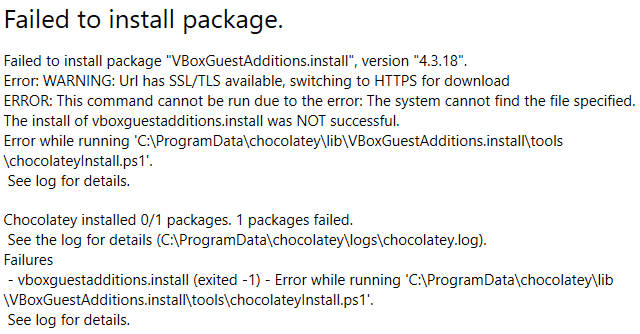
vertigo220
on 10 May 2018
@vertigo220 okay, so this sounds like there are two issues here. The first is with the clarity of the error message from Chocolatey CLI, and the other with Chocolatey GUI. Lets concentrate on splitting the discussions into two, and addressing them in the correct repos.
So again, that package is known to be broken, based on the red ball on the package page. In these situations, it is hard, if not impossible for Chocolatey to know exactly what is wrong with the installation scripts. In these situations, the recommendation has always been to go back to the package maintainer to seek help.
gep13
on 10 May 2018
As for the checksum error, it doesn't explain why it would have received such an error, so it leaves the user knowing what went wrong, but not why, which is also very important. So I don't know if it's corrupting in download, if there's an issue with the repo/server, or if, as you said, the file has been updated and the checksum hasn't. And I'm not even sure that possibility would occur to me, since I just figured it was calculating the checksum on both ends.
This is good feedback here. There is an additional warning that is provided that mentions a bit more, but I would like to leave it less hard to understand for folks new to Chocolatey. What would you suggest it say? Or do you need to understand more about how things work first so that we can word it better?
 ferventcoder
on 10 May 2018
ferventcoder
on 10 May 2018
Knowing more would certainly help, but I can hopefully give some thoughts that you can use with your better knowledge of it to come up with something.
Obviously, the best situation would be to be as precise and concise as possible, e.g. something like "The checksum for the file doesn't match. The checksum was last modified on 5-01-2018 and the file was last modified on 5-04-2018, so the mismatch is due to the the file being updated but not the checksum." And there should be the ability to report the problem or, if this is done automatically, it should mention that. You might even want to consider breaking the error message into basic and advanced sections, so something like what I wrote would be in the basic section, so beginner or less tech-savvy users could have an idea of what went wrong without being confused and overwhelmed by all the technical stuff, and putting the current info in the advanced section. That said, as I previously said, I know enough to understand that checksum error, but it doesn't actually help me aside from telling me what went wrong. But I need to know why if I'm to have any chance of getting it to work.
The ideal thing would be to have a checksum be automatically created for the file when it's updated, and to use that, so there's no possibility of having them out of sync. The maintainer uploads a new version, the checksum is updated on its own. Then someone installs the package and the checksum is calculated on their end and compared with the one on the server. If that's not feasible for some reason, then perhaps it should at least compare the checksum to the file on the server before downloading, to avoid having to wait for the download only to find out what the server could have determined. This would save bandwidth on both ends. And if it then flagged the mismatch on the server, it would prevent having to continually recalculate it and it could notify the maintainer. So it seems the problem should be manageable without even having to worry too much about the error message. But if not, then cleaning up the error message and trying to specify more accurately not just what went wrong, but where, while still keeping it as concise as possible, would be the goal.
vertigo220
on 10 May 2018
@vertigo220 part of the problem here is that most times, a Chocolatey Package is downloading the installer from a 3rd party website, i.e. using the vendors own download location. When a maintainer creates a Chocolatey Package, they download the installer, figure out the checksum, add it to the Chocolatey Package and then push the Chocolatey Package. However, from time to time, vendors change the file that is downloaded, without changing the application version. As a result, the checksum, which was once valid, is no longer. This isn't the fault of the package maintainer, and this isn't something that can be automated, since there is no "trigger" to know that it has happened.
gep13
on 10 May 2018
Ok, I was thinking they were putting their packages on a Chocolatey server. I assume there's no way for Chocolatey to remotely get a checksum for the file and compare it to the checksum included with the package?
Knowing that, perhaps a checksum error that simply says "The checksum for the file doesn't match. This may be due to a corrupted download, but it's usually due to the file being updated without updating the checksum." Then either include the ability to notify the package maintainer or a note saying they've been notified if that's the case.
vertigo220
on 10 May 2018
@vertigo220 said...
Ok, I was thinking they were putting their packages on a Chocolatey server. I assume there's no way for Chocolatey to remotely get a checksum for the file and compare it to the checksum included with the package?
Correct.
gep13
on 10 May 2018
@vertigo220 sounds like a documentation change. Fancy doing a PR for that? Sounds like a feature request for notifying maintainers, although I am not sure where that would go, i.e. we wouldn't want to flood maintainers with emails, and also the Chocolatey CLI has no direct information about the maintainers of a particular package. It could be added to the package-verifier service that we have.
gep13
on 10 May 2018
@ferventcoder @gep13 I'm working with a few test systems at the office to figure out a proper choco deployment. Seems like with choco 0.10.11, I can at least install one package at a time; but multiple packages will give up as "can't find on repo" type errors. I even tried paring things with https://github.com/elazarl/goproxy to get it to reduce outbound connections: that didn't seem to have an impact.
PowerShell apparently does have some setting to adjust throttling outgoing connections. Maybe that's something you all can look into? https://docs.microsoft.com/en-us/powershell/module/nettcpip/get-nettcpconnection?view=win10-ps
 unquietwiki
on 13 Jun 2018
unquietwiki
on 13 Jun 2018
@ferventcoder @gep13 et. al. : here's a batch file example of how to choco-install in bulk, that gets around whatever may be bugging @vertigo220 and myself. Setting the proxy is optional; but that go-proxy I found should be useful for testing, since it pipes out results to command line.
choco config set proxy <locationandport>
set list=adobeair adobereader-update ant-renamer cmdermini firefox flashplayerplugin graphicsmagick grepwin googlechrome git handbrake hwinfo imageglass naps2 notepadplusplus procexp robomirror vlc windirstat
(for %%a in (%list%) do (
    rem Un-rem next line if things still act up.
    rem timeout /t 1
    choco install %%a -y
))
Follow-up to report: I lost my job that I was trying to get this stuff deployed at; at least my boss & remaining crew will carry on with deployment (so I'm told). So I won't be able to help finish triaging per that environment; but might still be able to give some input otherwise.
unquietwiki
on 21 Jun 2018
So for you and for anyone else who happens across this ticket - we never recommend an organization use the community repository directly. In fact there is a link directly from the https://chocolatey.org/packages page that points directly to the disclaimer. We also have that little pop up that jumps up your first time into the packages section that you had to click on "I understand" - remember that? You read it all, right? (that's okay, nobody does)
The disclaimer text and link:

Note the reason mentioned here is reliability (which I think this issue is about). That disclaimer link is https://chocolatey.org/docs/community-packages-disclaimer.
When we follow that link, it brings us to the community repository use disclaimer, which includes the following (emphasis mine):
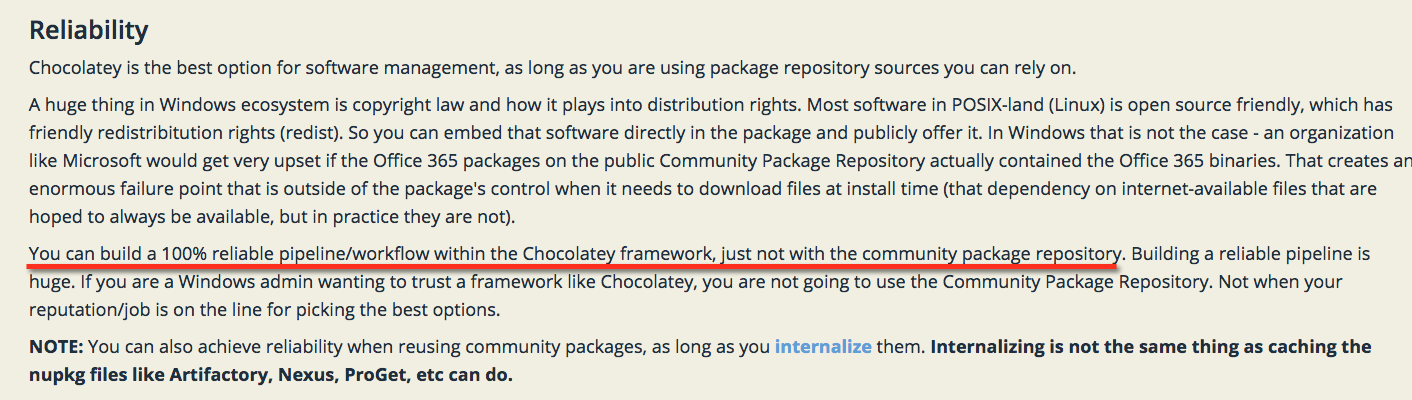
Given that you have been armed with this information and these tools, the next thing folks want to know is - well how do I do an organizational deployment? It should look like the following (thanks @pauby!):

And there exists a step by step guide to organizational deployment that will set you on the path for ultimate reliability in your organization - https://chocolatey.org/docs/how-to-setup-offline-installation
ferventcoder
on 21 Jun 2018
Note that none of the above is new information (maybe new to you, but freely available and the site attempts to point you to it as best it can without being too annoying) - we've been warning organizations about not using the community repository directly for years (original add for warning page was May 2016 - https://github.com/chocolatey/choco-wiki/commit/1b61ca01d4d92a42e46a7caa8bcc1bbda4c800f1, but if you follow https://chocolatey.org/blog/host-your-own-server and to the original at https://puppet.com/blog/chocolatey-hosting-your-own-server, you will see that was posted in January 2016. If you've followed me or seen any of my talks, we go back to 2014 or even further back where you'll see me never recommend use of the community repo for organizational use due to distribution rights constraints of a public repository (the community repo) and reliability issues when that public repo must download things from official distribution locations on the internet at runtime - trusting in the internet to be reliable is just never a good idea.
ferventcoder
on 21 Jun 2018
@ferventcoder Hey, I apologize if you feel bandwagon-ed on this. Maybe I need to open up a separate ticket for what I was seeing, but my use case was mixed pub+priv; with priv being priority + the most common stuff hosted on priv. A "one and done" failure wasn't just limited to external sources.
unquietwiki
on 21 Jun 2018
@unquietwiki not feeling bandwagon-ed at all - this is more for our additions to documentation that we are gearing up on - so we've been adding a little "extra" to some of our responses so we can pull that in later.
When you use choco new to create a package the interweaved documentation says embed the binaries for organizational use (and gives options for other internal sources). So private use should be 100% reliable (outside of course of Windows sometimes being weird about allowing installs, etc due to pending reboots). In an organizational deployment context, no part of that architecture should ever reach out to the internet (aside from those explicitly noted things like something that would internalize a package LONG before the runtime installations/upgrades are occurring). That means deploying Chocolatey itself to machines from an internal repository, that means that all packages that are deployed should have embedded binaries or have somewhere internal that is reliable to pull them from. Internal could be private cloud for our purposes.
To put it another way - organizations should not use the community repository directly. Internalize those packages and put them on your internal repositories? Sure. Cache those packages? No, that would still require downloading things from the internet at runtime.
Reaching out to the community repository directly from a production system to install/upgrade a package is not a good thing. For anyone who might happen across this - if you are doing this, you are walking a very dangerous line. You might get lucky for a while, but your luck might run out at some point. It's best to understand why we make the recommendations we do - it's not because we like giving you more work for the sake of work.
Let's take a possibly fictitious example of some folks who might have been using the community repository directly to upgrade their Puppet agents across all of their production repositories. They might have had that set to always be on the latest version. They might have been upgrading Puppet with the Chocolatey in a non-recommended way. There might have been a small bug in the Puppet installer accidentally implemented that caused some variables not to come up if you installed the same version twice - and those variables being unset might have caused NTFS permissions to be overwritten from the root of the drive. It might have only been triggered on an unattended install of that same version twice, not when attempting to do things in the GUI install or in any other scenario of installation, upgrade, downgrade, etc. AND it just happens that when deploying an upgrade for Puppet in this non-recommended way triggers that exact scenario to occur (the Puppet Agent Windows service using Chocolatey to upgrade Puppet, which causes Puppet and Chocolatey to shut down in the middle of that install, leaving that package in a pending state, and subsequently executes that upgrade a second time when Puppet Agent starts running again - then boom).
The damage for a scenario like above could be hundreds or thousands of machines that must be rebuilt and lots of lost time - hopefully only lost time and not data.
Let's say it really happened - it's definitely not something that could have been easily pinpointed and it might have been the perfect storm of a triggered scenario, but we can learn from this example and look at better practices that can be put into place to ensure things like this (and security threat scenarios, especially security threat scenarios) have a much lower chance of affecting you in a disastrous way (not an exhaustive list):
- Buffer: Don't blindly deploy installs/upgrades across your entire production infrastructure without testing that somewhere first.
- Failsafe: Make sure if you've automated the buffer, it should fail appropriately so it doesn't error and then still allow things to move forward
- Control: You should have control of everything in your environment and when things change - don't leave it in the hands of others to control, especially if they are not affiliated with you
- Hermetic: Following on control - everything you use should be inside your environment, no internet access.
- Deterministic: If you can't guarantee the same result every time, then it's probably not good. Have something reliable and repeatable.
- Security: I don't think there is much to say here - a healthy dose of security is always good
ferventcoder
on 21 Jun 2018
@ferventcoder You might want to go take over the NPM Foundation. Every 6-12mo, there seems to be some major issue with bad core packages taking down projects.
FWIW, I've been encouraging other devs to start making & maintaining their own Choco packages; so you don't have to. My observation of the packaging thus far seems to be that it relies heavily on non-packaged binaries. If the package authors are handling security & origin control, then your next concern is reliability & distribution: this is where caching can help (I still want to work on fixing up the SimpleServer). From using RPM & DEB repos on the Linux side of things: "diffing" & delta-compression might be something to investigate for public & private use cases. And WoW & other reputable systems come to mind in terms of adopting torrent-style sharing of loads. There are a lot of things that can be done to make us all happy; and not impinge on your bottom line.
unquietwiki
on 21 Jun 2018
My observation of the packaging thus far seems to be that it relies heavily on non-packaged binaries.
That's maybe due to only seeing the community package repository where that is done due to the constraint of distribution rights and a public repository? Due keep in mind, the community repo is referred to as the tip of the iceberg - it represents less than 5% of Chocolatey packages out there, but the rest are all internal so you won't see them. Run choco new test and look at the TODO file it generates - we've been battling exactly your perception.
ferventcoder
on 21 Jun 2018
@ferventcoder (reads the TODO again) Yeah, when I was crafting packages for internal use, I had to mix it up between internal binary & network share calls. I think even your own docs elsewhere said to not shove multiple MB/GB of data in a package.
I guess I can back out of this ticket, because I was thinking @vertigo220 was having a repeatable issue I could demonstrate by rate-limiting my install of internal and external packages; and you felt you had to school us all on not relying unduly on the external repo (of which you maintain with some understandable strain). I will continue my efforts to get other authors on board to make sure they're participating; and to take care of their own packages to save you the work. And I will participate in the project as it is so welcomed: you will not find me to be one of those "fix it for me please, I'm helpless" folks. Due apologies for any misconceptions.
unquietwiki
on 21 Jun 2018
@gep13 said:
This was picked up by our package-verifier service, which runs periodically on all current versions of software to ensure that they are still working correctly. The package maintainer of this package will have been alerted to the problem.
sounds like a documentation change. Fancy doing a PR for that? Sounds like a feature request for notifying maintainers, although I am not sure where that would go, i.e. we wouldn't want to flood maintainers with emails, and also the Chocolatey CLI has no direct information about the maintainers of a particular package. It could be added to the package-verifier service that we have.
I was going to create a new issue for the notification feature request, but I'm unclear on what's needed in that regard, since you said previously they would have been notified. As for preventing them from being flooded by emails, it seems the system could check if they've been emailed about a particular package in the past 24 or 48 hours and, if so, disregard it. Ideally it would be able to base that off of a particular issue type (e.g. checksum, missing file, etc), so they _would_ get notified of a different issue.
As for the PR, I'd love to do this, both to help out and learn how, but I wouldn't even know where to start. I assume I have to find the code with the error message and edit the message, but I don't know where to look for it. I'd be happy to do it with guidance, in order to learn, but I don't know if any of you have the time for that and might just prefer to do it yourselves because it would be faster. Let me know.
vertigo220
on 3 Jul 2018
I recently installed a bunch of programs with Chocolatey while setting up a computer, and I again had several failures. Would it be helpful to list them here so you guys can check them and see what the problems are? And is there any point in waiting for them to be fixed, i.e. is it at all reasonable to believe it would happen in the near future, or should I just give up on the hope of using Chocolatey to manage them and install them independently?
vertigo220
on 10 Apr 2020
There are a lot of moving parts here, and we are looking to help reduce them. Loads of times the issues with packages tend to come with packages going to urls that no longer work. One of the big things we wanted to fix initially was that issue of the last mile and making sure 404s occurred almost never was a CDN to hold those binaries and use that if they are available. Due to legal reasons, we needed to keep it to customers and not just open to everyone. I'd be interested in providing a commercial pro license to you if you are interested to see if it resolves the issues you are seeing - you can send me a message directly rob at chocolatey dot org.
ferventcoder
on 15 Jun 2020
Thanks, but I've decided to abandon chocolatey since it's broken and I need something more reliable, even if that means doing manual updates.
vertigo220
on 18 Jun 2020
While I appreciate the followup, I'll stress that "Chocolatey" is not broken.
- Chocolatey != Chocolatey.org packages
- Chocolatey > Chocolatey.org packages
You may have found issues with packages on the community repo, and it's valid to say that you would like to see that be more stable and that you are finding the ones you are using broken. The community repository can never be reliable due to distribution rights, and that's why I was offering to provide a license that will get you access to the customer CDN (where the reliability jumps by a hundredfold).
We could either remove some of the less reliable packages, or give people an option to make it more stable (in a way we can't offer for free due to legal requirements). It would be a free offer for you, but completely understand if you want to just go the manual route.
ferventcoder
on 1 Jul 2020
vertigo220
on 1 Jul 2020
I see the discussion there and the Chocolatey logs pointed you directly to a file to go look and see if there were any issues in it (not dozens of files, just one). The error logs tend to be actionable - that's one of the most important things we build into Chocolatey is to help folks work through issues that might come up in the world of managing software.
Understand that you may not want to put forth any additional effort for a free service and that's totally up to you.
ferventcoder
on 6 Jul 2020
Related issues
 jabrena
·
4Comments
jabrena
·
4Comments
 Workshop2
·
5Comments
Workshop2
·
5Comments
 tek0011
·
5Comments
tek0011
·
5Comments
 ExE-Boss
·
3Comments
ferventcoder
·
4Comments
ExE-Boss
·
3Comments
ferventcoder
·
4Comments