Cherrytree: No autosave feature, lost a shit tonne of work
Please ship autosave with default ON, like literally everyone else who has an autosave feature.
 bitshiftnetau
All 22 comments
I'm not convinced that the autosave should be on by default, personally I do save when I want with Ctrl+S so that I can just close without saving on purpose sometimes, could others cast their preference/point of view?
 giuspen
on 29 Aug 2020
giuspen
on 29 Aug 2020
I don't think using the save feature as some kind of version control is reason to deny standard usage of autosave for users.
Using the save feature as faux version control is something which is rather frowned upon. No offence but those are your own bad habits that shouldn't affect the community.
At the very least put up a sign on startup to say that turning it on/off is an option.
To give you an idea why I think it's necessary: it's a standard feature nowadays, to such an extent that not only did I not think to continuously hit ctrl+s like it's 1999, but it would never have occured to me that turning on a basic feature like autosave should even be necessary. It just isn't something people do anymore and haven't for quite a while.
However, if you really wanna keep it the way it is then at least warn people when they are closing the program that they haven't saved. That at the very least has been an industry standard courtesy for more than a decade.
Thanks for considering this option. I REALLY love the program. Kicks major ass!
bitshiftnetau
on 1 Sep 2020
I would not recommend this but it would be good if it save temporarily somewhere accessible
 benbardon
on 1 Sep 2020
benbardon
on 1 Sep 2020
100% agree that closing the program should prompt you to save or discard your work. Probably be a good idea to highlight the note when it has been edited but not saved, like many IDE's do.
Upon first manual save of a note or closing without saving it could ask you if you would like auto save On or Off. That it should please everyone's preference.
 monotok
on 1 Sep 2020
monotok
on 1 Sep 2020
But closing the program is definitely prompting the user to save data, if not it's a bug. What version are you running?
giuspen
on 2 Sep 2020
Sorry my mistake. 0.99.9 definitely prompts to save when closing!
monotok
on 2 Sep 2020
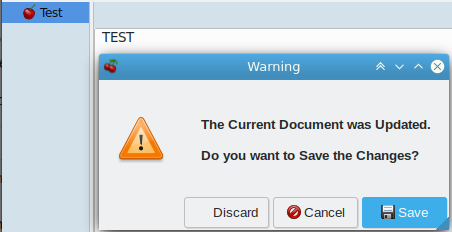
Warning message with 0.99.10 when trying to close a new test instance:
 ciranus
on 6 Sep 2020
ciranus
on 6 Sep 2020
Apologies. Busy week.
Windows 10 Pro Build 18363
CherryTree v0.39.4
It is prompting for a save on quit, now that I have turned off autosave on quit.
Garuanteed it was not doing that before when autosave on quit was not yet set. I specifically tested that before posting here or setting any options.
bitshiftnetau
on 7 Sep 2020
You should then clarify which exact saving settings combination you had to reproduce.
Before writing "_tonne of work_", this is the first setting I would have checked (with all applications).
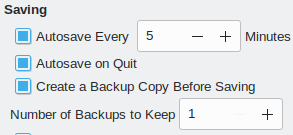
It's also maybe time to investigate cherrytree_0.99.10.exe
ciranus
on 7 Sep 2020
@bitshiftnetau , there was an issue a while ago when cherrytree couldn't save changes if notes contained specific unicode symbols and just silently crashed during saving. I think it can be your case. I'm not sure if it was fixed in 0.39 (it it not under development), but it is definitely fixed in 0.99
 txe
on 7 Sep 2020
txe
on 7 Sep 2020
Check the settings?! Yeh maybe.
Didn't know these settings even existed and that is my point. I'm new to this app and are unaware of the settings and it is reasonable to assume I don't need to check for autosave.
As an industry, we fixed that back in 2008.
This should not be difficult to understand friend. Users expect certain defaults when using modern programs.
Turn it on by default on a fresh install please. If not, that's cool. I'll just use something else.
bitshiftnetau
on 7 Sep 2020
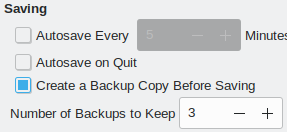
This is the default configuration I have with 0.99.10, and cannot reproduce your problem (on Linux).
Do you confirm you still have it with 0.99.10 on windows ?
ciranus
on 7 Sep 2020
it's a standard feature nowadays, to such an extent that not only did I not think to continuously hit ctrl+s like it's 1999, but it would never have occured to me that turning on a basic feature like autosave should even be necessary. It just isn't something people do anymore and haven't for quite a while.
This is just outright false. Ctrl+S is not "like it's 1999," and a statement like that (aside from being needlessly obnoxious) doesn't exactly seem like the best way to convince the developers to setup the software how you think it "should" be.
But hey, just out of curiosity, I'll have a quick look around my system & make sure:
MS Word+Excel+Outlook 2019 (for new emails): Nope, doesn't auto-save by default (prompts on exit or need to ctrl+s)
WPS Office (writer+spreadsheets): doesn't auto-save by default (prompts on exit or need to ctrl+s)
KWrite: doesn't auto-save by default (prompts on exit or need to ctrl+s)
Evolution (for new e-mails): doesn't auto-save by default (prompts on exit or need to ctrl+s)
Visual Studio: doesn't auto-save by default (prompts on exit or need to ctrl+s)
Foxit PhantomPDF: doesn't auto-save by default (prompts on exit or need to ctrl+s)
Photoshop: doesn't auto-save by default (prompts on exit or need to ctrl+s)
GIMP: doesn't auto-save by default (prompts on exit or need to ctrl+s)
...And so on and so on and so on. Off the top of my head, the only software I can think of (not including mobile) that auto-saves by default is OneNote.
Using the save feature as faux version control is something which is rather frowned upon. No offence but those are your own bad habits that shouldn't affect the community.
Again, no. I don't think you understand what "version control" is. Choosing not to save edits is not version control. Git is version control. And I've never once heard of anyone "frowning upon" having the ability to control when a document saves or not.
My view is clearly the exact opposite of @bitshiftnetau: if he/she was too negligent to bother checking if it would auto-save (UNLIKE the vast majority of Windows+Linux software), then it's inappropriate to come here & rail on the developers as if it were their fault.
I use the software exactly like @giuspen does and don't think it's a huge deal to expend 4 clicks or so to go into the settings & change it if the other behavior is preferred.
(Though @monotok's option of one-time asking to enable/disable autosave might be the best of both worlds.)
 metal450
on 8 Sep 2020
metal450
on 8 Sep 2020
I reflexively Ctrl+S every time I stop typing having after having been burned by lost work in the past. I lean toward enabling autosave by default, as I think the "I did this work but don't want to keep it" scenario is the minority use case. (Based on nothing but a hunch).
I don't feel too strongly one way or another, but it seems like autosave on best fits the "principle of least surprise" for software these days. If autosave off remains the default, I may consider overriding that in the Fedora builds.
 funnelfiasco
on 11 Sep 2020
funnelfiasco
on 11 Sep 2020
If autosave off remains the default, I may consider overriding that in the Fedora builds.
You should test before. If a new instance has never been saved at least once, CT does not know:
1 - which format (sqilte/xml) ?
2 - which name ?
.+ is it a good idea to have different default settings per packaging ? (ubuntu/fedora/windows).
(not convinced).
ciranus
on 11 Sep 2020
I'm leaning towards enabling the autosave by default, what's your position @txe ?
giuspen
on 11 Sep 2020
I think @bitshiftnetau complains about cherrytree not saving changes after closing the app, not about how they should be saved (manually or by autosave)
However, if you really wanna keep it the way it is then at least warn people when they are closing the program that they haven't saved. That at the very least has been an industry standard courtesy for more than a decade.
To make it clear, cherrytree always saves changes by asking about it if autosave is off, or just saving them if autosave is on. I tried to explain why saving didn't happen
there was an issue a while ago when cherrytree couldn't save changes if notes contained specific unicode symbols and just silently crashed during saving. I think it can be your case. I'm not sure if it was fixed in 0.39 (it it not under development), but it is definitely fixed in 0.99
While I'm not against enabling the autosave by default, it doesn't help in @bitshiftnetau case.
txe
on 11 Sep 2020
And "autosave" has no effect if the instance has never been saved (just tested), then not helping a new CT user with a fresh installation.
However, my setting has always been with "autosave' (i.e. nothing against default setting).
ciranus
on 11 Sep 2020
If I'm interested in a new software product, I'll look at its settings (at least briefly) before using it for a bulky job.
And: metal450 has shown above that Autosave is not the standard behavior on similar products.
IMHO: leave the default as it is now.
 Peterling007
on 15 Sep 2020
Peterling007
on 15 Sep 2020
@metal450 that is technically true, however most of those programs have a recovery feature in the case of a blackout or spontaneous shutdown.
To be a little more exact, IF an autosave feature exists on a program it is usually enabled by default. At least, that is my experience thus far.
I apologize for being needlessly aggressive, it is obviously inappropriate and something I am working very hard to improve. Won't happen again.
For the record @giuspen this software is great and I am a loud advocate for it's use wherever possible. Sorry for being an asshole earlier, thanks for entertaining the suggestion.
bitshiftnetau
on 28 Sep 2020
Autosave should definitely be enabled by default. I've repeatedly lost work because of system restarts.
 loansindi
on 2 Oct 2020
loansindi
on 2 Oct 2020
Also because our new young 0.99.x requires some time to stabilise I feel more comfortable in enabling by default the autosave once a minute as requested here even though I personally don't use it and disable it straight away
giuspen
on 4 Oct 2020
Related issues
 bhutch
·
6Comments
bhutch
·
6Comments
 HEDGHOK
·
6Comments
HEDGHOK
·
6Comments
 mamsiir
·
8Comments
mamsiir
·
8Comments
 JC-paavo
·
3Comments
JC-paavo
·
3Comments
 ElnuDev
·
6Comments
ElnuDev
·
6Comments
Most helpful comment
If I'm interested in a new software product, I'll look at its settings (at least briefly) before using it for a bulky job.
And: metal450 has shown above that Autosave is not the standard behavior on similar products.
IMHO: leave the default as it is now.