Since Python 2.7 is EOL a little over a year away and major Linux distros are looking at dropping it, what are the plans for moving CherryTree to Python 3?
 funnelfiasco
All 31 comments
Cherrytree is actually moving to C++/Gtkmm3
 giuspen
on 2 Oct 2018
giuspen
on 2 Oct 2018
Cherrytree is actually moving to C++/Gtkmm3
Pretty sad. Python makes a hackable app everybody (not just manual memory management wizards and makefile shamans as with C/C++) can extend and modify with fun and ease.
 ekaggata
on 15 Nov 2018
ekaggata
on 15 Nov 2018
Indeed, taking this to C++ would be about 10 steps backwards... I hope you will reconsider, it is high time we had a Python 3 version.
 nandoflorestan
on 9 Jul 2019
nandoflorestan
on 9 Jul 2019
The Python bindings for gtk3 are missing core functionality required from cherrytree. The C++ bindings are robust and up to date with gtk3. Python furthermore is way slower than C++, see https://stackoverflow.com/questions/801657/is-python-faster-and-lighter-than-c
giuspen
on 10 Jul 2019
I know Python is slower, most anything is slower than C++, doesn't affect this kind of application, and almost no one wants to hack in C++ today. If I may ask, what are you doing with GTK, that is different from whatever Zim, a Python 3 application, is doing?
nandoflorestan
on 10 Jul 2019
I'm afraid I didn't get your question @nandoflorestan
giuspen
on 10 Jul 2019
CherryTree is similar, in purpose and technologies used, to Zim. Why is Zim able to use GTK and display a tree-like structure and you aren't? Have you looked at their code? Are they doing something different? In case that investigation turns out not to be helpful, have you looked into fixing the bindings that currently don't satisfy your needs, rather than rewriting the whole application in a programming language much worse for this purpose?
nandoflorestan
on 10 Jul 2019
nandoflorestan
on 10 Jul 2019
The issue is not with the tree but with the clipboard. I know the excellent zim-wiki and I peeped into their use of the clipboard that is much simpler than that in cherrytree so couldn't help me.
What we disagree here is considering Python a better language for the purpose. I actually consider C++ light years better for the purpose.
Python is good for developing something very quickly, is good for proving an idea, but for a rubust application there is no match between the two.
giuspen
on 11 Jul 2019
Your last sentence there shows me you do not know much about Python, so I bid you goodbye now.
May this experience enlighten you about usage of low-level languages when building applications that most of the time sit waiting for the user to type something in.
nandoflorestan
on 11 Jul 2019
Any news on that? I am in trouble installing cherrytree on Fedora 31 :-)
 sklages
on 31 Oct 2019
sklages
on 31 Oct 2019
@sklages see https://github.com/giuspen/cherrytree/issues/581 for fedora 31. Cherrytree gtkmm3 first release ready in a couple of months
giuspen
on 2 Nov 2019
@giuspen thanks, works like a charm. Can't wait to see the gtkmm3 release :+1:
sklages
on 2 Nov 2019
Hi, is the new version any closer? With Python 2 leaving us I'd still like to be able to use cherrytree. Thanks!
 geckon
on 17 Apr 2020
geckon
on 17 Apr 2020
Hi, I'm glad to say the C++ version is almost here. All functions are working except imports (too much to do and it's not that essential for the first release). Currently, I'm fixing a few gaps and @giuspen is working on a windows installer. Then, it will be inner testing, and then, I suppose, users will try the program.
 txe
on 17 Apr 2020
txe
on 17 Apr 2020
@txe Will the C++ version be able to open cherrytree databases created via the python version?
 rnc
on 26 Apr 2020
rnc
on 26 Apr 2020
yes, it will, should be no worries about that!
txe
on 26 Apr 2020
cherry tree 0.39.2
CherryTree 0.39.3 Installed Linux Lite 5.0
Problem: copy paste text and graphics
I had Linux Lite 4.8 and Cherrytree version 0.39.2
In my studies I was able to copy and paste text and images by just selecting and copy.
Go to Cherrytree and paste...........................
Result Cherrytree pasted exactly as was on the web page I copied.
I had always used Zim but I have found out that Cherrytree allows copy paste of text and image in one action, I swapped to Cherrytree saving me lots of work when researching.
Linux Lite 5.0 installed last week, and of course via SNAPD I downloaded the Cherrytree.
cherry tree 0.39.3 version is what was downloaded and installed.
I am not in this version able to copy and paste text and images in one action, it only allows text copy?
I then have to go back and down load images separately and copy and paste into Cherrytree, aming it no different to the Zim process.
2 images of screen shots showing the exact copy paste command from webpage. 1 it pasted images as well 0.39.2 and the second text only 0.39.3.
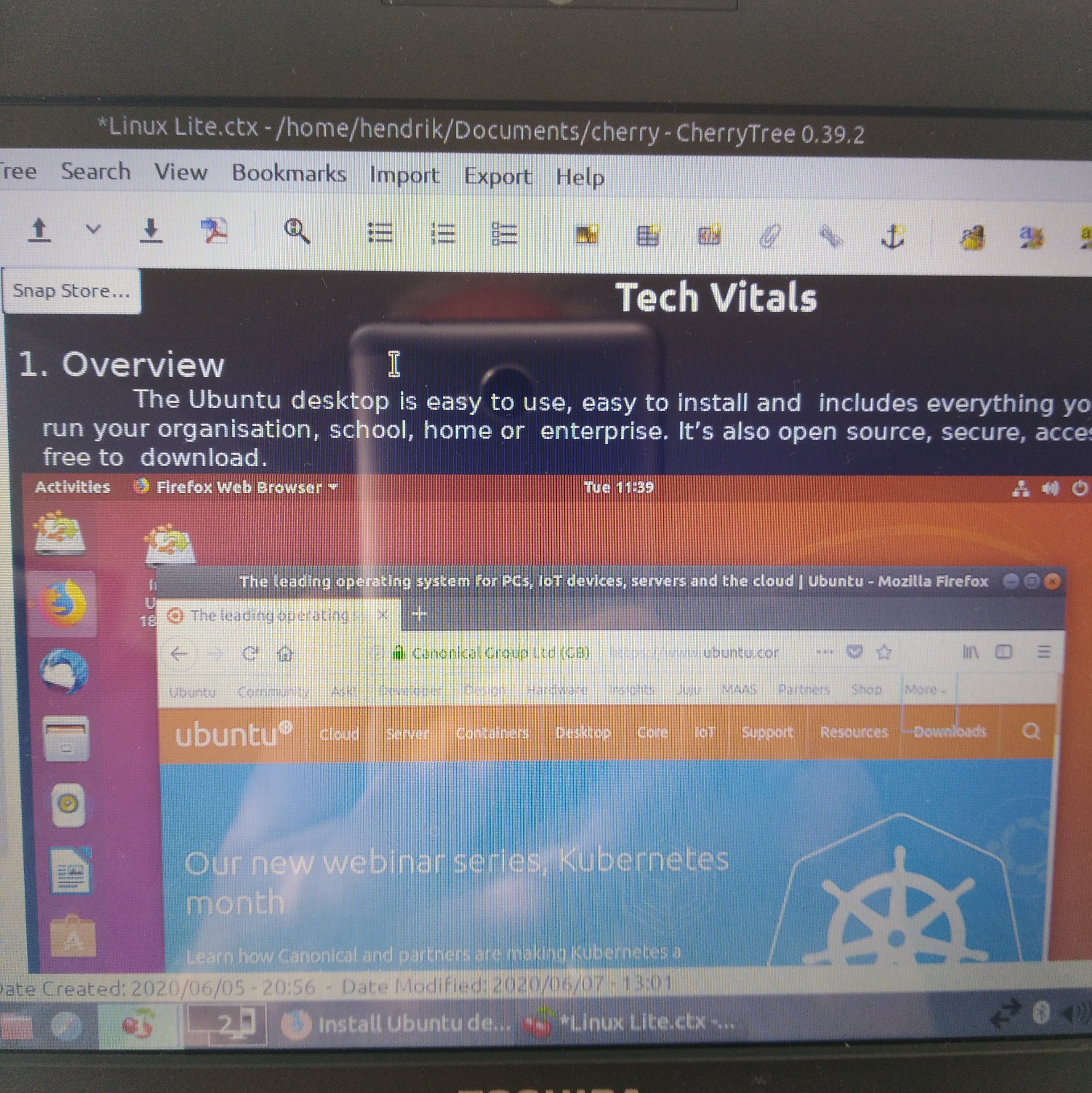
then 0.39.3
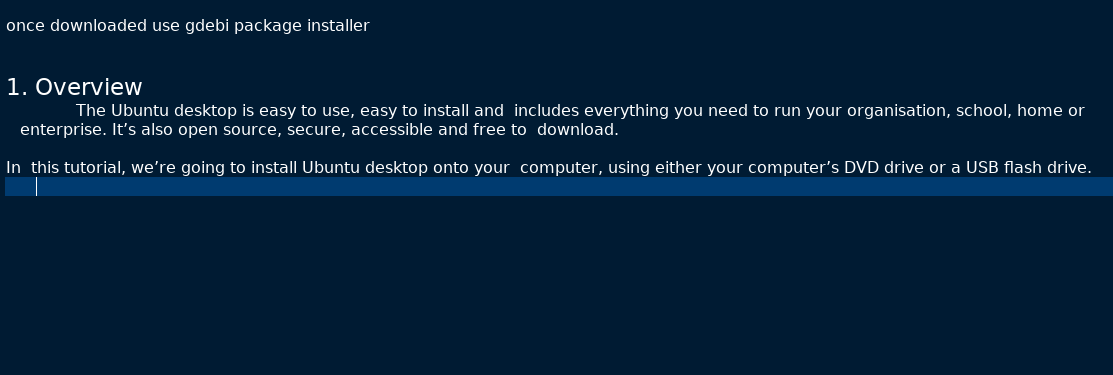
The other problem I had was that I got a bad text output from the SNAPD download.
I tried a number of times and still got this issue

I eventually found this fix??????
sudo rm /var/cache/fontconfig/*
sudo rm ~/.cache/fontconfig/*
then I was able to re open and actually read the Cherrytree.
Over all very disappointed by the current version. Hope you guys can sort this out very quickly.
Reagrds
H
 Mizscottie
on 7 Jun 2020
Mizscottie
on 7 Jun 2020
Hi @Mizscottie, no need to be disappointed, issues you run into are related to how SNAP works.
Do you have opportunity to install cherrytree from an ordinary package/deb, not from snap?
txe
on 7 Jun 2020
As a newbie, I am not sure how else to do this, I did down load via deb package and installed via GDEBI but had problems with the copy paste still.
Please advise what package I need to download please, via link?
regards
Myz scottie
Mizscottie
on 7 Jun 2020
Hmm, I checked Linux Lite 5.0, and it looks to be based on Ubuntu 20, so only snap and flatpak work there. We try to fix snap, so image copy\paste can work.
txe
on 7 Jun 2020
Thank you, I have tried the deb package and this is the error I get
"Error: Dependancy is not satisfiable:
python-enchant"
Mizscottie
on 7 Jun 2020
I see
@giuspen , do you remember that user who could install additional dependencies on Ubuntu 20? Did you try them and can they be provided?
txe
on 7 Jun 2020
@txe I tried but it was not straightforward because was forcing to downgrade packages versions and pin those versions, so I would not advise the average user to do that. I would rather invite to use the Gtkmm3 version with extra precaution if neither snap nor flatpak satisfy their needs
giuspen
on 7 Jun 2020
python-enchants did not work either
"E: Package 'python-gtk2' has no installation candidate
E: Package 'python-gtksourceview2' has no installation candidate
E: Package 'python-enchant' has no installation candidate
"
So I guess it appears Cherrytree at this time of upgrade 0.39.3 is broken.
Mizscottie
on 7 Jun 2020
@Mizscottie , ubuntu 20 removed all packages related to python2 and which cherrytree uses, thus snap is only an option there, I asked a snap developer to fix issues with snap your mention, will see if it's possible.
@giuspen , I didn't suggest c++ version, because image paste is not working there yet :)
txe
on 7 Jun 2020
Thanks, will wait with great anticipation.
Mizscottie
on 7 Jun 2020
@Mizscottie try the flatpak package
@txe with libcurl that I've been using for the new version check should be simple to add the download of images
giuspen
on 7 Jun 2020
@giuspen, great, I'll try it then
txe
on 7 Jun 2020
@Mizscottie the snap configuration was fixed. If ubuntu updated cherrytree snap, then the bugfix (to copy an image from a browser) is there.
txe
on 9 Jun 2020
@txe, @giuspen
Thank you very much, it works a treat. When you are studying topics it is so nice to just grab things on the fly, copy paste straight into CherryTree and then latter when off line you can peruse over things at your leisure and go over all the note takings.
Thank you, once again.
Mizscottie
on 10 Jun 2020
Related issues
 keesse
·
7Comments
keesse
·
7Comments
 kharaktur
·
9Comments
kharaktur
·
9Comments
 tliron
·
8Comments
tliron
·
8Comments
 ghost
·
3Comments
ghost
·
3Comments
 bhutch
·
6Comments
bhutch
·
6Comments
Most helpful comment
Hi, I'm glad to say the C++ version is almost here. All functions are working except imports (too much to do and it's not that essential for the first release). Currently, I'm fixing a few gaps and @giuspen is working on a windows installer. Then, it will be inner testing, and then, I suppose, users will try the program.