Checkout: Windows - Line endings & conversion
Many repos, use a line ending of \n.
When using Windows, these seem to be converted. Often, this isn't an issue with actual code, but has messed up testing. The following seems to fix it, run before the checkout action:
git config --system core.autocrlf false
git config --system core.eol lf
If this could be an option with 'checkout', some might find it helpful...
 MSP-Greg
All 14 comments
would .gitattributes solve the problem?
 ericsciple
on 13 Jan 2020
ericsciple
on 13 Jan 2020
Yes. I use them in my repos.
But, it's a change for people migrating from AppVeyor (along with UTF8 console encoding).
Also, for repos that are predominately *nix software that support Windows, may have binary files, etc...
Close if you'd like, just thought I'd mention it.
MSP-Greg
on 13 Jan 2020
With the temp fix in the OP, I'm getting a permissions error about trying to write to /etc/gitconfig. Any suggestions?
 devsnek
on 21 Jan 2020
devsnek
on 21 Jan 2020
@devsnek
I apologize, I didn't state in the original post that I noticed the issue when working with ps1 or cmd shells. I've also had the issue locally. Also, locally, I almost never work in the Git bash (or MSYS2) shell.
If you're using a bash shell, maybe try:
git config --global ...
I don't know...
MSP-Greg
on 21 Jan 2020
This worked for me:
    steps:
      - name: Set git to use LF
        run: |
          git config --global core.autocrlf false
          git config --global core.eol lf

      - uses: actions/checkout@v2
 lydell
on 22 Mar 2020
lydell
on 22 Mar 2020
Related is https://travis-ci.community/t/files-in-checkout-have-eol-changed-from-lf-to-crlf/349.
Per my comment in https://travis-ci.community/t/files-in-checkout-have-eol-changed-from-lf-to-crlf/349/3, I don't think the default config of core.autocrlf=true on a runner is correct, because otherwise there’s a considerable amount of work required to undo this behaviour.
I would suggest making the default on all runners false and then allowing people to configure it to true as required (not that this should really ever be required).
 myitcv
on 7 Apr 2020
myitcv
on 7 Apr 2020
I raised the same issue on the forum last year, and while it did get an initial reply from @ethomson, it hasn't seen any response since.
 mvdan
on 13 Apr 2020
mvdan
on 13 Apr 2020
If this could be an option with 'checkout', some might find it helpful...
Git already has a configuration option, it's the .gitattributes file, which has the added property of being universally supported by all systems, not just GitHub Actions.
Per my comment in https://travis-ci.community/t/files-in-checkout-have-eol-changed-from-lf-to-crlf/349/3, I don't think the default config of core.autocrlf=true on a runner is correct, because otherwise there’s a considerable amount of work required to undo this behaviour.
core.autocrlf's default is true because that's the default in Git for Windows.
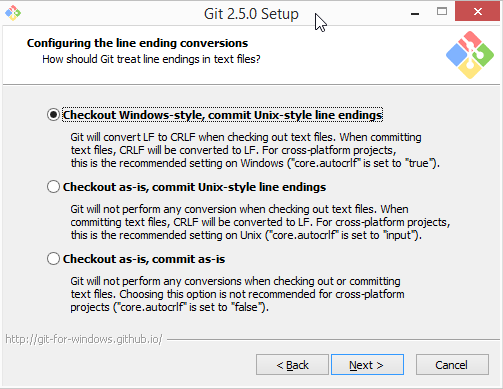
Most people use this unchanged, and so our runners are configured to match the most common setting. We see the majority of Windows users have configured this option. To change it to false would hurt most repositories that are missing a .gitattributes.
There's no "correct" choice here for users to make: it's purely a preference. And in the absence of correctness, we have to choose the option that supports the most users correctly.
But this is a guess. And we don't want to be in the business of guessing what to do about your line endings. We'd strongly prefer for us to tell us what you want to do. You can do that with a .gitattributes. This places the configuration about your repository where it belongs - in the repository itself.
To emulate the behavior of core.autocrlf=true, add a .gitattributes that is * text=auto. To emulate core.autocrlf=false, add a .gitattributes that is * -text. This will disable text translations (line ending changes).
More information is available in this blog post
 ethomson
on 14 Apr 2020
ethomson
on 14 Apr 2020
Thanks @ethomson. Doesn't setting * -text have the side effect that when files are added on Windows (for example) they will _not_ have their line endings normalised to LF?
myitcv
on 14 Apr 2020
@myitcv That's correct - sorry, I did sort of gloss over the many combinations of settings that are possible. 😰
Thanks @ethomson. Doesn't setting * -text have the side effect that when files are added on Windows (for example) they will not have their line endings normalised to LF?
Yes - that's correct - * -text will prevent any line ending translation. This should map to core.autocrlf=false in the absence of a core.eol setting.
There is an interesting bit to the translation of core.autocrlf/core.eol and .gitattributes - core.autocrlf=false is required for core.eol to have any effect - on the other hand, the eol attribute _implies_ the text attribute (not -text).
I don't think that I had really realized this seeming mismatch until you asked - it's not that core.autocrlf precisely means "do text translation" when true, you can set core.autocrlf=false and still see text translation, depending on the setting of core.eol.
I think that all the options for core.autocrlf plus core.eol are expressible with attributes.
Configuration: core.autocrlf=true
Attributes: * text=auto
Notes: core.eol cannot be used when core.autocrlf=true
Configuration: core.autocrlf=input
Attributes: * text eol=lf
Effect: Files on disk will are LF (all platforms), files in repository are LF. (This is equivalent to core.autocrlf=false with core.eol=lf.) core.eol cannot be used when core.autocrlf=true
Configuration: core.autocrlf=false
Attributes: * -text
Effect: Files on disk are whatever they were created in, checked in to the repository literally
Configuration: core.autocrlf=false core.eol=lf
Attributes: * text eol=lf
Effect: Files on disk are LF (all platforms), files in repository are LF
Configuration: core.autocrlf=false core.eol=crlf
Attributes: * text eol=crlf
Effect: Files on disk are CRLF (all platforms), files in repository are LF
Configuration: core.autocrlf=false core.eol=native
Attributes: * text=auto
Effect: Files on disk are CRLF (Windows), LF (everywhere else), files in repository are LF
ethomson
on 14 Apr 2020
Thanks @ethomson
There's no "correct" choice here for users to make:
This statement is the key here, and to your earlier point it makes sense for the default behaviour to be that one which will be most useful to the majority.
myitcv
on 14 Apr 2020
I'm going to add a troubleshooting doc. I'll add a section for this
ericsciple
on 15 Apr 2020
I also ran into this surprise. Using .gitattributes fixed it, but, I rather expected that there might be a hint about it in the README for checkout@v2
 spk121
on 28 Dec 2020
spk121
on 28 Dec 2020
I’ve actually changed my mind on this. I now think it’s _good_ that files are checked out with CRLF on Windows, because it’s helped me find two legit CRLF bugs in two projects.
My original issue was that Prettier failed on Windows because it mandates LF newlines. The _real_ solution to that is to only run Prettier on _one_ OS (like Ubuntu, since it’s fast) and _one_ Node.js version (instead of on all combinations, like I did before). It’s totally worth having a separate workflow for linting – it’s much faster!
Though I’ll have to note that I’ve had a few really annoying test failures due to CRLF, too, that didn’t provide any value and that I had to code around. But it still felt good finding those _actual_ CRLF bugs.
lydell
on 29 Dec 2020
Related issues
 luludan
·
5Comments
luludan
·
5Comments
 lukka
·
6Comments
lukka
·
6Comments
 jcharnley
·
4Comments
jcharnley
·
4Comments
 gitfool
·
3Comments
gitfool
·
3Comments
 thewavelength
·
7Comments
thewavelength
·
7Comments
Most helpful comment
This worked for me: