Summary
I have created an invalid secret and am unable to open any workspace because of it, I also cannot find a way to remove this secret.
Relevant information
I have an account for https://che.openshift.io/ and I tried to add an ssh key pair to the workspace there (the default key was too small). After I have done that, I am not able to open any workspace anymore (including the ones I created after), the error is always the same:
Error: Failed to run the workspace: "Failure executing: POST at: https://osoproxy.openshift.io/api/v1/namespaces/tin04ka-che/secrets. Message: Secret "workspace78n4zip9y67n0ru8-sshprivatekeys" is invalid: data[https://github.com]: Invalid value: "https://github.com": a valid config key must consist of alphanumeric characters, '-', '_' or '.' (e.g. 'key.name', or 'KEY_NAME', or 'key-name', regex used for validation is '[-._a-zA-Z0-9]+'). Received status: Status(apiVersion=v1, code=422, details=StatusDetails(causes=[StatusCause(field=data[https://github.com], message=Invalid value: "https://github.com": a valid config key must consist of alphanumeric characters, '-', '_' or '.' (e.g. 'key.name', or 'KEY_NAME', or 'key-name', regex used for validation is '[-._a-zA-Z0-9]+'), reason=FieldValueInvalid, additionalProperties={})], group=null, kind=Secret, name=workspace78n4zip9y67n0ru8-sshprivatekeys, retryAfterSeconds=null, uid=null, additionalProperties={}), kind=Status, message=Secret "workspace78n4zip9y67n0ru8-sshprivatekeys" is invalid: data[https://github.com]: Invalid value: "https://github.com": a valid config key must consist of alphanumeric characters, '-', '_' or '.' (e.g. 'key.name', or 'KEY_NAME', or 'key-name', regex used for validation is '[-._a-zA-Z0-9]+'), metadata=ListMeta(_continue=null, remainingItemCount=null, resourceVersion=null, selfLink=null, additionalProperties={}), reason=Invalid, status=Failure, additionalProperties={})."
As I understand it, the name that I gave to the key pair is invalid (contains "/" and ":"), is it correct?
I assumed that if I removed that invalid secret, I would be able to run workspaces again, but I haven't find a way to do so.
I located the cluster that was given to me, it has 2 namespaces, "tin04ka" and "tin04ka-che".
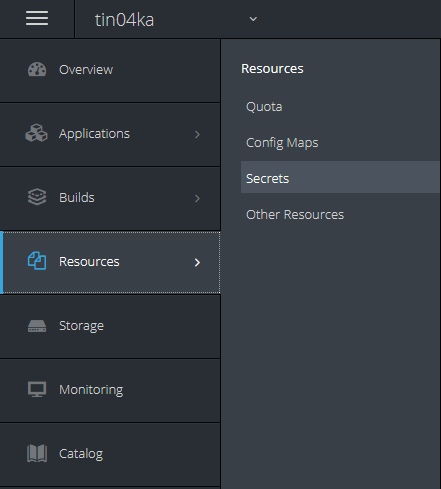
Namespace "tin04ka" contains the tab "Secrets" but none of them is called "workspace78n4zip9y67n0ru8-sshprivatekeys":
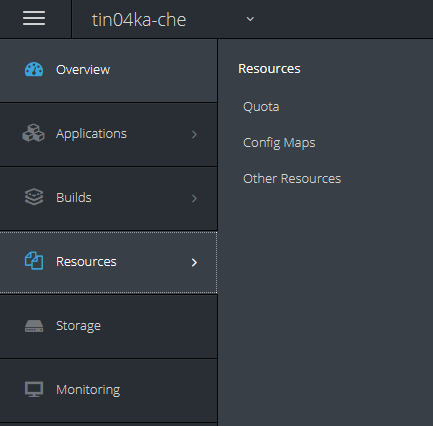
Namespace "tin04ka-che" doesn't have tab "Secrets" at all:
I tried to make a request to the address in the error message, so I made a GET request to the https://osoproxy.openshift.io/api/v1/namespaces/tin04ka-che/secrets
This is the response:
{
    "kind": "Status",
    "apiVersion": "v1",
    "metadata": {},
    "status": "Failure",
    "message": "secrets is forbidden: User \"tin04ka\" cannot list secrets in the namespace \"tin04ka-che\": no RBAC policy matched",
    "reason": "Forbidden",
    "details": {
        "kind": "secrets"
    },
    "code": 403
}
How can I delete this secret or is there any other way to make my workspaces work again?
 KateSieraia
All 13 comments
@KateSieraia hello, could you please clarify how the invalid secret was created? Please, provide the steps to reproduce
 ibuziuk
on 27 Oct 2020
ibuziuk
on 27 Oct 2020
As I understand it, the name that I gave to the key pair is invalid (contains "/" and ":"), is it correct?
@vinokurig could you please take a look. It looks like some validation step is missing during the key / pair creation
@KateSieraia in order to unblock you we can request a secret removal and cleanup the workspace78n4zip9y67n0ru8-sshprivatekeys on the infra level
ibuziuk
on 27 Oct 2020
@ibuziuk I tried to add the key pair in following ways:
- Ctrl + Shift + P -> type "ssh" -> choose "generate key pair", then I just followed the steps. This method didn't work for me though because I had to copy paste public and private keys, and for that I had to switch between notepad and browser, and every time the browser lost focus it would skip to the next step (for example, if I wanted to fill in public key, I would switch to notepad to copy it and when I switched back, the input field would already require me to fill in the private key)
- Ctrl + Shift + P -> type "ssh" -> choose "upload private key", then I just followed the steps. This method worked for me, but when I wanted to test it by reopening the workspace, I started getting the error mentioned above
@KateSieraia in order to unblock you we can request a secret removal and cleanup the workspace78n4zip9y67n0ru8-sshprivatekeys on the infra level
That would be great, thank you!
KateSieraia
on 27 Oct 2020
@KateSieraia thank you for the details @vinokurig could you please create a separate issue for adding validation to the "upload private key" flow? also how can now the invalid secret be deleted? Basically, there is no secret on the infrastructure level so I assume it is persisted on the db level atm
ibuziuk
on 27 Oct 2020
@KateSieraia could you please clean up the SSH keys via the API - https://che.openshift.io/swagger/#/ssh
ibuziuk
on 27 Oct 2020
@ibuziuk If I understand it correctly I should call
DELETE /ssh/{service}
What would be the service here? I tried "tin04ka-che" but it wasn't it.
KateSieraia
on 27 Oct 2020
it is a good question, @vinokurig should we try with the https://github.com service name ?
@KateSieraia let's try GET first before removal ;-) https://che.openshift.io/swagger/#!/ssh/getPairs
ibuziuk
on 27 Oct 2020
@ibuziuk I tried GET /ssh/{service} as well, here are the results:
GET https://che.openshift.io/api/ssh/tin04ka-che (or any other alphanumeric sequence, I tried a few random strings)
Response:
[]
GET https://che.openshift.io/api/ssh/https%3A%2F%2Fgithub.com (I tried to escape symbols)
Response:
<!doctype html>

<html lang="en">

<head>

    <title>HTTP Status 400 – Bad Request</title>

    <style type="text/css">

        body {

            font-family: Tahoma, Arial, sans-serif;

        }

        h1,

        h2,

        h3,

        b {

            color: white;

            background-color: #525D76;

        }

        h1 {

            font-size: 22px;

        }

        h2 {

            font-size: 16px;

        }

        h3 {

            font-size: 14px;

        }

        p {

            font-size: 12px;

        }

        a {

            color: black;

        }

        .line {

            height: 1px;

            background-color: #525D76;

            border: none;

        }

    </style>

</head>

<body>

    <h1>HTTP Status 400 – Bad Request</h1>

    <hr class="line" />

    <p><b>Type</b> Status Report</p>

    <p><b>Message</b> Invalid URI: noSlash</p>

    <p><b>Description</b> The server cannot or will not process the request due to something that is perceived to be a

        client error (e.g., malformed request syntax, invalid request message framing, or deceptive request routing).

    </p>

    <hr class="line" />

    <h3>Apache Tomcat/8.5.56</h3>

</body>

</html>
GET https://che.openshift.io/api/ssh/https://github.com
Response:
There is no any resources matched to request path /https://github.com
It would be nice to have GET /ssh API call that would list all services of the current user maybe?
KateSieraia
on 28 Oct 2020
Sorry for the late response, I was in a PTO :) I've created an issue to add a name validation for the SSH keys.
 vinokurig
on 28 Oct 2020
vinokurig
on 28 Oct 2020
@vinokurig nice, but how can we unblock @KateSieraia ?
It would be nice to have GET /ssh API call that would list all services of the current user maybe?
indeed introducing this API makes a lot of sense. Currently, it is not clear how can we retrieve the list of ssh for removal of the problematic one
ibuziuk
on 28 Oct 2020
@KateSieraia @ibuziuk
GET https://che.openshift.io/api/ssh/tin04ka-che (or any other alphanumeric sequence, I tried a few random strings)
Response:
[]
GET https://che.openshift.io/api/ssh/https%3A%2F%2Fgithub.com (I tried to escape symbols)
Response:
  <!doctype html>

  <html lang="en">

  <head>

      <title>HTTP Status 400 – Bad Request</title>

      <style type="text/css">

          body {

              font-family: Tahoma, Arial, sans-serif;

          }

          h1,

          h2,

          h3,

          b {

              color: white;

              background-color: #525D76;

          }

          h1 {

              font-size: 22px;

          }

          h2 {

              font-size: 16px;

          }

          h3 {

              font-size: 14px;

          }

          p {

              font-size: 12px;

          }

          a {

              color: black;

          }

          .line {

              height: 1px;

              background-color: #525D76;

              border: none;

          }

      </style>

  </head>

  <body>

      <h1>HTTP Status 400 – Bad Request</h1>

      <hr class="line" />

      <p><b>Type</b> Status Report</p>

      <p><b>Message</b> Invalid URI: noSlash</p>

      <p><b>Description</b> The server cannot or will not process the request due to something that is perceived to be a

          client error (e.g., malformed request syntax, invalid request message framing, or deceptive request routing).

      </p>

      <hr class="line" />

      <h3>Apache Tomcat/8.5.56</h3>

  </body>

  </html>
GET https://che.openshift.io/api/ssh/https://github.com
Response:
There is no any resources matched to request path /https://github.comIt would be nice to have GET /ssh API call that would list all services of the current user maybe?
To list SSH keys via API you need to use vcs as a service, so the request should look like:
curl -X GET --header 'Accept: application/json' --header 'Authorization: Bearer <user token>' https://che.openshift.io/api/ssh/vcs'`
To delete an SSH key:
``
curl -X DELETE --header 'Accept: application/json' --header 'Authorization: Bearer <user token>' https://che.openshift.io/api/ssh/vcs?name=<key name>'
vinokurig
on 28 Oct 2020
@vinokurig thank you very much! I was able to successfully list all keys using the service name "vcs" and was able to delete the key with the wrong name, after that I was able to open my workspaces once again :-)
KateSieraia
on 29 Oct 2020
@KateSieraia awesome, thank you for the great issue report. I believe we can close it for now and the proper validation is going to be handled in the https://github.com/eclipse/che/issues/18229
ibuziuk
on 29 Oct 2020
Related issues
 amisevsk
·
3Comments
amisevsk
·
3Comments
 sleshchenko
·
3Comments
sleshchenko
·
3Comments
 sudheerherle
·
3Comments
sudheerherle
·
3Comments
 l0rd
·
3Comments
l0rd
·
3Comments
 apupier
·
3Comments
apupier
·
3Comments
Most helpful comment
@vinokurig thank you very much! I was able to successfully list all keys using the service name "vcs" and was able to delete the key with the wrong name, after that I was able to open my workspaces once again :-)