Che: [Dogfooding] Cannot build che-theia on che.openshift.io
Describe the bug
For daily development using che.openshift.io I need to be able to build Che-Theia project.
For now it's impossible to do.
Steps to reproduce
Create a workspace using this devfile
metadata:
  name: test
projects:
  - name: theia
    source:
      location: 'https://github.com/eclipse-theia/theia.git'
      type: git
      branch: master
components:
  - id: redhat/vscode-yaml/latest
    type: chePlugin
  - mountSources: true
    endpoints:
      - name: theia-dev-flow
        attributes:
          protocol: http
          public: 'true'
        port: 3010
    memoryLimit: 3Gi
    type: dockerimage
    alias: che-dev
    image: 'eclipse/che-theia-dev:next'
  - id: che-incubator/typescript/latest
    memoryLimit: 2048M
    type: chePlugin
  - id: eclipse/che-machine-exec-plugin/latest
    type: chePlugin
  - id: eclipse/che-theia/latest
    memoryLimit: 2Gi
    type: cheEditor
    alias: theia-editor
apiVersion: 1.0.0
Then open a terminal in che-dev container, go to theia directory and build by yarn command.

When I turned off persist volumes, it did not affect the result.
attributes:
  persistVolumes: 'false'
After some playing with files (yarn builder creates, copies some files, etc), I got a message that quota has been exceeded.

Runtime
- [ ] che.openshift.io
Screenshots


 vitaliy-guliy
All 13 comments
cc @ibuziuk
 sleshchenko
on 13 Jan 2020
sleshchenko
on 13 Jan 2020
@slemeur @l0rd indeed this is a blocker for che-theia dogfooding, but I'm not sure what is the right pass for solving it? Should we start escalating https://bugzilla.redhat.com/show_bug.cgi?id=1647229#c17 ?
 ibuziuk
on 13 Jan 2020
ibuziuk
on 13 Jan 2020
I think issue is that volume is too small ( with ephemeral)
 benoitf
on 13 Jan 2020
benoitf
on 13 Jan 2020
The size of the folder with build che-theia (theia + che-theia extensions) is 1.2 gigabytes. Size of build che-theia and theia is 2.1 gb. To be able to develop che-theia with plugins we need at least 3 gigabytes. It's a minimum. In some cases it could be uncomfortable.
vitaliy-guliy
on 14 Jan 2020
ephemeral is not an infinite resource and I'm not sure we can allocate 3GB
ibuziuk
on 14 Jan 2020
@vitaliy-guliy I know you was able to build che-theia from the root. Could you please describe the workaround?
ibuziuk
on 22 Jan 2020
@ibuziuk let me copy here a part of my email to che-dev where I explained how I develop che-theia.
The main idea is using temporary directory in the root where the limitation
of disk space is 3 gigabytes, which is pretty enough to build the project.
The development flow includes:
- workspace creation, cloning theia sources
- copying sources to /tmp/theia directory
- initializing che-theia
- building
- launching
- making and applying changes
Workspace creation, cloning theia sources
To create a workspace I use devdile[1], which has a set of commands helping
me to operate with source code. After starting, my workspace has
cloned two theia and che-theia projects. I’m focused on developing
packages in theia core, that’s why sources of che-theia temporary are not used.
Copying sources to '/tmp/theia' directory
To copy sources to '/tmp/theia' directory I use rsync, running in che-dev container.
As eclipse/che-theia-dev image does not have rsync tool, I had to extend
that image[2] and install rsync. The devfile has '1 Rsync Theia' command to easily
synchronizing '/protects/theia' directory with '/tmp/theia'.
$ rsync -rtv --exclude='node_mobules' /projects/theia/ /tmp/theia/;
Initlalizing che-theia
To initialize che-theia we need to run 'che:theia init' in '/tmp/theia' directory.
The '2 Init che:theia' command does that in one click.
Building
'3 Build che:theia' command runs 'yarn' in '/tmp/theia' directory.
Launching
For Che-Theia I prefer to use dedicated directories for plugins, default plugins and
for projects, which is used as Theia workspace directory. In the directory with default
plugins I copy all the plugins from '/default-theia-plugins', which is accessible only from
'theia-ide'. That's why '4.1 Prepare theia-* dirs' command is running in that container.
$ mkdir -v /projects/theia-default-plugins
$ mkdir -v /projects/theia-plugins
$ mkdir -v /projects/theia-projects-dir
$ cd /default-theia-plugins
$ cp -v * /projects/theia-default-plugins/
'4.2 Launch' command sets necessary variables and launches Che-Theia
in 'che-dev' container.
$ cd /tmp/theia/examples/assembly
$ export CHE_PROJECTS_ROOT="/projects/theia-projects-dir"
$ export THEIA_DEFAULT_PLUGINS="local-dir:///projects/theia-default-plugins"
$ export THEIA_PLUGINS="local-dir:///projects/theia-plugins"
$ export THEIA_PLUGIN_ENDPOINT_DISCOVERY_PORT='2506'
$ theia start /projects/theia-projects-dir --hostname=0.0.0.0 --port=3010
To open Che-Theia, click 'che-dev/theia-dev-flow' node in My Workspace view.
Making and applying changes
Each time after doing changes, I synchronize sources from '/projects/theia' with
sources in '/tmp/theia' using '1 Rsync Theia' command.
Then I build Theia with '3 Build che:theia' and launch with '4.2 Launch'.
vitaliy-guliy
on 29 Jan 2020
I removed the blocker since there is a workaround for building che-theia on Hosted Che
ibuziuk
on 18 Feb 2020
@ibuziuk
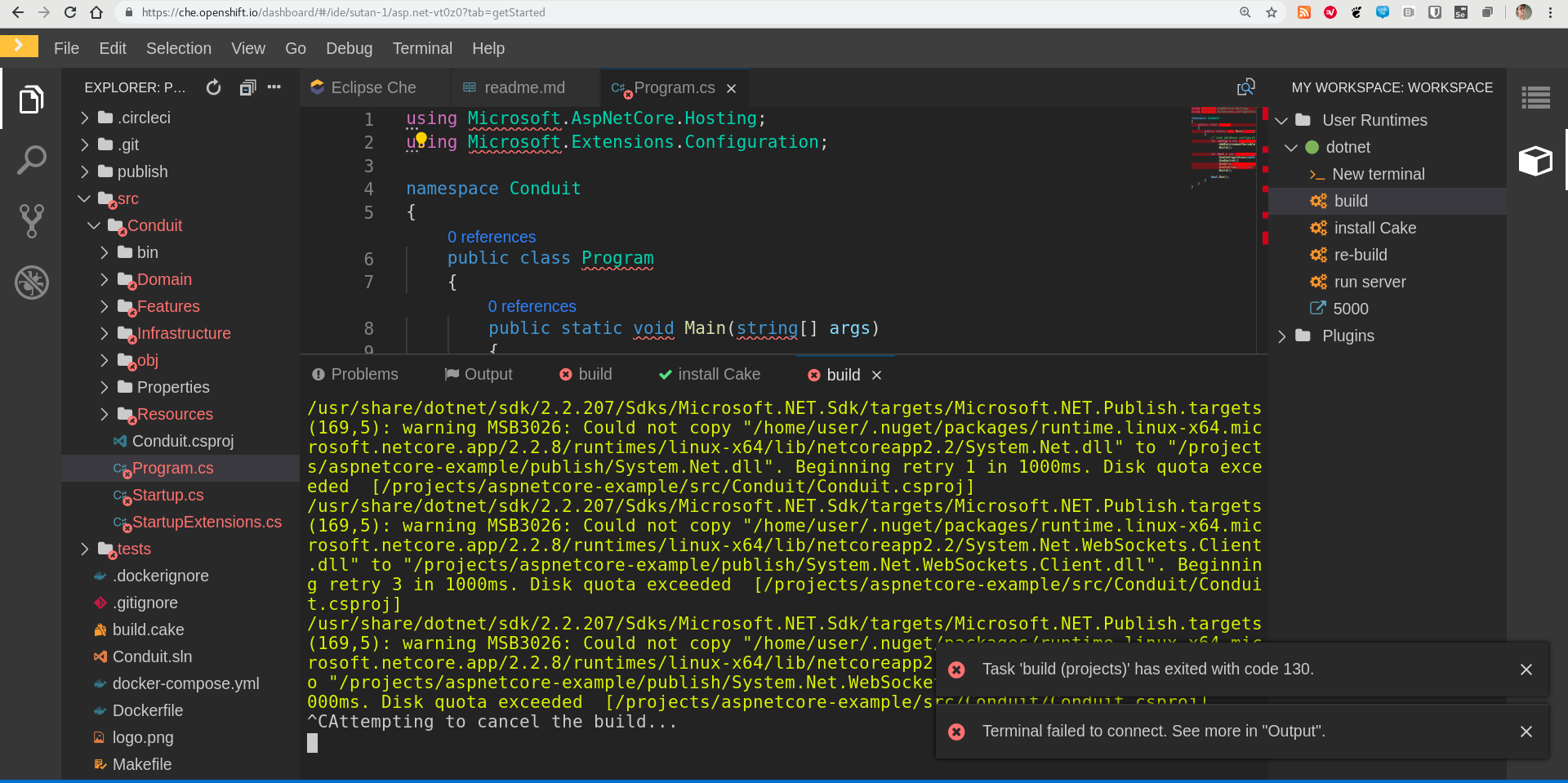
looks like the asp.net stack is also impacted ... (created from get started samples)
 sunix
on 2 Jun 2020
sunix
on 2 Jun 2020
@sunix in your case, you have a pretty informative message 'Disk quota exceeded'.
@ibuziuk when error, is it possible to add the information how the disk quota big?
vitaliy-guliy
on 3 Jun 2020
ok I just would like to have more space .... for ephemeral volume at least. I am starting to have many example that I would like to share with che.openshift.io but cannot.
For the user, it would be good to visually see in the che-theia bottom bar how full the volumes are. I don't know if it is possible but would be nice to have so people understand that this is not a problem with Che but that the disk quota.
sunix
on 3 Jun 2020
@sunix +1, it would be great to display a badge in the status. I think it's possible to get the disk usage using df command
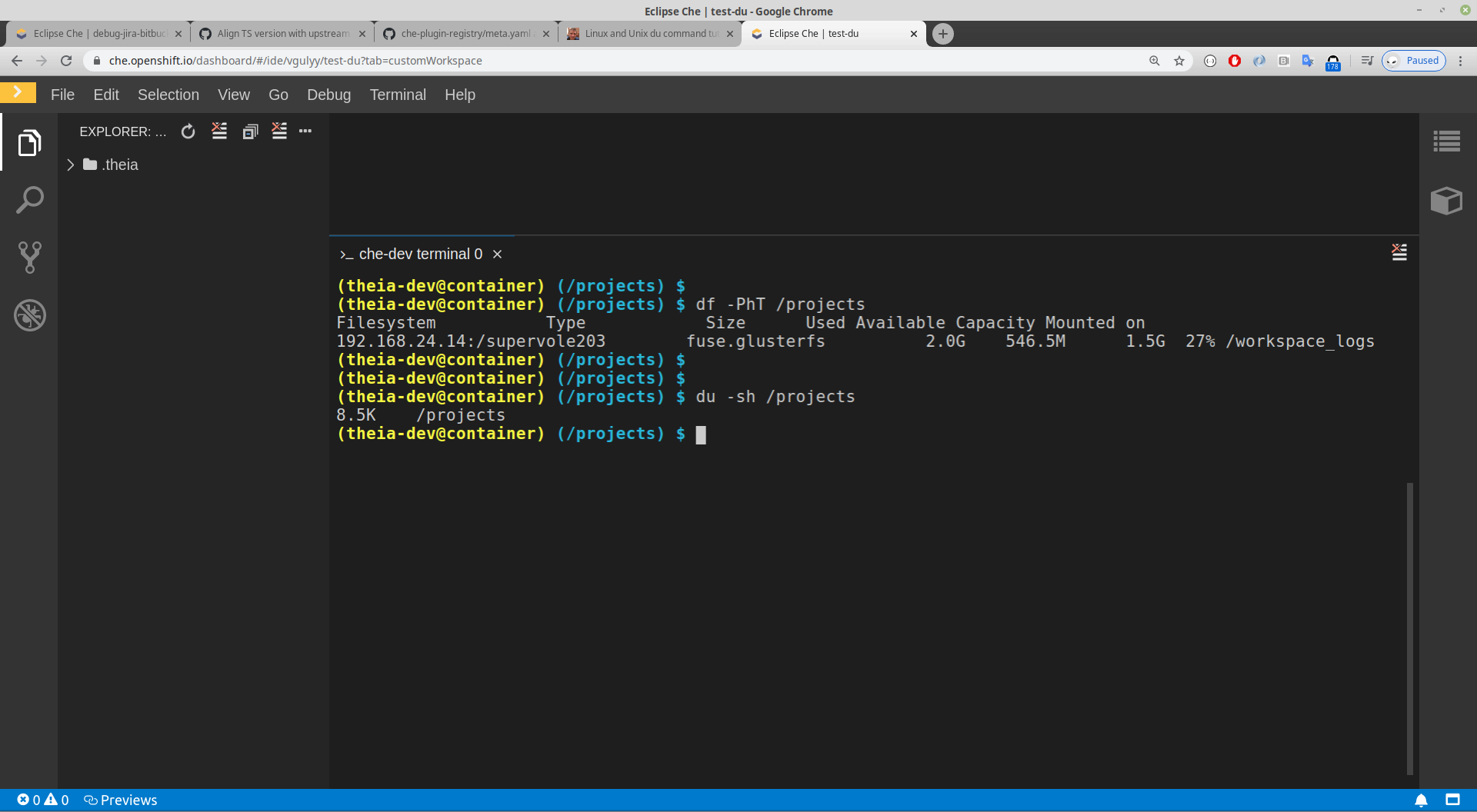
This is for workspace without projects.
But I don't understand what takes 546mb of disk if /projects directory contains only .theia directory with tasks.json file inside.
@ibuziuk have you seen that before?
Tested with this devfile
metadata:
  name: test-du
components:
  - id: eclipse/che-theia/latest
    memoryLimit: 1500M
    type: cheEditor
    alias: theia-editor
    env:
      - value: '0'
        name: NODE_TLS_REJECT_UNAUTHORIZED
  - mountSources: true
    endpoints:
      - name: theia-dev-flow
        port: 3010
        attributes:
          protocol: http
          public: 'true'
    memoryLimit: 3Gi
    type: dockerimage
    image: 'quay.io/eclipse/che-theia-dev:next'
    alias: che-dev
apiVersion: 1.0.0
I have created https://github.com/eclipse/che/issues/17205
 l0rd
on 22 Jun 2020
l0rd
on 22 Jun 2020
Related issues
 amisevsk
·
3Comments
l0rd
·
3Comments
amisevsk
·
3Comments
l0rd
·
3Comments
 AndrienkoAleksandr
·
3Comments
AndrienkoAleksandr
·
3Comments
 vanzhiganov
·
3Comments
vanzhiganov
·
3Comments
 sudheerherle
·
3Comments
sudheerherle
·
3Comments
Most helpful comment
I have created https://github.com/eclipse/che/issues/17205