Che: [OCP4] Che deployment fails due to permission denied in Postgres
Describe the bug
I installed a basic OCP 4 cluster on AWS. The default aws-ebs storage is used. I tried to install Che from the OperatorHub marketplace and the install failed because Postgres entered a CrashLoopBackOff state.
The Postgres container's logs show the following error:
johns-mbp-3:.odo johncollier$ oc logs postgres-cc6b567f-fc9hj
mkdir: cannot create directory '/var/lib/pgsql/data/userdata': Permission denied
Che version
- [ ] latest
- [x] nightly
- [ ] other: please specify
Steps to reproduce
- Deploy OpenShift 4 on AWS
- Make sure
aws-ebsis used for default strorage (should be for new installs on AWS) - Install the Che operator from OperatorHub
- Create a CheCluster custom resource to install Che
- The Che deployment will fail because Postgres will report the following error:

Expected behavior
Runtime
- [ ] kubernetes (include output of
kubectl version) - [x] Openshift (include output of
oc version) - [ ] minikube (include output of
minikube versionandkubectl version) - [ ] minishift (include output of
minishift versionandoc version) - [ ] docker-desktop + K8S (include output of
docker versionandkubectl version) - [ ] other: (please specify)
johns-mbp-3:.odo johncollier$ oc version
oc v3.11.0+0cbc58b
kubernetes v1.11.0+d4cacc0
features: Basic-Auth

Server https://<url>:6443
kubernetes v1.14.0+573d946
Screenshots
Installation method
- [ ] chectl
- [x] che-operator 7.0.0
- [ ] minishift-addon
- [ ] I don't know
Environment
- [ ] my computer
- [ ] Windows
- [ ] Linux
- [ ] macOS
- [x] Cloud
- [x] Amazon
- [ ] Azure
- [ ] GCE
- [ ] other (please specify)
- [ ] other: please specify
Additional context
 johnmcollier
All 25 comments
From my understanding it duplicates the https://github.com/eclipse/che/issues/14331
 tolusha
on 5 Sep 2019
tolusha
on 5 Sep 2019
Could you have a look pls @amisevsk
tolusha
on 5 Sep 2019
It does look like an instance of #14331 (at least, in terms of error), but I have no idea what's causing the issue. Maybe @davidfestal can help as he works on the Che operator.
 amisevsk
on 5 Sep 2019
amisevsk
on 5 Sep 2019
I don't have much more ideas. If we would need to add some more options in some k8s resources (deployments or PVs, possibly according to what is proposed in issue #14331), we might be able to implement the changes in the operator Go code, build and push a distinct operator docker image, and override it in the installed CSV + operator deployment, to test a possible solution.
 davidfestal
on 5 Sep 2019
davidfestal
on 5 Sep 2019
@davidfestal I can deploy the operator manually on OCP4 if you're able to get me a debug image to use.
johnmcollier
on 5 Sep 2019
@johnmcollier It wouldn't be possible tomorrow for me, but possibly on Monday.
davidfestal
on 5 Sep 2019
@davidfestal Yeah, no worries and no rush!
johnmcollier
on 5 Sep 2019
Hi Guys,
Thanks for working this issue. There are other users with the same problem, so please continue to make notes here as progress is made.
(Also, can we please amend the 'no rush' to be 'there is a small rush, please work as time allows. :) )
Thanks,
Rick
 RickJWagner
on 5 Sep 2019
RickJWagner
on 5 Sep 2019
bumping severity
 benoitf
on 6 Sep 2019
benoitf
on 6 Sep 2019
@davidfestal I can deploy the operator manually on OCP4 if you're able to get me a debug image to use.
@johnmcollier It would be great. I would start working on it on next Monday. And we could sync as soon as you're available.
davidfestal
on 6 Sep 2019
@johnmcollier it seems you installed Che through the operator in the default namespace. That might be the underlying reason of the error.
Could you try installing the Che operator in a dedicated namespace you create and check if the problem is still there ?
davidfestal
on 6 Sep 2019
@johnmcollier Could you also provide the OpenShift events for the postgres deployment, if you have a chance?
amisevsk
on 6 Sep 2019
@davidfestal @amisevsk Sure thing, I'll install in a non-default namespace and provide the postgres events.
Might be a little bit, I need to reinstall OCP4 first.
johnmcollier
on 6 Sep 2019
I reinstalled the Che operator in the che namespace and it started working!
Curious: Why does the default namespace fail but others are fine?
johnmcollier
on 6 Sep 2019
I tried to look into the definition of the default namespace vs. user namespaces, and didn't see anything special. But I'm not expert at all on container file-system permissions. However I'm not sure the default namespace is expected to be used by end-users.
davidfestal
on 12 Sep 2019
@gorkem @l0rd Do you confirm that the default namespace is not expected to be used to install user components such a Che server ?
In this case I assume that the action items (in order of priority) could be:
- _[mandatory]_ Document this restriction in the official Che Operator installation documentation (mainly the OperatorHub part of the documentation, since, afair,
chectl-based installation creates a dedicated user namespace). - _[mandatory]_ Fail the Che server installation when the Che operator detects that the
CheClustercustom resource is in thedefaultnamespace. We could now use the newDetailed MessageandHelp LinkCR status fields (visible in the OperatorHub) to provide feedback to the user and possibly link to the new documentation. - _[optional]_ Try to see if we can fail the installation of the Che Operator itself in the
defaultnamespace (However we would need to see how it would behave in OperatorHub: this step might not be worth the try due to its low added-value for the end-user who might still choose thedefaultnamespace initially) - _[optional]_ Drop the need to choose a namespace in the OpenShift OperatorHub UI. In the current status of the OperatorHub and OLM, the only way to do this would be to enable only the
AllNamespacesinstall mode on the Che Operator, at least of a dedicated channel. But this has to be explored first to really measure the impacts.
davidfestal
on 12 Sep 2019
@davidfestal yes I think we can say that the default namespace is usually not used in prod. But if someone wants "just" to try Che he will probably use the namespace default. Hence this may be a pretty common use case.
Other comments:
- I have tried it on CRC and could not reproduce it.
- I have also looked at Postgres operator and it allows to deploy on
defaultnamespace so why shouldn't we? - We should verify if we have the same problem when deploying the che-server (that mounts the data PV and write on it)
 l0rd
on 12 Sep 2019
l0rd
on 12 Sep 2019
Talked with @davidfestal and we should investigate this further to better understand the root cause: how is the Postgres operator behaving? does the che server pod has the same problem?
l0rd
on 23 Sep 2019
I'm having the exact same in a fresh install inside a Ubuntu 19 KVM guest with minikube and chectl
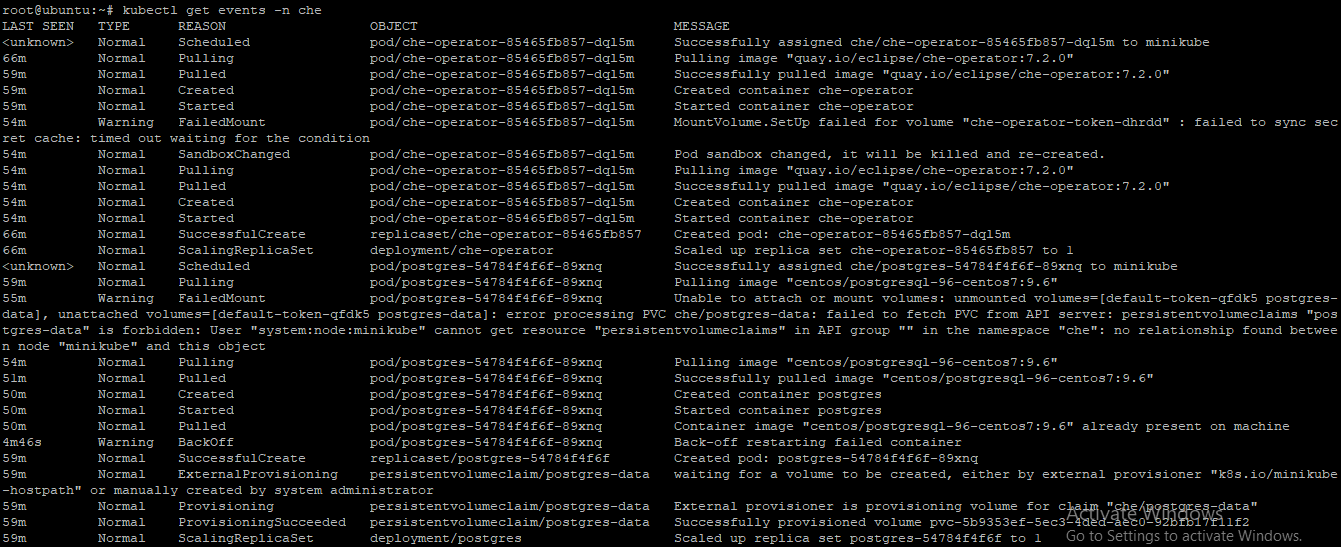
 gattytto
on 9 Oct 2019
gattytto
on 9 Oct 2019
Comparing Che installed in the che namespace to Che installed in the default namespace reveals that the securityContext gets set to {} in default, and is properly set in the che namespace:
  securityContext:
    seLinuxOptions:
      level: 's0:c22,c9'
    fsGroup: 1000480000
 tomgeorge
on 29 Oct 2019
tomgeorge
on 29 Oct 2019
As I'm investigating this more, it seems like default does not respect any of the security context constraints by default that are present in openshift... If I make a new user and give them create access to pods and deployments, and they run a pod, it will run as root/the default UID present in that images Dockerfile. When I run the same pod in another namespace it is runs in a security context. default seems to have annotations regarding security contexts, but does not respect them:
apiVersion: v1
kind: Namespace
metadata:
  annotations:
    openshift.io/sa.scc.mcs: s0:c6,c5
    openshift.io/sa.scc.supplemental-groups: 1000040000/10000
    openshift.io/sa.scc.uid-range: 1000040000/10000
  creationTimestamp: "2019-10-28T20:25:55Z"
  name: default
  resourceVersion: "7335"
  selfLink: /api/v1/namespaces/default
  uid: 2515d6e5-f9c1-11e9-9124-028754979780
spec:
  finalizers:
  - kubernetes
status:
  phase: Active
apiVersion: project.openshift.io/v1
kind: Project
metadata:
  annotations:
    openshift.io/sa.scc.mcs: s0:c6,c5
    openshift.io/sa.scc.supplemental-groups: 1000040000/10000
    openshift.io/sa.scc.uid-range: 1000040000/10000
  creationTimestamp: "2019-10-28T20:25:55Z"
  name: default
  resourceVersion: "7335"
  selfLink: /apis/project.openshift.io/v1/projects/default
  uid: 2515d6e5-f9c1-11e9-9124-028754979780
spec:
  finalizers:
  - kubernetes
status:
  phase: Active
I'm starting to think this is just a documentation issue that we will need to point out as @l0rd and @davidfestal have suggested. I reached out on the aos-devel slack channel but haven't had a reply yet.
tomgeorge
on 30 Oct 2019
Last update I think. There are two problems contributing to this issue:
- The above comment about random uids not getting correctly assigned in the
defaultnamespace - The default permissions in an ebs volume are 755, which is not group writeable. In the entrypoint script, it does some commands to change ownership of
/var/lib/pgsql:
Since by default the ebs volume is only user root writeable, and there is no security context fsGroup, the command fails.
To mitigate this we could change the operator to check if we are in the default namespace and set the security context, or we can document that che should not be run in the default namespace because it won't set the appropriate security context. We could also advise people that they could use a statically-provisioned PV with appropriate permissions, and back the postgres deployment with that, but I don't know if the operator works that way.
tomgeorge
on 31 Oct 2019
There is a known issue for this in the documentation. Should we open another GH issue to discuss possible code fixes for this?
tomgeorge
on 4 Nov 2019
@tomgeorge thanks, I believe we can close the issue since it is documented case and continue the discussion in the https://github.com/eclipse/che/issues/15092
 ibuziuk
on 5 Nov 2019
ibuziuk
on 5 Nov 2019
I'm unable to close this, can someone please close?
tomgeorge
on 5 Nov 2019
Related issues
 sleshchenko
·
3Comments
sleshchenko
·
3Comments
sleshchenko
·
3Comments
sleshchenko
·
3Comments
 redeagle84
·
3Comments
sleshchenko
·
3Comments
redeagle84
·
3Comments
sleshchenko
·
3Comments
 luckymore0520
·
3Comments
luckymore0520
·
3Comments
Most helpful comment
Comparing Che installed in the
chenamespace to Che installed in thedefaultnamespace reveals that thesecurityContextgets set to{}in default, and is properly set in thechenamespace: