Che: [Hosted Che] Unauthorized! Configured service account doesn't have access.
I tried to run theia within che following these instructions:
https://docs.google.com/document/d/1hFXTwzIU3MnqcciXH9E7xyUtEJRUeUuJ-e0JlEhTKjo/mobilebasic
After doing everything exactly what the docs say, the "Loading" dialog takes forever. After waiting a long time, I tried to start the workspace again. But I get the following issue:

Here copy'n'paste:
Failure executing: GET at: https://f8osoproxy-test-dsaas-production.09b5.dsaas.openshiftapps.com/api/v1/namespaces/zoker2-che/persistentvolumeclaims. Message: Unauthorized! Configured service account doesn't have access. Service account may have been revoked.. The error may be caused by an expired token or changed password. Update Che server deployment with a new token or password.
I also tried to install the theia stack with the same result.
Does anyone know what went wrong here? I did not change any parameter or anything else...
 TheZoker
All 31 comments
Same issue for me!
 mohschmid
on 9 Jan 2019
mohschmid
on 9 Jan 2019
Thanks @mohschmid and @TheZoker for reporting the issue.
@ibuziuk @benoitf @l0rd : Could you give a look?
 slemeur
on 10 Jan 2019
slemeur
on 10 Jan 2019
Same issue for me..???????
 hellanemrri
on 10 Jan 2019
hellanemrri
on 10 Jan 2019
Same issue as well. Any update?
 bryantson
on 19 Aug 2019
bryantson
on 19 Aug 2019
@bryantson Could you provide information about how did you deploy your Che? Chectl, operator, helm....? What were the arguments?
 sleshchenko
on 19 Aug 2019
sleshchenko
on 19 Aug 2019
@sleshchenko The issue was encountered when I used https://che.openshift.io. I also did encountered the issue when I ran minishift previously.
bryantson
on 19 Aug 2019
This is a che.openshift.io specific issue and seems to be related to how user accounts are provisioned there.
I've created issue https://github.com/redhat-developer/rh-che/issues/1569 to track this, as it's not a Che-specific issue.
 amisevsk
on 22 Aug 2019
amisevsk
on 22 Aug 2019
I also have this issue on Rancher so I don't think it's platform specific
 davidwindell
on 22 Aug 2019
davidwindell
on 22 Aug 2019
Even i have the same issue..any fixes for this? or is it still open?
 puneethpk
on 7 Oct 2019
puneethpk
on 7 Oct 2019
@puneethpk I beleive the original issue on che.openshift.io has been fixed. I am not able to reproduce it neither locally nor on an hosted instance of Che. Can you please provide some details that would help us reproduce it?
 l0rd
on 7 Oct 2019
l0rd
on 7 Oct 2019
@davidwindell @puneethpk Could you share details about your Che installations? The referenced error message is pretty specific to our production deployment.
As a test, the output of kubectl describe serviceaccount che or similar would be helpfu (in addition to the usual version/deploy method/cluster info).
amisevsk
on 7 Oct 2019
I'm no longer able to reproduce it, can't recall when it was fixed but it might be when I started applying cheWorkspacesNamespace to my helm values.
davidwindell
on 7 Oct 2019
I have deployed it using yaml files in kubernetes cluster deployed in aws. This is the error log i get when i try to create a workspace.Che service account has all the access.
The error may be caused by an expired token or changed password. Update Che server deployment with a new token or password
puneethpk
on 8 Oct 2019
I have deployed it using yaml files in kubernetes cluster deployed in aws. This is the error log i get when i try to create a workspace.Che service account has all the access.
The error may be caused by an expired token or changed password. Update Che server deployment with a new token or password
i am also facing same issue by using through yaml files , any solution please
 hari1992-web
on 1 Apr 2020
hari1992-web
on 1 Apr 2020
Error: Failed to start the workspace: "Failure executing: POST at: https://10.96.0.1/api/v1/namespaces. Message: Forbidden!Configured service account doesn't have access. Service account may have been revoked. namespaces is forbidden: User "system:serviceaccount:default:che" cannot create resource "namespaces" in API group "" at the cluster scope. The error may be caused by an expired token or changed password. Update Che server deployment with a new token or password."
hari1992-web
on 1 Apr 2020
related to https://github.com/eclipse/che/issues/15946
CC @ibuziuk
 skabashnyuk
on 1 Apr 2020
skabashnyuk
on 1 Apr 2020
related to #15946
CC @ibuziuk
Its not helpful please specify another answer
hari1992-web
on 1 Apr 2020
@hari1992-web this issue is might be related to https://github.com/eclipse/che/issues/15946 It's worth to check it again when https://github.com/eclipse/che/issues/15946 would be closed.
skabashnyuk
on 1 Apr 2020
Press F5 or click here to try again.
Error: Failed to start the workspace: "Failure executing: GET at: https://10.96.0.1/api/v1/namespaces/che-che. Message: Unauthorized! Configured service account doesn't have access. Service account may have been revoked. Unauthorized. The error may be caused by an expired token or changed password. Update Che server deployment with a new token or password."
hari1992-web
on 11 Apr 2020
Press F5 or click here to try again.
Error: Failed to start the workspace: "Failure executing: GET at: https://10.96.0.1/api/v1/namespaces/che-che. Message: Unauthorized! Configured service account doesn't have access. Service account may have been revoked. Unauthorized. The error may be caused by an expired token or changed password. Update Che server deployment with a new token or password."

hari1992-web
on 11 Apr 2020
Error: Error: Che TLS mode is turned on, but required "che-tls" secret is not pre-created in "che" namespace
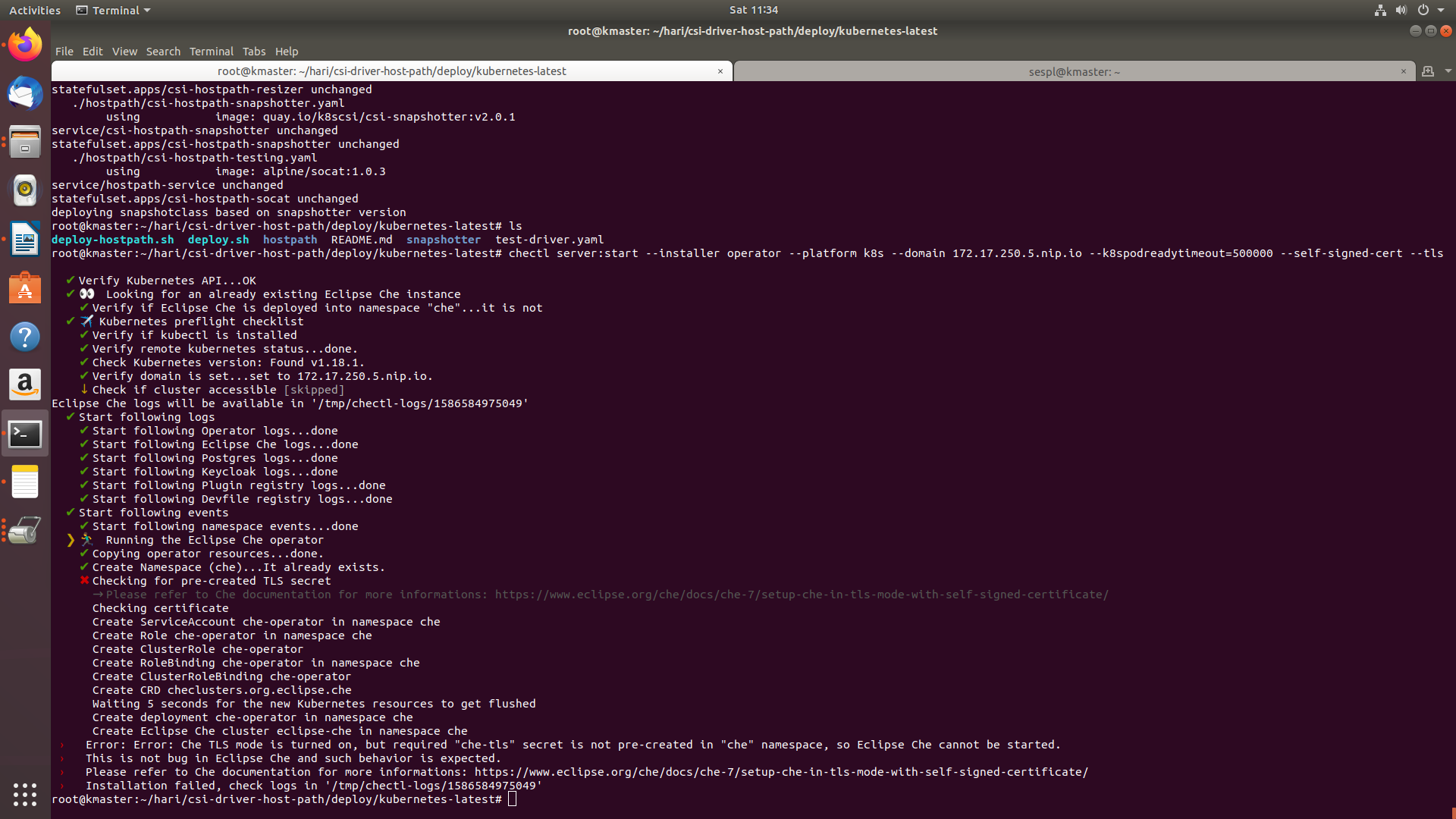 using chectl also its facing error
hari1992-web
on 11 Apr 2020
the original issue is che.openshift.io specific if you can still reproduce it on there, please provide details. Otherwise, please open a separate issue with details.
 ibuziuk
on 11 Apr 2020
ibuziuk
on 11 Apr 2020
eclipse che+keycloak+postgres sql on kubernetes how to write yaml files and what is the procedure please explain any body knows ????????????????????????/
hari1992-web
on 11 Apr 2020
eclipse che+keycloak+postgres sql on kubernetes how to write yaml files and what is the procedure please explain any body knows ????????????????????????/
@hari1992-web could you clarify what do you mean by writing yaml files? files for what? creating tls self-signed secret? BTW it does not seems a question related to this issue, please open a new issue with your question. Will try to help when understand which issues you face.
sleshchenko
on 13 Apr 2020
so I want to install eclipse che on kubernetes master machine through yaml files what is procedure ???
hari1992-web
on 13 Apr 2020
@hari1992-web We don't support installing through yaml files, we only support helm or operator.
For sure you can run helm with --dry-run and --debug options and extract yamls files you'll be able to apply manually, but it may be error-prone and I don't recommend doing it until you deeply understand Che Deployment. What the problem with chectl?
Please again, create a separate issue!
sleshchenko
on 14 Apr 2020
Looks like we had an issue with expired token on 1a and 1b. @skryzhny rotated the tokens and the issue should be fixed.
@hari1992-web could you please confirm that https://github.com/eclipse/che/issues/12366#issuecomment-612333192 is no longer reproducible fo r you?
ibuziuk
on 14 Apr 2020
@hari1992-web We don't support installing through yaml files, we only support helm or operator.
For sure you can run helm with --dry-run and --debug options and extract yamls files you'll be able to apply manually, but it may be error-prone and I don't recommend doing it until you deeply understand Che Deployment. What the problem with chectl?
Please again, create a separate issue!
ok I will use now with chectl and error will be posted please wait
Thanks
Advance
hari1992-web
on 14 Apr 2020
Readiness probe failed: HTTP probe failed with statuscode: 500
Back-off restarting failed container

facing this issue Iam using installating through chectl tool
please any body know this issue
Thanks Advance
hari1992-web
on 16 Apr 2020
1 month later, slip to backlog.
 nickboldt
on 22 Jun 2020
nickboldt
on 22 Jun 2020
The original issue has been fixed. Closing
ibuziuk
on 23 Jun 2020
Related issues
sleshchenko
·
3Comments
 redeagle84
·
3Comments
redeagle84
·
3Comments
 apupier
·
3Comments
apupier
·
3Comments
 luckymore0520
·
3Comments
luckymore0520
·
3Comments
 vanzhiganov
·
3Comments
vanzhiganov
·
3Comments
Most helpful comment
I also have this issue on Rancher so I don't think it's platform specific