Che: Authorization token is missed error after login on Safari Version 12.0 (14606.1.36.1.9)
Description
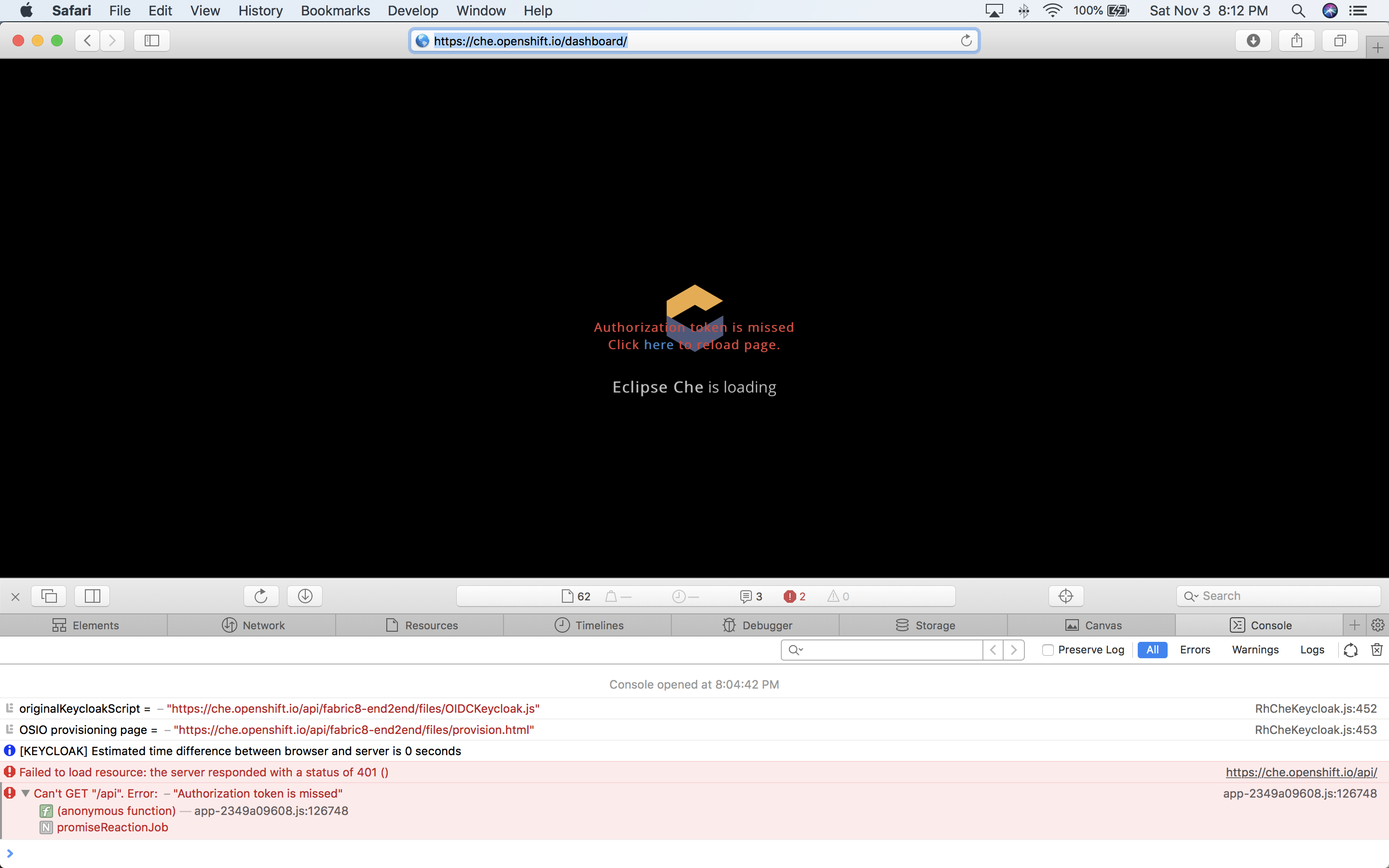
When I want to start che.openshift.io i get en error on Safari:
Authorization token is missed
Click here to reload page.
On Chrome it is working
Reproduction Steps
macOs Mojave
Safari Version 12.0 (14606.1.36.1.9)
 Bassinator
All 34 comments
Failure reproduces on:
MacOS High Sierra 10.13.6 (17G2307)
Safari Version 11.1.2 (13605.3.8)
Logged in w/ Red Hat Developer ID
Reloading page via link, as instructed in message, does not resolve the issue.
Also attempted in a new Private browser window.
Developer console screenshot attached...
Works successfully on: MacOS Firefox 63.0.1
 loadtheaccumulator
on 4 Nov 2018
loadtheaccumulator
on 4 Nov 2018
@davidfestal can you triage this one ?
 gorkem
on 5 Nov 2018
gorkem
on 5 Nov 2018
I've had a look into this one, helped by @benoitf since I don't have any Mac here to test correctly myself.
Though I still have to further check some points to confirm, it seems to me that it isn't related the end-2-end flow (RhChe-side) or to the authentication itself, since the Keycloak authentication step is correctly performed according to the logs . It seems more like a language incompatibility in the way promises are used at this place in the Dashboard initialization code. I'll check this in more details tomorrow with @benoitf .
 davidfestal
on 6 Nov 2018
davidfestal
on 6 Nov 2018
Also not working in Safari on iOS 12.1.
 kevinherron
on 11 Nov 2018
kevinherron
on 11 Nov 2018
Also not working in Safari on MacOS 10.14.2
 fzalila
on 14 Dec 2018
fzalila
on 14 Dec 2018
same error on a standard multi-user Docker installation with Safari 12.0.3 (14606.4.5) (clearing the cache etc. does not solve the problem)
 tjeske
on 2 Feb 2019
tjeske
on 2 Feb 2019
get same error on a standard multi-user Docker installation (che 7.0.0-beta-1.0) with Safari 12.0.3 (14606.4.5) (clearing the cache etc. does not solve the problem)
testing with iOS 12.1.4 (chrome, firefox, opera mini) got same error
 ivanhertanto
on 11 Mar 2019
ivanhertanto
on 11 Mar 2019
Is there any update on this issue? I just moved to Che after finding that Codenvy is basically dead but Che refuses to work in Safari. I using version 12.1.1 on MacOS 10.14.5.
 Dog2puppy
on 21 May 2019
Dog2puppy
on 21 May 2019
On IOS no Browser is working. Tried to disabel „prevent Cross-Site Tracking“ as mentioned in another link in#1431 übt this still dös Not work.
In Chrome or Firefox on IOS I don‘t even see an option to alow third Party Cookies. Most of the links in Google only mention non IOS versions of the browsers.
 Jeans1984
on 19 Jun 2019
Jeans1984
on 19 Jun 2019
The reason it doesn’t work on iOS with other browsers is because under the hood all browsers on iOS have to use WebKit. So basically all browsers are just a skin and they’re all Safari pretty much.
Dog2puppy
on 19 Jun 2019
I see this error from time to time, but in my case it's caused by being logged in with the wrong credentials (e.g. accessing our development cluster while logged into my normal account). Is the error reproducible in an incognito/private window?
 amisevsk
on 20 Jun 2019
amisevsk
on 20 Jun 2019
Was able to reproduce in a private window. I did use the GitHub login option when I was at the Red Hat login screen.
Dog2puppy
on 20 Jun 2019
Was able to reproduce in a private window. I did use the GitHub login option when I was at the Red Hat login screen.
Hmm, @davidfestal any thoughts here? I don't use the Github login option, and don't really follow the full RHD login process.
amisevsk
on 20 Jun 2019
I can confirm that all of the browsers on iOS seem to have this issue. Can't get it to work I'm afraid.
 BobbieERay
on 9 Aug 2019
BobbieERay
on 9 Aug 2019
Just tried with iPadOS 13 beta
User Agent:
13.0 Safari/605.1.15
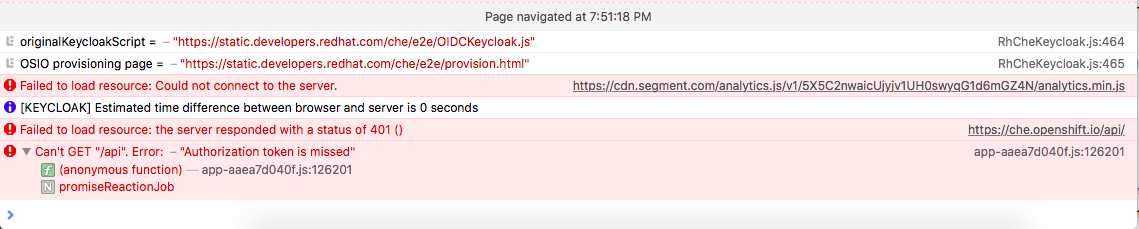
Page navigated at 7:51:18 PM
RhCheKeycloak.js:464originalKeycloakScript = – "https://static.developers.redhat.com/che/e2e/OIDCKeycloak.js"
RhCheKeycloak.js:465OSIO provisioning page = – "https://static.developers.redhat.com/che/e2e/provision.html"
https://cdn.segment.com/analytics.js/v1/5X5C2nwaicUjyjv1UH0swyqG1d6mGZ4N/analytics.min.jsFailed to load resource: Could not connect to the server.
[KEYCLOAK] Estimated time difference between browser and server is 0 seconds
https://che.openshift.io/api/Failed to load resource: the server responded with a status of 401 ()
app-aaea7d040f.js:126201Can't GET "/api". Error: – "Authorization token is missed"
 jcpowermac
on 21 Aug 2019
jcpowermac
on 21 Aug 2019
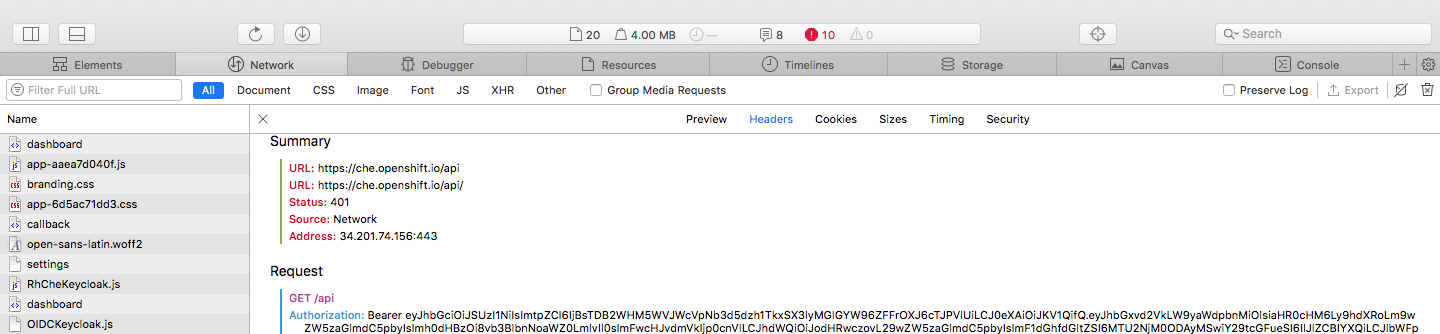
Summary
URL: https://che.openshift.io/api
URL: https://che.openshift.io/api/
Status: 401
Source: Network
Address: 34.201.74.156:443
Request
GET /api
Authorization: Bearer <removed>
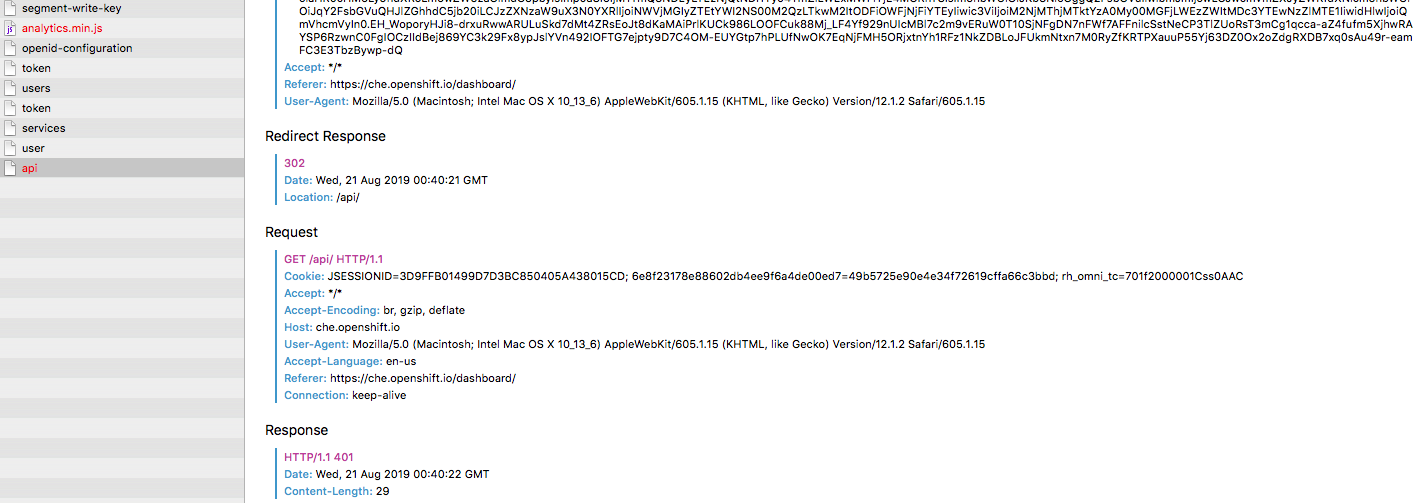
Accept: */*
Referer: https://che.openshift.io/dashboard/
User-Agent: Mozilla/5.0 (Macintosh; Intel Mac OS X 10_13_6) AppleWebKit/605.1.15 (KHTML, like Gecko) Version/12.1.2 Safari/605.1.15
Redirect Response
302
Date: Wed, 21 Aug 2019 00:40:21 GMT
Location: /api/
Request
GET /api/ HTTP/1.1
Cookie: JSESSIONID=3D9FFB01499D7D3BC850405A438015CD; 6e8f23178e88602db4ee9f6a4de00ed7=49b5725e90e4e34f72619cffa66c3bbd; rh_omni_tc=701f2000001Css0AAC
Accept: */*
Accept-Encoding: br, gzip, deflate
Host: che.openshift.io
User-Agent: Mozilla/5.0 (Macintosh; Intel Mac OS X 10_13_6) AppleWebKit/605.1.15 (KHTML, like Gecko) Version/12.1.2 Safari/605.1.15
Accept-Language: en-us
Referer: https://che.openshift.io/dashboard/
Connection: keep-alive
Response
HTTP/1.1 401
Date: Wed, 21 Aug 2019 00:40:22 GMT
Content-Length: 29
From a cursory glance, looks related to https://bugs.webkit.org/show_bug.cgi?id=188165, although I don't have the time to dig too deeply into it.
amisevsk
on 21 Aug 2019
Is there a change that Che could present this bug to an user in more friendly way?
E.g. say that the browser is not supported if this happens and browser agent is Safari?
 kpiwko
on 12 Sep 2019
kpiwko
on 12 Sep 2019
I was hoping iPad OS 13 would resolve this issue, but no change whatsoever. Still the same issue.
BobbieERay
on 25 Sep 2019
Also see this issue with che7.1.0+ocp4.1.12 bare metal install. safari, chrome are blocked with login by the issue. Firefox happened to see the login page and get in. Quite strange! it was quite a while ago for the issue to appear in the community. Any feedback for it?
after clicking login button, loading page will call /api with token for some reason. Then the call was replocated to /api/ by server and eventually the token gets lost. the following call will end up with missing token message and stuck.
Hope it work soon. thanks.
 gaord
on 28 Sep 2019
gaord
on 28 Sep 2019
Same problem here. Safari Version 13.0.2 on MacOS Mojave.
 RafaelMiquelino
on 10 Oct 2019
RafaelMiquelino
on 10 Oct 2019
Add another user under osX Cataline 10.15.11+Safari 13.0.3. It works with chrome, but I would prefers Safari.
Please fix this, thank you
 maquejp
on 7 Dec 2019
maquejp
on 7 Dec 2019
Same as above. Can't get it working on Chrome either. macOS Mojave 10.14.6, Chrome 78.0.3904.108 or Safari 13.03
However it seems to work in Firefox 71.0
 rkedge
on 7 Dec 2019
rkedge
on 7 Dec 2019
Same problem here on a 2018 MacBook Pro.
OS: Catalina 10.15.2
Browser: Safari version 13.0.4 (15608.4.9.1.3)
 andrewbober
on 6 Jan 2020
andrewbober
on 6 Jan 2020
Solution (temporary) - Use non WebKit browser. Just got che.openshift.io to work on Firefox. Also enable cookies in the browser or you will never receive a token!!!! Major problem. I usually have third party cookies blocked but "not if I want to use Che online"
It seems this is a problem with ALL WebKit browsers and the cookie thing with all the following. I had che.openshift.io in Edge working but that changed last week with their new WebKit based Edge browser was installed. Today I tried with Edge, Opera, Chrome, and Brave all have problems with starting a workbench. Firefox works a treat.
 mikeysb2
on 6 Feb 2020
mikeysb2
on 6 Feb 2020
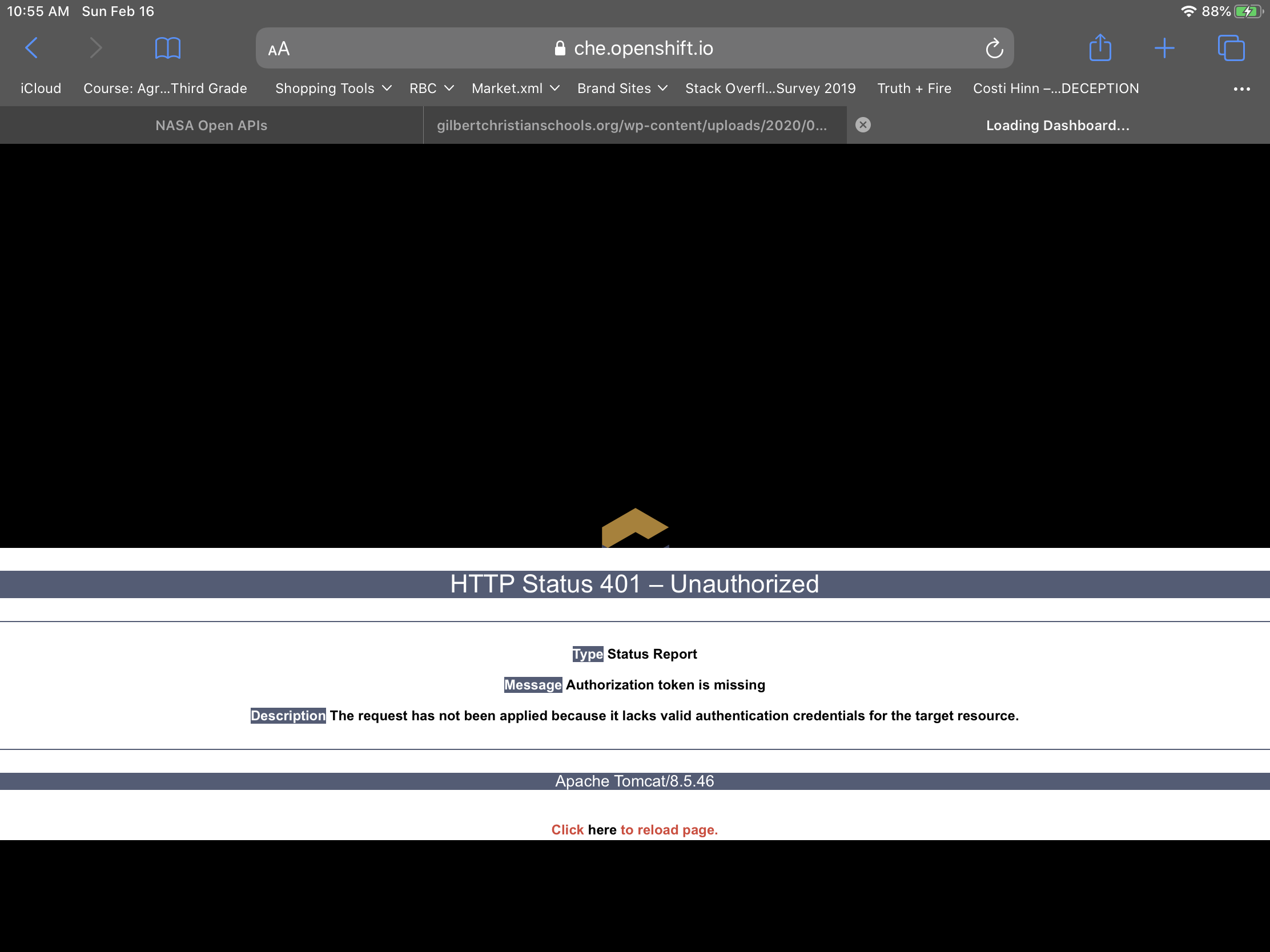
Feb 2020, FYI This still does not work on iPadOS 13.3.3.1 Safari
iPadOS Safari redhat che.openshift.io
 fshtank
on 16 Feb 2020
fshtank
on 16 Feb 2020
Feb 2020, FYI This still does not work on iPadOS 13.3.3.1 Safari
iPadOS Safari redhat che.openshift.io
Same problem
 sergNikitin777
on 23 Feb 2020
sergNikitin777
on 23 Feb 2020
Safari is currently supported neither for vanilla Eclipse Che nor for Hosted Che (che.openshift.io), please try Chrome or Firefox instead. This issue has the open-for-dev status label and contributions from the community are most welcome.
 ibuziuk
on 23 Feb 2020
ibuziuk
on 23 Feb 2020
Safari is currently supported neither for vanilla Eclipse Che nor for Hosted Che (che.openshift.io), please try Chrome or Firefox instead. This issue has the
open-for-devstatus label and contributions from the community are most welcome.
I tried, the same problem observed for firefox and chrome on iPadOS 13.3.3.1 Safari
sergNikitin777
on 25 Feb 2020
@sergNikitin777 The issue is that iOS/iPadOS devices are forced to use webkit under the hood, so Chrome and Firefox end up using the same engine as Safari there.
amisevsk
on 25 Feb 2020
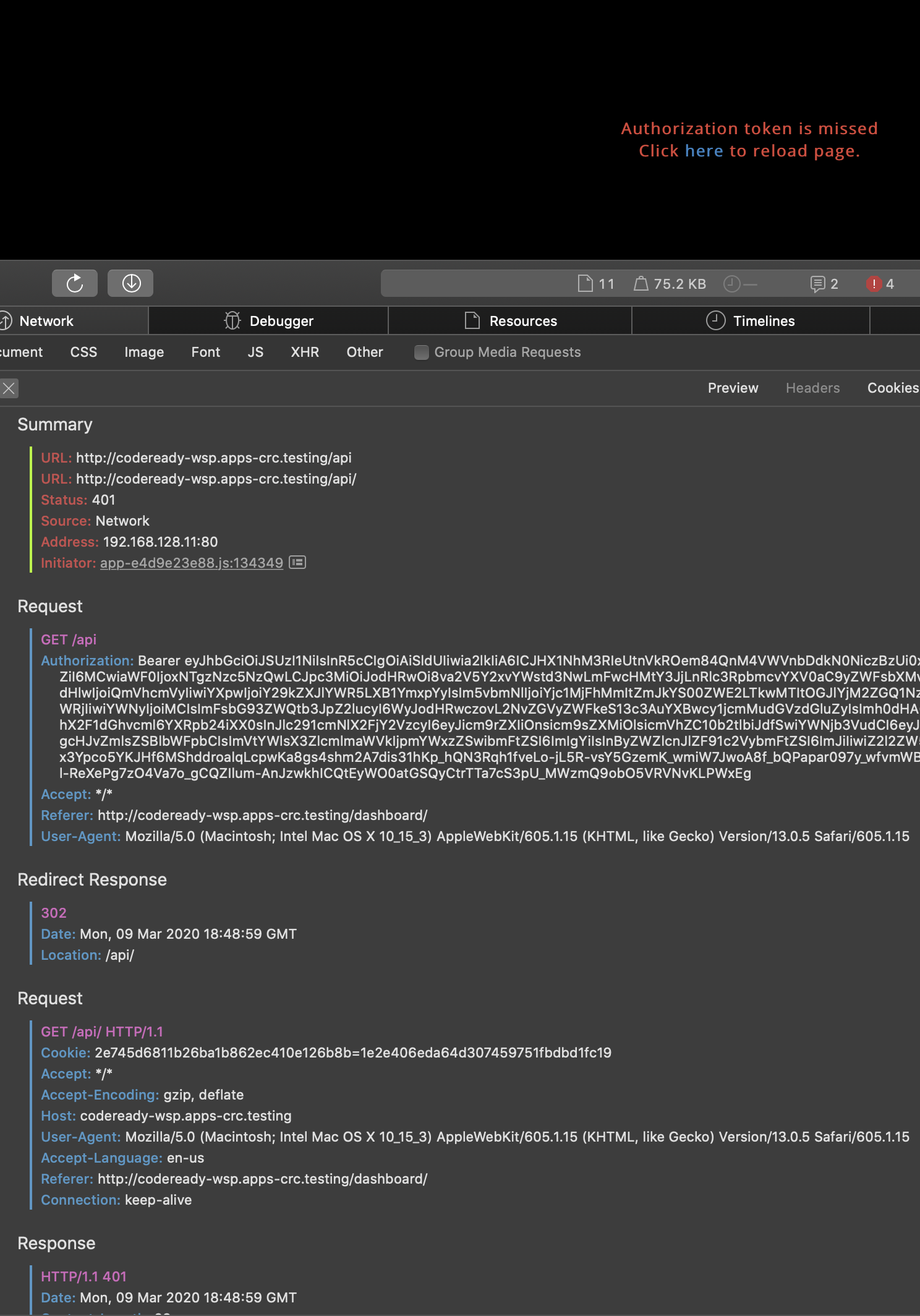
It looks like Safari doesn't like the redirect. It gets a 301 on <host>/api -> <host>/api/ and on that redirect WebKit doesn't send the Authorization header, but instead appends a cookie. See below for a chromium to safari comparison.
Not sure if WebKit is in the wrong here for not sending that header, but can we just have the first request here to be <host>/api/? It looks like chromium also gets a 301 on that initial /api request and then issues a /api/ request with the Authorization header set.
I don't know where that redirect happens when logging in and its hard to find /api when searching to figure out where exactly it is. Maybe someone more knowledgeable with Che/auth can look?
Safari (both OS X and iPadOS/iOS. test on v:OSX Safari 13.0.5):
Summary
URL: http://codeready-wsp.apps-crc.testing/api
URL: http://codeready-wsp.apps-crc.testing/api/
Status: 401
Source: Network
Address: 192.168.128.11:80
Initiator:
app-e4d9e23e88.js:134349

Request
GET /api
Authorization: Bearer <REMOVED>
Accept: */*
Referer: http://codeready-wsp.apps-crc.testing/dashboard/
User-Agent: Mozilla/5.0 (Macintosh; Intel Mac OS X 10_15_3) AppleWebKit/605.1.15 (KHTML, like Gecko) Version/13.0.5 Safari/605.1.15

Redirect Response
302
Date: Mon, 09 Mar 2020 18:48:59 GMT
Location: /api/

Request
GET /api/ HTTP/1.1
Cookie: 2e745d6811b26ba1b862ec410e126b8b=1e2e406eda64d307459751fbdbd1fc19
Accept: */*
Accept-Encoding: gzip, deflate
Host: codeready-wsp.apps-crc.testing
User-Agent: Mozilla/5.0 (Macintosh; Intel Mac OS X 10_15_3) AppleWebKit/605.1.15 (KHTML, like Gecko) Version/13.0.5 Safari/605.1.15
Accept-Language: en-us
Referer: http://codeready-wsp.apps-crc.testing/dashboard/
Connection: keep-alive

Response
HTTP/1.1 401
Date: Mon, 09 Mar 2020 18:48:59 GMT
Content-Length: 29
Chromium 82.0.4080.0 OSX
General:
Request URL: http://codeready-wsp.apps-crc.testing/api
Request Method: GET
Status Code: 302
Remote Address: 192.168.128.11:80
Referrer Policy: strict-origin-when-cross-origin

Request:
Date: Mon, 09 Mar 2020 18:50:34 GMT
Location: /api/
Transfer-Encoding: chunked
Accept: */*
Accept-Encoding: gzip, deflate
Accept-Language: en-US,en;q=0.9
Authorization: Bearer <REMOVED>
Cache-Control: no-cache
Connection: keep-alive
Cookie: 2e745d6811b26ba1b862ec410e126b8b=1e2e406eda64d307459751fbdbd1fc19
Host: codeready-wsp.apps-crc.testing
Pragma: no-cache
Referer: http://codeready-wsp.apps-crc.testing/dashboard/
User-Agent: Mozilla/5.0 (Macintosh; Intel Mac OS X 10_15_3) AppleWebKit/537.36 (KHTML, like Gecko) Chrome/82.0.4080.0 Safari/537.36
Then the redirect
General:
Request URL: http://codeready-wsp.apps-crc.testing/api/
Request Method: GET
Status Code: 200
Remote Address: 192.168.128.11:80
Referrer Policy: strict-origin-when-cross-origin
Cache-Control: public, no-cache, no-store, no-transform
Content-Encoding: gzip
Content-Type: application/json

Request:
Date: Mon, 09 Mar 2020 18:50:34 GMT
Set-Cookie: JSESSIONID=2C752C0FDDF7D2E94AB6CB09FE2CCD39; Path=/api; HttpOnly
Transfer-Encoding: chunked
Vary: Accept-Encoding
Accept: */*
Accept-Encoding: gzip, deflate
Accept-Language: en-US,en;q=0.9
Authorization: Bearer <REMOVED>
Cache-Control: no-cache
Connection: keep-alive
Cookie: 2e745d6811b26ba1b862ec410e126b8b=1e2e406eda64d307459751fbdbd1fc19
Host: codeready-wsp.apps-crc.testing
Pragma: no-cache
Referer: http://codeready-wsp.apps-crc.testing/dashboard/
User-Agent: Mozilla/5.0 (Macintosh; Intel Mac OS X 10_15_3) AppleWebKit/537.36 (KHTML, like Gecko) Chrome/82.0.4080.0 Safari/537.36
No screenshot as I can login.
Note, this was also done on che.openshift.io and I get the same result
 btannous
on 9 Mar 2020
btannous
on 9 Mar 2020
@btannous Thanks for this information.
I managed to get Che partially working with Safari by fronting it with Nginx with this rule
      location = /api {
        proxy_pass http://che/api/;
      }
I'm able to login and start a workspace but I'm unable to see the workspace due to a weird error when Safari tried to execute loader.html as JavaScript.
You can try it here https://che.legionx.com
 mingfang
on 11 Mar 2020
mingfang
on 11 Mar 2020
@mingfang Yeah, there is another issue that Theia is not loaded https://github.com/eclipse/che/issues/16335
 sleshchenko
on 12 Mar 2020
sleshchenko
on 12 Mar 2020
@mingfang Yeah, there is another issue that Theia is not loaded #16335
@sleshchenko
To workaround #16335 I added this to my nginx proxy
add_header 'Access-Control-Allow-Origin' '*';
You can try it in the link I posted above to see the next problem with loader.html.
mingfang
on 12 Mar 2020
Related issues
 johnmcollier
·
3Comments
johnmcollier
·
3Comments
 vanzhiganov
·
3Comments
vanzhiganov
·
3Comments
 InterestedInTechAndCake
·
3Comments
InterestedInTechAndCake
·
3Comments
 LaneGeek
·
3Comments
LaneGeek
·
3Comments
 JamesDrummond
·
3Comments
JamesDrummond
·
3Comments
Most helpful comment
It looks like Safari doesn't like the redirect. It gets a
301on<host>/api -> <host>/api/and on that redirect WebKit doesn't send the Authorization header, but instead appends a cookie. See below for a chromium to safari comparison.Not sure if WebKit is in the wrong here for not sending that header, but can we just have the first request here to be
<host>/api/? It looks like chromium also gets a301on that initial/apirequest and then issues a/api/request with theAuthorizationheader set.I don't know where that redirect happens when logging in and its hard to find
/apiwhen searching to figure out where exactly it is. Maybe someone more knowledgeable with Che/auth can look?Safari (both OS X and iPadOS/iOS. test on v:OSX Safari 13.0.5):
Chromium 82.0.4080.0 OSX
Then the redirect
No screenshot as I can login.
Note, this was also done on che.openshift.io and I get the same result