Che: Every user has system permissions by default
Description
I am running Che 6.7.0 on Kubernetes with Keycloak. When firing up a new Che server, each and every user authenticated with keycloak has "manage system" permissions.
I also tried to remote the permissions from a user via /swagger API client. The request fails with
{
  "message": "User can't edit permissions for this instance"
}
The Documentation about permissions also seems to be incomplete / misleading. It does not mention anything about the error message shown above. At the same time it says "System permissions are applicable to organizations" which does not make any sense to me.
Is it correct that there is currently no way to manage permissions with my setup?
 toorog
All 10 comments
When firing up a new Che server, each and every user authenticated with keycloak has "manage system" permissions.
This is what I have when creating a new user:
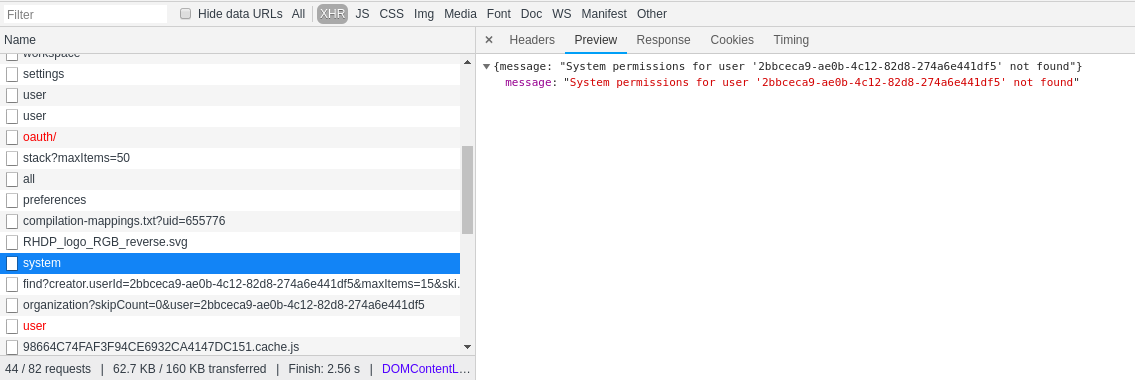
Can you share response you get from this call?
As to docs, indeed, I don't know why organizations term is used there.
And the error you get is expected - your user does not have system permissions.
 ghost
on 28 Jul 2018
ghost
on 28 Jul 2018
If I have a look at the same call that you showed in your screenshot (with the same user I am using at swagger-ui), I get the same result than you.
Assuming that no user has system permissions: How to assign them to a user? Once more the docs do not say anything about it, and also the REST-calls fail (I assume because the user assigning these permissions has to have it on his own).
toorog
on 30 Jul 2018
Update: I found out that every user with username admin has system permissions automatically.
From my perspective this is a major security issue: The permissions should not be based on the username. The User-ID should be used instead, or even better a keycloak role.
@eivantsov Shall I create a dedicated ticket for this change request or can you transform this one?
toorog
on 30 Jul 2018
@toorog the failing REST call is expected, this is how User Dashboard checks if current user has manageSystem permissions.
By default, there's a pre-created Che user admin (with the default password admin). This user has manageSystem system permissions out of the box. However, you can assign a different user to be the admin. Just add the following to your cm https://github.com/eclipse/che/blob/master/dockerfiles/init/manifests/che.env#L579
In the config, there can be just one admin user. However, you can assign manageSystem permissions for a particular user. Log in as admin/admin and in swagger run the following:
{
  "userId": "9aaeae23-2217-45ca-8559-3bfbdca7701b",
  "actions": [
    "manageSystem"
  ],
  "domainId": "system"
}
And it is impossible to register another user with username admin.
ghost
on 30 Jul 2018
@eivantsov My setup does not use the keycloak that comes with che. It uses another keycloak instance which is OIDC provider for other applications as well. Therefore initially there was no admin user in keycloak.
I then added a user admin in keycloak, and automagically it hat manageSystem permissions in che. This leads to the conclusion that che is assigning permissions based on the username, and not on the user-id. Furthermore the permissions for the admin user (however it is named) seem to be hard coded.
In my scenario any user might change his username. The only thing that is immutable is the user-id (that's also the concept of OIDC). So my proposal would be to:
- Assign permissions only based on immutable properties (user id in this case)
- Do no che-internal permission management at all and use keycloak roles instead.
toorog
on 30 Jul 2018
@toorog you can configure default admin user name with such property CHE_SYSTEM_ADMIN__NAME
https://github.com/eclipse/che/blob/master/dockerfiles/init/manifests/che.env#L579
 skabashnyuk
on 30 Jul 2018
skabashnyuk
on 30 Jul 2018
@skabashnyuk Yes I got that from @eivantsov statement already. But this does not change anything on the fact that it is bad practice to tie permissions to non-immutable values.
toorog
on 30 Jul 2018
@toorog this is a mechanism to provision one admin user out of the box. That user may then provide priviliges to a different user, and you may then not use the env at all.
ghost
on 30 Jul 2018
@toorog I can propose the following scenario.
- You set up CHE_SYSTEM_ADMIN__NAME in configuration name of the first admin.
- Admin login, he gets manageSystem permissions.
2.1 If admin want's he add new admins - You setup CHE_SYSTEM_ADMIN__NAME as null, so no one else can be granted manageSystem permissions automatically.
In this way, we will cover "chicken-egg" problem with first admin and your use case with changing the name as well.
skabashnyuk
on 30 Jul 2018
Suggestion by @skabashnyuk sounds quite reasonable. Closing the issue
ghost
on 10 Sep 2018
Related issues
 apupier
·
3Comments
apupier
·
3Comments
 johnmcollier
·
3Comments
johnmcollier
·
3Comments
 AndrienkoAleksandr
·
3Comments
AndrienkoAleksandr
·
3Comments
 sleshchenko
·
3Comments
sleshchenko
·
3Comments
 amisevsk
·
3Comments
amisevsk
·
3Comments