Description
Started with CHE_MULTUSER=true and all three containers started. First attempt to reach Che using the usual URL of http://hostname:8080/dashboard fails with message invalid parameter: redirect_uri
Then tried to access keycloak using URL http://hostname:5050/auth Its asking for a username and password to login to keycloak. Are there default credentials? I can create a default admin user for keycloak using docker commands:
docker exec ...... keycloak/bin/add-user-keycloak.sh -u username -p password
docker restart ......
Reproduction Steps
See above
Ubuntu 16.04 Che 6.0.0-M4
Diagnostics:
 levjason
All 20 comments
@levjason what is your OS and how exactly did you start Che? Can you share the entire output?
Default credentials are admin/admin
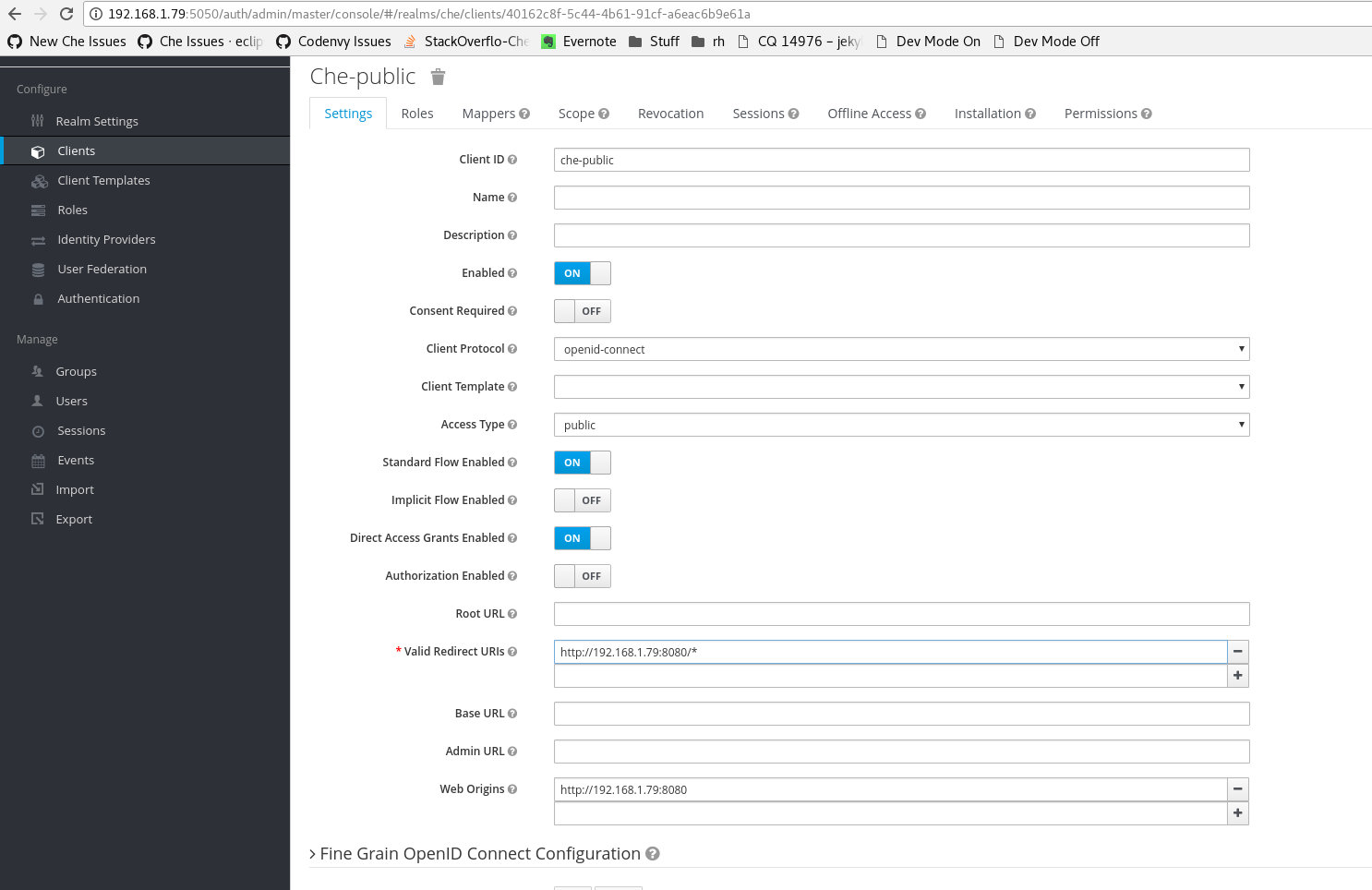
You may try fixing redirect uri error yourself though. Go to hostname:5050, login to admin console, go to clients, che, and look at redirect uris there. It should be the URL that you used to access Che.
 ghost
on 22 Dec 2017
ghost
on 22 Dec 2017
The OS is Ubuntu 16.04.
This is the command I used to start Che:
docker run -it --rm -e CHE_MULTIUSER=true -v /var/run/docker.sock:/var/run/docker.sock -v /home/usajlev/che_data:/data eclipse/che:nightly start --skip:scripts
levjason
on 22 Dec 2017
@levjason output from your docker run command please
ghost
on 22 Dec 2017
levjason
on 22 Dec 2017
@levjason do you access Che at http://10.130.54.161:8080?
ghost
on 22 Dec 2017
@eivantsov No, I was using http://usrscp29:8080 It works with http://10.130.54.161:8080/
levjason
on 22 Dec 2017
@levjason let me explain what has caused the error. When CLI starts Che multi user, it auto detects your IP and uses it in Keycloak config for che client. In your case, redirect URL wasn't smth that Keycloak expected. You may manually add another one, both to redirect uris and web origins.
ghost
on 22 Dec 2017
@eivantsov I see. Thanks.
levjason
on 22 Dec 2017
@eivantsov .i did as you said. But its still the SAME.. I.e redirect to uri /auth/realms..... But when i change the PATHPARAMETER for port of that uri to 8080.. It works but plugin dont work.. For that i should turn on DEV MODE.please help me sir..
 ShresthaRujal
on 15 May 2018
ShresthaRujal
on 15 May 2018
@ruzalsh can you describe in detail how you started Che and what URL do you use to access it.
ghost
on 15 May 2018
Sure! I am beginner so. Please correct me
if i am wrong.. docker run -it --rm -e CHE_MULTIUSER=true -e CHE_HOST=inetIp -v /var/run/docker.sock:/var/run/docker.sock -v /eclipse-che/data:/data -v cheDir/:/repo --env CHE_PORT=8080 eclipse/che:nightly start
ShresthaRujal
on 15 May 2018
Even tried from docker image without any repo but it said same "Invalid parameter: redirect_uri"
Url is : http://10.100.x.x:32929/username/workspace?wsagent-ref-prefix=dev-
ShresthaRujal
on 21 May 2018
@ruzalsh you need to go to $CHE_HOST:5050/auth, login to admin console (admin:admin), go to clients, che-public, and add the IP you use to access Che to redirectUris and webOrigins
ghost
on 21 May 2018
@eivantsov
Yes i tried adding my ip as you mentioned above with picture. But it don't work..
ShresthaRujal
on 21 May 2018
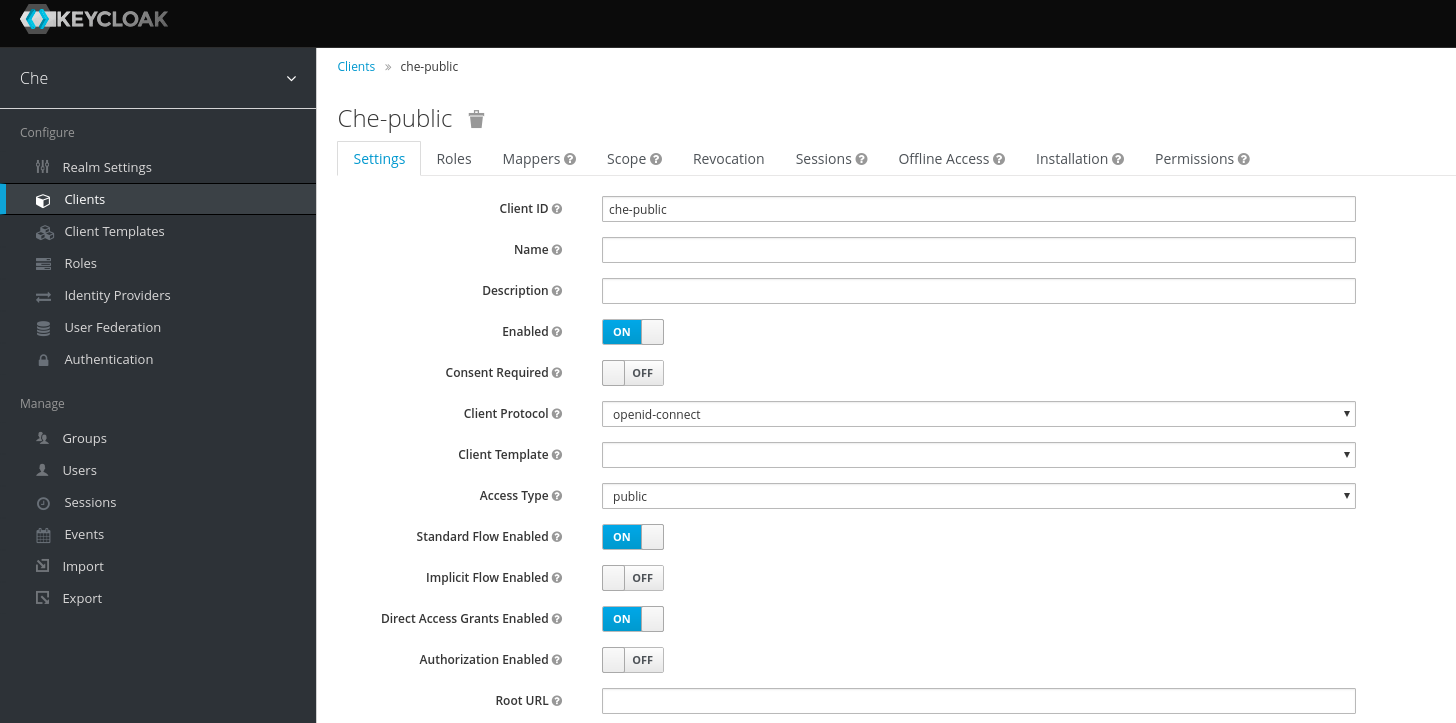
@ruzalsh sharing a screenshot will help
ghost
on 21 May 2018
https://imgur.com/a/hY7P6T9
I am sorry. I am unknown of posting image in github. But i did share image via imgur In above link..
ShresthaRujal
on 21 May 2018
@ruzalsh I meant screenshot of your keycloak admin console
Smth like this
ghost
on 21 May 2018
Opps! My bad. https://imgur.com/a/HgKX6Gf . here it is sir!
ShresthaRujal
on 21 May 2018
Since I cannot really see IPs, please make sure the IP you use to access Che is there in web origins and redirect uris.
ghost
on 21 May 2018
Yes sir. I tried with same ip and port that i use to access eclipse-che in keycloak . since both keycloak and che are in same host, i even tried with 127.0.0.1. Also tried with docker0 inetip. Firewall is down. Os is Centos 7. Gulp 3.9.1, python 2.7.5, node 10.1.0 bower 1.8.4, typings 2.1.1, mvn 3.5.3, java 1.8 , go 1.10.1 . Do i have any disadvantage with current system and configuration?? Is there any other way to run it? I am beginner and i want to dive deep into your system.
ShresthaRujal
on 21 May 2018
Related issues
 JamesDrummond
·
3Comments
JamesDrummond
·
3Comments
 redeagle84
·
3Comments
redeagle84
·
3Comments
 johnmcollier
·
3Comments
johnmcollier
·
3Comments
 Ohrimenko1988
·
3Comments
Ohrimenko1988
·
3Comments
 sleshchenko
·
3Comments
sleshchenko
·
3Comments
Most helpful comment
@ruzalsh you need to go to
$CHE_HOST:5050/auth, login to admin console (admin:admin), go to clients, che-public, and add the IP you use to access Che to redirectUris and webOrigins