Description
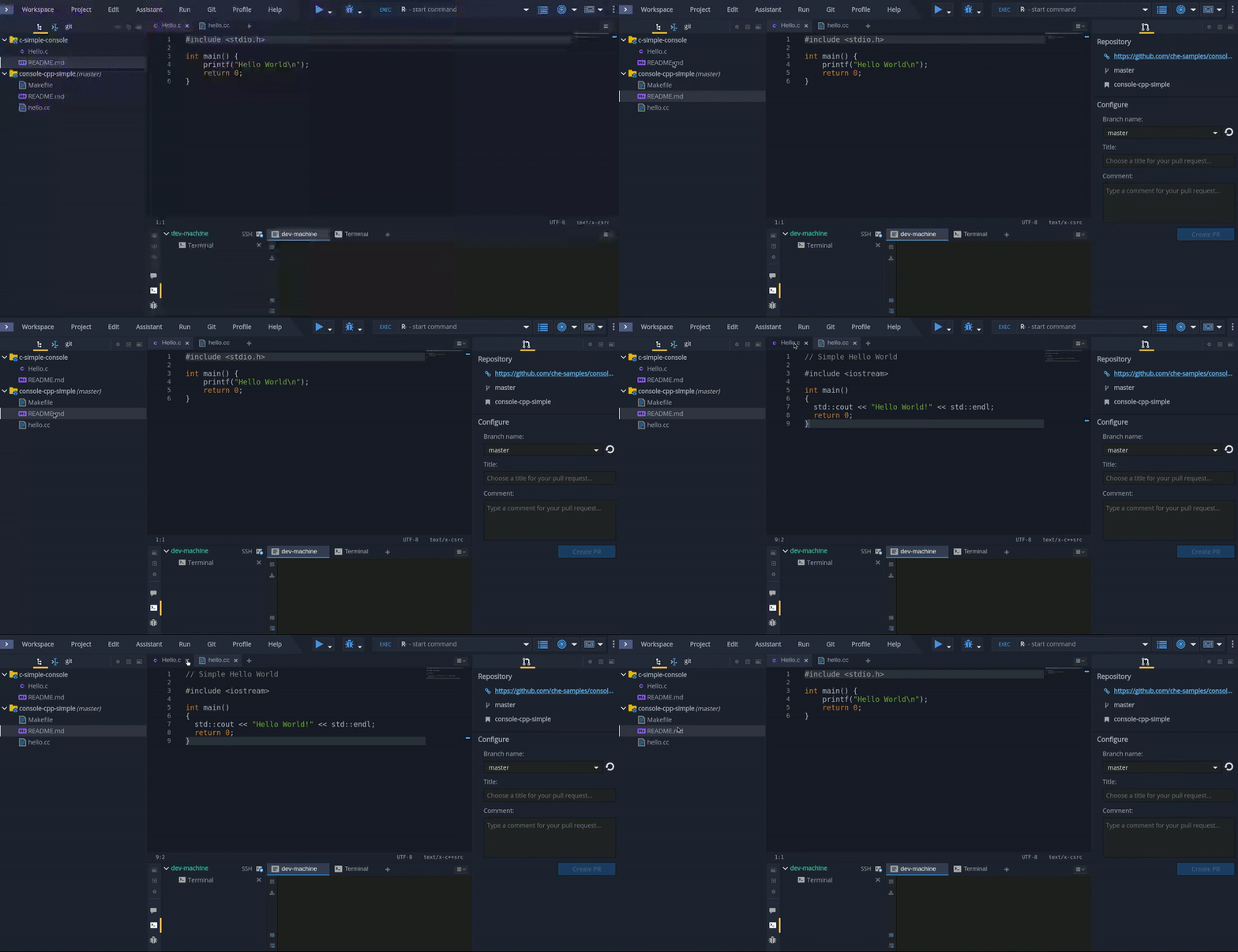
Sometimes appearing and disappearing of pull request panel is not comfortable:
- After IDE loading, clicking on a project causes appearance of the panel. In most cases it is useless and uses editor's space.
- If two (or more) projects are added into workspace and some of them aren't under git, changing selection in project explorer between them or even tabs in editor causes the panel appearance and disappearance. And a user has no ability to alter or turn off such annoying behaviour. If someone have to work with two projects, where one of them isn't project under git - it's a disaster.
Reproduction Steps
- Open a workspace
- Select a project under git in project explorer
Screencast:
- [ ] Once it closed don't show it again until page is refreshed
- [ ] If panel is opened and the current project isn't a git project then some massage should be dipslayed
 mmorhun
All 19 comments
The problem is not in the pull-request panel, it happens because when the right part has no panels to show and when selection is set to Git project pull request panel is added to part and it appears. Also when selection is set to project without Git, pull request panel disappears from part and the part hides. The problem is in the part's behavior.
 vinokurig
on 10 Nov 2017
vinokurig
on 10 Nov 2017
I think show PullRequest panel just because project under Git control is not good idea. User should to decide code is ready for PR, then make PR.
 vparfonov
on 10 Nov 2017
vparfonov
on 10 Nov 2017
Honestly I don't feel this is annoying in real life (real life means when using Che every day with real projects):
- In real life, you work 100% of your time with the same Git provider. The screenshot shows "fake" project, these kind of behavior of a feature should be commented for real use case.
- It's good to show the panel so people know that it exists, closing it once should close by default for this project.
- maybe if you don't use this feature, we should have an option to hide the panel in the preferences. But please do not disable it by default :) ... at least this should be discuss in a more global discussion on how it can work well with the new git panel (maybe adding a button "Create a PR").
To me, this issue is not priority at all and would prefer to see git panel improvements rather than this one.
Thanks
 sunix
on 10 Nov 2017
sunix
on 10 Nov 2017
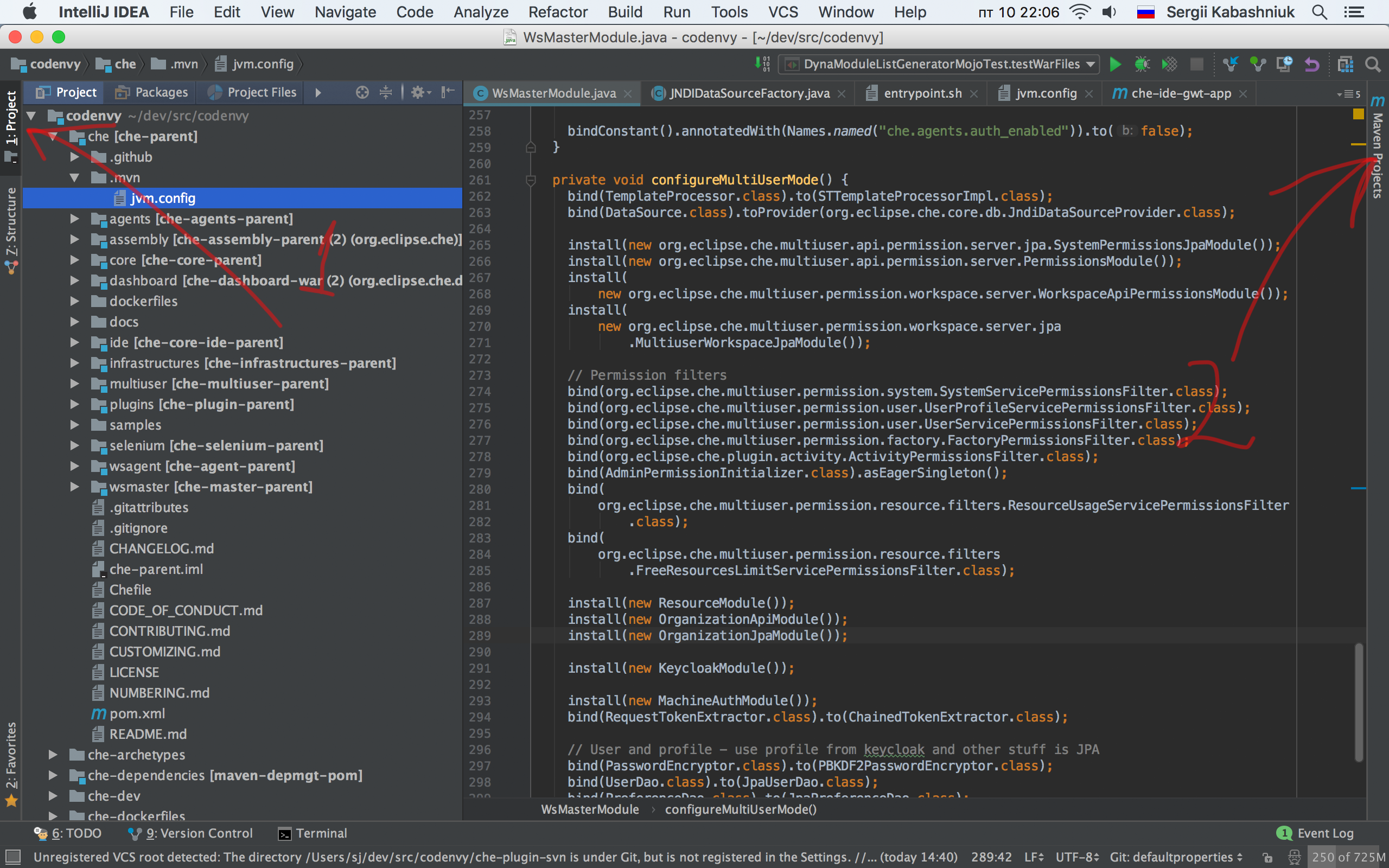
Why don't we reinvent a wheel and do like IntelliJ is doing?
To have some state for opened panel(1) and hidden (2)
 skabashnyuk
on 10 Nov 2017
skabashnyuk
on 10 Nov 2017
I totally agree with @skabashnyuk . "show/hide panel button" should exist. I know main argument to remove them it's a saving more space. But I don't think we should throw away such important and usefull conception. I usually always used "show/hide" button panel feature. And It was very usefull and easy to use. It was nice user experience for me. With current mechanism showing panel I spend more time to find and show or hide some panels. I need look on a lot icons and think what should I click to get expected result. And I need click more than one button. I think classic way to show/hide panels was better. Desktop Eclipse and IntelliJ use this way. But any way it's only mine own opinion and user experience.
 AndrienkoAleksandr
on 11 Nov 2017
AndrienkoAleksandr
on 11 Nov 2017
The PR panel is a differentiator, we need to highlight it for people. However once it’s closed it should stay closed. Having a preference to set whether it’s open on project load (default) or closed on project load is fine.
 bmicklea
on 11 Nov 2017
bmicklea
on 11 Nov 2017
@bmicklea what would be an action to bring it back?
skabashnyuk
on 11 Nov 2017
It would be closed but still there on the right - you’d just click it to open. Or am I misunderstanding the question?
bmicklea
on 11 Nov 2017
It would be closed but still there on the right
That is a good question. I don't know.
skabashnyuk
on 11 Nov 2017
Yes - were not removIng it, just keeping it closed once it’s closed.
--
Brad Micklea // Developer Tools // 416.707.0792
bmicklea
on 11 Nov 2017
but there is nothing to do ... it already keeping closed once it's closed
sunix
on 17 Nov 2017
Could we just close this issue because it is not an issue in my opinion
sunix
on 17 Nov 2017
OK
cannot reproduce with 2 git projects (close panel, switch project, panel is still closed)
can reproduce with 1 git project and 1 non git project ( close panel, switch project, switch project, panel reopens)
Then in real life I personally never have project not managed by git ... even for my svn project I use git-svn. I would prefer to see git panel improvements rather than this one. But this is my opinion.
sunix
on 17 Nov 2017
It's really distracting. Example
I have 1 project managed by git. Each time I start workspace I see this panel and close it.
What is the point of this behavior? I don't need it after workspace start. But when I will need it I have to restart my workspace?
I think the goal of this issue is to find the proper way of hiding closing this panel.
For example like this https://github.com/eclipse/che/issues/7304#issuecomment-343573433
@sunix @slemeur or you think this is a right behavior?
skabashnyuk
on 21 Nov 2017
@skabashnyuk You need do three steps:
- Click on the panels icon:

- In the list icons find left panel icon (icons are small so it's not easy...):
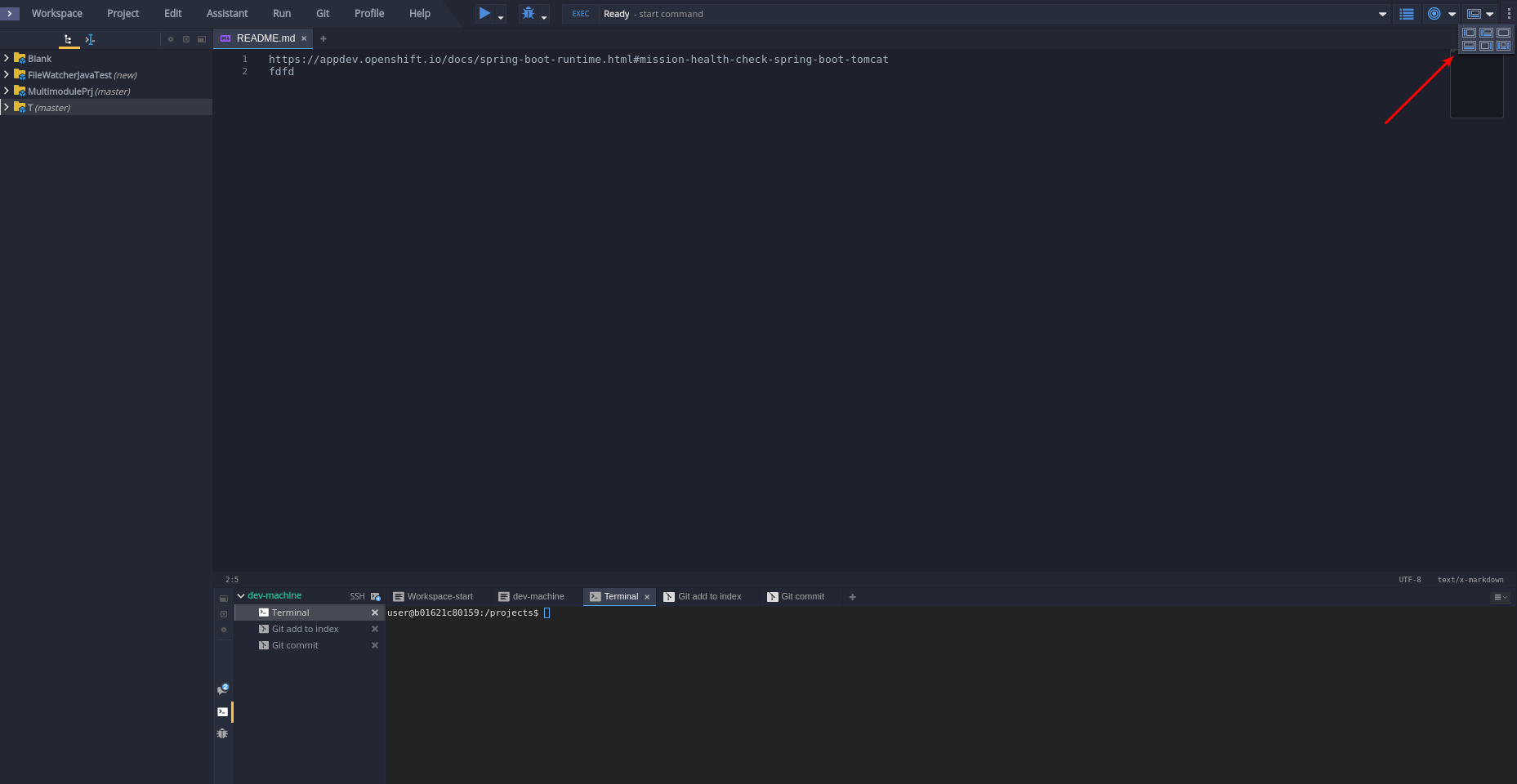
- Click on the found icon(icon is small and click is not easy too..):
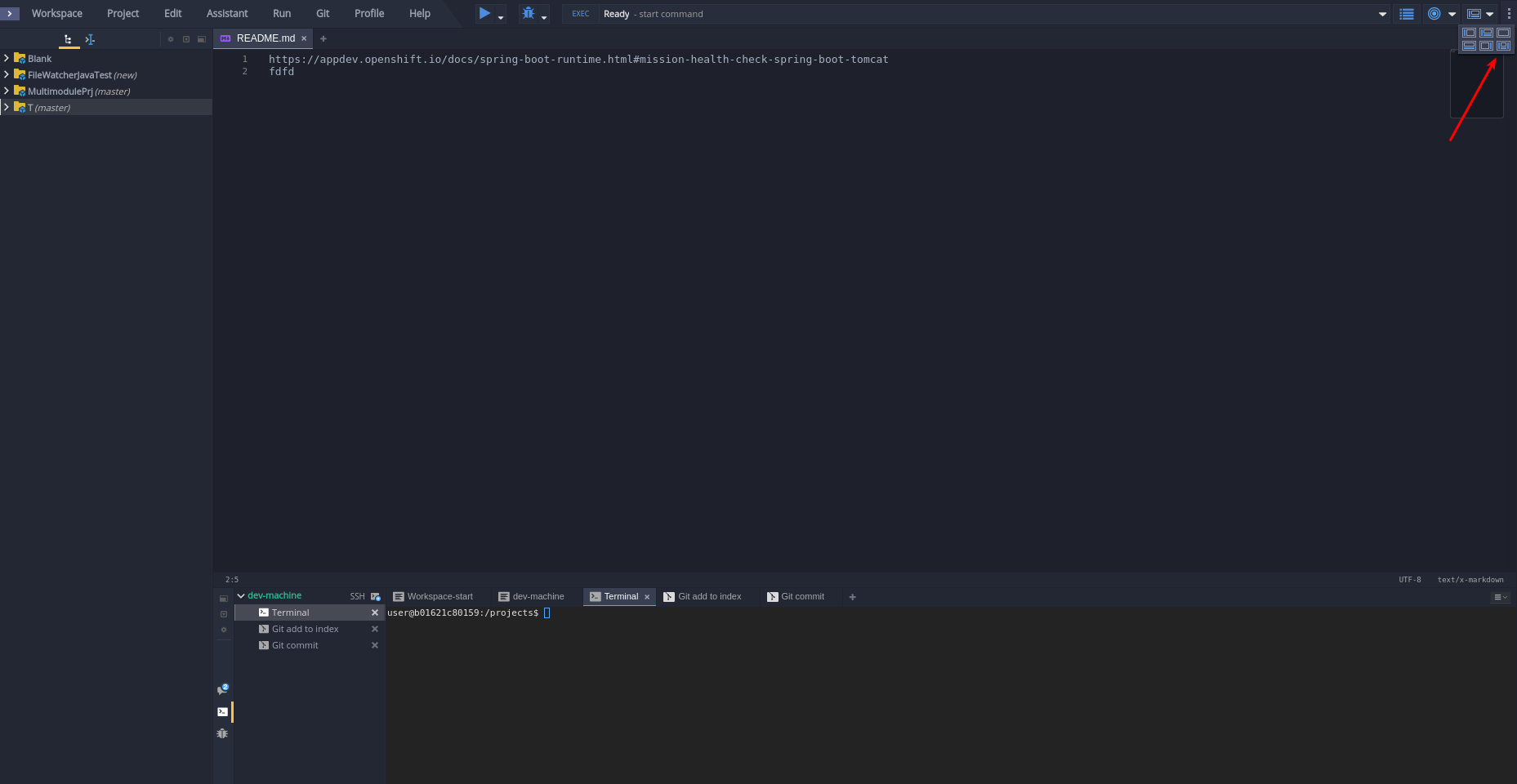
- And finally you will see pull request panel:
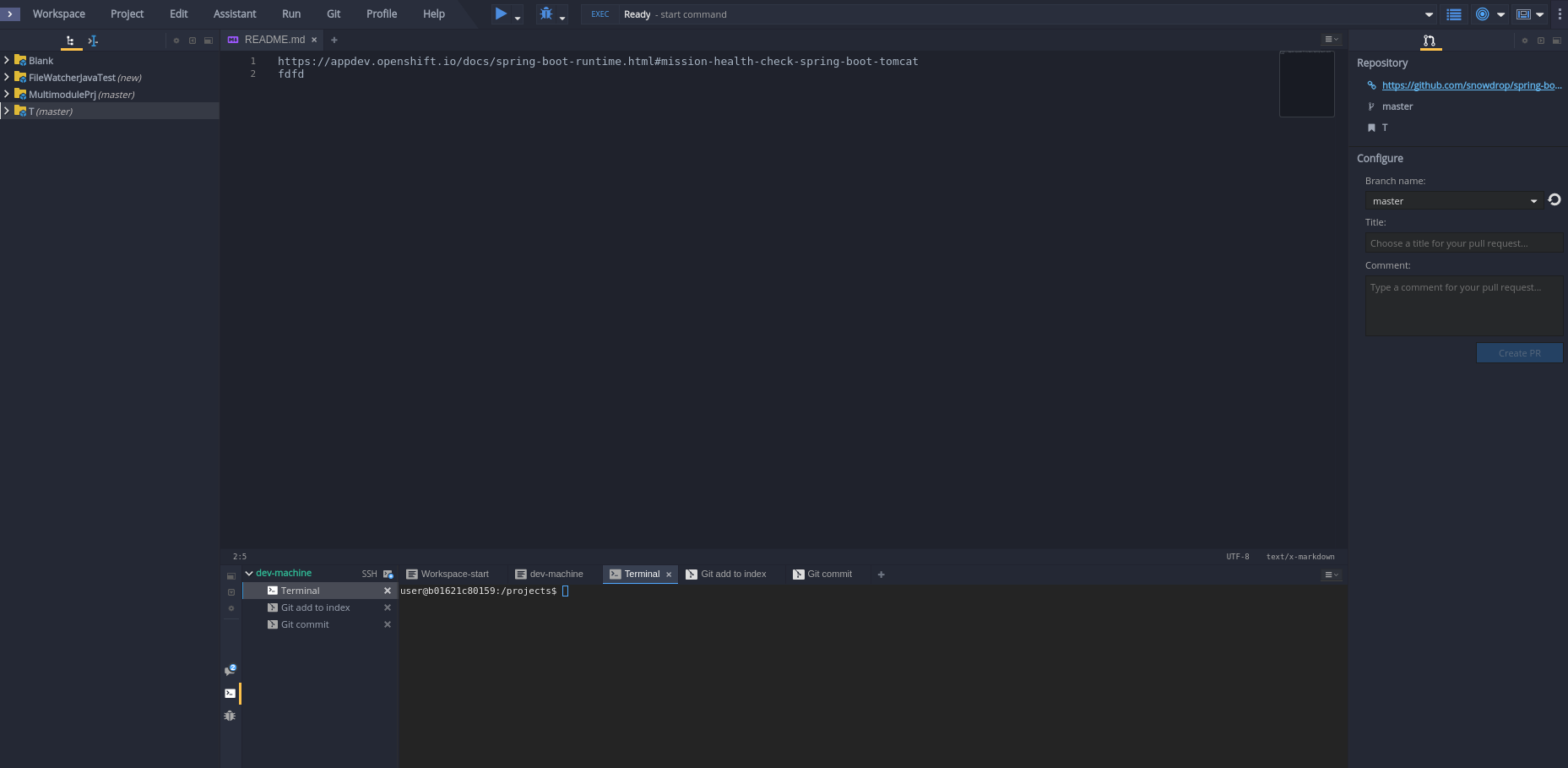
Show/hide button was much easier: only ONE CLICK.
AndrienkoAleksandr
on 21 Nov 2017
The pull request panel is not supposed to be displayed all the time. It's a one time action that user should be able to call from:
- A menu item (in this case, the user will need to use his mouse)
- using the command palette (in this case, the user will not have to leave the keyboard)
Once the pull request proceed, user will likely hide the panel and get the editor maximize.
 slemeur
on 21 Nov 2017
slemeur
on 21 Nov 2017
Linking to https://github.com/eclipse/che/issues/4993
slemeur
on 21 Nov 2017
@skabashnyuk in real life I don't restart a workspace all the time. But maybe we are missing layout preferences ... that's all. For instance each time I start a workspace I minimise the Dashboard pane. When I have a panel layout settings and restart the workspace or open another workspace, I would like Che to use the same previous layout.
To reopen the PR panel, why not having a button like the dashboard pane ?
sunix
on 22 Nov 2017
Linking to #7975
slemeur
on 20 Dec 2017
Related issues
 redeagle84
·
3Comments
redeagle84
·
3Comments
 johnmcollier
·
3Comments
AndrienkoAleksandr
·
3Comments
johnmcollier
·
3Comments
AndrienkoAleksandr
·
3Comments
 amisevsk
·
3Comments
amisevsk
·
3Comments
 l0rd
·
3Comments
l0rd
·
3Comments
Most helpful comment
Why don't we reinvent a wheel and do like IntelliJ is doing?

To have some state for opened panel(1) and hidden (2)