Description
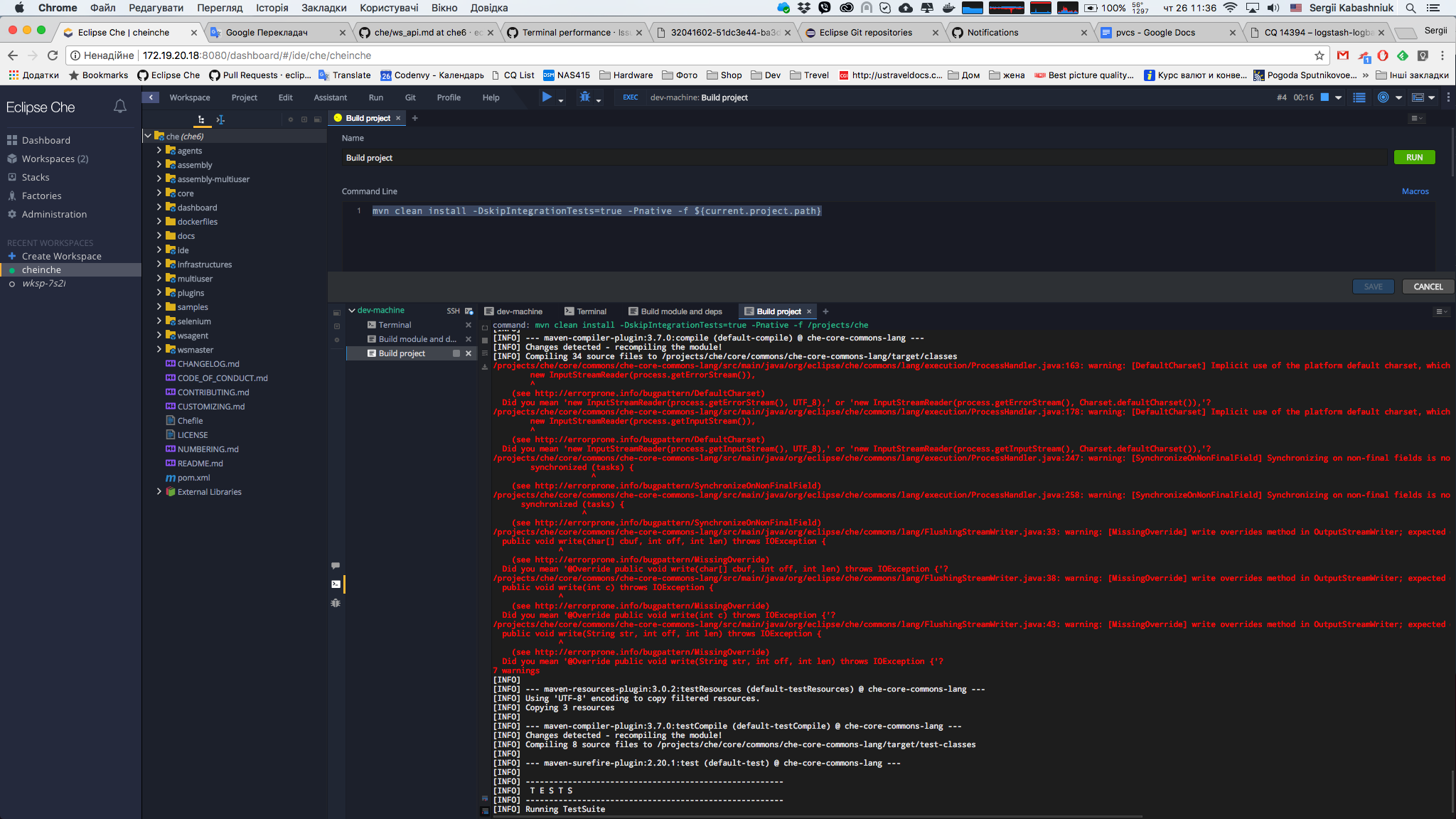
When I've tried to build che in che I've noticed that overall performance of browser tab become slower and slower. Something like starting from 1/3 or 1/4 of total build. I can assume that it happens because of a big amount of output produced by build command. I can propose that in one moment of time we can show only limited number of rows(let's say 100) and then use our exec agent api to get remaining logs https://github.com/eclipse/che/blob/che6/agents/go-agents/docs/ws_api.md#get-process-logs
Reproduction Steps
Run build che in che.
OS and version:
OSX
Diagnostics:
Browser tab become unresponsive
 skabashnyuk
All 12 comments
Can we try not sending the output to IDE to check if it is the real reason first?
 gazarenkov
on 26 Oct 2017
gazarenkov
on 26 Oct 2017
Browser places all output in console in processes panel. When amount of lines become more 3000-5000 browser become working slower and slower. The reason is browser renders the console widget on each adding a new line and when amount of lines too much browser hangs.
We need to improve console widget and show only part of output. Other part of output we can easily keep in the memory and show when user scrolls up the console.
 vitaliy-guliy
on 26 Oct 2017
vitaliy-guliy
on 26 Oct 2017
OK, solution proposed by @skabashnyuk looks good, moreover I think (and @eivantsov remember this too) we had this back in version 3.x or so.
Definitely it is blocker for more-less big projects like Che
gazarenkov
on 26 Oct 2017
If problem is slow rendering, like variant to resolve problem we can use for rendering command output terminal widget (instead of our custom GWT widget): xterm.js in read only mode. This widget is faster renders command output and for this widget we can use "attach" plugin for bufferization data to render. And very often build tools use some progressors with ANSI escape sequences for some pretty graphic effects(loaders, pseudo graphic animations...). Our GWT command output widget doesn't has ANSI escape sequences parser and display such output incorrectly. xterm.js contains embedded control sequences parser. Or we should really rework current command output widget.
 AndrienkoAleksandr
on 26 Oct 2017
AndrienkoAleksandr
on 26 Oct 2017
@AndrienkoAleksandr your comment is great, thanks a lot!
I would say we need to optimize our output channels too.
Would be great if you can make more detailed analysis of xterm.js vs ours output processing and share your ideas how we can optimize it. This is really important and high priority for us.
Meantime (I consider implementing it takes time), I would use something "fast and dirty".
gazarenkov
on 26 Oct 2017
Subtask: compare rendering performance terminal widget vs CommandOutputConsole. https://github.com/eclipse/che/issues/7029
AndrienkoAleksandr
on 27 Oct 2017
FYI CQ for xterm 2.9.2 https://dev.eclipse.org/ipzilla/show_bug.cgi?id=15063
skabashnyuk
on 5 Dec 2017
@skabashnyuk @AndrienkoAleksandr that means we can improve it already?
gazarenkov
on 5 Dec 2017
Yes, we have working prototype of the code https://github.com/AndrienkoAleksandr/che/tree/CHE-7008-xterm.js. I handled situation with xterm.js bug, so we can use current xterm.js even without update to newer version. I will improve this code and will create pull request. About update xterm.js it would be nice to do it too, but it's not a blocker any more for current task.
AndrienkoAleksandr
on 6 Dec 2017
@AndrienkoAleksandr sounds great!
so we can fix that for next release ?
gazarenkov
on 6 Dec 2017
@gazarenkov To complete this task I need do some things:
Should be done before merge branch:
- Apply option READONLY in the xterm.js in the che-lib to hide focus in the widget and cancel attaching input events. It's not critical but will be nice.
- Some kind of output we colorize by our custom logic (for example docker download image output , some log error output). I need adaptate this logic to ability render this colors in xterm.js. (Xterm.js render colors like escape sequense, but current implementation apply colors like string in css format).
Seems separated subtasks:
- I need check max scrollback for xterm.js. If our IDE client can correct working with MAX scrollback size we can use it. In case if it's spend a lot of operative memory we should cut scrollback to size, I think 5000 lines, and when user scrolls to cut part we download from server and render next part of output . Prototype of the code here: https://github.com/AndrienkoAleksandr/che/commits/CHE-7008
- Rework download output feature. In the current state it's broken. We applied logic to limitation output like 500 lines. When user click "Download output button" he downloads all output text which was rendered on the client. But it's not all output. It's a cut part of output - 500 lines. I think it should work by another way. I think we should download this output from server.
AndrienkoAleksandr
on 6 Dec 2017
This issue is fixed and not a blocker after merging proposed solution
can propose that in one moment of time we can show only limited number of rows(let's say 100)
merged in https://github.com/eclipse/che/pull/7051
Follow up issue https://github.com/eclipse/che/issues/10577
skabashnyuk
on 30 Jul 2018
Related issues
 vanzhiganov
·
3Comments
vanzhiganov
·
3Comments
 SkorikSergey
·
3Comments
SkorikSergey
·
3Comments
 sleshchenko
·
3Comments
sleshchenko
·
3Comments
 redeagle84
·
3Comments
redeagle84
·
3Comments
 sudheerherle
·
3Comments
sudheerherle
·
3Comments
Most helpful comment
@gazarenkov To complete this task I need do some things:
Should be done before merge branch:
Seems separated subtasks: