Description
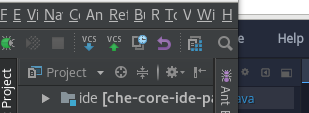
It is hard for me to recognize UI elements in Che because of small size and/or contrast.
The code in the editor is small and I haven't found any way to increase it without increasing all the elements of the window.
Zooming of the browser doesn't allow to change elements size in a comfortable way and it is not persisted across IDE usage sessions.
Even after I increased zooming of the tab by 10% some buttons were too small.
Take a look at file tree buttons in zoomed by 10% Che and regular buttons in IDEA:
Reproduction Steps
OS and version:
Diagnostics:
 garagatyi
All 9 comments
+1.
 AndrienkoAleksandr
on 19 Oct 2017
AndrienkoAleksandr
on 19 Oct 2017
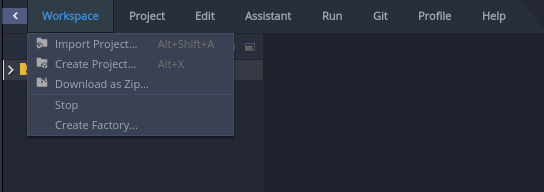
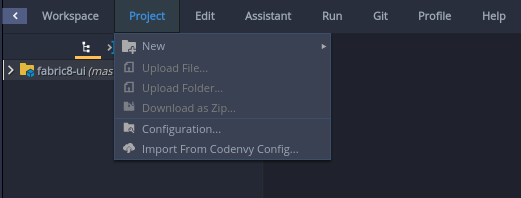
+1 menus state are not clear when all are enabled.
Enabled:
Mixed state:
 ashumilova
on 19 Oct 2017
ashumilova
on 19 Oct 2017
Same with find results:

ashumilova
on 19 Oct 2017
Would be very useful to be able to customize fonts size and font type.
garagatyi
on 19 Oct 2017
+100 about menus state are not clear when all are enabled.
AndrienkoAleksandr
on 19 Oct 2017
@slemeur Can you take a look and revise those colors?
 vparfonov
on 20 Oct 2017
vparfonov
on 20 Oct 2017
@vitaliy-guliy : I feel that the redesign work is not completed. Have those elements been cleaned during your work on the UI?
There are a lot of different issues reported in this issue. We will not be able to track those properly. I'd recommend to split that into separate issues and link them here.
Few points:
- We need to control the size of the icons - they are not consistent
- We can rework the styles, put more contrast - but keep in mind users have different tastes and will want flexibility - having ability to customize the font and styles is quite important.
- What about the light theme?
 slemeur
on 20 Oct 2017
slemeur
on 20 Oct 2017
Let's leave here the only things which are related to styles/colors which, as it stated to description are "hard to read" and consider it as a "bug" (P1 I would say).
"Enhancements" (like customization), indeed, can be moved to other issues.
 gazarenkov
on 22 Oct 2017
gazarenkov
on 22 Oct 2017
@slemeur It seems I changed only the menu background. Other components are unchanged.
The issues means to increase readability of the text in menu, editor and find results.
Let's go with this for both themes.
 vitaliy-guliy
on 23 Oct 2017
vitaliy-guliy
on 23 Oct 2017
Related issues
 apupier
·
3Comments
apupier
·
3Comments
 redeagle84
·
3Comments
redeagle84
·
3Comments
 sleshchenko
·
3Comments
AndrienkoAleksandr
·
3Comments
sleshchenko
·
3Comments
AndrienkoAleksandr
·
3Comments
 johnmcollier
·
3Comments
johnmcollier
·
3Comments
Most helpful comment
+1 menus state are not clear when all are enabled.

Enabled:
Mixed state:
