Chatterino2: Cant run chatterino after recovering data
So my hard disk got corrupted and luckily i was able to recover the data, but after recovering, everytime i try to open chatterino i get these errors:
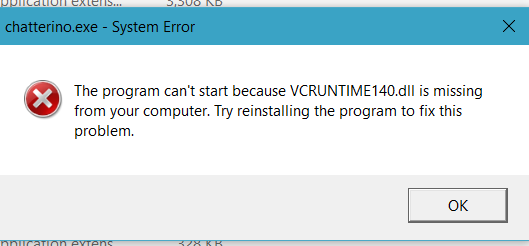
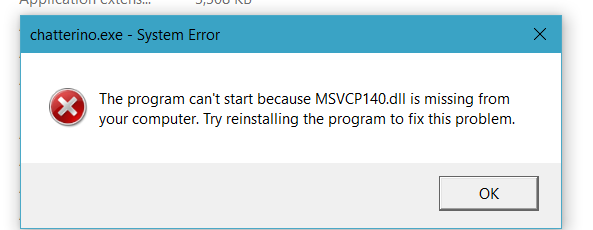
what should i do? I tried uninstalling and deleting everything but it doesnt work :/
 stellarakshay
All 9 comments
Looks like visual c++ runtime redistributables are missing
 Mm2PL
on 11 Sep 2020
Mm2PL
on 11 Sep 2020
Looks like visual c++ runtime redistributables are missing
Where would those usually be located?
stellarakshay
on 11 Sep 2020
@stellarakshay you need to download vcredist packages from Microsoft's site and that should fix your issue. You can look those up, but if you want a solution that will surely work, download chatterino installer from https://chatterino.com, simply reinstall and while installing the application, make sure to check "install vcredist packages" (or something similar) - this way, correct vcredist package will be installed alongside chatterino.
This issue happens quite often when trying to start chatterino after fresh install etc.
If this fixes chatterino, make sure to close the issue :)
 zneix
on 11 Sep 2020
zneix
on 11 Sep 2020
That seemed to have worked, but every time i run it it just crashes after like 10 seconds. Im gonna keep trying tho
stellarakshay
on 11 Sep 2020

this is what keeps happening, dk what to do
stellarakshay
on 11 Sep 2020
Make sure you run both installers:
x86: https://aka.ms/vs/16/release/vc_redist.x86.exe
x64: https://aka.ms/vs/16/release/vc_redist.x64.exe
 alazymeme
on 11 Sep 2020
alazymeme
on 11 Sep 2020
still crashing after like 5 seconds
stellarakshay
on 12 Sep 2020
@stellarakshay You said your hard disk got corrupted, so I assume dll files in your system and some other stuff might've got corrupted as well and the best solution would be just reinstalling the operating system.
If you didn't have this issue before data corruption, then please try my advice and see if it helps.
zneix
on 12 Sep 2020
i was able to recover all of the settings and it eventually worked after restarting. Thanks for help @zneix @alazymeme @Mm2PL
stellarakshay
on 15 Sep 2020
Related issues
 nitrousGranola
·
3Comments
nitrousGranola
·
3Comments
 doximanman
·
3Comments
doximanman
·
3Comments
 SaDiablo
·
3Comments
SaDiablo
·
3Comments
 Leeqo
·
3Comments
Leeqo
·
3Comments
 TETYYS
·
3Comments
TETYYS
·
3Comments
Most helpful comment
i was able to recover all of the settings and it eventually worked after restarting. Thanks for help @zneix @alazymeme @Mm2PL