Chatterino2: 2nd custom highlight color unchangeable
When clicking the color for the 2nd highlight in the list, the color menu doesn't open. I've experienced it on Linux (KDE) and Windows.
But I do love the new ability to change the color of highlights. Makes them infinitely more useful.
 AnsonX10
All 12 comments
Are you talking about whispers highlights?

 Mm2PL
on 22 Aug 2020
Mm2PL
on 22 Aug 2020
Whispers is the 2nd in the list of message highlights, and also doesn't let you change the color (same as "Users" highlight colors). I can't be sure they're related, but it seems coincidental that it also happens to be the 2nd item in the list.
AnsonX10
on 22 Aug 2020
I can open the color menu on the second user highlight (6th item on the list).
What Chatterino version are you running? You can look this up in the About tab of the Settings. I'm looking for the version and commit 🙂
Mm2PL
on 22 Aug 2020
@Mm2PL are you sure? I'm pretty sure there is no code to change whisper color and considering the "color" row for whispers doesn't exist I don't think you can click it (in your image).
 apa420
on 22 Aug 2020
apa420
on 22 Aug 2020
@apa420, There is no code for that, you are correct. I said that I can change the second highlight created by the user, which is 6th item on the list counting the highlights not created by the user.
@AnsonX10, I think there may be a misunderstanding here. I have no idea if you wanted to change the color of the whisper highlights or the second highlight you created.

The issue template is there to help describe issues/suggestions clearly to minimize situations like this.
Mm2PL
on 22 Aug 2020
The whisper is the second item in the highlight list.
It makes sense to me.
Well it makes sense with the extra info.
apa420
on 22 Aug 2020

And yes, I am only wanting to change user highlight colors, not whisper colors. (Although that would probably be nice too.)
AnsonX10
on 22 Aug 2020
Ok so every highlighted user except for the 2nd item you can change color for.
apa420
on 22 Aug 2020
Exactly.
Mm2PL said "I can open the color menu on the second user highlight (6th item on the list)."
But that's the message highlight list, not users. There, you can put whatever text you want to highlight.
AnsonX10
on 22 Aug 2020
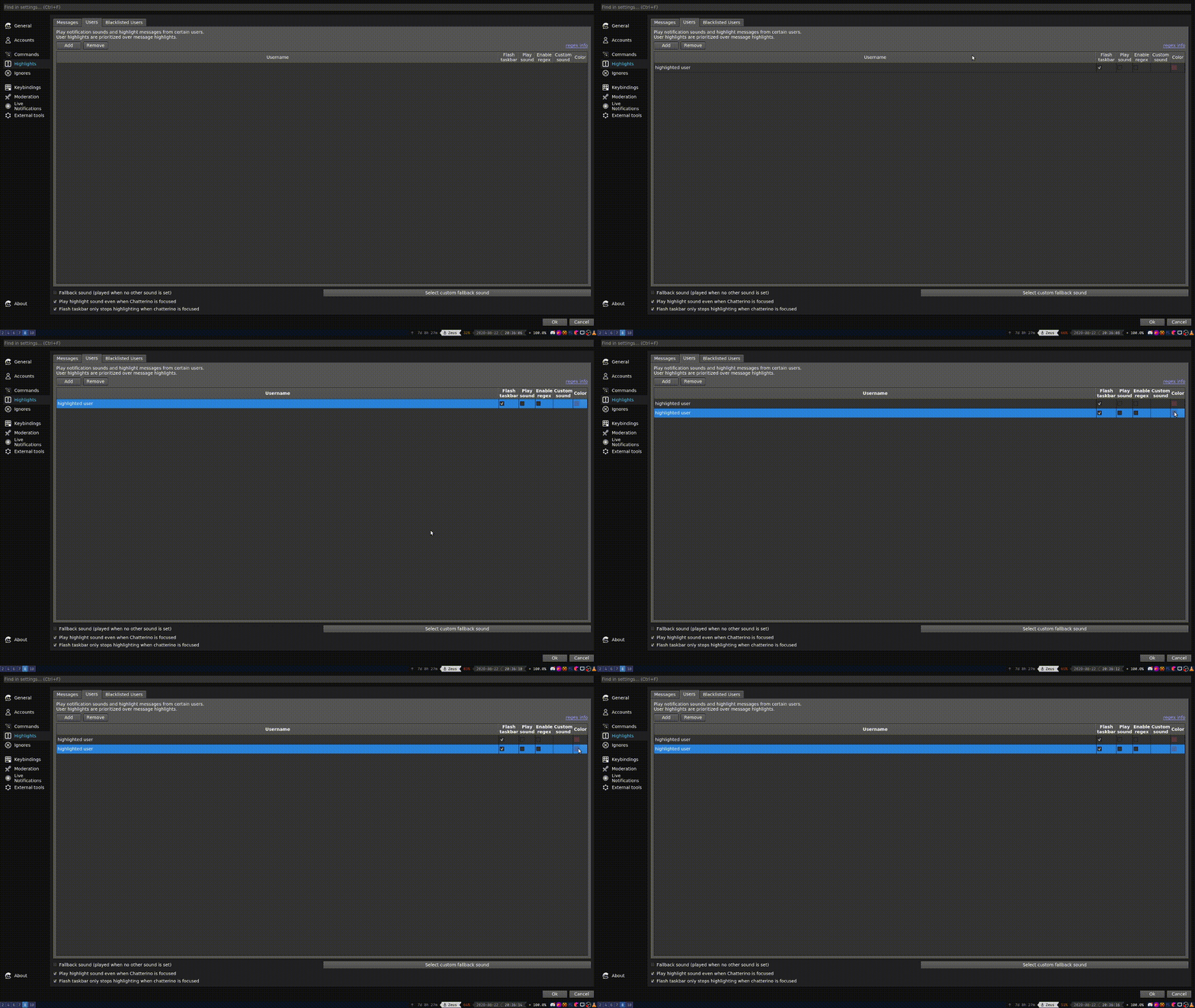
Can reproduce on Highlighted Users on 359adbce.
Quick guide for people seeing this thread later:
- Create (or have) at least two User Highlights
- Attempt to change the Color of the 2nd one
- Observe that nothing happens, while the expected behavior is to open the color picker.
You can easily go around this bug by adding another highlight and deleting it.
E: Here's a GIF of me reproducing the bug 🙂
Mm2PL
on 22 Aug 2020
Hmm, this "feels" very similar to a bug that was fixed in https://github.com/Chatterino/chatterino2/pull/1522. I will look into it.
 leon-richardt
on 22 Aug 2020
leon-richardt
on 22 Aug 2020
Regarding the missing color field in the "Whispers" row: After consulting git blame, it seems like @fourtf commented the relevant code out in 097f4ccb3. Not sure if this was done on purpose (in that case, the code should have been deleted altogether, not just commented out) or on accident. But @fourtf can probably shed some light on that.
leon-richardt
on 22 Aug 2020
Related issues
 SaDiablo
·
3Comments
SaDiablo
·
3Comments
 TranRed
·
3Comments
TranRed
·
3Comments
 kehlery
·
3Comments
kehlery
·
3Comments
 zamusek
·
3Comments
zamusek
·
3Comments
 LeaPhant
·
3Comments
LeaPhant
·
3Comments
Most helpful comment
Can reproduce on Highlighted Users on 359adbce.
Quick guide for people seeing this thread later:
You can easily go around this bug by adding another highlight and deleting it.
E: Here's a GIF of me reproducing the bug 🙂
