Chatterino2: Chatterino total crash when trying to remove entry from highlights etc.
Chatterino crashes without any messages when clicking the "remove" button in settings and having something selected to be removed. Doesn't crash when pressing it without anything selected.
Happens under:
- Commands
- Highlights -> messages, users and excluded users
- Ignores -> Messages
To reproduce
Settings -> any of the mentioned tabs -> add message -> select it/mark it -> press remove
button -> total crash. Happens anytime and everytime without fail.
Chatterino version
----> Chatterino 2.1.7 (commit 845c8fa63)
Operating system
Win 10
Version 10.0.18362 Build 18362
Additional information
The messages don't get removed after the crash has happened, so it's not possible to remove entries at all.
 Credskiz
All 11 comments
can't replicate on arch linux
 apa420
on 2 Feb 2020
apa420
on 2 Feb 2020
I can't reproduce either (on b895315 and Arch). Could you check if the crash still occurs for you in the latest nightly build?
 leon-richardt
on 3 Feb 2020
leon-richardt
on 3 Feb 2020
I was able to replicate this issue from within an environment where the application did not have sufficient permissions to modify the settings.json file - which is where those settings are stored - so it seems to "crash" Chatterino instead of showing an error message.
This was the outcome when using Safe Mode on Windows 10 which tells me this may just be an environment issue.
 5E7EN
on 3 Feb 2020
5E7EN
on 3 Feb 2020
I can't reproduce either (on b895315 and Arch). Could you check if the crash still occurs for you in the latest nightly build?
Downloaded -> chatterino-windows-x86-64.zip -> unzipped, closed current chatterino, and opened this one, still crashes.
I was able to replicate this issue from within an environment where the application did not have >sufficient permissions to modify the settings.json file - which is where those settings are stored - so >it seems to "crash" Chatterino instead of showing an error message.
This was the outcome when using Safe Mode on Windows 10 which tells me this may just be an environment issue.
AppData\Roaming\Chatterino2\Settings
Is set to read-only and can't manually change it, as it resets to read-only whenever I check it again after applying.
Edit: Correction: the above setting was only for the folder, the settings.json file has all permissions.
Credskiz
on 3 Feb 2020
This happens to me on the latest version on macOS
 lightningxcookie
on 28 Feb 2020
lightningxcookie
on 28 Feb 2020
Unable to reproduce on Linux
Unable to reproduce on macOS Catalina (10.15.2)
 pajlada
on 29 Feb 2020
pajlada
on 29 Feb 2020
Unable to reproduce on Windows 10 (1909), Chatterino Nightly 2.1.7 (commit 53e52e189, )
I tried denying all access to settings.json and then manipulating settings in various ways, no crash
 RAnders00
on 29 Feb 2020
RAnders00
on 29 Feb 2020
Are you able to provide a screenshot? Could be related to https://github.com/Chatterino/chatterino2/issues/1078
 alazymeme
on 28 May 2020
alazymeme
on 28 May 2020
For reference, the screenshot attached in https://github.com/Chatterino/chatterino2/issues/1937 shows the crash to occur at this line:
https://github.com/Chatterino/chatterino2/blob/cbcd5f3863b6edf22b6d6ffb625bd338f3ea112d/src/common/SignalVectorModel.hpp#L214
So maybe this could be some kind of serialization problem when Chatterino tries to serialize the updated model (without the deleted row) and attempts access at an index that no longer exists?
leon-richardt
on 11 Sep 2020
@pajlada, hopefully this is useful.
Repro steps:
- Start Chatterino with blank
commands.json - Add command, then select and remove it
Similar crash occurs when commands.json is populated with a few existing items, and either adding new command then immediately removing, or removing existing command.
Sorry, I don't know C++ or the codebase at all, but exception, stack trace and locals:
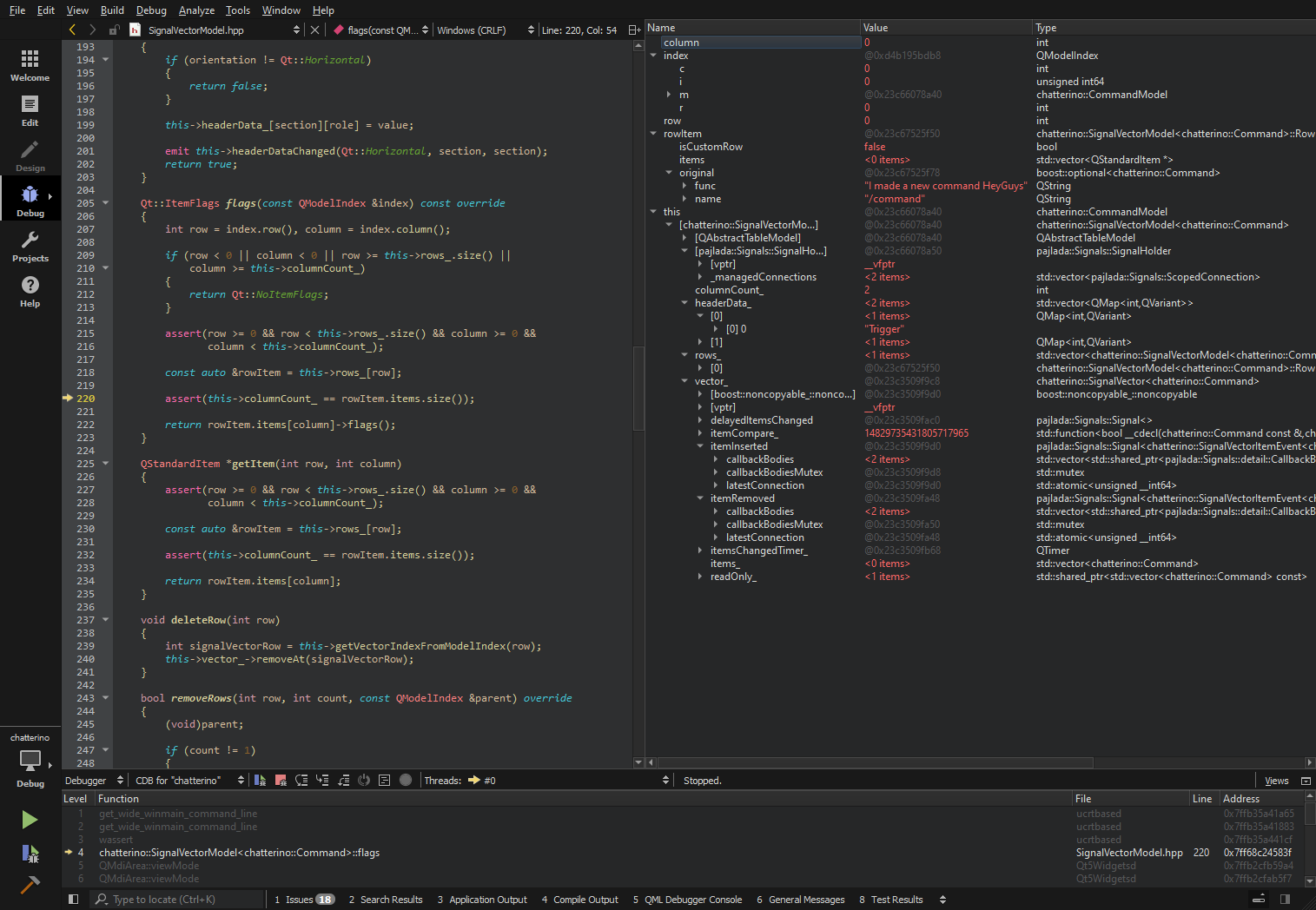
Assertion failed!

Program: ...t_5_15_0_MSVC2019_64bit-Debug\debug\chatterino.exe
File: C:\Users\user\Documents\chatterin.../SignalV...del.hpp
Line: 220

Expression: this->columnCount_ == rowItem.items.size()

For information on how your program can cause an assertion
failure, see the Visual C++ documentation on asserts

(Press Retry to debug the application - JIT must be enabled)Assertion failed!

Program: ...t_5_15_0_MSVC2019_64bit-Debug\debug\chatterino.exe
File: C:\Users\user\Documents\chatterin.../SignalV...del.hpp
Line: 220

Expression: this->columnCount_ == rowItem.items.size()

For information on how your program can cause an assertion
failure, see the Visual C++ documentation on asserts

(Press Retry to debug the application - JIT must be enabled)
Chatterino Nightly 2.2.2 (commit 7eabba959, 13.09.2020)
 sando
on 13 Sep 2020
sando
on 13 Sep 2020
fixed earlier today
 fourtf
on 26 Sep 2020
fourtf
on 26 Sep 2020
Related issues
 DatGuy1
·
3Comments
DatGuy1
·
3Comments
 TranRed
·
3Comments
TranRed
·
3Comments
 kehlery
·
3Comments
fourtf
·
3Comments
kehlery
·
3Comments
fourtf
·
3Comments
 nitrousGranola
·
3Comments
nitrousGranola
·
3Comments