Chatterbot: ImportError: cannot import name 'ChatBot'
@gunthercox
Everytime I'm running this code it is showing me this error..
ImportError: cannot import name 'ChatBot'
here's the code..
from chatterbot import ChatBot
from chatterbot.trainers import ListTrainers
import osbot= ChatBot('Bot')
bot.set_trainers(ListTrainers)for files in os.listdir('F:\Project Data\chatterbot-corpus-master\chatterbot_corpus\data\english'):
data=open('F:\Project Data\chatterbot-corpus-master\chatterbot_corpus\data\english'+files,'r').readlines()
bot.train(data)while True:
message=input("USER:")
if(message.strip() != 'bye'):
reply=bot.get_response(message)
print("BOT:" + reply)
if(message.strip() == 'bye'):
print("BOT:BYE :-), hope to see you again")
break
 jayeshsk
All 23 comments
I have tried the above program both in VS code and pycharm.
for pycharm the error is:
**ImportError: cannot import name 'ChatBot'**
for VS code the error is:
Traceback (most recent call last):
File "chat.py", line 2, in
from chatterbot.trainer import ListTrainers
ModuleNotFoundError: No module named 'chatterbot.trainer'
please help me with this....
`
jayeshsk
on 26 Aug 2018
@jayeshsk is it possible that you created a file named chatterbot.py? If this is the case, imports from chatterbot will fail.
 gunthercox
on 26 Aug 2018
gunthercox
on 26 Aug 2018
@gunthercox
no, the file is named as cb.py
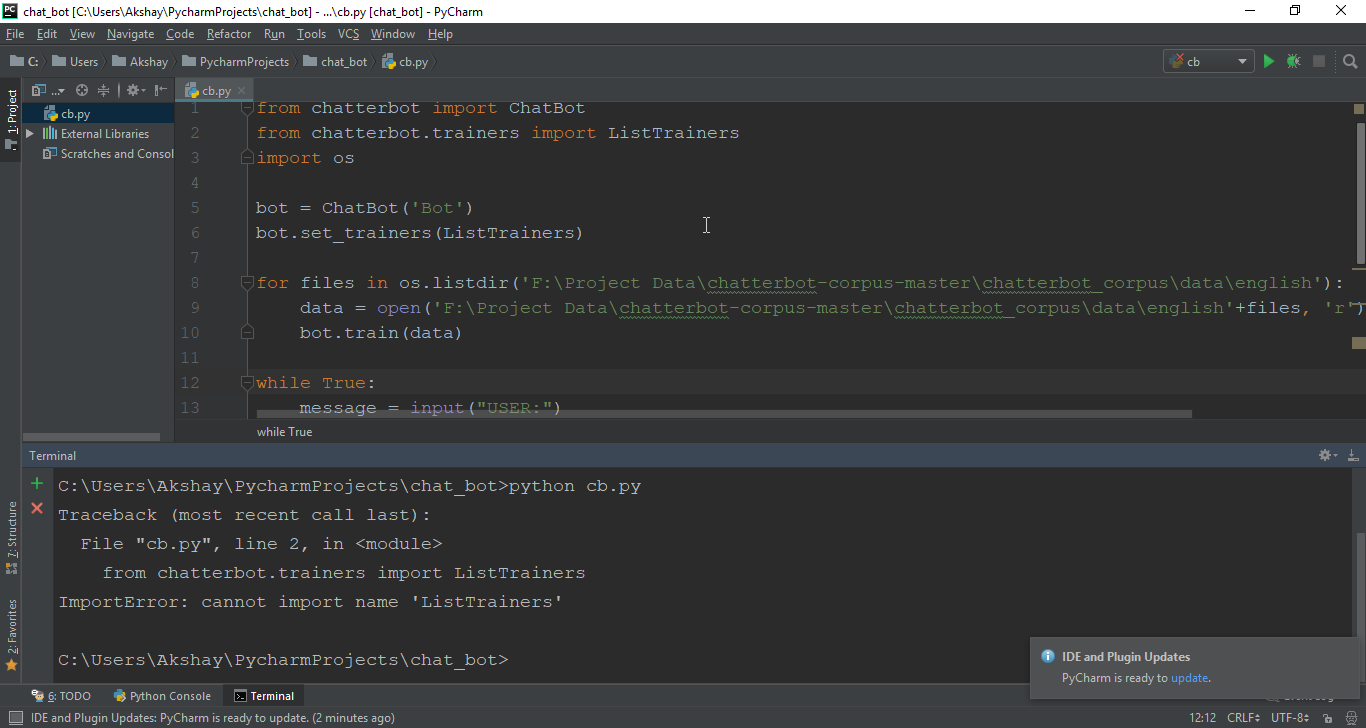
jayeshsk
on 27 Aug 2018
Change ListTrainers to ListTrainer.
gunthercox
on 27 Aug 2018
@gunthercox
now it is again showing the same error
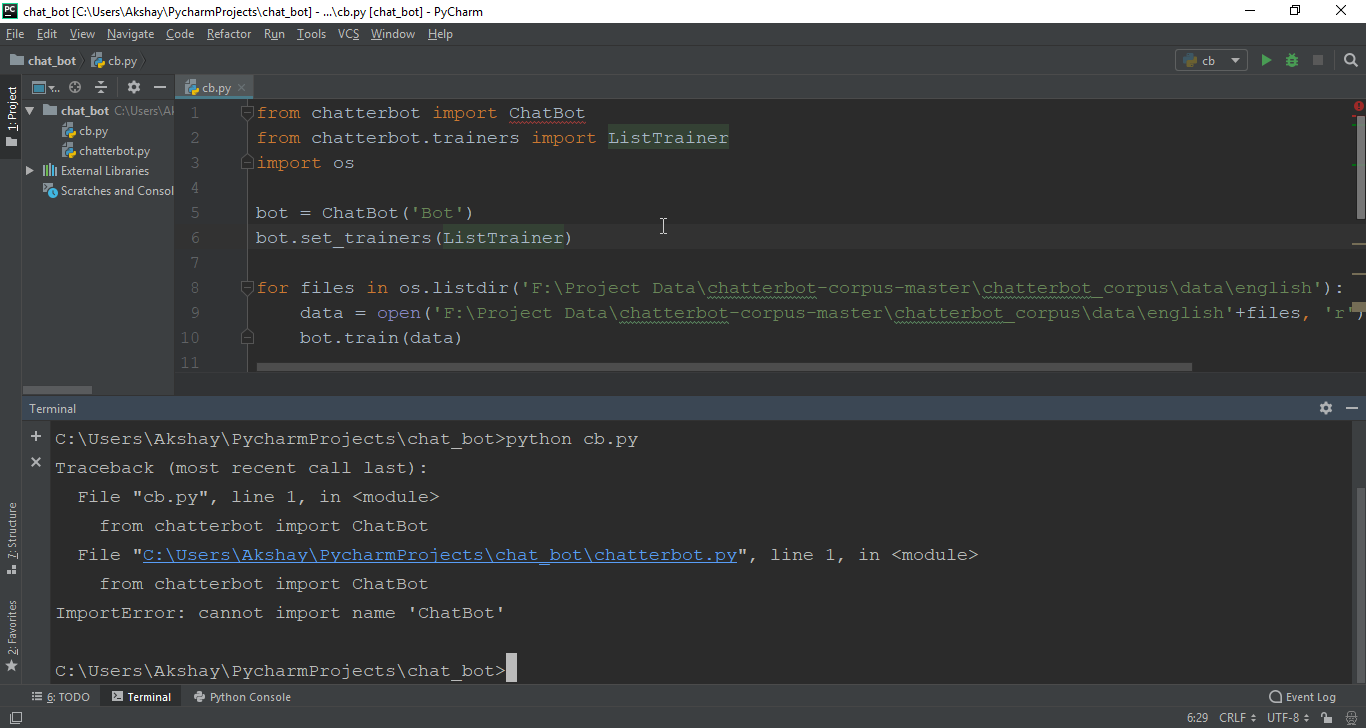
jayeshsk
on 27 Aug 2018
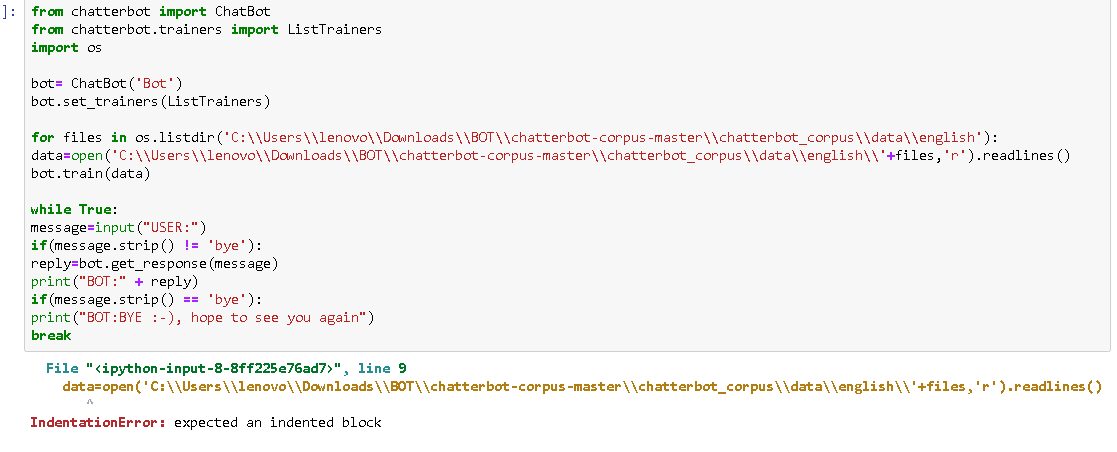
In that screenshot, you have a chatterbot.py file. That is the cause of the import error you are seeing.
gunthercox
on 28 Aug 2018
@gunthercox
the errors now say they can't access the file...
and sometimes it say can't import listtrainer...
there is lot of confusion.
can we have a teamviewer session,please?
jayeshsk
on 28 Aug 2018
@gunthercox
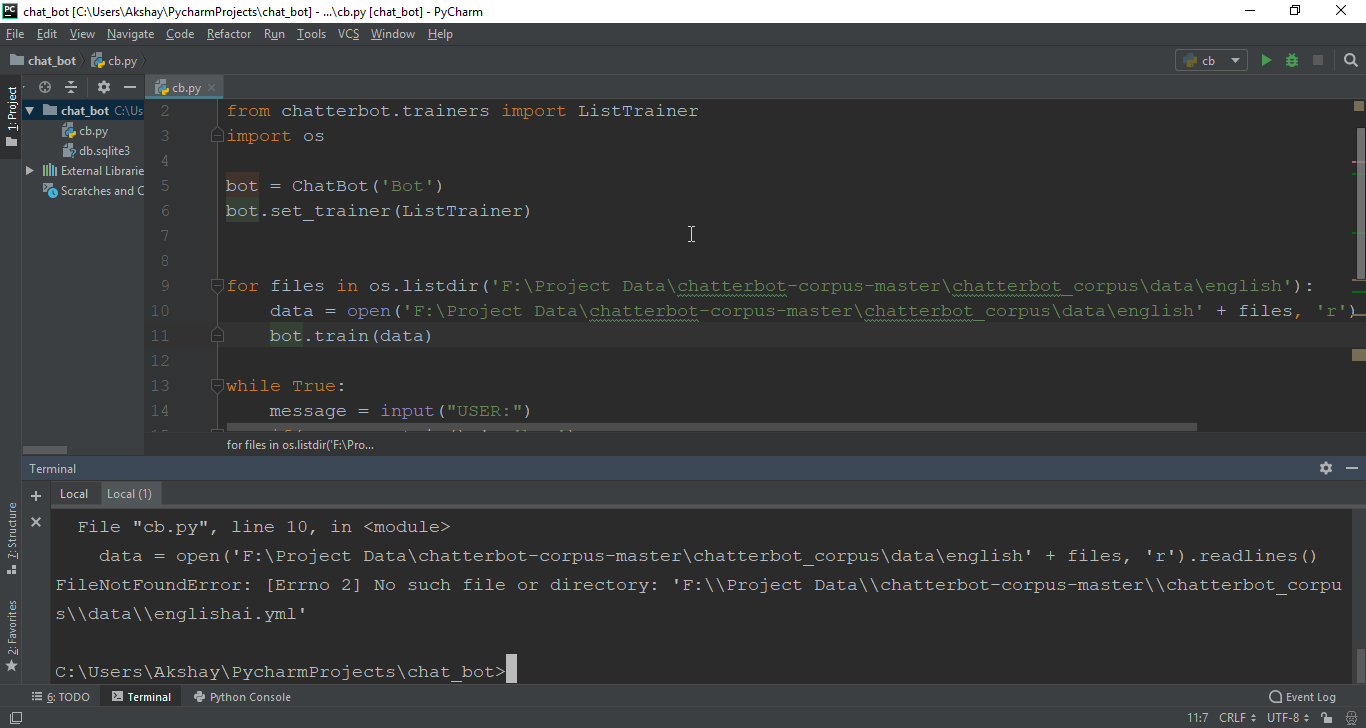
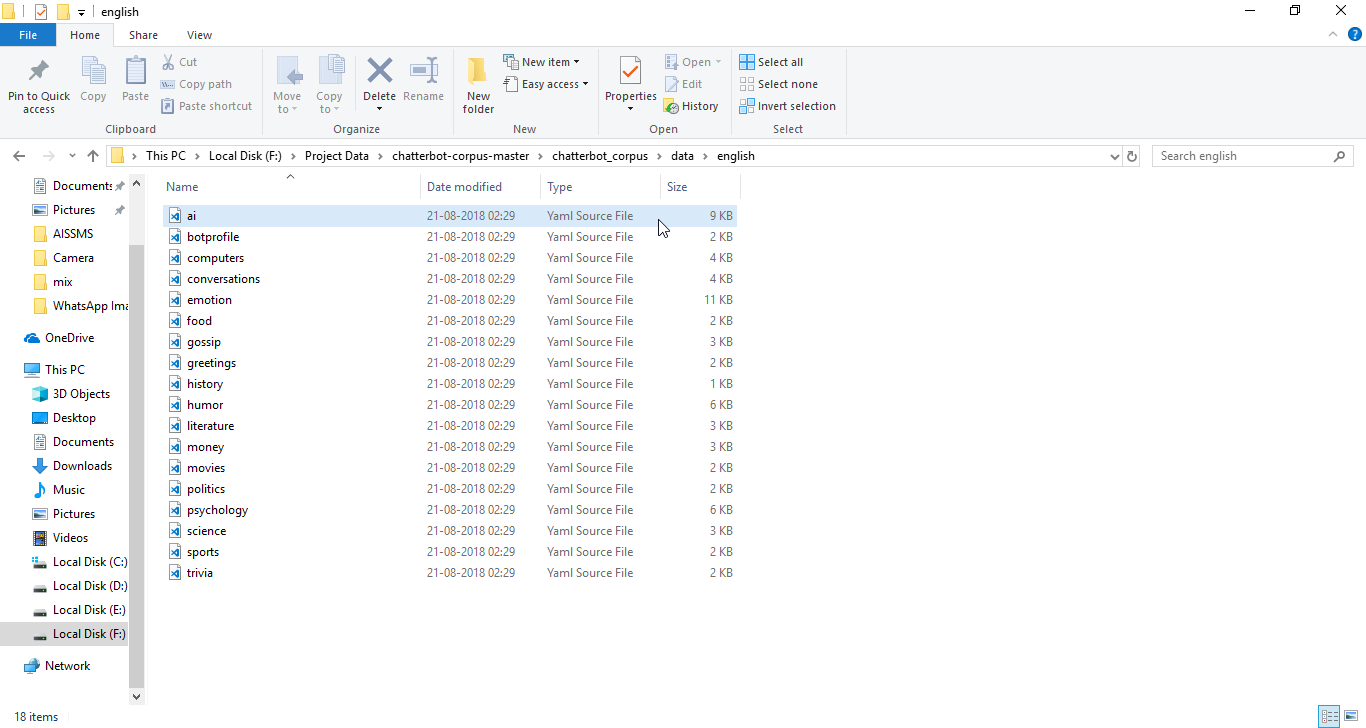
now it is saying files don't exist....
jayeshsk
on 28 Aug 2018
Based on the error message, it looks like the path you've build isn't a valid file path to those yaml files. I think you are missing a trailing slash / in the initial string.
gunthercox
on 14 Sep 2018
@jayeshsk
Realise that the file its trying to find is "englishai.yml" from \data instead of "ai.yml" from \data\english\
So what you need to do is add a \ on the line (which I have already done so for you) : data=open('F:\Project Data\chatterbot-corpus-master\chatterbot_corpus\data\english\'+files,'r').readlines()
 belligerentbeagle
on 11 Dec 2018
belligerentbeagle
on 11 Dec 2018
Are you able to run the above code? I am also trying, however, I am getting an error. Kindly help
 neelabhsriv
on 8 Mar 2019
neelabhsriv
on 8 Mar 2019
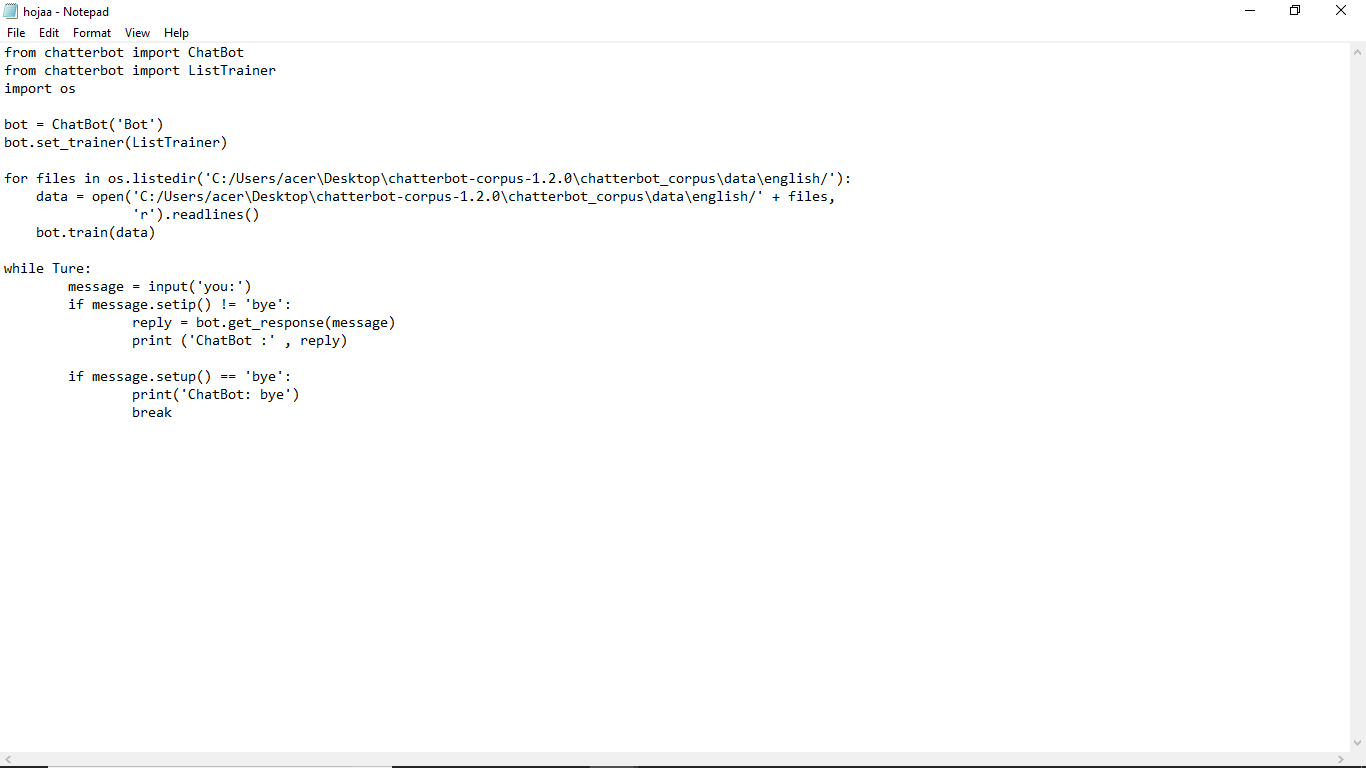
this is code
 shivam2200
on 16 Apr 2019
shivam2200
on 16 Apr 2019
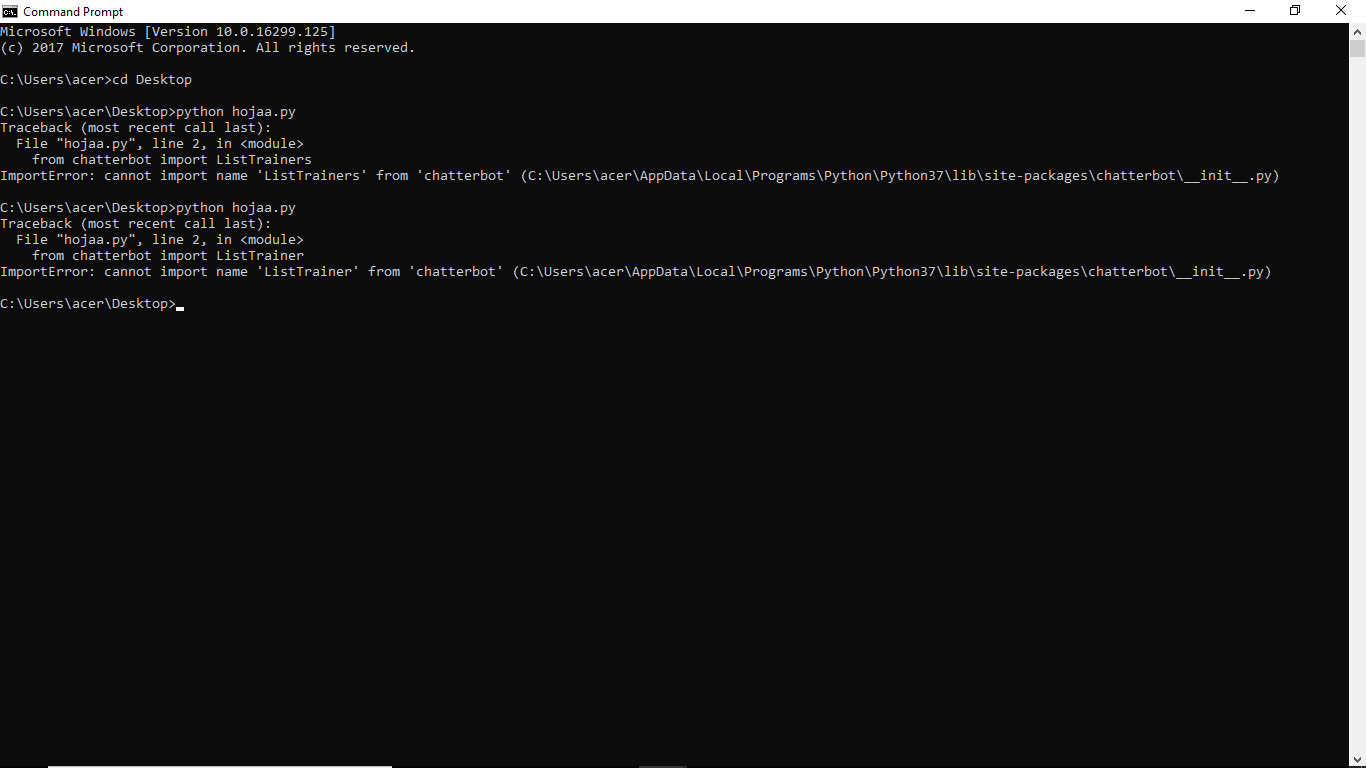
this is the error
shivam2200
on 16 Apr 2019
yea me too can anybody help wit this?
 KarthiJi
on 13 May 2019
KarthiJi
on 13 May 2019
Hi @KarthiJi, the error ImportError: cannot import name 'ChatBot' can happen for a number of reasons. The most likely reason is that ChatterBot has not been installed on your system.
The easiest way to do this is by running the command pip install chatterbot.
In some cases Python 3 gets installed under the command entrypoint of python3, if this is the case you can install ChatterBot by running python3 -m pip install chatterbot
gunthercox
on 14 May 2019
Thank you for the support 😄😄
On Tue, May 14, 2019, 6:01 AM Gunther Cox <[email protected] wrote:
Hi @KarthiJi https://github.com/KarthiJi, the error ImportError: cannot
import name 'ChatBot' can happen for a number of reasons. The most likely
reason is that ChatterBot has not been installed on your system.The easiest way to do this is by running the command pip install
chatterbot.
In some cases Python 3 gets installed under the command entrypoint of
python3, if this is the case you can install ChatterBot by running python3
-m pip install chatterbot—
You are receiving this because you commented.
Reply to this email directly, view it on GitHub
https://github.com/gunthercox/ChatterBot/issues/1380?email_source=notifications&email_token=AL2FS3JA3IJWXBX3CYIBOFLPVIB4HA5CNFSM4FRSR2S2YY3PNVWWK3TUL52HS4DFVREXG43VMVBW63LNMVXHJKTDN5WW2ZLOORPWSZGODVJ5PPY#issuecomment-492033983,
or mute the thread
https://github.com/notifications/unsubscribe-auth/AL2FS3MZ54IY4TTPC6GHNXLPVIB4HANCNFSM4FRSR2SQ
.
shivam2200
on 14 May 2019
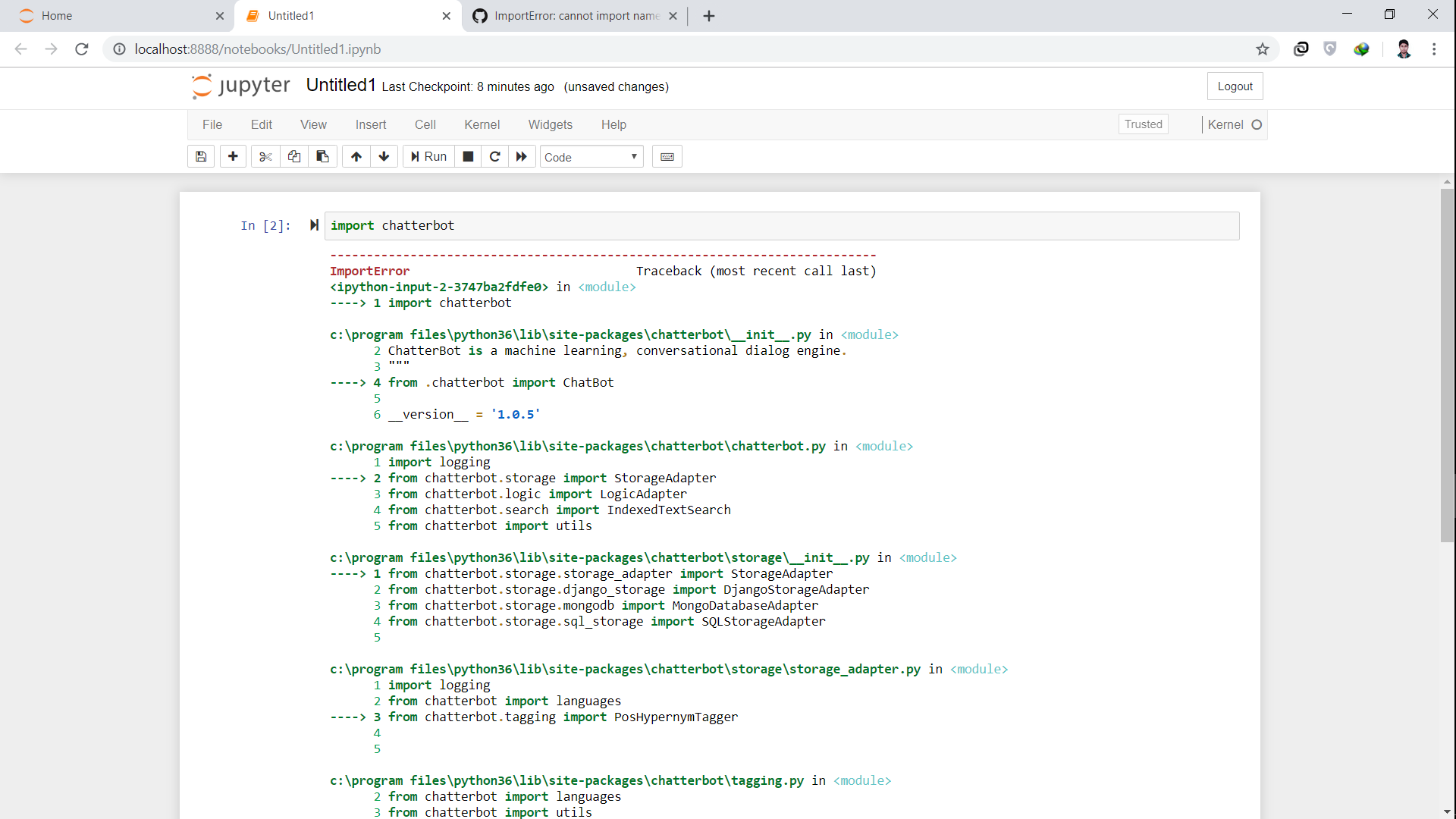
What is the problem here , I can't even import chatterbot module ?

 DRON1997
on 17 May 2019
DRON1997
on 17 May 2019
@jayeshsk is it possible that you created a file named
chatterbot.py? If this is the case, importsfrom chatterbotwill fail.
Definitely my main problem was this one :)
 onurgoker
on 10 Dec 2019
onurgoker
on 10 Dec 2019
This Error Maybe due to Some reason.
- chatter is not installed try
pip install chatterbot - You are using a different environment. try to change the environment
- chatterbot is not in the path
 codePerfectPlus
on 13 Jun 2020
codePerfectPlus
on 13 Jun 2020
H:\Python Projects> cmd /C "C:\Users\SanglapAppData\Local\Programs\Python\Python36\python.exe c:\Users\Sanglap.vscode\extensions\ms-python.python-2020.7.96456\pythonFiles\lib\python\debugpy\launcher 61072 -- "h:\Python Projects\Test.py" "
Traceback (most recent call last):
File "C:\Users\SanglapAppData\Local\Programs\Python\Python36\lib\site-packages\sqlalchemy\engine\base.py", line 2228, in _wrap_pool_connect
return fn()
File "C:\Users\SanglapAppData\Local\Programs\Python\Python36\lib\site-packages\sqlalchemy\pool.py", line 434, in connect
return _ConnectionFairy._checkout(self)
File "C:\Users\SanglapAppData\Local\Programs\Python\Python36\lib\site-packages\sqlalchemy\pool.py", line 831, in _checkout
fairy = _ConnectionRecord.checkout(pool)
File "C:\Users\SanglapAppData\Local\Programs\Python\Python36\lib\site-packages\sqlalchemy\pool.py", line 563, in checkout
rec = pool._do_get()
File "C:\Users\SanglapAppData\Local\Programs\Python\Python36\lib\site-packages\sqlalchemy\pool.py", line 1355, in _do_get
return self._create_connection()
File "C:\Users\SanglapAppData\Local\Programs\Python\Python36\lib\site-packages\sqlalchemy\pool.py", line 379, in _create_connection
return _ConnectionRecord(self)
File "C:\Users\SanglapAppData\Local\Programs\Python\Python36\lib\site-packages\sqlalchemy\pool.py", line 508, in __init__
self.__connect(first_connect_check=True)
File "C:\Users\SanglapAppData\Local\Programs\Python\Python36\lib\site-packages\sqlalchemy\pool.py", line 722, in __connect
pool.dispatch.connect(self.connection, self)
File "C:\Users\SanglapAppData\Local\Programs\Python\Python36\lib\site-packages\sqlalchemy\event\attr.py", line 259, in __call__
fn(args, *kw)
File "C:\Users\SanglapAppData\Local\Programs\Python\Python36\lib\site-packages\chatterbot\storage\sql_storage.py", line 43, in set_sqlite_pragma
dbapi_connection.execute('PRAGMA journal_mode=WAL')
sqlite3.OperationalError: cannot change into wal mode from within a transaction
The above exception was the direct cause of the following exception:
Traceback (most recent call last):
File "h:\Python Projects\Test.py", line 4, in
bot = ChatBot('Test')
File "C:\Users\SanglapAppData\Local\Programs\Python\Python36\lib\site-packages\chatterbotchatterbot.py", line 41, in __init__
self.storage = utils.initialize_class(storage_adapter, *kwargs)
File "C:\Users\SanglapAppData\Local\Programs\Python\Python36\lib\site-packages\chatterbot\utils.py", line 54, in initialize_class
return Class(args, *kwargs)
File "C:\Users\SanglapAppData\Local\Programs\Python\Python36\lib\site-packages\chatterbot\storage\sql_storage.py", line 46, in __init__
if not self.engine.dialect.has_table(self.engine, 'Statement'):
File "C:\Users\SanglapAppData\Local\Programs\Python\Python36\lib\site-packages\sqlalchemy\dialectssqlite\base.py", line 1357, in has_table
connection, "table_info", table_name, schema=schema
File "C:\Users\SanglapAppData\Local\Programs\Python\Python36\lib\site-packages\sqlalchemy\dialectssqlite\base.py", line 1799, in _get_table_pragma
cursor = connection.execute(statement)
File "C:\Users\SanglapAppData\Local\Programs\Python\Python36\lib\site-packages\sqlalchemy\engine\base.py", line 2143, in execute
connection = self.contextual_connect(close_with_result=True)
File "C:\Users\SanglapAppData\Local\Programs\Python\Python36\lib\site-packages\sqlalchemy\engine\base.py", line 2192, in contextual_connect
self._wrap_pool_connect(self.pool.connect, None),
File "C:\Users\SanglapAppData\Local\Programs\Python\Python36\lib\site-packages\sqlalchemy\engine\base.py", line 2232, in _wrap_pool_connect
e, dialect, self
File "C:\Users\SanglapAppData\Local\Programs\Python\Python36\lib\site-packages\sqlalchemy\engine\base.py", line 1528, in _handle_dbapi_exception_noconnection
util.raise_from_cause(sqlalchemy_exception, exc_info)
File "C:\Users\SanglapAppData\Local\Programs\Python\Python36\lib\site-packages\sqlalchemy\util\compat.py", line 296, in raise_from_cause
reraise(type(exception), exception, tb=exc_tb, cause=cause)
File "C:\Users\SanglapAppData\Local\Programs\Python\Python36\lib\site-packages\sqlalchemy\util\compat.py", line 276, in reraise
raise value.with_traceback(tb)
File "C:\Users\SanglapAppData\Local\Programs\Python\Python36\lib\site-packages\sqlalchemy\engine\base.py", line 2228, in _wrap_pool_connect
return fn()
File "C:\Users\SanglapAppData\Local\Programs\Python\Python36\lib\site-packages\sqlalchemy\pool.py", line 434, in connect
return _ConnectionFairy._checkout(self)
File "C:\Users\SanglapAppData\Local\Programs\Python\Python36\lib\site-packages\sqlalchemy\pool.py", line 831, in _checkout
fairy = _ConnectionRecord.checkout(pool)
File "C:\Users\SanglapAppData\Local\Programs\Python\Python36\lib\site-packages\sqlalchemy\pool.py", line 563, in checkout
rec = pool._do_get()
File "C:\Users\SanglapAppData\Local\Programs\Python\Python36\lib\site-packages\sqlalchemy\pool.py", line 1355, in _do_get
return self._create_connection()
File "C:\Users\SanglapAppData\Local\Programs\Python\Python36\lib\site-packages\sqlalchemy\pool.py", line 379, in _create_connection
return _ConnectionRecord(self)
File "C:\Users\SanglapAppData\Local\Programs\Python\Python36\lib\site-packages\sqlalchemy\pool.py", line 508, in __init__
self.__connect(first_connect_check=True)
File "C:\Users\SanglapAppData\Local\Programs\Python\Python36\lib\site-packages\sqlalchemy\pool.py", line 722, in __connect
pool.dispatch.connect(self.connection, self)
File "C:\Users\SanglapAppData\Local\Programs\Python\Python36\lib\site-packages\sqlalchemy\event\attr.py", line 259, in __call__
fn(args, **kw)
File "C:\Users\SanglapAppData\Local\Programs\Python\Python36\lib\site-packages\chatterbot\storage\sql_storage.py", line 43, in set_sqlite_pragma
dbapi_connection.execute('PRAGMA journal_mode=WAL')
sqlalchemy.exc.OperationalError: (sqlite3.OperationalError) cannot change into wal mode from within a transaction (Background on this error at: http://sqlalche.me/e/e3q8)
Any Suggestion ?
 SuperSanglap
on 4 Aug 2020
SuperSanglap
on 4 Aug 2020
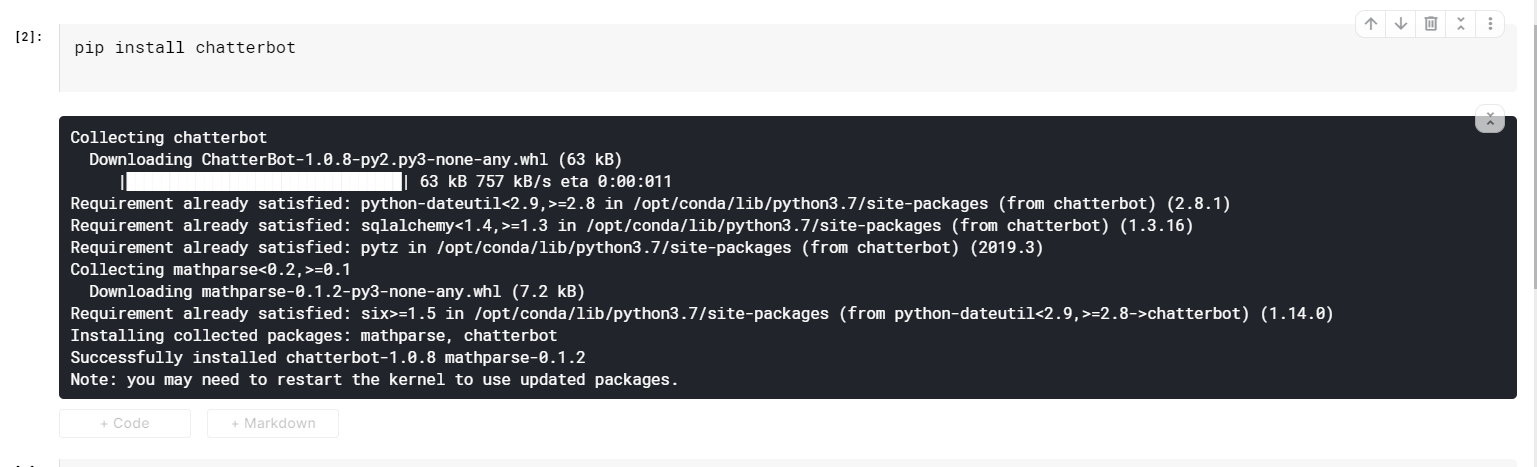
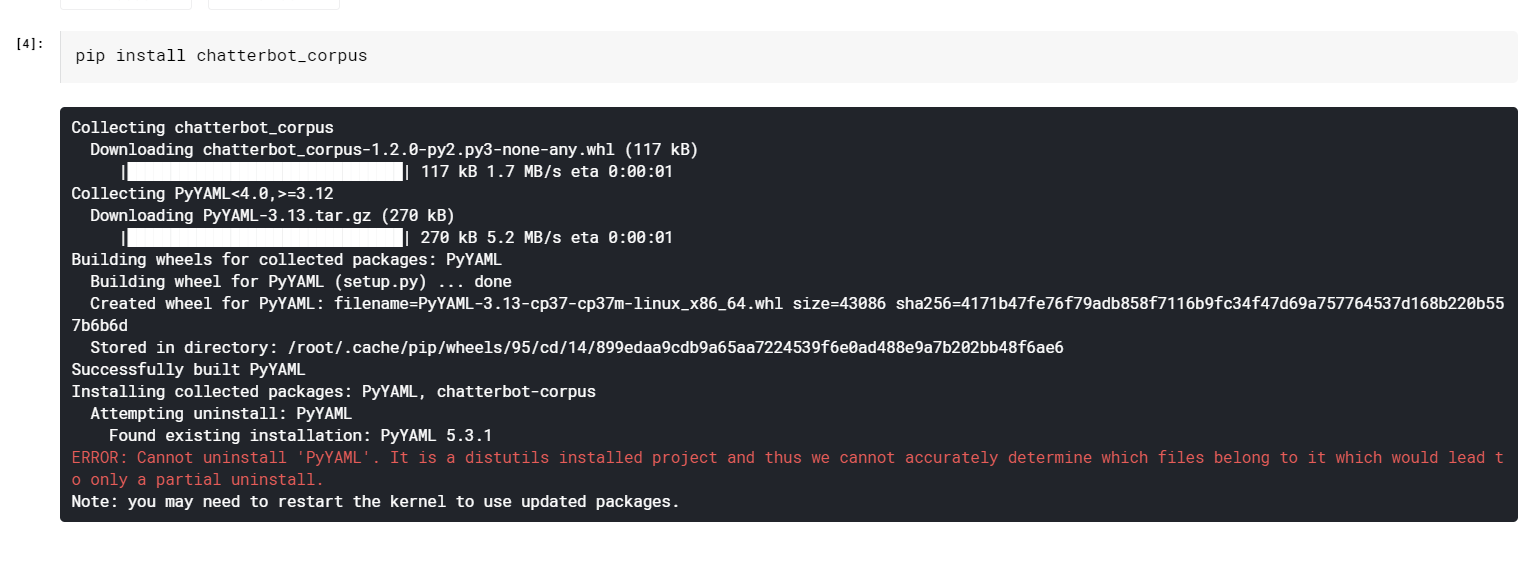
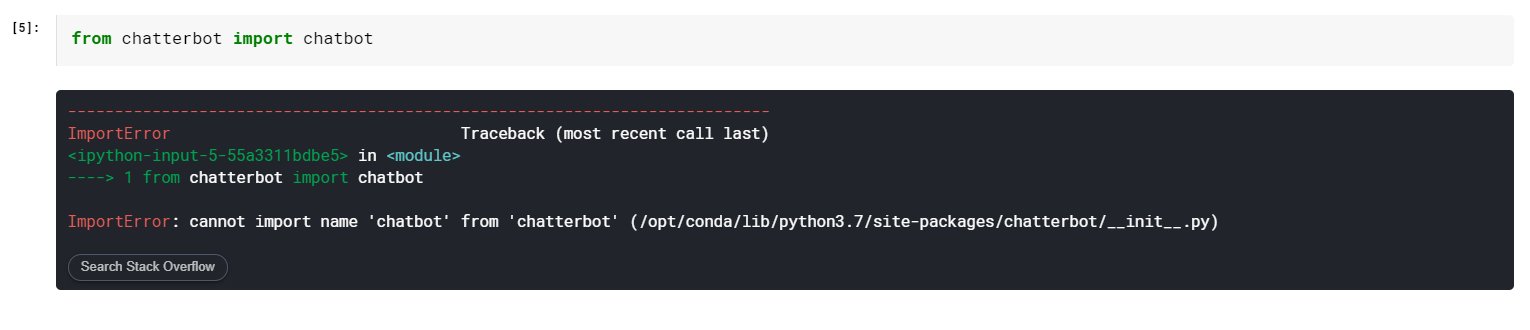
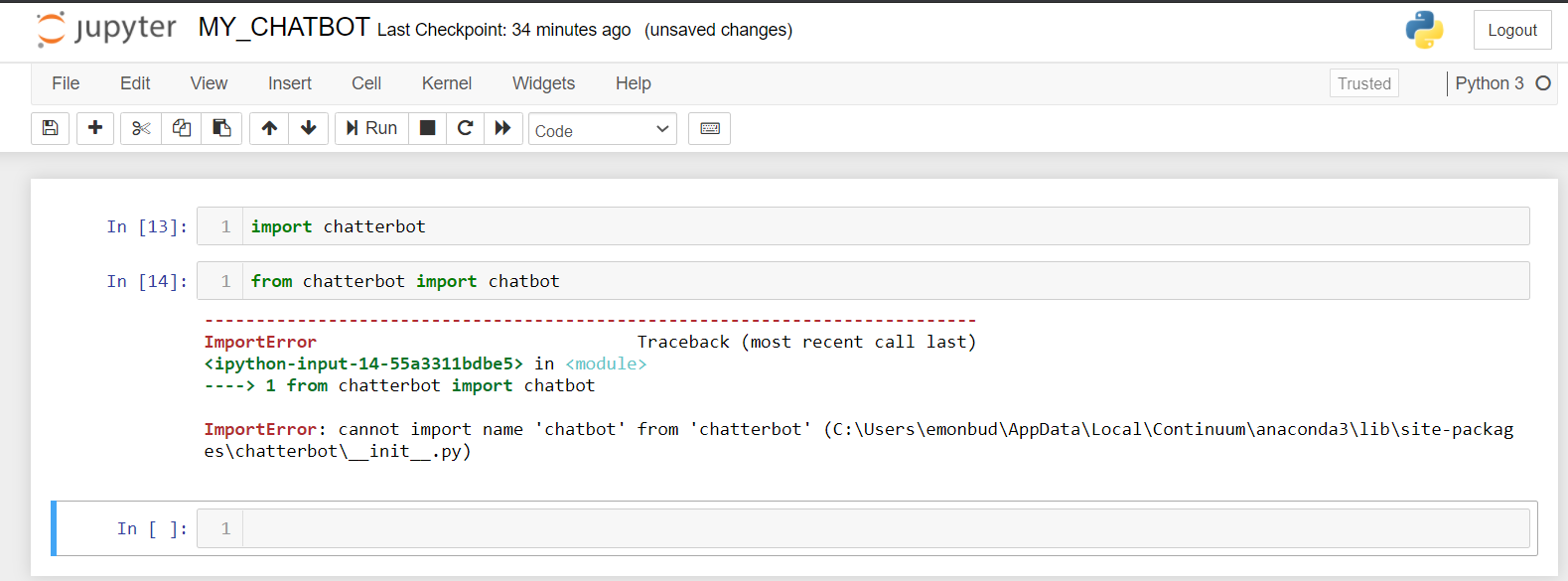
I have tried, different method, different environment, failed to import.
It's a problem about version of PyYAML , What I think. Any Suggestion ?
 aaroha33
on 12 Oct 2020
aaroha33
on 12 Oct 2020
I had the same issue.. it got solved when i followed 3 steps,
From command line i executed this code...
_python -m pip install chatterbot_I installed spacy from command line
_pip install spacy_I changed myfile name from chatterbot.py to talks.py
yay...!! Error gone.... :)
 laxmisundar
on 22 Nov 2020
laxmisundar
on 22 Nov 2020
@jayeshsk is it possible that you created a file named
chatterbot.py? If this is the case, importsfrom chatterbotwill fail.
Hahaha, you made my day, thanks!
 wyneg
on 29 Dec 2020
wyneg
on 29 Dec 2020
Related issues
 thedp
·
4Comments
thedp
·
4Comments
 juanpialbano
·
4Comments
juanpialbano
·
4Comments
 AmusingThrone
·
3Comments
AmusingThrone
·
3Comments
 Jackojc
·
4Comments
Jackojc
·
4Comments
 vkosuri
·
4Comments
vkosuri
·
4Comments
Most helpful comment
@jayeshsk is it possible that you created a file named
chatterbot.py? If this is the case, importsfrom chatterbotwill fail.