Chatterbot: the question comes in Response and answer comes in statement in next row

 sherinmannambeth
All 32 comments
@sherinmannambeth which version of chatterbot are you using?
To know current of chatterbot issue this command on your terminal (venv)user$python -m chatterbot --version
 vkosuri
on 7 Aug 2017
vkosuri
on 7 Aug 2017
I used 0.7.4 and upgraded to version 0.7.5 now but still the same issue.
I got a feeling that, chatterbot responds back to me and the questions I ask back will be the answer for the Chatterbot. So all data it getting to the wrong database table.
 Issen007
on 7 Aug 2017
Issen007
on 7 Aug 2017
@vkosuri I am using 0.7.5 version
@Issen007 sometimes the questions I ask are also returned to me as answers.
sherinmannambeth
on 8 Aug 2017
@sherinmannambeth I think you are using mongodb storage adapter,if yes the work around is use tochatterbot version 0.5.4.It will resolve your issue.
 bainadeashish
on 8 Aug 2017
bainadeashish
on 8 Aug 2017
I can now see that with 0.7.6 that if I ask a question I got the correct responds, but when I ask another question or continue the conversation, the chatterbot think that is the answer for the statement that the Chatterbot responded back to be from the first question.
Then next time I ask the 2nd question I got the wrong answer back.
First Time:
Me: Hello
Bot: Hi,
Me: How are you?
Bot: I'm good
Second Time:
Me: Hello
Bot: Hi,
Me: How are you?
Bot: Hi,
When I look in the SQLite Database I can now see following info
Statement | Responds
Hi, | How are you
Hello | Hi
I got a feeling that I'm pushing in data for each statement.
/Christian
Issen007
on 9 Aug 2017
@bainadeashish I am using "chatterbot.storage.DjangoStorageAdapter"
sherinmannambeth
on 10 Aug 2017
@sherinmannambeth just a question for you, are you using it together with Django?
And have you sort of copycat the django App HTML code that includes as an example with the GitHub package?
Because I start thinking this is not a Chatterbot problem. I think this is a HTML/Django problem that the responds start to be the question and everything you and I type will be the responds.
Issen007
on 14 Aug 2017
@Issen007 Yes, I am using the same Django App HTML Code. But this issue doesnt happen when I train data from the corpus. When trained, the question goes to statement and answer goes to response. If this where to be Django's problem then y doesnt it reflect on training?
sherinmannambeth
on 14 Aug 2017
Even during when you run the corpus data file?
Issen007
on 14 Aug 2017
For trained data its normal. Only while running the bot the problem persists.
sherinmannambeth
on 14 Aug 2017
And that's what's I mean. I think we have a JavaScript / Python issue here and not a Python problem.
When I follow the code in the HTML form we pushing in the same data though the same field and variable.
So I think we need to debug the webpage/javascript and make sure that is proper configured.
Issen007
on 14 Aug 2017
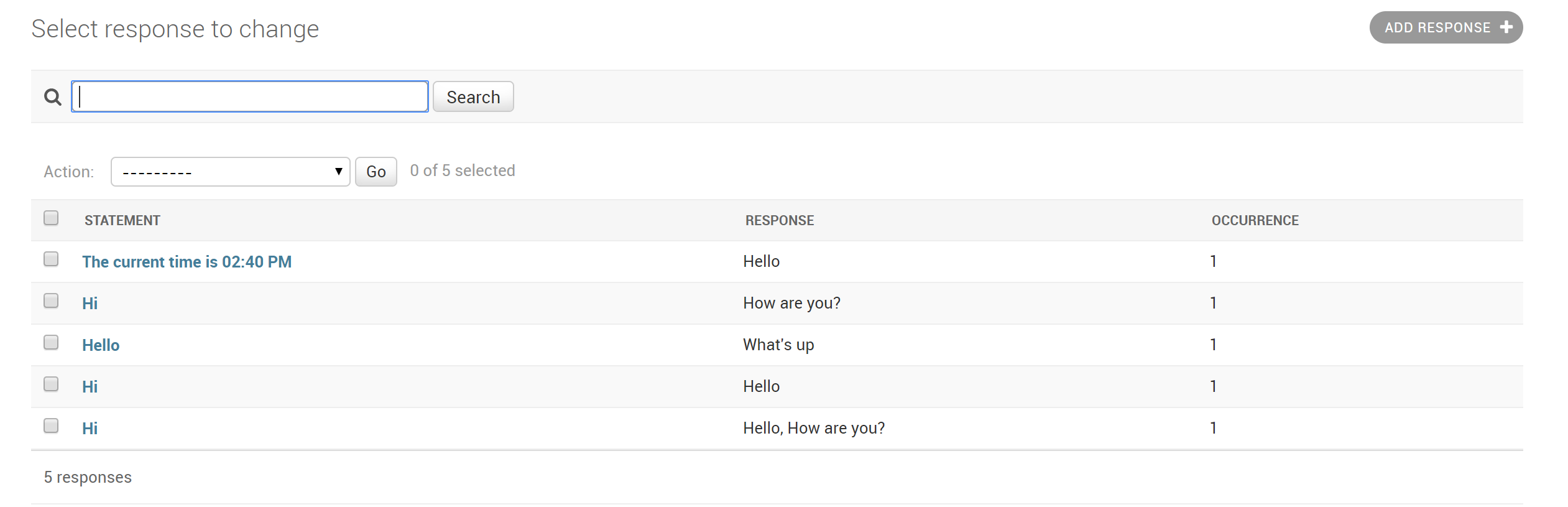
This is what you got when you run your chatbot?
Issen007
on 14 Aug 2017
@gunthercox @vkosuri can you point me to the area where you take the Javascript inputData and POST it to Python chatterbotURL?
Because I can see that we don't insert the first statement. And I got a feeling that you take the first sentence and then the second sentence match that data with existing data in the database.
If not match, then do you add the data to the data.
If exist you just add the counter with +1.
Need to follow that entire data flow to see where it goes wrong.
Thanks
Issen007
on 15 Aug 2017
vkosuri
on 15 Aug 2017
Thanks, That one did I already found out but what python file does that one pointing to?
I did search in view.py and url.py but can't find that inputData line.
Issen007
on 15 Aug 2017
I think you are looking this
vkosuri
on 15 Aug 2017
@vkosuri Thanks and this was the area I looking for.
But can now see that there is updates in the code at GitHub but no formal update that could be used though pip install --upgrade chatterbot command.
But I will upgrade though GitHub and see if that fix solve the issue for us.
Issen007
on 15 Aug 2017
The new code sort of solve the issue for me.
But now do I get the Chatterbot Respond in the Statement column and the Responds column, also my statement also get in both columns.
I think this could be great by design function to be able to predict where the conversation will end.
Issen007
on 15 Aug 2017
@gunthercox @vkosuri from my point of view has this issue been solved by the new code.
@sherinmannambeth FYI, if you run a git clone from GitHub on this project to a separate directory.
Copy the all data from directory ChatterBot/chatterbot/* to your <virt env>/lib/pythonX.X/site-packages/chatterbot
Then will your Statement/Responds issue been solved and we can close this ticket.
Issen007
on 16 Aug 2017
@Issen007 I have done what you said and this is what I got when tested,
My conversation
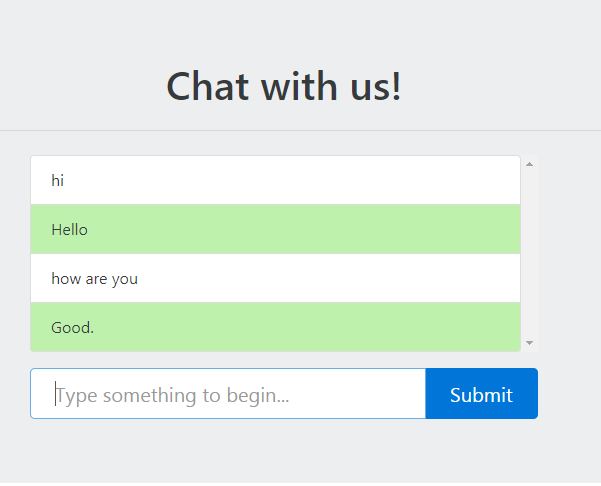
In Django admin

sherinmannambeth
on 16 Aug 2017
This is correct, and this is what I asked @gunthercox and @vkosuri
If the idea was to create a conversation we need both ChatterBot Reponds and what will your Responds be to his previews answer to be able to predict future conversation.
Thanks
Issen007
on 16 Aug 2017
No no..the conversation is working fine..but what comes in Django admin later becomes part of the training data...according to my conversation only two rows should be created in the admin part..but theres an extra row which finally adds up to be a wrong training data.

The later effect is that when I ask "Hello", it will respond "How are you"
sherinmannambeth
on 17 Aug 2017
@sherinmannambeth I'll will work on this today and see if I can solve it. Because I agree with you with that result.
But let me go though the code and see if I can find that statement in the code and see where it push in the responds in to the database.
@vkosuri maybe you have some sort of guidelines to come up with where I should search for.
Issen007
on 18 Aug 2017
My guess, check proper order it is saving into database. i.e update procedure
vkosuri
on 18 Aug 2017
@sherinmannambeth I think I found the issue.
If you put a # infront of line 101-105 in django_storage.py then will you remove the double statement.
@gunthercox @vkosuri do we know why we got that function?
Because when I switch that values to
            Response.objects.create(
                response=response_statement,
                statement=statement
            )
the Chatterbot will then insert the correct statement and responds in the correct field.
But that function do also help the chatterbot to create the statement / responds twice.
I can do a new pull request and fix that for you, but need to understand why we even have it in the first place.
Issen007
on 18 Aug 2017
I think the meaning of keeping another create is, if Response didn't created create it, create Response object. it should something like below.
if not created:
    Response.objects.create(
                    statement=response_statement,
                    response=statement
    )
Has this issue been fixed? I am also getting this issue. @vkosuri @Issen007 @gunthercox
 rdt712
on 29 Sep 2017
rdt712
on 29 Sep 2017
@rdt712 No idea, where were this, Might @Issen007 know about this?
vkosuri
on 29 Sep 2017
In order to get around this, I am just setting the read_only flag to true. I don't particularly care that the chatbot learns from my users and the current way produces weird results. @vkosuri
rdt712
on 29 Sep 2017
@rdt712 if the read_only flag works for you.
But if you implement the "workaround" from the 18th of Aug, then it works.
Issen007
on 2 Oct 2017
@vkosuri sorry to say that your idea to solve it didn't work. But again I haven't got time to look in to this because of other works that need to be done before.
Issen007
on 2 Oct 2017
@rdt712
In reference to #1035
where are you using the read_only=True, I am setting that in _example_app/settings.py_ in CHATTERBOT definition, it is throwing error
Thanks
 nikhilv-quantela
on 26 Oct 2017
nikhilv-quantela
on 26 Oct 2017
Related issues
 yuvalBor
·
3Comments
yuvalBor
·
3Comments
 decode007
·
3Comments
decode007
·
3Comments
 coolrb
·
3Comments
coolrb
·
3Comments
 engrphil
·
3Comments
engrphil
·
3Comments
 thedp
·
4Comments
thedp
·
4Comments
Most helpful comment
@sherinmannambeth I think I found the issue.
If you put a # infront of line 101-105 in django_storage.py then will you remove the double statement.
@gunthercox @vkosuri do we know why we got that function?
Because when I switch that values to
the Chatterbot will then insert the correct statement and responds in the correct field.
But that function do also help the chatterbot to create the statement / responds twice.
I can do a new pull request and fix that for you, but need to understand why we even have it in the first place.