Charts: MongoDB cluster does not have a master.
beck@beck:/var/local/acp$ for i in 0 1 2; do kubectl exec -n default acp-mongodb-release-$i -- sh -c 'mongo --eval="printjson(rs.isMaster())"'; done
MongoDB shell version v4.4.0
connecting to: mongodb://127.0.0.1:27017/?compressors=disabled&gssapiServiceName=mongodb
Implicit session: session { "id" : UUID("34fb6222-279a-4bed-995f-ccf9a0e41f39") }
MongoDB server version: 4.4.0
{
    "topologyVersion" : {
        "processId" : ObjectId("5f4e10f7b08138c6bb5fbf2f"),
        "counter" : NumberLong(0)
    },
    "ismaster" : false,
    "secondary" : false,
    "info" : "Does not have a valid replica set config",
    "isreplicaset" : true,
    "maxBsonObjectSize" : 16777216,
    "maxMessageSizeBytes" : 48000000,
    "maxWriteBatchSize" : 100000,
    "localTime" : ISODate("2020-09-01T09:17:24.828Z"),
    "logicalSessionTimeoutMinutes" : 30,
    "connectionId" : 133,
    "minWireVersion" : 0,
    "maxWireVersion" : 9,
    "readOnly" : false,
    "ok" : 1
}
MongoDB shell version v4.4.0
connecting to: mongodb://127.0.0.1:27017/?compressors=disabled&gssapiServiceName=mongodb
Implicit session: session { "id" : UUID("8dff3d4f-d460-4b19-b103-9e732bde1a8e") }
MongoDB server version: 4.4.0
{
    "topologyVersion" : {
        "processId" : ObjectId("5f4e111a924f1689cf6771c7"),
        "counter" : NumberLong(0)
    },
    "ismaster" : false,
    "secondary" : false,
    "info" : "Does not have a valid replica set config",
    "isreplicaset" : true,
    "maxBsonObjectSize" : 16777216,
    "maxMessageSizeBytes" : 48000000,
    "maxWriteBatchSize" : 100000,
    "localTime" : ISODate("2020-09-01T09:17:25.748Z"),
    "logicalSessionTimeoutMinutes" : 30,
    "connectionId" : 14,
    "minWireVersion" : 0,
    "maxWireVersion" : 9,
    "readOnly" : false,
    "ok" : 1
}
MongoDB shell version v4.4.0
connecting to: mongodb://127.0.0.1:27017/?compressors=disabled&gssapiServiceName=mongodb
Implicit session: session { "id" : UUID("e9fb3729-e53b-42b0-aff3-649161f9bbe1") }
MongoDB server version: 4.4.0
{
    "topologyVersion" : {
        "processId" : ObjectId("5f4e1145ed4dddb377dd0969"),
        "counter" : NumberLong(0)
    },
    "ismaster" : false,
    "secondary" : false,
    "info" : "Does not have a valid replica set config",
    "isreplicaset" : true,
    "maxBsonObjectSize" : 16777216,
    "maxMessageSizeBytes" : 48000000,
    "maxWriteBatchSize" : 100000,
    "localTime" : ISODate("2020-09-01T09:17:26.826Z"),
    "logicalSessionTimeoutMinutes" : 30,
    "connectionId" : 11,
    "minWireVersion" : 0,
    "maxWireVersion" : 9,
    "readOnly" : false,
    "ok" : 1
}
 denissabramovs
All 25 comments
In the logs i have this:
Advertised Hostname: 163.21.71.33
Pod name doesn't match initial primary pod name, configuring node as a secondary
Hi @denissabramovs ,
Could you share the parameters you used to install the Chart?
 miguelaeh
on 2 Sep 2020
miguelaeh
on 2 Sep 2020
sure hold on
helm install acp-mongodb-release --set 'rbac.create=true,persistence.enabled=true,architecture=replicaset,replicaCount=3,externalAccess.autoDiscovery.enabled=true,externalAccess.enabled=true,externalAccess.service.type=NodePort,externalAccess.service.nodePorts[0]='32001',externalAccess.service.nodePorts[1]='32002',externalAccess.service.nodePorts[2]='32003',auth.rootPassword=somePassword1,auth.username=admin,auth.password=somePassword2,auth.database=admin' bitnami/mongodb
this was the latest one
denissabramovs
on 2 Sep 2020
Hi @denissabramovs ,
Thank you very much for reporting this issue. I have been able to reproduce it. It seems this does not happen with the default parameters. I will open a task on our side to investigate the issue.
Regards.
miguelaeh
on 3 Sep 2020
Thank you for your work. We will be waiting for updates.
denissabramovs
on 3 Sep 2020
This issue happens if you use:
fullnameOverride: mongodb
in your values
I commented it out:
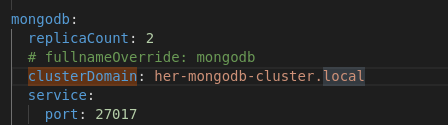
and now replicaset works:
 YannisMarios
on 6 Sep 2020
YannisMarios
on 6 Sep 2020
Hmm, is there a way to override this value/param from chart install command?
denissabramovs
on 6 Sep 2020
@denissabramovs That's the problem. If you override it the replicaset will be created with no master.
I am not sure though if this is always the case. It seems that sometimes this works for me and sometimes even if I don't override fullname by not using "fullnameOverride" still the replicaset gets created without a master.
This needs further investigation
YannisMarios
on 6 Sep 2020
This is strange, how bitnami managed to launch it in replicaset mode? This chart was tested, right?
denissabramovs
on 6 Sep 2020
If you look at the default values.yaml

I don't know if the chart has been tested with replicaset architecture.
YannisMarios
on 6 Sep 2020
Hi guys,
I can confirm we are using the replicaset mode when testing the helm chart.
I guess it should be an issue with a certain combination of parameters that we have missed. It is really difficult to test all the possible combinations for the parameters so we test the basic and more used ones.
Sorry for the inconvenience, and thank you for your investigations!
miguelaeh
on 7 Sep 2020
@miguelaeh can you please post full helm install command with all paramteres which you are using for testing purposes? I would like to try to start in on my local env.
denissabramovs
on 7 Sep 2020
Possibly i could find out the problematic parameters by adding one by one.
denissabramovs
on 7 Sep 2020
@miguelaeh The problem seems to be with the fullnameOverride. Have you tried it?
I have added bitnami/mongodb chart as a subchart dependency in my parent Chart.yml

When I don't use "fullnameOverride" in my parents values or use it with the chart's folder name (fullnameOverride: mongodb) then the replicaser gets created with master and slave ok.
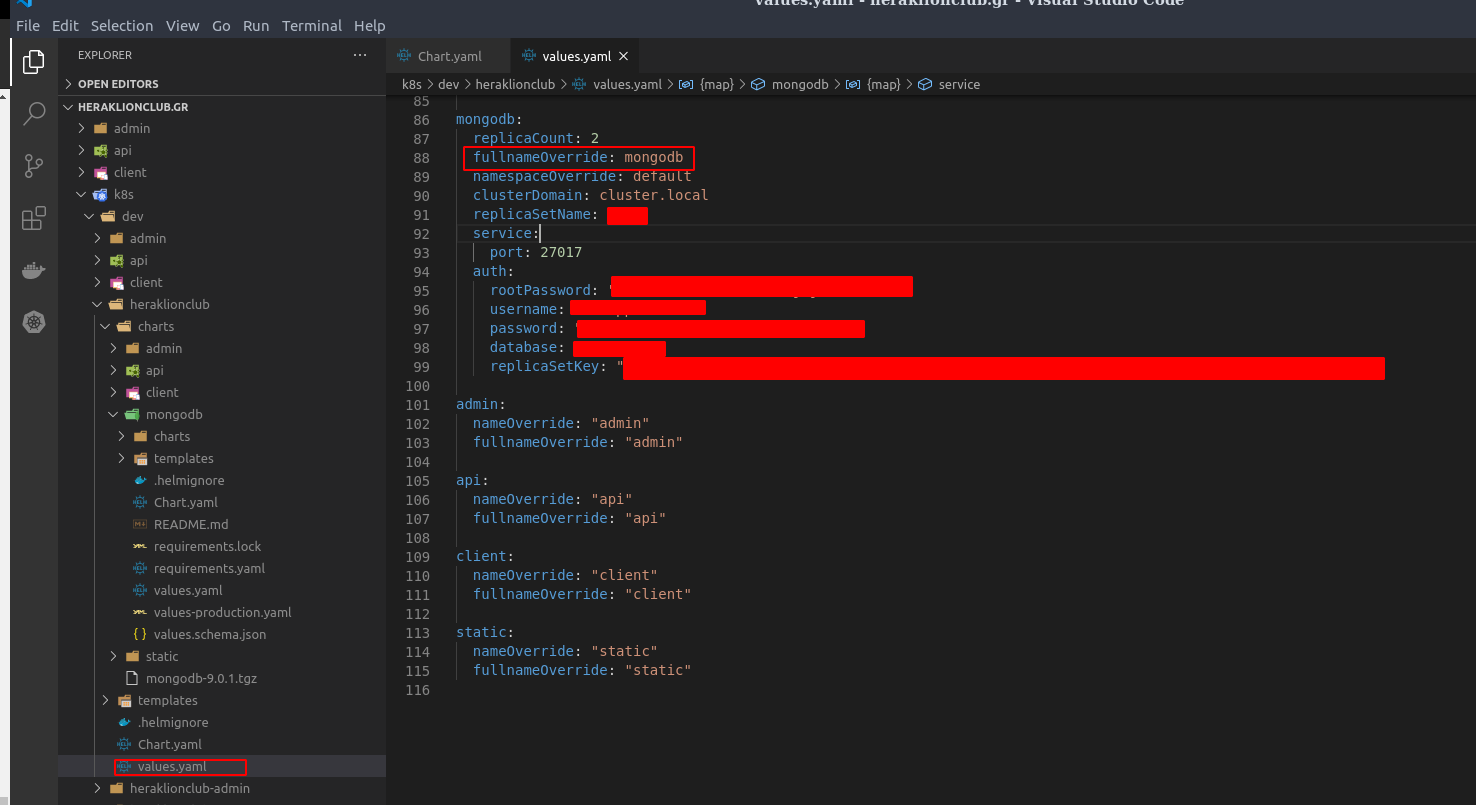
I you want you may try to override fullnameOverride, namespaceOverride and clusterDomain. I think those 3 maybe causing the problem.
Thank you
YannisMarios
on 7 Sep 2020
Hi again guys!
I am not sure about the fullnameOverride, installing with:
helm install mongodb --set 'rbac.create=true,persistence.enabled=true,architecture=replicaset,replicaCount=3,externalAccess.autoDiscovery.enabled=true,externalAccess.enabled=true,externalAccess.service.type=NodePort,externalAccess.service.nodePorts[0]='32001',externalAccess.service.nodePorts[1]='32002',externalAccess.service.nodePorts[2]='32003',auth.rootPassword=somePassword1,auth.username=admin,auth.password=somePassword2,auth.database=admin' bitnami/mongodb
The fullnameOverride is not set and the same issue appears.
miguelaeh
on 8 Sep 2020
I mean, the working example of replicaset you use in tests.
Full helm install command which is working in your tests.
I can confirm we are using the replicaset mode when testing the helm chart.
denissabramovs
on 8 Sep 2020
Hi @denissabramovs ,
Sorry for the confusion, we are testing the replication in the pipeline using docker-compose but not for the Helm Chart.
I have been doing more tests with the first command you provided and I think the issue only appears when using NodePorts services.
Checking the templates deeper it seems that the auto-discovery pod for external access is being created only when using LoadBalancer services.
I think there are two options to work around this while we work on fix it.
- Do no use NodePort services, use LoadBalancer instead.
- (If the external access is not needed) use ClusterIP services.
As you can see here the auto-discovery pod is only created for LoadBalancer services:
 {{- if and .Values.externalAccess.enabled .Values.externalAccess.autoDiscovery.enabled (eq .Values.externalAccess.service.type "LoadBalancer") }}
         - name: auto-discovery
           image: {{ include "mongodb.externalAccess.autoDiscovery.image" . }}
           imagePullPolicy: {{ .Values.externalAccess.autoDiscovery.image.pullPolicy | quote }}
           command:
             - /scripts/auto-discovery.sh
           env:
             - name: MY_POD_NAME
               valueFrom:
                 fieldRef:
                   fieldPath: metadata.name
             - name: SHARED_FILE
               value: "/shared/info.txt"
           {{- if .Values.externalAccess.autoDiscovery.resources }}
           resources: {{- toYaml .Values.externalAccess.autoDiscovery.resources | nindent 12 }}
           {{- end }}
           volumeMounts:
             - name: shared
               mountPath: /shared
             - name: scripts
               mountPath: /scripts/auto-discovery.sh
               subPath: auto-discovery.sh
         {{- end }}
Auto-discovery image is that image which is requesting external ip service, which can output our cluster external cluster ip?
denissabramovs
on 9 Sep 2020
Hi @denissabramovs ,
Sorry, I am not sure I understand the last question.
To expose external IPs you can use LoadBalancer services.
miguelaeh
on 10 Sep 2020
No no, I meant something other than LoadBalancer
denissabramovs
on 10 Sep 2020
The pod will try to get the external ip of the node using curl -s https://ipinfo.io/ip unless externalAccess.service.domain is provided.
From your README
denissabramovs
on 10 Sep 2020
Hi @denissabramovs ,
That parameter is actually intended to be used with NodePort services. It is basically to provide the hostname that will be resolved to your cluster nodes external IPs.
To be honest, I am not sure if providing that parameter will bypass the issue, but if you have an external hostname pointing to your cluster external IPs we would appreciate if you can try with it.
miguelaeh
on 11 Sep 2020
Same issue as above described..
I tested the both option (NodePort & LoadBalander), only LoadBalancer mode works.
Is an appointment scheduled for providing fix?
 milkeryildirim
on 26 Sep 2020
milkeryildirim
on 26 Sep 2020
Hi,
I am afraid we don't have news about this. We cannot provide an estimated date for the fix, but we will update this thread once we have news.
Sorry for the inconveniences.
Regards.
miguelaeh
on 28 Sep 2020
Will try to post here the results with LoadBalancer setup.
denissabramovs
on 28 Sep 2020
Related issues
 Cellebyte
·
5Comments
Cellebyte
·
5Comments
 tkam8
·
5Comments
tkam8
·
5Comments
 estenssoros
·
3Comments
estenssoros
·
3Comments
 wantdrink
·
6Comments
wantdrink
·
6Comments
 emreberber
·
3Comments
emreberber
·
3Comments
Most helpful comment
This issue happens if you use:
in your values
I commented it out:
and now replicaset works: