Charts: [bitnami/wordpress] Can't change upload size on Wordpress; tells that the max is 40Mb, but in reality, it is no more than 1Mb.
Two causes, one problem.
Which chart:
wordpress 9.1.1
Describe the bug
The default max upload size of Apache (or openresty?) is smaller than in php.ini. I tried changing it with wordpress-htaccess.conf, and it didn't work either.
To Reproduce
Steps to reproduce the behavior:
- Create a ConfigMap:
apiVersion: v1
kind: ConfigMap
metadata:
  name: kammiac-site-config
  namespace: kammiac-site
data:
  wordpress-htaccess.conf: |-
    <Directory "/bitnami/wordpress">
      LimitRequestBody 41943040
      SSLRenegBufferSize 41943040
    </Directory>
    <Directory "/opt/bitnami/wordpress">
      LimitRequestBody 41943040
      SSLRenegBufferSize 41943040
    </Directory>
- Create a regular stateful wordpress deployment with values:
    allowOverrideNone: true
    customHTAccessCM: kammiac-site-config
    ingress:
      enabled: true
      certManager: true
      hostname: kammiac.medkam.ru
      tls: true
    persistence:
      storageClass: kammiac-site-storage
      size: 50Gi
    mariadb:
      master:
        persistence:
          storageClass: kammiac-site-storage
    livenessProbeHeaders:
      - name: X-Forwarded-Proto
        value: https
    readinessProbeHeaders:
      - name: X-Forwarded-Proto
        value: https
    service:
      type: ClusterIP
- In the pod, run
cat /htaccess/wordpress-htaccess.confand observe that your config map is present.
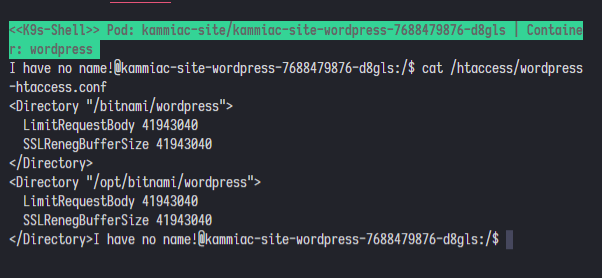
- Log in to Wordpress. Create a new post/page and open its editor.
- Add a block "File".
- Click the "Media Library" button. Observe that Wordpress states that the max upload size is 40Mb.
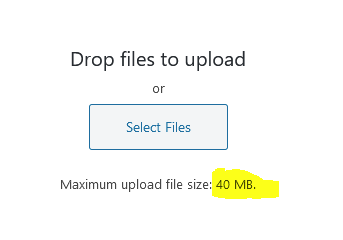
- Upload any file with size in between 1Mb and 40Mb.
- Get error 413 in your console.
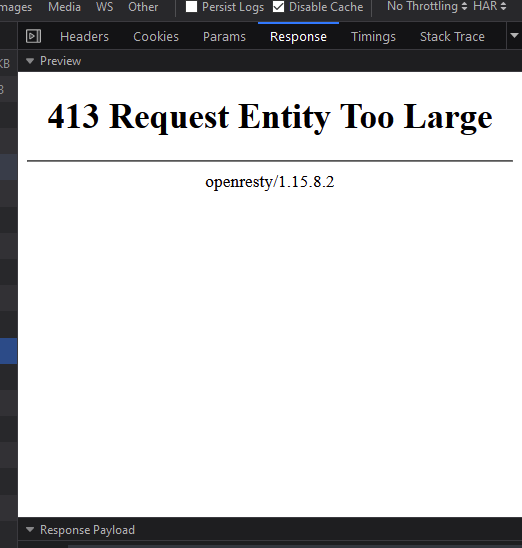
- Cry.
Expected behavior
The real max upload size must be 40mb by default.
The cap set by openresty must be changeable, and the method should be documented.
Version of Helm and Kubernetes:
- Output of
helm version:
version.BuildInfo{Version:"v3.1.2", GitCommit:"d878d4d45863e42fd5cff6743294a11d28a9abce", GitTreeState:"clean", GoVersion:"go1.13.8"}
- Output of
kubectl version:
Client Version: version.Info{Major:"1", Minor:"15+", GitVersion:"v1.15.8-beta.0", GitCommit:"6c143d35bb11d74970e7bc0b6c45b6bfdffc0bd4", GitTreeState:"archive", BuildDate:"2020-01-02T00:00:00Z", GoVersion:"go1.13.5", Compiler:"gc", Platform:"linux/amd64"}
Server Version: version.Info{Major:"1", Minor:"17", GitVersion:"v1.17.4", GitCommit:"8d8aa39598534325ad77120c120a22b3a990b5ea", GitTreeState:"clean", BuildDate:"2020-03-12T20:55:23Z", GoVersion:"go1.13.8", Compiler:"gc", Platform:"linux/amd64"}
Additional context
—
 CosmoMyzrailGorynych
All 7 comments
@CosmoMyzrailGorynych It looks like you are using an external Ingress controller, because the Bitnami WordPress chart does not deploy an OpenResty Ingress Controller.
Keep in mind that the chart deploys an Apache server, so despite the changes below, you may also need to update the Apache configuration as well.
Usually the way to fix this issue consists of setting an annotation to override a NGINX configuration line that is specific to this chart. See some examples below:
Official Kubernetes Ingress Controller:
--set 'ingress.annotations.nginx.ingress.kubernetes.io/client-max-body-size=40m'
IBM BlueMix Ingress Controller:
--set 'ingress.annotations.ingress.bluemix.net/client-max-body-size=size=40m'
 marcosbc
on 6 Apr 2020
marcosbc
on 6 Apr 2020
@marcosbc, thank you! You pushed me in the correct direction. We are using fluxcd.io with HelmOperator, MetalLB, and stable/nginx-ingress chart. Probably openresty comes with the latter one.
I added your annotation plus nginx.ingress.kubernetes.io/proxy-body-size: "40m", and it worked!
Here are my final values for the helm chart (it will probably be useful for others):
    wordpressScheme: https
    allowOverrideNone: true
    customHTAccessCM: kammiac-site-config
    ingress:
      enabled: true
      certManager: true
      hostname: kammiac.ru
      annotations:
        nginx.ingress.kubernetes.io/client-max-body-size: "40m"
        nginx.ingress.kubernetes.io/proxy-body-size: "40m"
      tls: true
      extraHosts:
        - name: kammiac.medkam.ru
          path: /
    livenessProbeHeaders:
      - name: X-Forwarded-Proto
        value: https
    readinessProbeHeaders:
      - name: X-Forwarded-Proto
        value: https
    service:
      type: ClusterIP
This Issue has been automatically marked as "stale" because it has not had recent activity (for 15 days). It will be closed if no further activity occurs. Thanks for the feedback.
![stale[bot] picture](https://avatars3.githubusercontent.com/in/1724?v=4&s=40) stale[bot]
on 23 Apr 2020
stale[bot]
on 23 Apr 2020
Uuuuh the bot is broken
CosmoMyzrailGorynych
on 23 Apr 2020
Yes, that's right. We will check that bot. Thanks and sorry for the noise
 carrodher
on 23 Apr 2020
carrodher
on 23 Apr 2020
I have the same issue. I used Rancher "Apps" to install wordpress which uses this chart. how can I fix this issue there?
 hadifarnoud
on 16 Jul 2020
hadifarnoud
on 16 Jul 2020
@hadifarnoud Could you open a new issue with more details? It is fine if you link to this one. Please add as much information as possible for us to troubleshoot this issue, including the type of NGINX Ingress Controller you have configured.
marcosbc
on 16 Jul 2020
Related issues
 lexual
·
3Comments
lexual
·
3Comments
 ianhlee
·
4Comments
ianhlee
·
4Comments
 nonpool
·
6Comments
nonpool
·
6Comments
 tkam8
·
5Comments
tkam8
·
5Comments
 mcritchlow
·
4Comments
mcritchlow
·
4Comments
Most helpful comment
@CosmoMyzrailGorynych It looks like you are using an external Ingress controller, because the Bitnami WordPress chart does not deploy an OpenResty Ingress Controller.
Keep in mind that the chart deploys an Apache server, so despite the changes below, you may also need to update the Apache configuration as well.
Usually the way to fix this issue consists of setting an annotation to override a NGINX configuration line that is specific to this chart. See some examples below:
Official Kubernetes Ingress Controller:
--set 'ingress.annotations.nginx.ingress.kubernetes.io/client-max-body-size=40m'
IBM BlueMix Ingress Controller:
--set 'ingress.annotations.ingress.bluemix.net/client-max-body-size=size=40m'