- [x] I've read, understood, and done my best to follow the *CONTRIBUTING guidelines.
What did you do?
Pinched to zoom in the graph
What did you expect to happen?
The graph should zoom in
What happened instead?
App crashed
Charts Environment
pod 'Socket.IO-Client-Swift', '~> 13.1.0'
10.1 (10B61)
Swift 4
iOS11.2
macOS 10.13.6
Demo Project
This is a company application, I can not send it.
detalis:
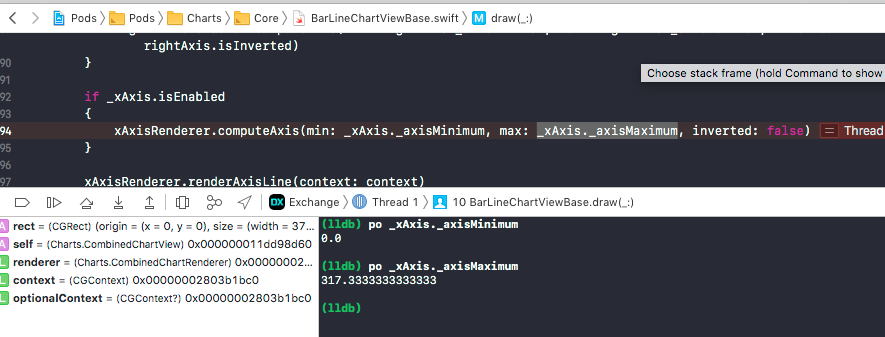
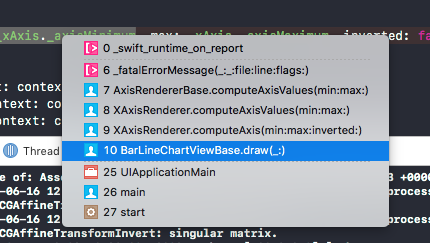
When zooming in the graph, we get this - CODE FROM THE POD:
/// Sets up the axis values. Computes the desired number of labels between the two given extremes.
///////////////////////////////// MIN and MAX are NaN   /////////////////////////////////


@objc open func computeAxisValues(min: Double, max: Double)
{
    guard let axis = self.axis else { return }

    let yMin = min
    let yMax = max

    let labelCount = axis.labelCount
    let range = abs(yMax - yMin)

    if labelCount == 0 || range <= 0 || range.isInfinite
    {
        axis.entries = [Double]()
        axis.centeredEntries = [Double]()
        return
    }

    // Find out how much spacing (in y value space) between axis values
    let rawInterval = range / Double(labelCount)
    var interval = rawInterval.roundedToNextSignficant()

    // If granularity is enabled, then do not allow the interval to go below specified granularity.
    // This is used to avoid repeated values when rounding values for display.
    if axis.granularityEnabled
    {
        interval = interval < axis.granularity ? axis.granularity : interval
    }

    // Normalize interval
    let intervalMagnitude = pow(10.0, Double(Int(log10(interval)))).roundedToNextSignficant() <- THE LINE WITH THE CRASH

 nivbp7
All 7 comments
I get a crash when zooming on the Mac version too.
I'm using this code to zoom based on the values obtained from an NSSlider:
self.barChartView.zoom(scaleX: 1.2, scaleY: 0.0, x: 0, y: 0)
It crashes in ChartDataRendererBase.swift with an EXE BAD INSTRUCTION error:

 brendand
on 29 Jun 2019
brendand
on 29 Jun 2019
is it caused by NaN? Can you post the crash log?
 liuxuan30
on 1 Aug 2019
liuxuan30
on 1 Aug 2019
I got this error randomly on ios simulator (I'm using react-native). How to fix it? And what if I return just true? First I get another error caused by a NaN and solved in this way : https://stackoverflow.com/questions/45496912/how-to-clear-a-chart-and-then-add-data-to-it-in-swift-3-using-chartview-clear
 bbored
on 13 Sep 2019
bbored
on 13 Sep 2019
normally, a NaN means some data is invalid, like dividing zero, or NULL. IMO I disagree we should capture NaN exception, because it hides the reason behind it.
So I encourage if you met NaN crash, send the full crash log and maybe check your data why it's NaN in the first place. A lot of common cases are either passing invalid data, or missing data but requiring the chart to draw something, such as the axis, which would need at least a min and max value to draw.
liuxuan30
on 17 Sep 2019
Thank you. I wrongly tried to reset the barchart graph, now switched to conditional rendering. First I set as start values y=[], after y=[null,null,null,null,null] and now y=[0,0,0,0,0,]
bbored
on 17 Sep 2019
normally I would argue that y=[null,null,null,null,null] should not be passed into Charts anyway. You can detect this earlier and give a more meaningful warning. When you pass a bunch of null into a chart, this chart will have to pick a default axis range and draw nothing. I mean we could do this, but right now we think this is better for you to handle this scenario.
liuxuan30
on 26 Sep 2019
Hey all, reviving this old thread, as I'm having a crash on the same line
AxisRendererBase.computeAxisValues(min:max:) + 119
I've not yet ascertained with certainty the cause of my issue, but in my hunt, I have found another issue that can cause the NaN crash:
The chart's viewPortHandler can get a bad matrix, where:
// AxisRendererBase.computeAxis(min:max:inverted:) : Lines 70-71
let p1 = transformer.valueForTouchPoint(CGPoint(x: viewPortHandler.contentLeft, y: viewPortHandler.contentTop))
let p2 = transformer.valueForTouchPoint(CGPoint(x: viewPortHandler.contentLeft, y: viewPortHandler.contentBottom))
The values returned by the transformer, p1 and/or p2, will be NaN
The result is the same. A crash occurs at
let intervalMagnitude = pow(10.0, Double(Int(log10(interval)))).roundedToNextSignficant()
Repro:
You can repro this easily. Just call this prior to updating the data, which forces an invalid viewport matrix:
chart.setVisibleXRangeMaximum(0.0)
I think it worth adding a NaN check following the transformers, or modifying the viewport handler to guard against invalid matrices.
 bradgmueller
on 22 Oct 2020
bradgmueller
on 22 Oct 2020
Related issues
 JW00332
·
4Comments
JW00332
·
4Comments
 heumn
·
3Comments
heumn
·
3Comments
 BrandonShega
·
4Comments
BrandonShega
·
4Comments
 kirti0525
·
3Comments
kirti0525
·
3Comments
 guanyanlin
·
3Comments
guanyanlin
·
3Comments
Most helpful comment
I get a crash when zooming on the Mac version too.
I'm using this code to zoom based on the values obtained from an NSSlider:
self.barChartView.zoom(scaleX: 1.2, scaleY: 0.0, x: 0, y: 0)It crashes in ChartDataRendererBase.swift with an EXE BAD INSTRUCTION error: