Charts: [stable/prometheus-operator] Howto expose prometheus, grafana and alertmanager with nginx ingress
Is this a request for help?: yes
Is this a BUG REPORT or FEATURE REQUEST? (choose one): FEATURE REQUEST
I think some clear documentation is needed here in order to expose prometheus, grafana and alertmanager with nginx ingress, using path based routing e.g:
Version of Helm and Kubernetes:
k8s v1.13.2
helm v2.12.3
Which chart:
stable/nginx-ingress version 1.3.0
stable/prometheus-operator version 2.2.2
What happened:
- I cannot expose prometheus, grafana and alertmanager using path based routing with Nginx Ingress controller
Alertmanager Helm values:
alertmanager:
  enabled: true
  ingress:
    enabled: true
    annotations:
      kubernetes.io/ingress.class: "nginx"
      nginx.ingress.kubernetes.io/rewrite-target: /$1
      nginx.ingress.kubernetes.io/backend-protocol: "HTTP"
    hosts:
      - my.host.com
    tls:
      - secretName: my-tls
        hosts:
          - my.host.com

  alertmanagerSpec:
    routePrefix: /alerts/?(.*)
    externalUrl: https://my.host.com/alerts/
Grafana Helm values:
grafana:
  enabled: true
  defaultDashboardsEnabled: true
  adminPassword: admin
  ingress:
    enabled: true
    annotations:
      kubernetes.io/ingress.class: "nginx"
      nginx.ingress.kubernetes.io/rewrite-target: /$1
      nginx.ingress.kubernetes.io/backend-protocol: "HTTP"
    hosts:
      - my.host.com
    tls:
      - secretName: my-tls
        hosts:
          - my.host.com

    path: /grafana/?(.*)
  grafana.ini:
    server:
      root_url: https://my.host.com/grafana/
Prometheus Helm values:
prometheus:
  enabled: true
  service:
    nodePort: 30900
    type: NodePort
  ingress:
    enabled: true
    annotations:
      kubernetes.io/ingress.class: nginx
      nginx.ingress.kubernetes.io/rewrite-target: /$1
      nginx.ingress.kubernetes.io/backend-protocol: "HTTP"
    hosts:
      - my.host.com
    tls:
      - secretName: my-tls
        hosts:
          - my.host.com

  prometheusSpec:
    routePrefix: /prom/?(.*)
    externalUrl: https://my.host.com/prom/
What you expected to happen:
I expect to be able to browse to each
https://my.host.com/alerts/
https://my.host.com/grafana/
https://my.host.com/prom/
How to reproduce it (as minimally and precisely as possible):
helm install stable/prometheus-operator --version 2.2.2
Anything else we need to know:
Alert Manager pod fails with
Liveness probe failed: Get http://10.244.1.18:9093/alerts/?(.*)/api/v1/status: dial tcp 10.244.1.18:9093: connect: connection refused
Prometheus pod fails with
Liveness probe failed: Get http://10.244.3.12:9090/prom/?(.*)/-/healthy: dial tcp 10.244.3.12:9090: connect: connection refused
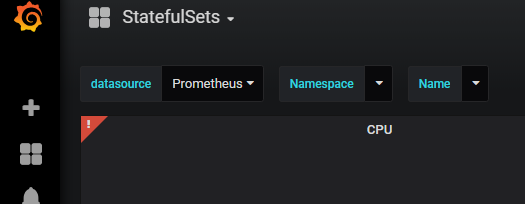
I can only reach Grafana but UI has errors
 dkirrane
All 10 comments
All that is required for ingress to work is specifying ingress enabled and setting a URL. No other changes are required. This configuration is pretty much standard across the charts in this repository
From what you are describing the issue seems to be with Prometheus not starting up, rather than errors to do with ingress. This also suggests that your issues with grafana are actually an extension of prometheus pods not running and grafana failing to connect to them.
Could you try running the chart without changing it and then port-forward to grafana and see if it works?
 vsliouniaev
on 18 Feb 2019
vsliouniaev
on 18 Feb 2019
This issue has been automatically marked as stale because it has not had recent activity. It will be closed if no further activity occurs. Any further update will cause the issue/pull request to no longer be considered stale. Thank you for your contributions.
![stale[bot] picture](https://avatars.githubusercontent.com/in/1724?v=4&s=40) stale[bot]
on 20 Mar 2019
stale[bot]
on 20 Mar 2019
This issue is being automatically closed due to inactivity.
stale[bot]
on 3 Apr 2019
I am having the same issue.
I believe it's not about the FQDN but the path.
I managed to fix the grafana part yesterday with this config but the same config on prometheus doesn't work.
prometheus:
  podDisruptionBudget:
    enabled: true
    minAvailable: 1
  ingress:
    enabled: true
    annotations:
      kubernetes.io/ingress.class: nginx
      nginx.ingress.kubernetes.io/rewrite-target: /$2
    tls:
      - secretName: caas-azure-demo
        hosts:
          - caas-azure-demo.dev.domain.com
    hosts:
      - caas-azure-demo.dev.domain.com
    paths:
      - "/prometheus(/|$)(.*)"
grafana:
  adminPassword: Password123!
  grafana.ini:
    server:
      root_url: "%(protocol)s://%(domain)s:%(http_port)s/grafana/"
      enable_gzip: "true"
  ingress:
    enabled: true
    annotations:
      kubernetes.io/ingress.class: nginx
      nginx.ingress.kubernetes.io/rewrite-target: /$2
    tls:
      - secretName: caas-azure-demo
        hosts:
          - caas-azure-demo.dev.domain.com
    hosts:
      - caas-azure-demo.dev.domain.com
    path: "/grafana(/|$)(.*)"
I tried the config from the original poster as well and it doesn't work.
Any hints as to what is the correct way?
 DavidHache
on 13 Jun 2019
DavidHache
on 13 Jun 2019
So, I think what's going on here is that the hosts needs the path in it, take a look here at what the helm chart is doing:
spec:
  rules:
  {{- range .Values.server.ingress.hosts }}
    {{- $url := splitList "/" . }}
    - host: {{ first $url }}
      http:
        paths:
          - path: /{{ rest $url | join "/" }}
            backend:
              serviceName: {{ $serviceName }}
              servicePort: {{ $servicePort }}
  {{- end -}}
it seems with the way it's populating path is just by splitting the hosts, which it assumes is a full path like "foo.com/prometheus" and splits it... but then with the newer ingress controllers, I ton' think this will work with the nginx.ingress.kubernetes.io/rewrite-target: annotation and path specs...
 AXington
on 21 Aug 2019
AXington
on 21 Aug 2019
Can this issue be opened? We are facing the same problem.
 mzs114
on 31 Jan 2020
mzs114
on 31 Jan 2020
Try this:
helm upgrade -i prometheus stable/prometheus-operator --values monitoring_prometheus.yaml
monitoring_prometheus.yaml
defaultRules:
  create: true
  rules:
    alertmanager: true
    etcd: true
    general: true
    k8s: true
    kubeApiserver: true
    kubePrometheusNodeAlerting: true
    kubePrometheusNodeRecording: true
    kubernetesAbsent: true
    kubernetesApps: true
    kubernetesResources: true
    kubernetesStorage: true
    kubernetesSystem: true
    kubeScheduler: true
    network: true
    node: true
    prometheus: true
    prometheusOperator: true
    time: true

  ## Labels for default rules
  labels: {}
  ## Annotations for default rules
  annotations:
    priority: 'high'


kubeControllerManager:
  enabled: true
  serviceMonitor:
    https: false
    insecureSkipVerify: true

kubelet:
  enabled: true
  serviceMonitor:
    https: false

alertmanager:
  alertmanagerSpec:
    image:
      repository: quay.io/prometheus/alertmanager
      tag: v0.18.0
  ingress:
    enabled: true
    annotations:
      kubernetes.io/ingress.class: nginx
      nginx.ingress.kubernetes.io/rewrite-target: /$2
      # nginx.ingress.kubernetes.io/auth-type: basic
      # nginx.ingress.kubernetes.io/auth-secret: admin
      # nginx.ingress.kubernetes.io/auth-realm: "Authentication Required - ok"
    tls:
    - secretName: cluster1
      hosts:
        - cluster1.kubelab.int
    hosts:
      - cluster1.kubelab.int
    paths:
      - "/alertmanager(/|$)(.*)"
  podDisruptionBudget:
    enabled: true
    minAvailable: 1
  config:
    global:
      resolve_timeout: 5m
    route:
      group_by: ['job']
      group_wait: 30s
      group_interval: 5m
      repeat_interval: 12h
      receiver: 'cluster1'
      routes:
      - match:
          alertname: 'CPUThrottlingHigh'
        receiver: 'null'
      - match:
          alertname: 'KubeStatefulSetReplicasMismatch'
        receiver: 'null'
      - match:
          alertname: Watchdog
        receiver: 'null'
      - match:
          severity: 'critical'
        receiver: 'null'
      - match_re:
          severity: '^(none|warning|critical)$'
        receiver: 'null'


prometheus:
  prometheusSpec:
    externalUrl: 'https://cluster1.kubelab.int/prometheus/'
    routePrefix: '/prometheus'
  podDisruptionBudget:
    enabled: true
    minAvailable: 1
  ingress:
    enabled: true
    annotations:
      # nginx.ingress.kubernetes.io/auth-type: basic
      # nginx.ingress.kubernetes.io/auth-secret: admin
      # nginx.ingress.kubernetes.io/auth-realm: "Authentication Required - ok"

    tls:
      - secretName: cluster1
        hosts:
          - cluster1.kubelab.int
    hosts:
      - cluster1.kubelab.int
    paths:
      - "/prometheus/"

grafana:
  adminPassword: Password123!
  grafana.ini:
    server:
      root_url: "%(protocol)s://%(domain)s:%(http_port)s/grafana/"
      enable_gzip: "true"
  ingress:
    enabled: true
    annotations:
      kubernetes.io/ingress.class: nginx
      nginx.ingress.kubernetes.io/rewrite-target: /$2
    tls:
      - secretName: cluster1
        hosts:
          - cluster1.kubelab.int
    hosts:
      - cluster1.kubelab.int
    path: "/grafana(/|$)(.*)"

additionalScrapeConfigs:
  name: additional-scrape-configs
  key: prometheus-additional.yaml
All that is required for ingress to work is specifying ingress enabled and setting a URL. No other changes are required. This configuration is pretty much standard across the charts in this repository
@vsliouniaev,
So there is NO need to install stable/nginx-ingress either? nginx is part of stable/prometheus-operator chart??
 zzhao2010
on 19 Jun 2020
zzhao2010
on 19 Jun 2020
Getting below message even after multiple attempts for grafana URL access after installing Prometheus and Grafana using kube-prometheus-stack operator. Any clues on what else could be the issue since I see correct root_url inside grafana.ini inside Grafana pod?
**If you're seeing this Grafana has failed to load its application files
This could be caused by your reverse proxy settings.
If you host grafana under subpath make sure your grafana.ini root_url setting includes subpath. If not using a reverse proxy make sure to set serve_from_sub_path to true.
If you have a local dev build make sure you build frontend using: yarn start, yarn start:hot, or yarn build
Sometimes restarting grafana-server can help**
grafana:
  enabled: true
  namespaceOverride: ""
  rbac:
    pspUseAppArmor: false
  grafana.ini:
    server:
      root_url: "%(protocol)s://%(domain)s:%(http_port)s/grafana/"


    ## Hostnames.
    ## Must be provided if Ingress is enable.
    ##
    # hosts:
    #   - grafana.domain.com
    hosts:
      - sbgrafana.myorgdev.com

    ## Path for grafana ingress
    path: "/grafana(/|$)(.*)"
 cnukwas
on 14 Oct 2020
cnukwas
on 14 Oct 2020
Posting a solution yet another place to make it easier for others, in case someone runs into similar issues. Make sure to create a values.yaml with defaults using below command, to avoid updating anything in installed chart files. Not sure why it didn't work without enabling serve_from_sub_path, but it's ok as it's working now. Note that I didn't enable Ingress section since I have already created Ingress route outside the installation process.
helm show values prometheus-com/kube-prometheus-stack > custom-values.yaml
Then install by changing below values in custom-values.yaml. Change namespace as needed.
helm -n monitoring install -f ./custom-values.yaml pg prometheus-com/kube-prometheus-stack
grafana:
  enabled: true
  namespaceOverride: ""
  # set pspUseAppArmor to false to fix Grafana pod Init errors
  rbac:
    pspUseAppArmor: false
  grafana.ini:
    server:
      domain: mysb.grafanasite.com
      #root_url: "%(protocol)s://%(domain)s/"
      root_url: https://mysb.grafanasite.com/grafana/
      serve_from_sub_path: true

  ## Deploy default dashboards.
  ##
  defaultDashboardsEnabled: true

  adminPassword: prom-operator

  ingress:
    ## If true, Grafana Ingress will be created
    ##
    enabled: false

    ## Annotations for Grafana Ingress
    ##
    annotations: {}
      # kubernetes.io/ingress.class: nginx
      # kubernetes.io/tls-acme: "true"

    ## Labels to be added to the Ingress
    ##
    labels: {}

    ## Hostnames.
    ## Must be provided if Ingress is enable.
    ##
    # hosts:
    #   - grafana.domain.com
    hosts:
      - mysb.grafanasite.com

    ## Path for grafana ingress
    path: /grafana/
Related issues
 donkeyx
·
3Comments
donkeyx
·
3Comments
 mickengland
·
3Comments
vsliouniaev
·
3Comments
mickengland
·
3Comments
vsliouniaev
·
3Comments
 out-of-band
·
3Comments
out-of-band
·
3Comments
 harshmehta93
·
3Comments
harshmehta93
·
3Comments
Most helpful comment
I am having the same issue.
I believe it's not about the FQDN but the path.
I managed to fix the grafana part yesterday with this config but the same config on prometheus doesn't work.
I tried the config from the original poster as well and it doesn't work.
Any hints as to what is the correct way?