Charts: [keycloak:4.0.8] You need local access to create the initial admin user ?
Is this a request for help?: yes
Is this a BUG REPORT or FEATURE REQUEST? (choose one): bug-report
Version of Helm and Kubernetes: 2.12.1, 1.10.x
Which chart: keycloak 4.0.8
What happened:
installed with following values:
keycloak:
  password: "my-secret"
  ingress:
    enabled: true
    annotations:
      kubernetes.io/ingress.class: internal
      ingress.kubernetes.io/affinity: cookie
    hosts:
      - keycloak.me.com
    tls:
      - hosts:
        - keycloak.me.com
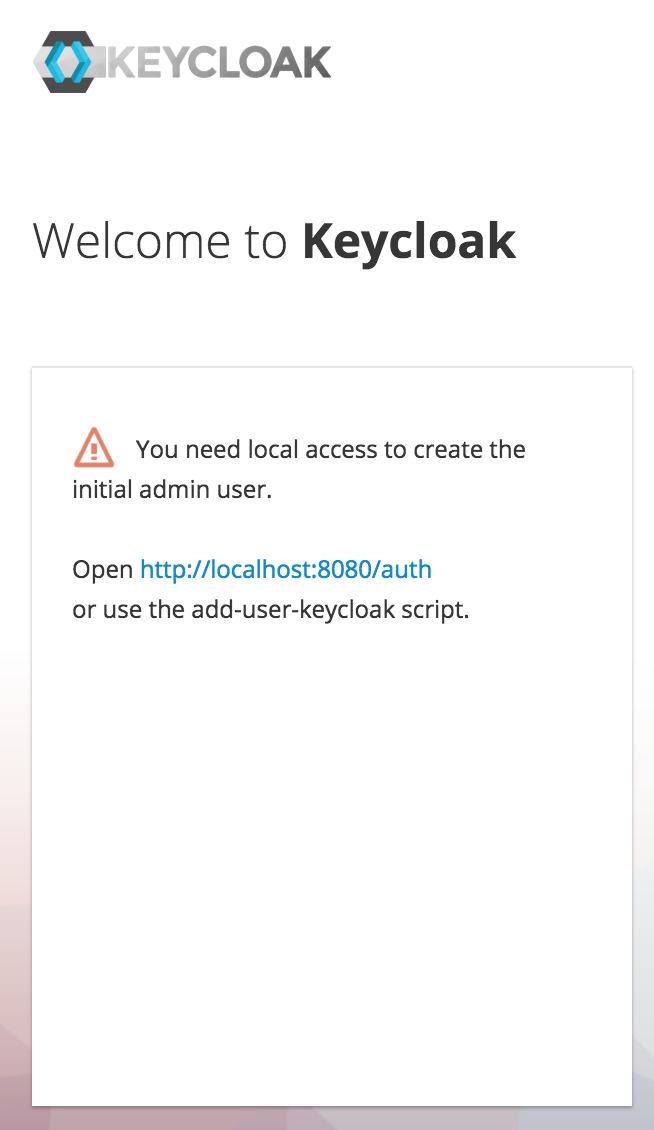
What you expected to happen:
expect to be able to login with user = keycloak and password = my-secret
How to reproduce it (as minimally and precisely as possible):
helm install with above values
Anything else we need to know:
 tony-kerz
All 17 comments
Confirmed
 gabibbo97
on 24 Dec 2018
gabibbo97
on 24 Dec 2018
Same error on our own
Chart version: 4.0.8
 Monpoke
on 27 Dec 2018
Monpoke
on 27 Dec 2018
Same issue
Chart version: 4.0.8
 RealArtemiy
on 3 Jan 2019
RealArtemiy
on 3 Jan 2019
same issue
chart version: 4.3.0
tony-kerz
on 23 Jan 2019
work around:
kubectl port-forward svc/keycloak-http 8080:80 -n {my-ns}
then hit localhost:8080 and punch in your initial admin user...
tony-kerz
on 23 Jan 2019
This issue has been automatically marked as stale because it has not had recent activity. It will be closed if no further activity occurs. Any further update will cause the issue/pull request to no longer be considered stale. Thank you for your contributions.
![stale[bot] picture](https://avatars.githubusercontent.com/in/1724?v=4&s=40) stale[bot]
on 22 Feb 2019
stale[bot]
on 22 Feb 2019
This issue is being automatically closed due to inactivity.
stale[bot]
on 8 Mar 2019
Same error.
I'm going to try to fix it.
 okgolove
on 18 Mar 2019
okgolove
on 18 Mar 2019
I am also hitting same issue with stable version. Is keycloak helm chart can be configured to create initial user ?
@okgolove, you have any suggestions ?
 shiva075gowda
on 11 May 2019
shiva075gowda
on 11 May 2019
there is always this as a work around
tony-kerz
on 11 May 2019
@shiva075gowda hi! Haven't any time to work on this. As far as I remember enabling PVC has resolved the problem.
If I have any news I will write about.
okgolove
on 12 May 2019
BTW, keycloak chart is deprecated and moved here https://github.com/codecentric/helm-charts
okgolove
on 15 May 2019
Goto .../keycloak/services/src/main/java/org/keycloak/services/resources/WelcomeResource.java this file and find isLocal() method set the return value as true.
When you trying to login with new DB even you are hosted, It will redirect to Admin user registration page.
I tried with docker.
 muruganarul007
on 29 Aug 2019
muruganarul007
on 29 Aug 2019
Goto
.../keycloak/services/src/main/java/org/keycloak/services/resources/WelcomeResource.javathis file and find isLocal() method set the return value as true.When you trying to login with new DB even you are hosted, It will redirect to Admin user registration page.
I tried with docker.
did you install keycloak application?
docker run -p "8080:8080" -e KEYCLOAK_USER=admin -e KEYCLOAL_PASSWORD=pass jboss/keycloak
this command also giving same error
 garimagupta715
on 19 Jan 2020
garimagupta715
on 19 Jan 2020
docker run -p "8080:8080" -e KEYCLOAK_USER=admin -e KEYCLOAL_PASSWORD=pass jboss/keycloak
You have typo in your command (KEYCLOAL). KEYCLOAK_PASSWORD solved the problem for me
 Jarmil1
on 3 Feb 2020
Jarmil1
on 3 Feb 2020
Goto
.../keycloak/services/src/main/java/org/keycloak/services/resources/WelcomeResource.javathis file and find isLocal() method set the return value as true.
When you trying to login with new DB even you are hosted, It will redirect to Admin user registration page.
I tried with docker.did you install keycloak application?
docker run -p "8080:8080" -e KEYCLOAK_USER=admin -e KEYCLOAL_PASSWORD=pass jboss/keycloak
this command also giving same error
There is typo error in the above command. Please use the below command,
docker run -p "8080:8080" -e KEYCLOAK_USER=admin -e KEYCLOAK
_PASSWORD=pass jboss/keycloak
muruganarul007
on 3 Feb 2020
it is done. my mistake, thanks for response
garimagupta715
on 3 Feb 2020
Related issues
 onyxet
·
3Comments
onyxet
·
3Comments
 musabmasood
·
3Comments
musabmasood
·
3Comments
 gajus
·
3Comments
gajus
·
3Comments
 ChrisCooney
·
3Comments
ChrisCooney
·
3Comments
 donkeyx
·
3Comments
donkeyx
·
3Comments
Most helpful comment
You have typo in your command (KEYCLOAL). KEYCLOAK_PASSWORD solved the problem for me