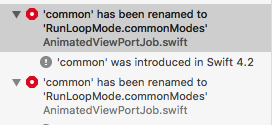
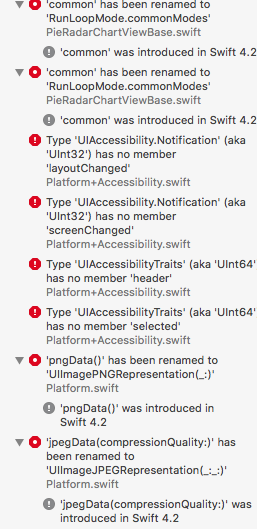
Charts: As of todays update, I am running into this issue. 'common' renamed RunLoopMode.commonModes
What did you do?
Updated to new version of Charts on an iOS 12 project by running pod update in terminal
What did you expect to happen?
no errorrs
What happened instead?
Charts version/Branch/Commit Number:
Xcode version: 10
Swift version: 4.1
Platform(s) running Charts: 12
macOS version running Xcode:
Demo Project
ℹ Please link to or upload a project we can download that reproduces the issue.
 sdevo619
All 9 comments
Me too
 muzoman
on 18 Sep 2018
muzoman
on 18 Sep 2018
在pod 添加 试试
post_install do |installer|
  installer.pods_project.targets.each do |target|
      target.build_configurations.each do |config|
          if target.name == 'Charts'
              config.build_settings['SWIFT_VERSION'] = '4.2'
              else
              config.build_settings['SWIFT_VERSION'] = '4.1'
          end
      end
  end
end
 CoderDoraemon
on 18 Sep 2018
CoderDoraemon
on 18 Sep 2018
在pod 添加
post_install do |installer|
  installer.pods_project.targets.each do |target|
      target.build_configurations.each do |config|
          if target.name == 'Charts'
              config.build_settings['SWIFT_VERSION'] = '4.2'
              else
              config.build_settings['SWIFT_VERSION'] = '4.1'
          end
      end
  end
end
Where is this code placed?
muzoman
on 18 Sep 2018

CoderDoraemon
on 18 Sep 2018
Please try this version:https://github.com/danielgindi/Charts/tree/4.0.0
 cythb
on 19 Sep 2018
cythb
on 19 Sep 2018
@cythb stop asking people to try 4.0 branch. IT'S NOT FOR PUBLIC. Next time I saw you post like this, I will delete it.
 liuxuan30
on 19 Sep 2018
liuxuan30
on 19 Sep 2018
Please note, we try to make sure master branch always work with latest Xcode and Swift; if you plan to upgrade your EVERY swift library to 4.2, you can take the new code. Otherwise, stick to old Chart library.
The new commits for Swift 4.2 will not work with lower versions.
liuxuan30
on 19 Sep 2018
@srn214 , @muzoman I had encounter same issue, thanks for solution 👍 , Could you please explain a bit more. Is this is setting swift version in build setting to 4.2 but why its working. Any help appreciated.
 SURYAKANTSHARMA
on 24 Sep 2018
SURYAKANTSHARMA
on 24 Sep 2018
i just correct the code with
forMode: RunLoop.Mode.common
 Jovisx
on 30 Dec 2018
Jovisx
on 30 Dec 2018
Related issues
 Shunshine07
·
3Comments
Shunshine07
·
3Comments
 newbiebie
·
3Comments
newbiebie
·
3Comments
 anhltse03448
·
3Comments
anhltse03448
·
3Comments
 Bharati555
·
4Comments
Bharati555
·
4Comments
 ahmedsafadii
·
3Comments
ahmedsafadii
·
3Comments
Most helpful comment