Charts: ScatterViewChart entries hide when zooming
ScatterViewChart entries hide when zooming
When scrolling the maximum item is hidden, all other items disappear.
is it have option?
 dhhyuk
All 10 comments
not quite understand what are you asking? a bug or you want to hide something?
 liuxuan30
on 27 Oct 2017
liuxuan30
on 27 Oct 2017
a bug.
When I scrolled after I zoomed in, some of the entries in the data set disappeared.
dhhyuk
on 27 Oct 2017
can we reproduce it with ChartsDemo? It looks fine though
liuxuan30
on 27 Oct 2017
before zooming.
https://drive.google.com/file/d/0B3Lv_uliEGSjWkZfUTlNT3Z5MGs/view?usp=sharing
shown all entries.
but after zooming.
https://drive.google.com/file/d/0B3Lv_uliEGSjMXoyT0lwUWU2WFU/view?usp=sharing
When the entry on the far right disappears, center entries disappears.
dhhyuk
on 1 Nov 2017
ok. but we need more details then; the axis range seems not changed much. I encourage you debug on your side first.
have you checked all your data entries are there in drawDataSet? need you give a minimum reproducible steps or, code that can reproduce with charts demo
liuxuan30
on 2 Nov 2017
Append Entry Code
func updateChartData() {
var dataSets: [ScatterChartDataSet] = []
let aliveEntry = aliveSensors.map {
return Double($0.sensorVoltage) > self.VOLTAGE_MINIMUM ? ChartDataEntry(x: valueToGraphPosition(x: Double($0.sensorVoltage)), y: Double($0.sensorIlluminationAvg)) : ChartDataEntry(x: Double($0.sensorVoltage), y: Double($0.sensorIlluminationAvg))
}
let deadEntry = deadSensors.map {
return Double($0.sensorVoltage) > self.VOLTAGE_MINIMUM ? ChartDataEntry(x: valueToGraphPosition(x: Double($0.sensorVoltage)), y: Double($0.sensorIlluminationAvg)) : ChartDataEntry(x: Double($0.sensorVoltage), y: Double($0.sensorIlluminationAvg))
}
print("Entry Count : \(aliveEntry.count), \(deadEntry.count)")
let aliveSet = ScatterChartDataSet(values: aliveEntry, label: "Alive")
aliveSet.setColor(UIColor.blue, alpha: 1.0)
aliveSet.scatterShapeSize = 3
aliveSet.setScatterShape(ScatterChartDataSet.Shape.circle)
let deadSet = ScatterChartDataSet(values: deadEntry, label: "Dead")
deadSet.setColor(UIColor.red, alpha: 1.0)
deadSet.scatterShapeSize = 3
deadSet.setScatterShape(ScatterChartDataSet.Shape.circle)
dataSets.append(aliveSet)
dataSets.append(deadSet)
let data = ScatterChartData(dataSets: dataSets)
scatterChartView.data = data
}
And Chart Setting Code
scatterChartView.delegate = self
scatterChartView.xAxis.labelPosition = .bottom
scatterChartView.xAxis.axisMinimum = -500
scatterChartView.xAxis.axisMaximum = 19000
scatterChartView.xAxis.gridLineWidth = 0
let description = Description()
description.text = ""
scatterChartView.chartDescription = description
let zero = ChartLimitLine(limit: 0, label: "0")
zero.labelPosition = .leftBottom
zero.lineColor = UIColor.gray
zero.lineWidth = 0.5
zero.valueFont = UIFont.systemFont(ofSize: 8)
scatterChartView.xAxis.addLimitLine(zero)
scatterChartView.xAxis.valueFormatter = IndexAxisValueFormatter(values: [])
The code to add data to the chart.
I have checked dataSet entry count when chartTranslated. but entry count not changed.
Same entry count and data count.
When scrolling, some entries disappeared, but entry count not changed.
I do not know why the data in the middle disappears.
Is there another way to check the drawDataSet?
(Thank you for helping me with my inexperienced English Talking. :))
dhhyuk
on 2 Nov 2017
with your code I am not sure as well; what's the order when you setup chart data and configure charts? Which is first?
are you able to reproduce with ChartsDemo?
liuxuan30
on 3 Nov 2017
do you mean i able to reproduce using ChartsDemo?
i followed chartsDomo code. i changed only datas.
dhhyuk
on 3 Nov 2017
Yes, we need code so we can reproduce with ChartsDemo.
liuxuan30
on 6 Nov 2017
Hi guys,
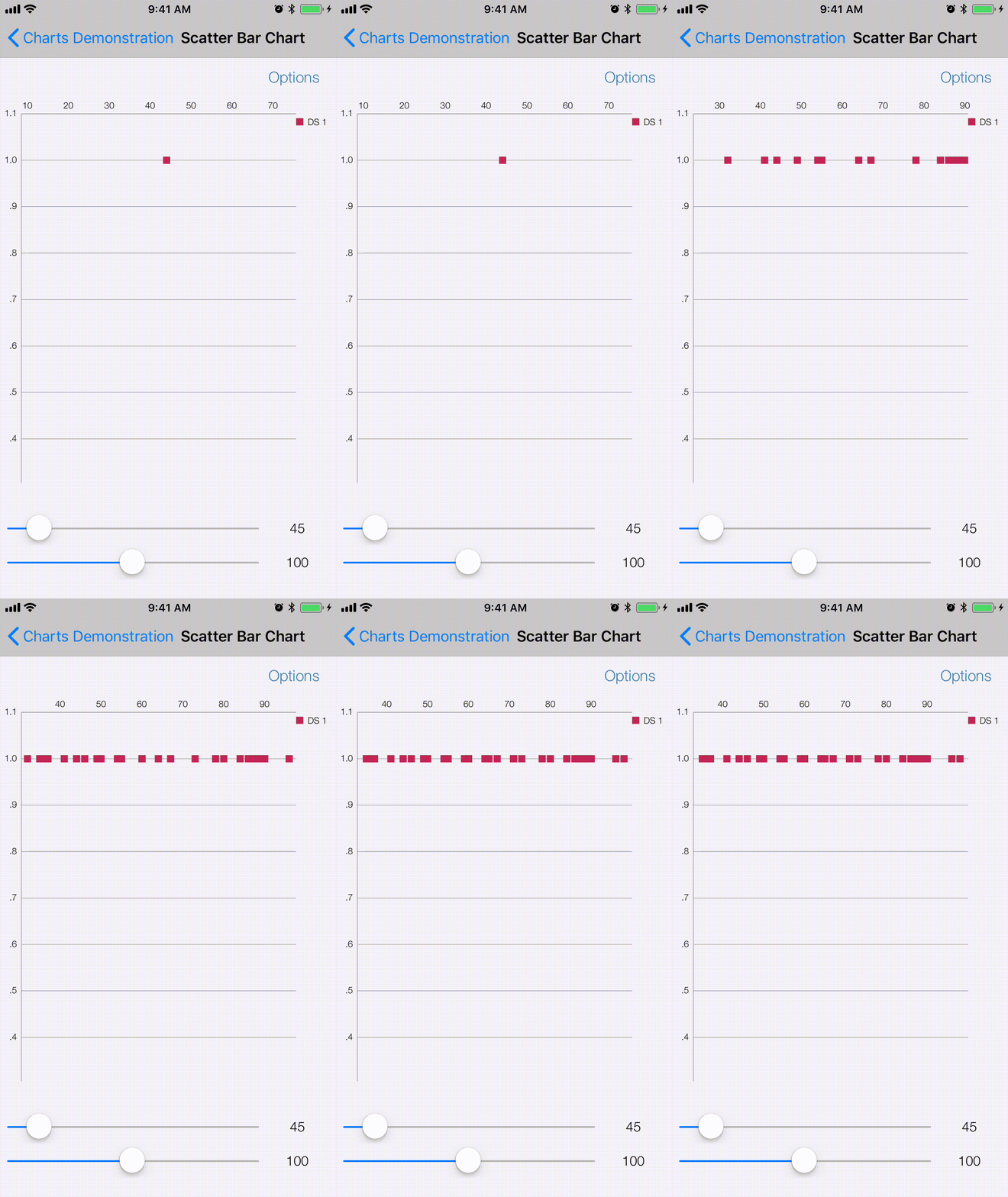
I am seeing this exact same problem as dhhyuk. I attempted to repurpose a scatter chart as a sort of time line.....
I have forked the repo and altered the ScatterChart Data to reproduce this problem: https://github.com/JayGoTenna/Charts
OR
You could just change setDataCount in ScatterChartViewController.m to look like this:
- (void)setDataCount:(int)count range:(double)range
{
    NSMutableArray *yVals1 = [[NSMutableArray alloc] init];
//    NSMutableArray *yVals2 = [[NSMutableArray alloc] init];
//    NSMutableArray *yVals3 = [[NSMutableArray alloc] init];

    for (int i = 0; i < count; i++)
    {
        double val = (double) (arc4random_uniform(range)) + 3;
        [yVals1 addObject:[[ChartDataEntry alloc] initWithX:val y:1]];

//        val = (double) (arc4random_uniform(range)) + 3;
//        [yVals2 addObject:[[ChartDataEntry alloc] initWithX:(double)i + 0.33 y:val]];
//
//        val = (double) (arc4random_uniform(range)) + 3;
//        [yVals3 addObject:[[ChartDataEntry alloc] initWithX:(double)i + 0.66 y:val]];
    }

    ScatterChartDataSet *set1 = [[ScatterChartDataSet alloc] initWithValues:yVals1 label:@"DS 1"];
    [set1 setScatterShape:ScatterShapeSquare];
    [set1 setColor:ChartColorTemplates.colorful[0]];
//    ScatterChartDataSet *set2 = [[ScatterChartDataSet alloc] initWithValues:yVals2 label:@"DS 2"];
//    [set2 setScatterShape:ScatterShapeCircle];
//    set2.scatterShapeHoleColor = ChartColorTemplates.colorful[3];
//    set2.scatterShapeHoleRadius = 3.5f;
//    [set2 setColor:ChartColorTemplates.colorful[1]];
//    ScatterChartDataSet *set3 = [[ScatterChartDataSet alloc] initWithValues:yVals3 label:@"DS 3"];
//    [set3 setScatterShape:ScatterShapeCross];
//    [set3 setColor:ChartColorTemplates.colorful[2]];

    set1.scatterShapeSize = 8.0;
//    set2.scatterShapeSize = 8.0;
//    set3.scatterShapeSize = 8.0;

    NSMutableArray *dataSets = [[NSMutableArray alloc] init];
    [dataSets addObject:set1];
//    [dataSets addObject:set2];
//    [dataSets addObject:set3];

    ScatterChartData *data = [[ScatterChartData alloc] initWithDataSets:dataSets];
    [data setValueFont:[UIFont fontWithName:@"HelveticaNeue-Light" size:7.f]];

    _chartView.data = data;
}
now when you zoom in or out or scroll on the chart, you'll notice shapes disappear.....
 JayGoTenna
on 10 Jul 2018
JayGoTenna
on 10 Jul 2018
Related issues
 Aungbandlab
·
4Comments
Aungbandlab
·
4Comments
 Bharati555
·
4Comments
Bharati555
·
4Comments
 guanyanlin
·
3Comments
guanyanlin
·
3Comments
 PrashantKT
·
3Comments
PrashantKT
·
3Comments
 Shunshine07
·
3Comments
Shunshine07
·
3Comments
Most helpful comment
Hi guys,
I am seeing this exact same problem as dhhyuk. I attempted to repurpose a scatter chart as a sort of time line.....
I have forked the repo and altered the ScatterChart Data to reproduce this problem: https://github.com/JayGoTenna/Charts
OR
You could just change setDataCount in ScatterChartViewController.m to look like this:
now when you zoom in or out or scroll on the chart, you'll notice shapes disappear.....