Charts: [stable/jenkins] copy-default-config
* BUG REPORT*
Version of Helm and Kubernetes:
helm 2.5.0
k8s both 1.6.4 and 1.7
Which chart:
stable/jenkins
What happened:
I am facing this error:
Jul 31 18:48:44 node3 kubelet[31864]: E0731 18:48:44.089263   31864 pod_workers.go:182] Error syncing pod 80d4013a-7607-11e7-b10f-0050568645c6 ("jk-jenkins-3568112839-9xkbj_default(80d4013a-7607-11e7-b10f-0050568645c6)"), skipping: [failed to "InitContainer" for "copy-default-config" with RunInitContainerError: "init container \"copy-default-config\" exited with 1"
Jul 31 18:48:44 node3 kubelet[31864]: , failed to "StartContainer" for "copy-default-config" with CrashLoopBackOff: "Back-off 20s restarting failed container=copy-default-config pod=jk-jenkins-3568112839-9xkbj_default(80d4013a-7607-11e7-b10f-0050568645c6)"
What you expected to happen:
How to reproduce it (as minimally and precisely as possible):
I focused tests on k8s 1.7
helm install --name jenkins --namespace jenkins stable/jenkins --set Master.ImageTag=2.70 --set rbac.install=true --set Master.ServiceType=ClusterIP --set Master.HostName=test.mysite.com --set Persistence.Enabled=False
or
helm install stable/jenkins --set Master.ServiceType=ClusterIP --set Persistence.Enabled=false --set Master.ImageTag=2.67 --name jk
I've tried various combinations, with or without persistence, various jenkins images, etc.
Anything else we need to know:
 ReSearchITEng
All 16 comments
Hmm, works for me on k8s 1.64, stable/jenkins-0.8.2:
kubectl version
Client Version: version.Info{Major:"1", Minor:"7", GitVersion:"v1.7.2", GitCommit:"922a86cfcd65915a9b2f69f3f193b8907d741d9c", GitTreeState:"clean", BuildDate:"2017-07-21T19:06:19Z", GoVersion:"go1.8.3", Compiler:"gc", Platform:"darwin/amd64"}
Server Version: version.Info{Major:"1", Minor:"6", GitVersion:"v1.6.4", GitCommit:"d6f433224538d4f9ca2f7ae19b252e6fcb66a3ae", GitTreeState:"clean", BuildDate:"2017-05-19T18:33:17Z", GoVersion:"go1.7.5", Compiler:"gc", Platform:"linux/amd64"}

helm version
Client: &version.Version{SemVer:"v2.5.0", GitCommit:"012cb0ac1a1b2f888144ef5a67b8dab6c2d45be6", GitTreeState:"clean"}
Server: &version.Version{SemVer:"v2.5.0", GitCommit:"012cb0ac1a1b2f888144ef5a67b8dab6c2d45be6", GitTreeState:"clean"}
Result:
helm install --name jenkins --namespace jenkins stable/jenkins --set Master.ImageTag=2.70 --set rbac.install=true --set Master.ServiceType=ClusterIP --set Master.HostName=test.mysite.com --set Persistence.Enabled=False
NAME:   jenkins
LAST DEPLOYED: Tue Aug  1 09:11:29 2017
NAMESPACE: jenkins
STATUS: DEPLOYED

RESOURCES:
==> v1/ConfigMap
NAME                   DATA  AGE
jenkins-jenkins-tests  1     1s
jenkins-jenkins        3     1s

==> v1/ServiceAccount
NAME             SECRETS  AGE
jenkins-jenkins  1        1s

==> v1beta1/ClusterRoleBinding
NAME                          AGE
jenkins-jenkins-role-binding  1s

==> v1/Service
NAME                   CLUSTER-IP      EXTERNAL-IP  PORT(S)    AGE
jenkins-jenkins-agent  100.68.178.34   <none>       50000/TCP  1s
jenkins-jenkins        100.71.118.252  <none>       8080/TCP   1s

==> v1beta1/Deployment
NAME             DESIRED  CURRENT  UP-TO-DATE  AVAILABLE  AGE
jenkins-jenkins  1        1        1           0          1s

==> v1beta1/Ingress
NAME             HOSTS            ADDRESS  PORTS  AGE
jenkins-jenkins  test.mysite.com  80       1s

==> v1/Secret
NAME             TYPE    DATA  AGE
jenkins-jenkins  Opaque  2     1s


NOTES:
1. Get your 'admin' user password by running:
  printf $(kubectl get secret --namespace jenkins jenkins-jenkins -o jsonpath="{.data.jenkins-admin-password}" | base64 --decode);echo

2. Visit http://test.mysite.com

3. Login with the password from step 1 and the username: admin

For more information on running Jenkins on Kubernetes, visit:
https://cloud.google.com/solutions/jenkins-on-container-engine
#################################################################################
######   WARNING: Persistence is disabled!!! You will lose your data when   #####
######            the Jenkins pod is terminated.                            #####
#################################################################################
Configure the Kubernetes plugin in Jenkins to use the following Service Account name jenkins-jenkins using the following steps:
  Create a Jenkins credential of type Kubernetes service account with service account name jenkins-jenkins
  Under configure Jenkins -- Update the credentials config in the cloud section to use the service account credential you created in the step above.
 fhemberger
on 1 Aug 2017
fhemberger
on 1 Aug 2017
It's due to proxy. Once chart is updated with env vars like http_proxy,https_proxy,no_proxy, all is fine.
For sure it's required by init_container, not clear yet if the actual container needs it as well.
ReSearchITEng
on 1 Aug 2017
I'm faced with the same issue. I attached to the copy-default-config container and found that it failed trying to download the plugins.
Downloading plugins...
Downloading plugin: kubernetes from https://updates.jenkins.io/download/plugins/kubernetes/0.11/kubernetes.hpi
Downloading plugin: workflow-job from https://updates.jenkins.io/download/plugins/workflow-job/2.13/workflow-job.hpi
Downloading plugin: workflow-aggregator from https://updates.jenkins.io/download/plugins/workflow-aggregator/2.5/workflow-aggregator.hpi
Downloading plugin: credentials-binding from https://updates.jenkins.io/download/plugins/credentials-binding/1.12/credentials-binding.hpi
Downloading plugin: git from https://updates.jenkins.io/download/plugins/git/3.4.0/git.hpi
Downloading plugin: kubernetes-plugin from https://updates.jenkins.io/download/plugins/kubernetes-plugin/0.11/kubernetes-plugin.hpi
Downloading plugin: workflow-job-plugin from https://updates.jenkins.io/download/plugins/workflow-job-plugin/2.13/workflow-job-plugin.hpi
Downloading plugin: workflow-aggregator-plugin from https://updates.jenkins.io/download/plugins/workflow-aggregator-plugin/2.5/workflow-aggregator-plugin.hpi
Downloading plugin: git-plugin from https://updates.jenkins.io/download/plugins/git-plugin/3.4.0/git-plugin.hpi
Downloading plugin: credentials-binding-plugin from https://updates.jenkins.io/download/plugins/credentials-binding-plugin/1.12/credentials-binding-plugin.hpi
Failed to download plugin: workflow-aggregator or workflow-aggregator-plugin
Failed to download plugin: kubernetes or kubernetes-plugin
Failed to download plugin: workflow-job or workflow-job-plugin
Failed to download plugin: git or git-plugin
Failed to download plugin: credentials-binding or credentials-binding-plugin
The strange thing is that for each plugin it tries to install something is adding -plugin to the url.
For ex:
https://updates.jenkins.io/download/plugins/kubernetes/0.11/kubernetes.hpi
Works fine, however
https://updates.jenkins.io/download/plugins/kubernetes-plugin/0.11/kubernetes-plugin.hpi
Doesn't exist upstream. To install the jenkins chart I'm passing:
Master:
  InstallPlugins: []
I haven't tried with an older version yet.
Versions:
Client Version: version.Info{Major:"1", Minor:"7", GitVersion:"v1.7.0", GitCommit:"d3ada0119e776222f11ec7945e6d860061339aad", GitTreeState:"clean", BuildDate:"2017-06-29T23:15:59Z", GoVersion:"go1.8.3", Compiler:"gc", Platform:"linux/amd64"}
Server Version: version.Info{Major:"1", Minor:"7", GitVersion:"v1.7.2", GitCommit:"922a86cfcd65915a9b2f69f3f193b8907d741d9c", GitTreeState:"clean", BuildDate:"2017-07-21T08:08:00Z", GoVersion:"go1.8.3", Compiler:"gc", Platform:"linux/amd64"}

Client: &version.Version{SemVer:"v2.6.0", GitCommit:"5bc7c619f85d74702e810a8325e0a24f729aa11a", GitTreeState:"clean"}
Server: &version.Version{SemVer:"v2.6.0", GitCommit:"5bc7c619f85d74702e810a8325e0a24f729aa11a", GitTreeState:"clean"}
 pjelar
on 31 Aug 2017
pjelar
on 31 Aug 2017
Dealing with this same error, installing the base chart seems to be no problem, but when I alter it to include the plugins i want I run into this. Any one find a solution or work around?
 DevinFlick
on 2 Oct 2017
DevinFlick
on 2 Oct 2017
Yes, one needs to define the env vars for proxy in the init container.
ReSearchITEng
on 3 Oct 2017
I can't even start jenkins. I get the same issue. Steps:
- launch minikube (v0.22.3)
- run
helm init(using helm v2.6.2) - run
helm install stable/jenkins
The relevant lines from kubectl get event are:
28s        12m         8         callous-labradoodle-jenkins-257625438-761c0   Pod                     spec.initContainers{copy-default-config}   Normal    Pulled                    kubelet, minikube                                                        Successfully pulled image "jenkinsci/jenkins:2.46.3"
28s        12m         8         callous-labradoodle-jenkins-257625438-761c0   Pod                     spec.initContainers{copy-default-config}   Normal    Created                   kubelet, minikube                                                        Created container
28s        12m         8         callous-labradoodle-jenkins-257625438-761c0   Pod                     spec.initContainers{copy-default-config}   Normal    Started                   kubelet, minikube                                                        Started container
11s        11m         70        callous-labradoodle-jenkins-257625438-761c0   Pod                                                                Warning   FailedSync                kubelet, minikube                                                        Error syncing pod
11s        11m         63        callous-labradoodle-jenkins-257625438-761c0   Pod                     spec.initContainers{copy-default-config}   Warning   BackOff                   kubelet, minikube                                                        Back-off restarting failed container
kubectl version gives:
Client Version: version.Info{Major:"1", Minor:"8", GitVersion:"v1.8.1", GitCommit:"f38e43b221d08850172a9a4ea785a86a3ffa3b3a", GitTreeState:"clean", BuildDate:"2017-10-12T00:45:05Z", GoVersion:"go1.9.1", Compiler:"gc", Platform:"darwin/amd64"}
Server Version: version.Info{Major:"1", Minor:"7", GitVersion:"v1.7.5", GitCommit:"17d7182a7ccbb167074be7a87f0a68bd00d58d97", GitTreeState:"clean", BuildDate:"2017-10-06T20:53:14Z", GoVersion:"go1.8.3", Compiler:"gc", Platform:"linux/amd64"}
Logs from the init container show the issue:
kubectl logs impressive-lemur-jenkins-3142645326-61rt4 -c copy-default-config
rm: cannot remove '/usr/share/jenkins/ref/plugins/credentials-binding.lock': Is a directory
rm: cannot remove '/usr/share/jenkins/ref/plugins/git.lock': Is a directory
rm: cannot remove '/usr/share/jenkins/ref/plugins/kubernetes.lock': Is a directory
rm: cannot remove '/usr/share/jenkins/ref/plugins/workflow-aggregator.lock': Is a directory
rm: cannot remove '/usr/share/jenkins/ref/plugins/workflow-job.lock': Is a directory
Creating initial locks...
mkdir: cannot create directory ‘/usr/share/jenkins/ref/plugins/kubernetes.lock’: File exists
I guess the apply_config.sh script needs updating to rm -rf /usr/share/jenkins/ref/plugins/*.lock instead of just rm /usr/share/jenkins/ref/plugins/*.lock
 boosh
on 24 Oct 2017
boosh
on 24 Oct 2017
There seem to be 2 issues:
- Trying to delete directories as files (
rm -rffixes this) - Two attempts are made to download each plugin, one with an invalid URL. E.g. it tries to download both https://updates.jenkins.io/download/plugins/kubernetes/0.11/kubernetes.hpi (which does exist) and also https://updates.jenkins.io/download/plugins/kubernetes-plugin/0.11/kubernetes-plugin.hpi which doesn't.
Either way, commenting out the list of plugins in values.yaml under InstallPlugins at least means that Jenkins can be started.
I'll open a PR for the first.
boosh
on 24 Oct 2017
For anyone hitting this, the current chart does work on GKE. I ran into this on minikube.
boosh
on 25 Oct 2017
+1 also hitting this
 bcg62
on 22 Nov 2017
bcg62
on 22 Nov 2017
Yup, busted - seemed to work before not sure what the deal is now - I see some *.lock exists and is a dir errors so perhaps it is not creating the files properly. This could be something to do with the / whatever mechanism actually installing the plugins themselves within the apply_config.sh script itself.
 srflaxu40
on 7 Dec 2017
srflaxu40
on 7 Dec 2017
Issues go stale after 90d of inactivity.
Mark the issue as fresh with /remove-lifecycle stale.
Stale issues rot after an additional 30d of inactivity and eventually close.
If this issue is safe to close now please do so with /close.
Send feedback to sig-testing, kubernetes/test-infra and/or fejta.
/lifecycle stale
 fejta-bot
on 7 Mar 2018
fejta-bot
on 7 Mar 2018
+1
I'm having the same issue :
rm: cannot remove '/usr/share/jenkins/ref/plugins/git.lock': Is a directory
and it is because of the proxy:
- 1st time : tries to download > timeout > container fails
- 2nd time and later : can not rm the plugin lock files
For the rm, the 'rm -rf' will fix it.
But what is the best way to add env vars http_proxy, https_proxy, no_proxy? Shall I have to change the Chart or is there a way to add it dynamically?
 msepehr
on 14 Mar 2018
msepehr
on 14 Mar 2018
Hi!
Commit c64abe27d24bafbc17b5adec5049b03212283ab4 added the ability to specify proxy. See the Readme.
I think this issue can be closed
 Nodraak
on 10 Apr 2018
Nodraak
on 10 Apr 2018
Stale issues rot after 30d of inactivity.
Mark the issue as fresh with /remove-lifecycle rotten.
Rotten issues close after an additional 30d of inactivity.
If this issue is safe to close now please do so with /close.
Send feedback to sig-testing, kubernetes/test-infra and/or fejta.
/lifecycle rotten
/remove-lifecycle stale
fejta-bot
on 10 May 2018
Rotten issues close after 30d of inactivity.
Reopen the issue with /reopen.
Mark the issue as fresh with /remove-lifecycle rotten.
Send feedback to sig-testing, kubernetes/test-infra and/or fejta.
/close
fejta-bot
on 9 Jun 2018
Ohh! What's a long night :(
After investigation, a single plugin has been added with a non-existing version causes the same problem .
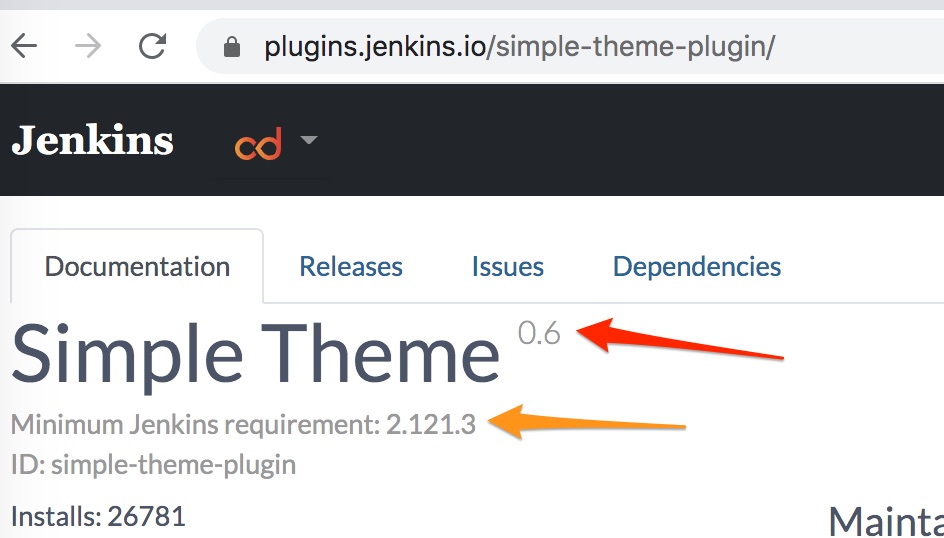
I was looking to the version pointed by orange 🔶 arrow.. while I have to pick the version pointed by red 🔴 arrow .
10 hours so far!
Helm Values was updated ! .. Things start working
Good luck!
 abdennour
on 27 Jul 2020
abdennour
on 27 Jul 2020
Related issues
 dene14
·
3Comments
dene14
·
3Comments
 paskal
·
3Comments
paskal
·
3Comments
 richardalberto
·
3Comments
richardalberto
·
3Comments
 mickengland
·
3Comments
mickengland
·
3Comments
 tyg03485
·
3Comments
tyg03485
·
3Comments
Most helpful comment
+1
I'm having the same issue :
rm: cannot remove '/usr/share/jenkins/ref/plugins/git.lock': Is a directoryand it is because of the proxy:
For the rm, the 'rm -rf' will fix it.
But what is the best way to add env vars http_proxy, https_proxy, no_proxy? Shall I have to change the Chart or is there a way to add it dynamically?