Chart.js: How can I use the animation "collections"?
I'm going to use the collections at animation level.
Reading the documentation, it seems that you can assign a name to an object into animation options and this object should contain multiple properties, identified by properties array.
Therefore I'm trying to add to chart options the following animation configuration:
animation: {
      mycolors : {
          properties: ['backgroundColor'],
          type: 'color',
          from: 'black',
          duration: 5000,
          loop: true
      },
},
but my animation configuration is ignored.
Instead, using the same configuration, setting colors as collection name, it works.
animation: {
      colors : {
          properties: ['backgroundColor'],
          type: 'color',
          from: 'black',
          duration: 5000,
          loop: true
      },
},
Then I have the doubt if the collection name must be colors or numbers (therefore are fixed) or if I can use different names.
And if I can use different names, how is the animation engine aware about which collection should be used?
Here is CodePen https://codepen.io/stockinail/pen/YzwdObe
Chart.js: dist/master
 stockiNail
All 8 comments
The defaults kick in. See https://codepen.io/kurkle/pen/MWKLpMW?editors=1010
The 2nd chart usesbackgroundColor directly, which overrides any collections (the default colors collection)
 kurkle
on 22 Jul 2020
kurkle
on 22 Jul 2020
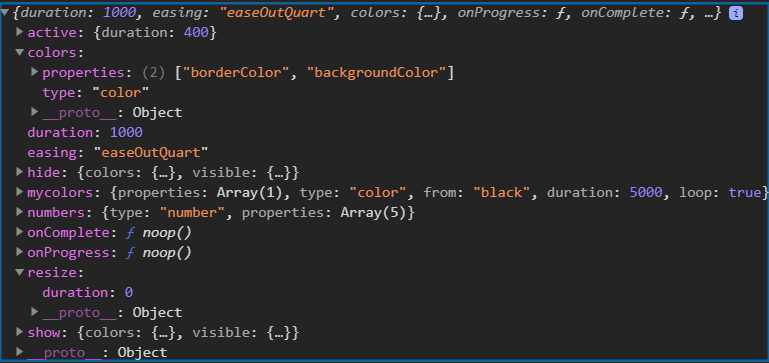
Snip of the final animation options when only mycolors is defined:
kurkle
on 22 Jul 2020
@kurkle thank you very much.
I had a look to your sample before your last updates and it worked resetting the default.
      colors: {
          properties:[]
      },
      mycolors : {
          properties: ['backgroundColor'],
          type: 'color',
          from: 'black',
          duration: 5000,
          loop: true
      },
Therefore I need to "reset" the default collection and then I can use mine.
That means I can have only 1 collection for each type (1 for color, 1 for number) that I can call as I want, isn't it?
But now, having a look to the same sample, where you are not resetting the colors.properties, it does not work.
stockiNail
on 22 Jul 2020
But now, having a look to the same sample, where you are not resetting the colors.properties, it does not work.
Sorry, did not mean to save that one. Added colors: false (which works also) to the pen.
kurkle
on 22 Jul 2020
Added 3rd sample to the pen, using custom mode's. Maybe that is what you are looking for?
kurkle
on 22 Jul 2020
@kurkle thank you again!
Now it sounds more clear how to use it. I missed the colors: false option which enables your own collection!!
That's not documented but I don't know if this is only my problem because I didn't understood.
THANKSS!
stockiNail
on 22 Jul 2020
Documentation is probably the issue. Maybe you could take a look at it now that you know how it works? :)
kurkle
on 22 Jul 2020
Documentation is probably the issue. Maybe you could take a look at it now that you know how it works? :)
Yes, but let me finish the implementation on the lib (I'm completing the work with the new 3.0.0 features) and then I'll propose some updates (by PR related to this issue that I'll reopen) on the doc. Ok?
stockiNail
on 22 Jul 2020
Related issues
 lbowers
·
3Comments
lbowers
·
3Comments
 adriantombu
·
3Comments
adriantombu
·
3Comments
 benmccann
·
3Comments
benmccann
·
3Comments
 gouthamrv
·
3Comments
gouthamrv
·
3Comments
 joebirkin
·
3Comments
joebirkin
·
3Comments
Most helpful comment
Yes, but let me finish the implementation on the lib (I'm completing the work with the new 3.0.0 features) and then I'll propose some updates (by PR related to this issue that I'll reopen) on the doc. Ok?