Chart.js: 3.0.0a Bug in real time with identical values
Hello dev team!
Expected Behavior
In real time mode (push/shift) with identical values, the line is good in 2.9.3.
https://codepen.io/tofnet/pen/NWqJBYa
Current Behavior
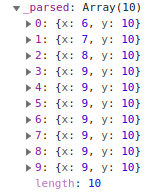
In the new version 3.0.0a with same code and identical values, the line disappears gradually.
https://codepen.io/tofnet/pen/OJVqwqj
Environment
- Chart.js version: 3.0.0 alpha
- Browser name and version: Edge Version 83.0.461.1 (Official) dev (64 bits)
 Tofnet
All 8 comments
Thanks for testing out the alpha and filing a report @Tofnet!
It looks like the issue is that _onDataShift calls _removeElements, which removes the given element, but does not reparse the existing elements. It probably should reparse all elements that occur after the removed elements since the x coordinate is changing for those elements
Would you agree with that solution @kurkle? I think you know that part of the code best
 benmccann
on 1 Apr 2020
benmccann
on 1 Apr 2020
@kurkle did you have a chance to look at this?
 etimberg
on 13 May 2020
etimberg
on 13 May 2020
Hello, nice the bug is solved.
But now I see a difference on the animation with a black background. Maybe this is a new issue?:
2.9.3: https://codepen.io/tofnet/pen/NWqJBYa
Master: https://codepen.io/tofnet/pen/wvKRqOr
Tofnet
on 20 May 2020
@tofnet you are using indexed colors with single value.
Without indexed colors it works fine: https://codepen.io/kurkle/pen/ZEbVaJB?editors=1010
Not quite sure why it works in 2.9.3 or if that would be considered a bug for v3.
 kurkle
on 20 May 2020
kurkle
on 20 May 2020
The behavior of the last point is kind of funny even if you set lineTension: 0. @kurkle do you know if there's a way to stop if from coming up from 0 more like the 2.9.3 version?
benmccann
on 20 May 2020
Sure, there are many ways to alter the animation. Easiest one would be to disable it for y coordinate:
https://codepen.io/kurkle/pen/YzyddVm?editors=1010
kurkle
on 20 May 2020
That's awesome! Thanks for taking the time to share!
benmccann
on 20 May 2020
Yes, thank you Kurkle.
For people who would like to test with the original random function, just modify with:
const rand = () => Array.from({ length: 10 }, () => Math.floor(Math.random() * 100));
Tofnet
on 20 May 2020
Related issues
 gabrieldesouza
·
3Comments
gabrieldesouza
·
3Comments
 JewelsJLF
·
3Comments
JewelsJLF
·
3Comments
 nanospeck
·
3Comments
nanospeck
·
3Comments
 gouthamrv
·
3Comments
gouthamrv
·
3Comments
 kennsippell
·
3Comments
kennsippell
·
3Comments
Most helpful comment
Sure, there are many ways to alter the animation. Easiest one would be to disable it for
ycoordinate:https://codepen.io/kurkle/pen/YzyddVm?editors=1010