Chart.js: when chartjs change data from receive ajax response , on hover event at bars show old data
hi
i am using char js on my laravel project
char js is ok and no problem
i have filter form data that when clicked on filter button your chart data is changed and recieve from ajax response.
when chart is change data is ok but when hover over chart bar show old data of chart.
my code is :
let requestData = {};

function chartData(url, data) {
    console.log("data is :", data);
    let labels = [];
    let values = [];
    $.ajax({
        url: url,
        type: 'POST',
        data: data,
        dataType: "json",
        async: false,
        success: function (data) {
            $.each(data.data, function (key, value) {
                labels.push(key);
                values.push(value);
            });
        }
    });
    return {
        labels,
        values
    }
}

function updateChart(url, requestData) {
    let results = chartData(url, requestData);

    let ctx = document.getElementById("orders_chart").getContext('2d');
    let orderChart = new Chart(ctx, {
        type: 'bar',
        data: {},
        options: {
            title: {
                display: true,
                text: 'نمودار بر مبنای روز'
            },
            scales: {
                yAxes: [{
                    ticks: {
                        beginAtZero: true
                    }
                }]
            }
        }
    });

    orderChart.clear();
    orderChart.data = {
        labels: results.labels,
        datasets: [
            {
                label: "سفارش ها",
                backgroundColor: '#e74c3c',
                data: results.values,
            },
        ]
    };
    orderChart.update();
}

// first initial
updateChart(url, requestData);

$('#filter_btn').click(function () {
 bmrbehnam
All 6 comments
@bmrbehnam please follow the issue guidelines and include an interactive example. I'm closing this bug without investigation, but please feel free to reopen once that's done. It's not scalable for a few volunteer maintainers to do that work for thousands of bug reporters
 benmccann
on 31 Mar 2019
benmccann
on 31 Mar 2019
You need to update after changing data.
 kurkle
on 31 Mar 2019
kurkle
on 31 Mar 2019
You need to
updateafter changing data.
Im update after changing data by this code :
$('#filter_btn').click(function () {
        requestData = {
            app_id: $('#app_id').val(),
            from: $('#from_date').val(),
            to: $('#to_date').val()
        };
        updateChart(url, requestData);
    });
but not solve this bug.
bmrbehnam
on 1 Apr 2019
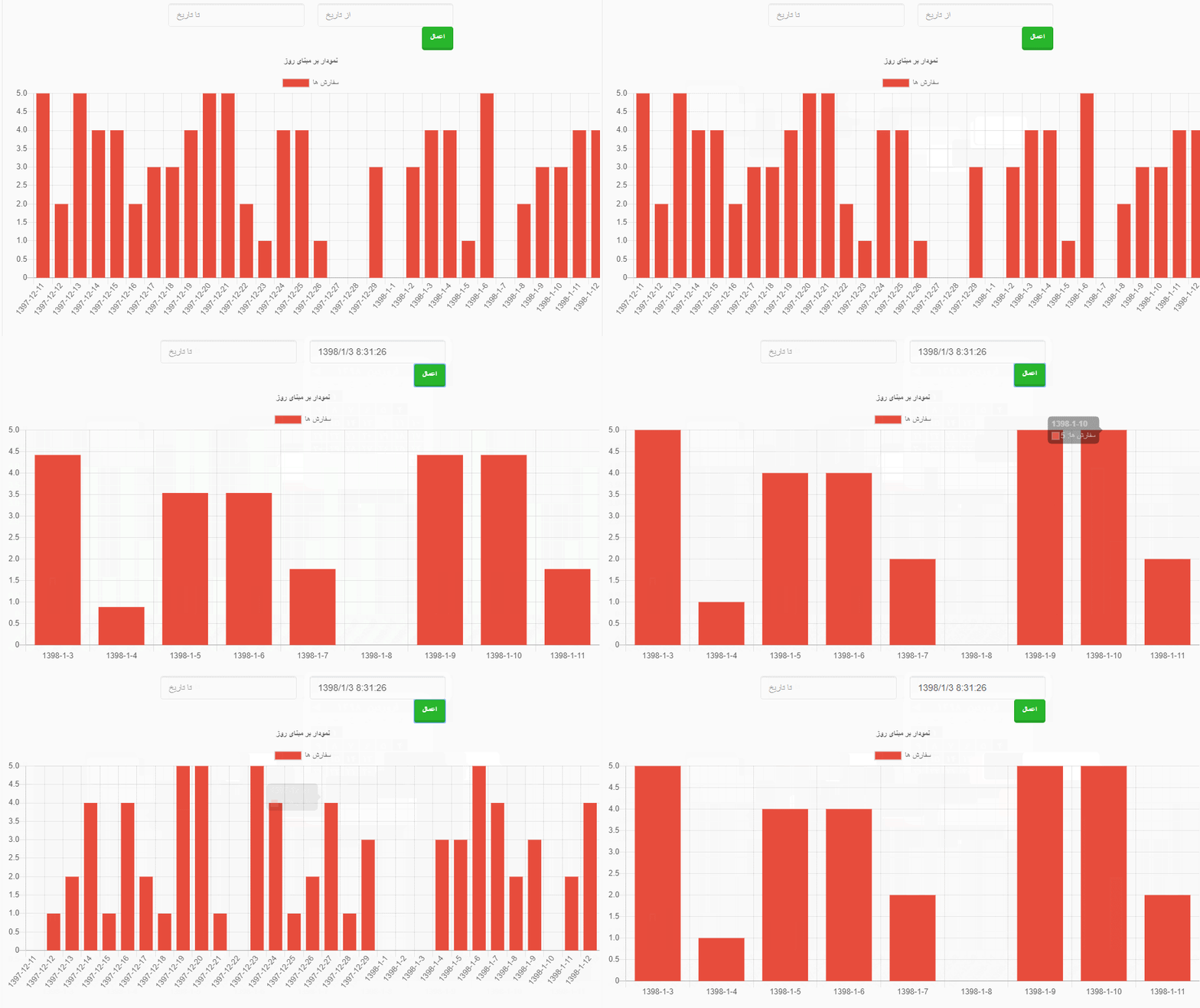
problem is show on above gif image.
bmrbehnam
on 1 Apr 2019
bump!
 jimmybrawn
on 18 Jun 2019
jimmybrawn
on 18 Jun 2019
Either destroy the graph you have made with window.myBar.destroy() or change the data values of the graph then update:
if ( typeof window.myBar == "object"){
window.myBar.data = config.data;
window.myBar.update();
}
Hope that helps.
 999DaZa
on 26 Jun 2019
999DaZa
on 26 Jun 2019
Related issues
 bytesnz
·
3Comments
bytesnz
·
3Comments
 Woogles
·
3Comments
Woogles
·
3Comments
 JewelsJLF
·
3Comments
JewelsJLF
·
3Comments
 gouthamrv
·
3Comments
gouthamrv
·
3Comments
 akashrajkn
·
3Comments
akashrajkn
·
3Comments