I have this Y-axis object:
{
    id: 'events',
    type: 'category',
    labels: this.state.eventLabelArray),
    scaleLabel: {
        display: true,
        labelString: 'Phenology'
    },
    ticks: {
        autoSkip: true
    }
}
Despite autoSkip being declared as "true," it's not working-each label is rendered, none are skipped:
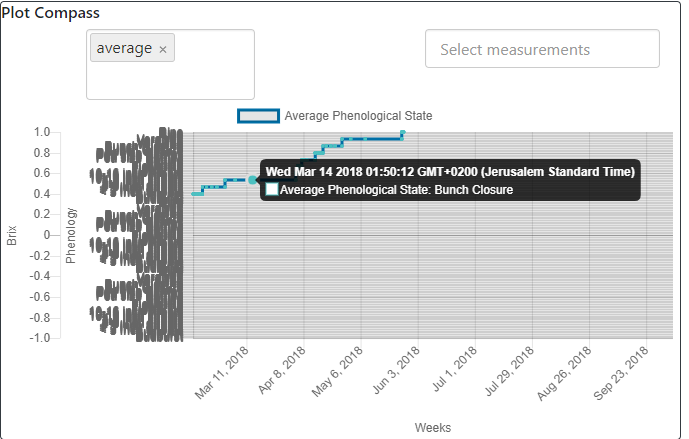
If I de-duplicate the labels, the data is no longer mapped in the tooltip:
{
    id: 'events',
    type: 'category',
    labels: Array.from([...new Set(this.state.eventLabelArray)]),
    scaleLabel: {
        display: true,
        labelString: 'Phenology'
    },
    ticks: {
        autoSkip: true
    }
}

 boriskogan81
All 8 comments
I believe the issue here is that the label auto skipper is not implemented for vertical axes. I think another ticket already covers this but I can't find it
 etimberg
on 18 Jan 2018
etimberg
on 18 Jan 2018
i also got this issue if i set a custom min/max value in the ticks object and the min/max value is only a little bit above/under the auto labeled values
 ximex
on 18 Feb 2019
ximex
on 18 Feb 2019
I'm pretty sure the auto skipper is implemented for vertical axes: https://github.com/chartjs/Chart.js/blob/32aeeac82cdc371b6eb15e0b3442d307e2f36df7/src/core/core.scale.js#L629. But it sounds like maybe there's a bug where it's not working correctly
 benmccann
on 18 Feb 2019
benmccann
on 18 Feb 2019
auto skipper is enabled for vertical in master only (PR #5922), so probably fixed.
 kurkle
on 18 Feb 2019
kurkle
on 18 Feb 2019
is there a date for the next release?
ximex
on 18 Feb 2019
TBD. I think we'd like to get a number of pending PRs merged first
benmccann
on 18 Feb 2019
Was this resolved?
kurkle
on 15 Nov 2019
Going to call this resolved since 2.9 shipped with these changes
etimberg
on 25 Jan 2020
Related issues
 gabrieldesouza
·
3Comments
gabrieldesouza
·
3Comments
 nickgoodliff
·
3Comments
nickgoodliff
·
3Comments
 gouthamrv
·
3Comments
gouthamrv
·
3Comments
 JAIOMP
·
3Comments
JAIOMP
·
3Comments
 HeinPauwelyn
·
3Comments
HeinPauwelyn
·
3Comments
Most helpful comment
i also got this issue if i set a custom min/max value in the ticks object and the min/max value is only a little bit above/under the auto labeled values