Chart.js: Document method of truncating decimals
Expected Behavior
An option to truncate decimals.
Current Behavior
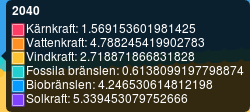
Currently many decimals are being displayed when hovering over a datapoint. I have no problem of them being used in calculating positions but for display purposes it would be nice to be able to truncate some decimals.
Possible Solution
Implement an option to allow truncation of decimals.
Context
Many decimals are not always useful when showing a graph to another person.
Environment
- Chart.js version: 2.7.1
- Browser name and version: Firefox 52.4.0 ESR
documentation
 emilhem
👍1
All 2 comments
You could add a personalized callback to the tooltip labels, where you round the values
e.g.
tooltipItem.yLabel.toFixed(2)would return a value with 2 decimal places.
2.123.toFixed(2)
>> "2.12"
2.0001.toFixed(2)
>> "2.00"
Math.round(tooltipItem.yLabel * 100) / 100would return a value rounded to the nearest 2nd decimal place.
Math.round(2.123 * 100) / 100
>> 2.12
Math.round(2.00001 * 100) / 100
>> 2
tooltips: {
    callbacks: {
        label: function(tooltipItem, data) {
            var label = data.datasets[tooltipItem.datasetIndex].label || '';

            if (label) {
                label += ': ';
            }
            label += tooltipItem.yLabel.toFixed(2);
            return label;
        }
    }
}
 jcopperfield
on 24 Nov 2017
jcopperfield
on 24 Nov 2017
👍5
🎉2
@jcopperfield has the recommend solution. I think this is a good opportunity to update our documentation with this example to help future users.
 etimberg
on 14 Dec 2017
etimberg
on 14 Dec 2017
Was this page helpful?
0 / 5 - 0 ratings
Related issues
 gabrieldesouza
·
3Comments
gabrieldesouza
·
3Comments
 adriantombu
·
3Comments
adriantombu
·
3Comments
 JewelsJLF
·
3Comments
JewelsJLF
·
3Comments
 nanospeck
·
3Comments
nanospeck
·
3Comments
 HeinPauwelyn
·
3Comments
HeinPauwelyn
·
3Comments
Most helpful comment
You could add a personalized callback to the tooltip labels, where you round the values
e.g.
tooltipItem.yLabel.toFixed(2)would return a value with 2 decimal places.Math.round(tooltipItem.yLabel * 100) / 100would return a value rounded to the nearest 2nd decimal place.