Hi!
I am using radar chart.
Is there any way to set or change data value to chars, like here: http://prntscr.com/hdos7s
Best regards,
PU
 UrbanskiPawel
All 7 comments
You could add a callback function which returns letters instead of numbers.
scale: {
ticks: {
stepSize: 1,
callback: function(value) {
return String.fromCharCode(value + 64);
},
}
}
 jcopperfield
on 22 Nov 2017
jcopperfield
on 22 Nov 2017
@jcopperfield thanks for help! ...but unfortunately it's not working.
Before (with numbers): https://prnt.sc/hnneqp
After (with Your code): https://prnt.sc/hnnekk
I think chart need to work on numbers but I thought that there's any "afterFunction" where I can replace only label. Any suggestions?
UrbanskiPawel
on 15 Dec 2017
@UrbanskiPawel Could you provide a jsfiddle of the example screenshots?
jcopperfield
on 15 Dec 2017
@UrbanskiPawel seems to be working for me https://codepen.io/anon/pen/PEqVoE
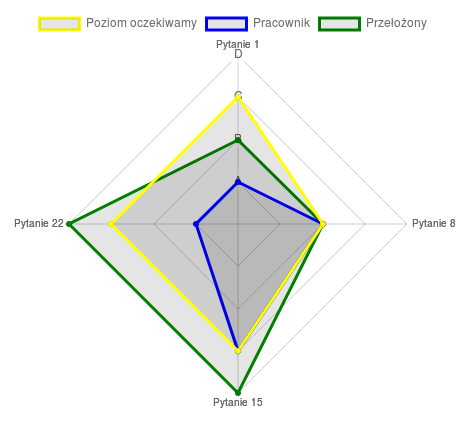
var ctx = document.getElementById("myChart");
var config = {
    type: 'radar',
    data: {
        labels: ["Pytanie 1", "Pytanie 8", "Pytanie 15", "Pytanie 22"],
        datasets: [
            {
                label: "Poziom oczekiwamy",
                borderColor: 'yellow',
                pointBackgroundColor: 'yellow',
                data: [3, 2, 3, 3]
            }, {
                label: "Pracownik",
                borderColor: 'blue',
                pointBackgroundColor:'blue',
                data: [1, 2, 3, 1]
            }, {
                label: "Przełożony",
                borderColor: 'green',
                pointBackgroundColor:'green',
                data: [2, 2, 4, 4]
            }
        ]
    },
    options: {
        legend: {
            position: 'top',
        },
        scale: {
          ticks: {
            stepSize: 1,
            min: 0,
            callback: function(value) {
                return String.fromCharCode(value + 64);
            },
          }
        }
    }
};
var myChart = new Chart(ctx, config);
@jcopperfield it's working like a charm! Before I used old version of library but now it's great. Thank U very much!!!
I have last question about this chart. Maybe You know.
I want to set const scale (always show A,B,C,D).
When all values are set up it's ok: http://prntscr.com/ho9i5c
But when I hide "Przełożony" there's only A,B,C: http://prntscr.com/ho9iwj
I tried with afterFit:
scale: {
afterFit: function (scale) {
scale.end = 4;
scale.max = 4;
}
}
But it's working not enough good: http://prntscr.com/ho9jkw - there's no 'D' and lines...
Maybe U could help me with this?
UrbanskiPawel
on 16 Dec 2017
@UrbanskiPawel just add min and max values to the scale.ticks options.
scale: {
  ticks: {
    stepSize: 1,
    min: 0,
    max: 4,
    callback: function(value) {
        return String.fromCharCode(value + 64);
    },
  }
}
@jcopperfield Thank You! It's working! :)
UrbanskiPawel
on 16 Dec 2017
Related issues
 bytesnz
·
3Comments
bytesnz
·
3Comments
 kennsippell
·
3Comments
kennsippell
·
3Comments
 joebirkin
·
3Comments
joebirkin
·
3Comments
 Woogles
·
3Comments
Woogles
·
3Comments
 akashrajkn
·
3Comments
akashrajkn
·
3Comments
Most helpful comment
@UrbanskiPawel seems to be working for me https://codepen.io/anon/pen/PEqVoE
