on line 11546 in dist of 2.7.1:
var fontSize = valueOrDefault(labelOpts.fontSize, globalDefault.defaultFontSize);
labelOpts is undefined.
I just followed the basic getting started:
http://www.chartjs.org/docs/latest/getting-started/usage.html
 Pimnr47
All 14 comments
@Pimnr47 do you have a fiddle that reproduces this as well? Might help in debugging
 etimberg
on 18 Nov 2017
etimberg
on 18 Nov 2017
@Pimnr47 I created a fiddle with the same code as the page linked above and no errors are seen in the console.
etimberg
on 22 Nov 2017
I think @Pimnr47 has some code that sets the legend.labels option to something undefined. Maybe as the result of some function.
Example to trigger issue
var ctx = document.getElementById("myChart");
var legendOptions = {};
var myChart = new Chart(ctx, {
    type: 'bar',
    data: {
        labels: ["One", "Two", "Three", "Four", "Five", "Six"],
        datasets: [{
            label: '# of Votes',
            data: [12, 19, 3, 5, 2, 3],
        }]
    },
    options: {
        legend: {
            labels: legendOptions.labels
        },
    }
});
To prevent any such cases being reported in the future I think the configuration should be sanitized before being merged with the defaults, or warn the user with console.warn.
 jcopperfield
on 23 Nov 2017
jcopperfield
on 23 Nov 2017
Thanks @jcopperfield! I think we could put a console.warn statement just before https://github.com/chartjs/Chart.js/blob/master/src/helpers/helpers.core.js#L189 which should produce a warning statement if sval is undefined.
@simonbrunel @benmccann thoughts?
etimberg
on 24 Nov 2017
@etimberg I'm not sure that will totally solve the problem. For such a checker to be robust, it should check every user supplied setting being the correct type and respecting its limits.
e.g. if someone sets the barPercentage percentage it should be checked to be a Number and that its value is in the range [0.0, 1.0]. If it's not, use the default and maybe possibly use console.warn to inform the user/developer. This checking should of course be repeated before every update, possibly also checking the datasets for invalid values to prevent errors like #4978.
jcopperfield
on 24 Nov 2017
@etimberg IIRC, sval undefined is a valid input for the merge process (e.g. to "invalidate" an option), which seems what happen here. labelOpts === undefined is not supported, but merge({a: 42}, {a: undefined}) looks correct to me, so I would not change the merge logic.
@jcopperfield Actually, barPercentage may become a scriptable options, so would support Number|Number[]|Function, the function returning Number|Number[] depending on the current data, which complicate the validation process.
If we decide to validate user inputs, we should do that for every single option (for consistency), not only for reported issues. Though, that could be complicated, for example with scriptable options where we need to evaluate a function, in a specific data/dataset context, to get the final value. I feel that will make the code much slower but also chaotic if we don't have a centralized/declarative way to validate options.
 simonbrunel
on 24 Nov 2017
simonbrunel
on 24 Nov 2017
@simonbrunel I agree that having Function as scriptable option would complicate a centralized sanitizing function. In that case the validation should be done at runtime, since the function has to be called at some point, maybe by wrapping it in a helper-function.
jcopperfield
on 24 Nov 2017
Doing such validation for every options at every data (scriptable options) will seriously degrade update performance, I'm not sure it worths it :\
simonbrunel
on 24 Nov 2017
Just checking the type wouldn't be much slower than the helper-function valueOrDefault, which is already used. I agree that checking scriptable options is less important, although they are more error prone, so some sanitation has to be done before use anyway. Or maybe we are talking about two different things.
jcopperfield
on 24 Nov 2017
I'm running into the same issue, after attempting to follow the basic example.
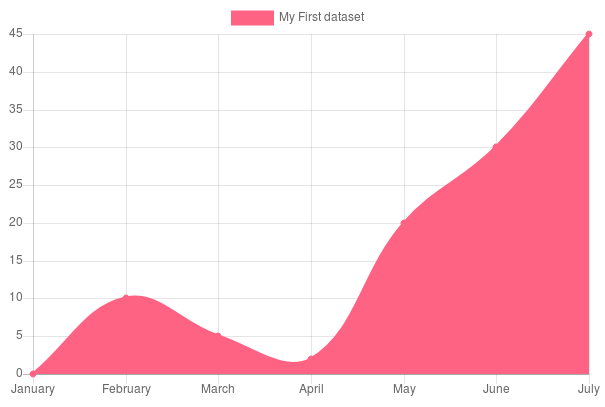
This is the instantiation code I have:
var myChart = new Chart(metric_chart, {
                        type: 'line',
                        // The data for our dataset
                        data: {
                            labels: ["January", "February", "March", "April", "May", "June", "July"],
                            datasets: [{
                                label: "My First dataset",
                                backgroundColor: 'rgb(255, 99, 132)',
                                borderColor: 'rgb(255, 99, 132)',
                                data: [0, 10, 5, 2, 20, 30, 45],
                            }]
                        },
                        options: {}
                    });
 sweatherall
on 3 Dec 2017
sweatherall
on 3 Dec 2017
@sweatherall Your example seems to be working for me (example)
jcopperfield
on 4 Dec 2017
@sweatherall I don't support you're using a premade template on your site? Maybe something like Gentelella? I was having the same problem. Stumped me for hours. Turns out the template had an initialization routine that overwrote the label option completely. Do a search in your project for Chart.defaults.global and see if you get any hits.
 scooter12
on 20 Feb 2018
scooter12
on 20 Feb 2018
@scooter12 woooow, im using Gentellela template, and thats the issue, thanks a lot!
 cinder92
on 28 May 2018
cinder92
on 28 May 2018
Still happens in v3.0.0-beta.3 https://jsfiddle.net/812hjngm/
etimberg
on 9 Oct 2020
Related issues
 bytesnz
·
3Comments
bytesnz
·
3Comments
 nickgoodliff
·
3Comments
nickgoodliff
·
3Comments
 srijitcoder
·
3Comments
srijitcoder
·
3Comments
 akashrajkn
·
3Comments
akashrajkn
·
3Comments
 kennsippell
·
3Comments
kennsippell
·
3Comments
Most helpful comment
@sweatherall I don't support you're using a premade template on your site? Maybe something like Gentelella? I was having the same problem. Stumped me for hours. Turns out the template had an initialization routine that overwrote the label option completely. Do a search in your project for Chart.defaults.global and see if you get any hits.