Chart.js: [FEATURE] Amend sample pages to show code used to create the sample chart
Expected Behavior
The new sample pages are great, but it's a bit of an annoyance to have to either View Source or inspect the page using the developer console to see how the example was made. A similar library which I occasionally use, Chartist, provides the code in a toggle-able div with each sample, which you can see by visiting that link.
Current Behavior
Need to view source to see sample code.
Possible Solution
I would add the same code as powers each example into a pre element (or code block, assuming Markdown is used), with a button of some sort to toggle the visibility of the code. I don't think it's necessary to make the samples editable, at this time.
If this is something the maintainers are interested in, I could work on updating the docs to work as I note above.
 tiesont
All 8 comments
That's a great idea @tiesont. I'd be happy to look at a PR for this 😃
 etimberg
on 26 Jun 2017
etimberg
on 26 Jun 2017
@etimberg Cool beans. I probably won't get to this until the end of the week, but I don't imagine it would take long to have a first iteration done once I start working on this.
tiesont
on 26 Jun 2017
Sounds good 😄
etimberg
on 27 Jun 2017
Okay, I think this is actually pretty simple, assuming what I've found to work in my local repo is acceptable. I built this for the vertical bar chart sample:
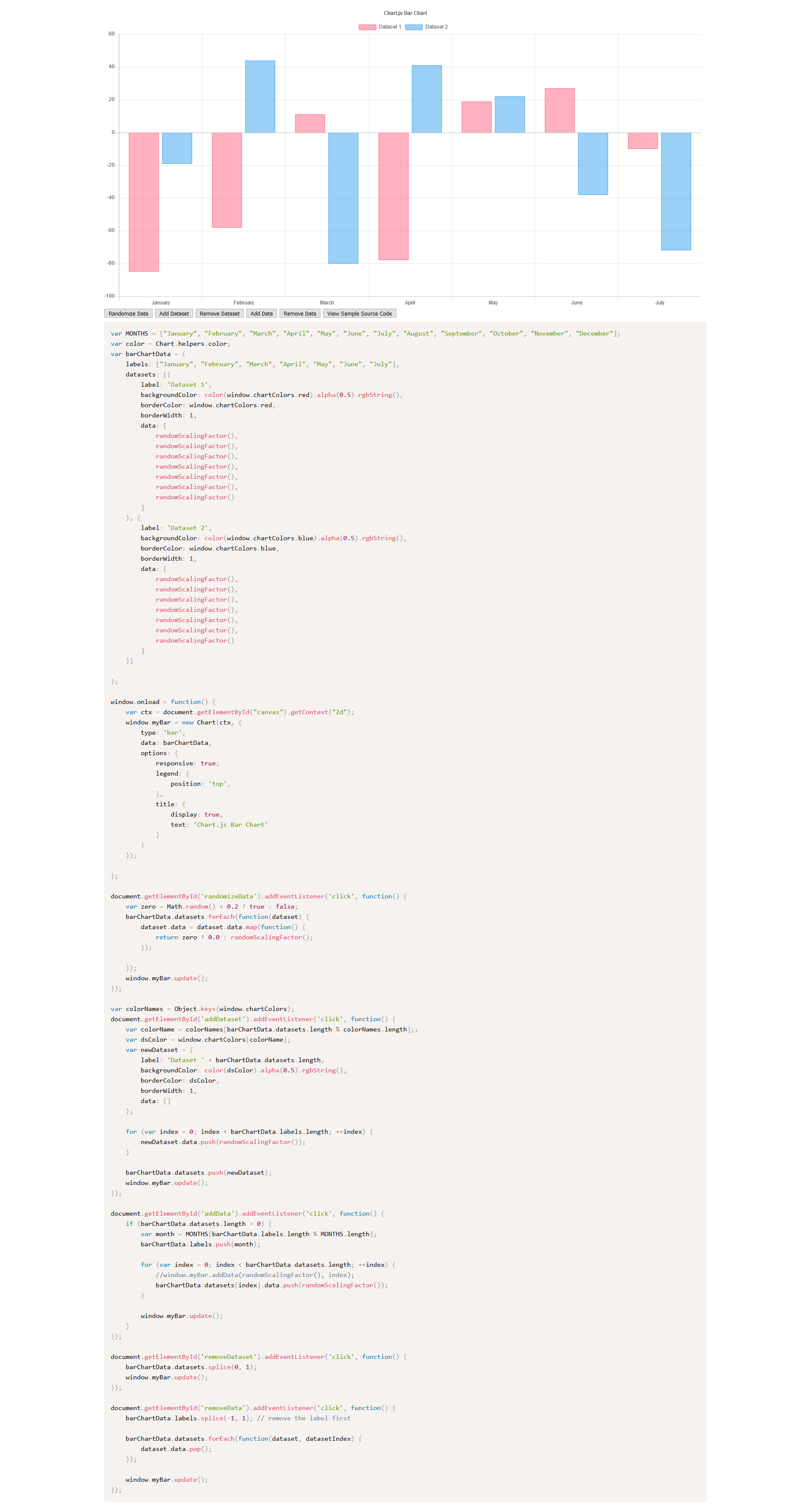
That's a full-screen capture. I used Prism.js to syntax highlight the sample code, but highlight.js seems to work about as well, if you prefer that. I inject the sample code by simply reading the embedded script, after giving it an ID:
<script>
    var viewButton = document.getElementById('viewSource');
    viewButton.onclick = function(e){
        var source = document.getElementById('sample-source');
        var output = document.getElementById('sample-code');
        output.innerHTML = source.innerHTML;
        Prism.highlightAll();
    };
</script>

<script id="sample-source">
    var MONTHS = ["January", "February", "March", "April", "May", "June", "July", "August", "September", "October", "November", "December"];
    var color = Chart.helpers.color;

    //... truncated the rest of the code

</script>
I insert the code into this:
<div style="overflow: auto;">
    <pre><code id="sample-code" class="language-js"></code></pre>
</div>
I did tweak the sample page to be centered, as I thought that looked better, but I can switch it back.
tiesont
on 2 Jul 2017
Not sure I would display the whole JavaScript here (could be simply a link to the GitHub source file). Instead, I was thinking of the same mechanism only to pretty display the chart data/options.
 simonbrunel
on 2 Jul 2017
simonbrunel
on 2 Jul 2017
But I guess it's just a matter of how you split your code and define the <script id="sample-source">
simonbrunel
on 2 Jul 2017
At this point, <script id="sample-source"> is just the existing script in the sample page, with an ID added so that I can target it. I added the "reader" code as a separate script tag.
The reason I prefer to show the entire source is that it makes this new section a complete functional chunk of example code - I don't have to guess where a dataset was defined, for instance. The idea is to make it so that a user could copy the code and tweak it; that's how I figured out how to use Chart'js, anyway. It also seemed like the easiest way to make sure no one has to update the "displayed" code if the sample gets updated, since it's just reading it's own source.
I can add a max-height and a scrollbar, if that helps, too.
tiesont
on 2 Jul 2017
Here's a version with a Github-ish theme for Prism, plus a max-height on the code block:

I can push these changes to my fork if you want to review what I've done. I'm also not against doing something different if this method is not kosher for whatever reason. Mostly looking for feedback, here.
tiesont
on 2 Jul 2017
Related issues
 kennsippell
·
3Comments
kennsippell
·
3Comments
 gabrieldesouza
·
3Comments
gabrieldesouza
·
3Comments
 JewelsJLF
·
3Comments
JewelsJLF
·
3Comments
 akashrajkn
·
3Comments
akashrajkn
·
3Comments
 gouthamrv
·
3Comments
gouthamrv
·
3Comments
Most helpful comment
Okay, I think this is actually pretty simple, assuming what I've found to work in my local repo is acceptable. I built this for the vertical bar chart sample:
That's a full-screen capture. I used Prism.js to syntax highlight the sample code, but highlight.js seems to work about as well, if you prefer that. I inject the sample code by simply reading the embedded script, after giving it an ID:
I insert the code into this:
I did tweak the sample page to be centered, as I thought that looked better, but I can switch it back.