Chart.js: Stacked bar visualisation on 2.6.0
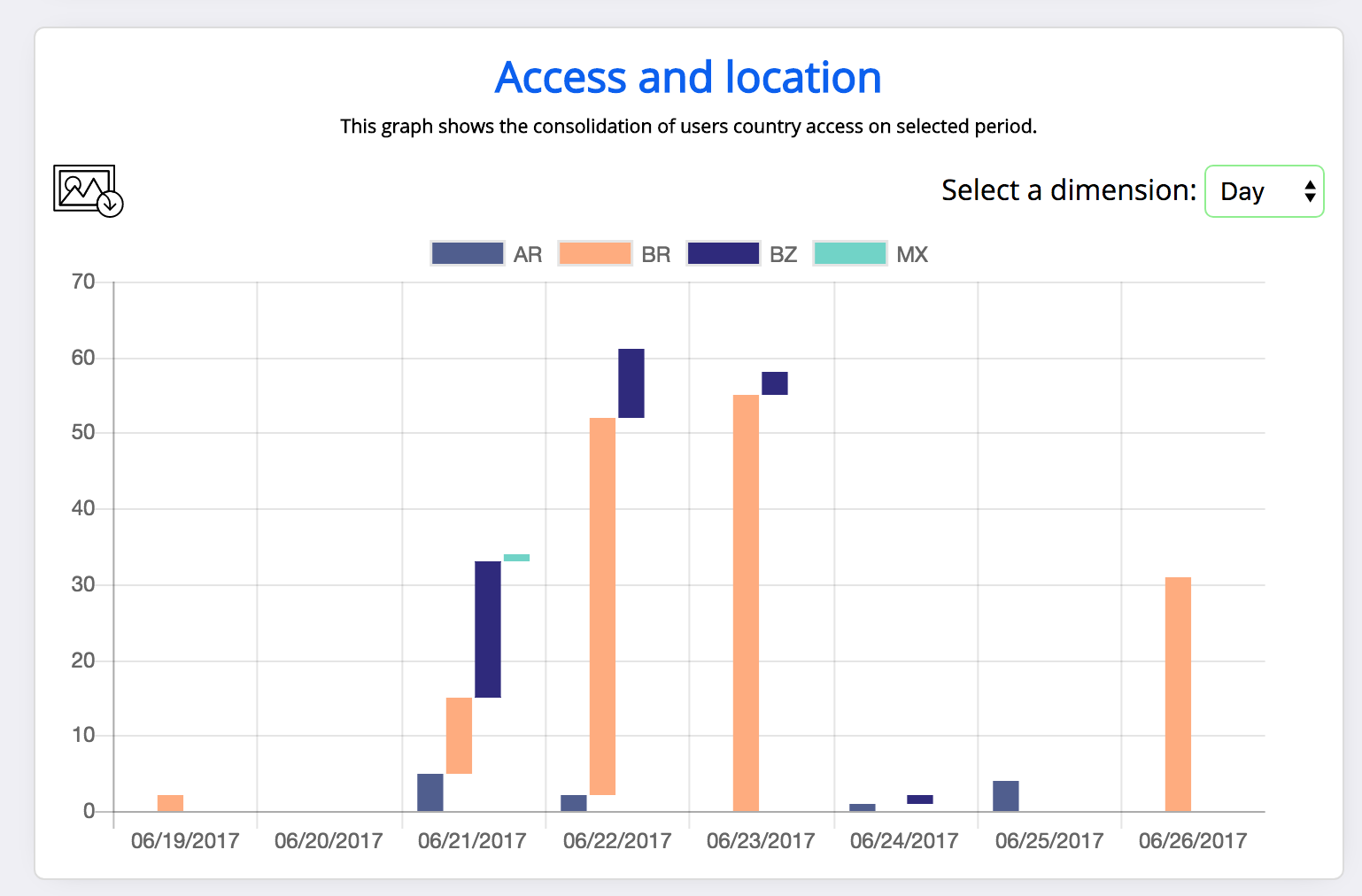
After upgrading from chart.js 2.5.0 to 2.6.0 stacked bar visualisations aren't stacking any more - will try to look into chart.js code and make a pull request if successful.
2.5.0

2.6.0
Code
new Chart(chartContainer, {
    "type": "bar",
    "data": {
        "labels": context.contextLabels,
        "datasets": datasets
    },
    "options": {
        "scales": {
            "yAxes": [{
                "stacked": true,
                "ticks": {
                    "min": 1,
                    "max": max > 100 ? max : 100
                }
            }]
        }
    }
});
Edit (SB): code formatting
 jungleBadger
All 10 comments
@jungleBadger that's actually a bug fix, the 2.6.0 screenshot is the expected result: stacked on y but not on x. I think setting stacked: true on the x axis should produce the result you want?
 simonbrunel
on 26 Jun 2017
simonbrunel
on 26 Jun 2017
@simonbrunel well thats embarrassing! Thank you very much for your answer and sorry about the mistake.
(setting X axis to stacked worked as expected)
jungleBadger
on 26 Jun 2017
I actually didn't upgraded to 2.6.0 again before sampling your suggestion. Worked on 2.5.0 with the following code but 2.6.0 the previous behaviour persists.:
new Chart(chartContainer, {
                "type": "bar",
                "data": {
                    "labels": context.contextLabels,
                    "datasets": datasets
                },
                "options": {
                    "scales": {
                        "xAxes": [{
                            "stacked": true
                        }],
                        "yAxes": [{
                            "ticks": {
                                "min": 1,
                                "max": max > 100 ? max : 100
                            }
                        }]
                    }
                }
            });
The sample code (http://www.chartjs.org/samples/latest/charts/bar/stacked.html) has the stacked: true option on both axes - seems odd, but perhaps that's what you're seeing?
window.onload = function() {
    var ctx = document.getElementById("canvas").getContext("2d");
    window.myBar = new Chart(ctx, {
        type: 'bar',
        data: barChartData,
        options: {
            title:{
                display:true,
                text:"Chart.js Bar Chart - Stacked"
            },
            tooltips: {
                mode: 'index',
                intersect: false
            },
            responsive: true,
            scales: {
                xAxes: [{
                    stacked: true,
                }],
                yAxes: [{
                    stacked: true
                }]
            }
        }
    });
};
On a related tangent, @simonbrunel, has there been any thoughts on adding the code used to create each example into its page (similar to how Chartist provides their examples)?
 tiesont
on 26 Jun 2017
tiesont
on 26 Jun 2017
Hello @tiesont I've tried with both stacked true and behaviour persists
jungleBadger
on 26 Jun 2017
@jungleBadger Don't suppose that you could create a jsFiddle (or similar) that reproduces what you're seeing?
tiesont
on 26 Jun 2017
@jungleBadger you need stacked: true on both x and y axes (fiddle 2.6.0)
@tiesont I agree that editable snippets in the example would be nice (that could be a new ticket)
simonbrunel
on 26 Jun 2017
@simonbrunel I'll create an issue for that, then.
tiesont
on 26 Jun 2017
Hey Guys I believe you are right about the snippet and I apologize for not doing so.
Besides that I can make this work using 2.5.0 only. Even with stacked true on both axes - I will keep looking into it since the fiddle worked.
Many thanks.
jungleBadger
on 26 Jun 2017
This is how stacked works on both axes in 2.6.0:

@jungleBadger you can still create a fiddle with your code
simonbrunel
on 26 Jun 2017
Related issues
 joebirkin
·
3Comments
joebirkin
·
3Comments
 frlinw
·
3Comments
frlinw
·
3Comments
 benmccann
·
3Comments
benmccann
·
3Comments
 lizbanach
·
3Comments
lizbanach
·
3Comments
 Woogles
·
3Comments
Woogles
·
3Comments
Most helpful comment
This is how
stackedworks on both axes in 2.6.0:@jungleBadger you can still create a fiddle with your code